

Everything Quests
A unified replacement for the Blizzard quest experience with fully customizable tracker, world map overlays, and a current, regularly updated Midnight and Forever chain guide
Details
Expansion
 Forever
 Categories
Developers

Having issues?
Everything Quests
A complete quest experience for World of Warcraft, with nameplate quest icons, world-quest map pins, a chain guide, an account-wide quest history, and a custom objective tracker that installs alongside it automatically. Install it and it just works, with nothing to configure unless you want to. Current with patch 12.1, and it runs on Classic Era, Burning Crusade Classic and, as a work in progress, WoW Forever, where it puts objective markers on your map and minimap and lets you look up almost any quest in the game before you ever pick it up.










New in 2.1.0: a new look for the Chain Guide
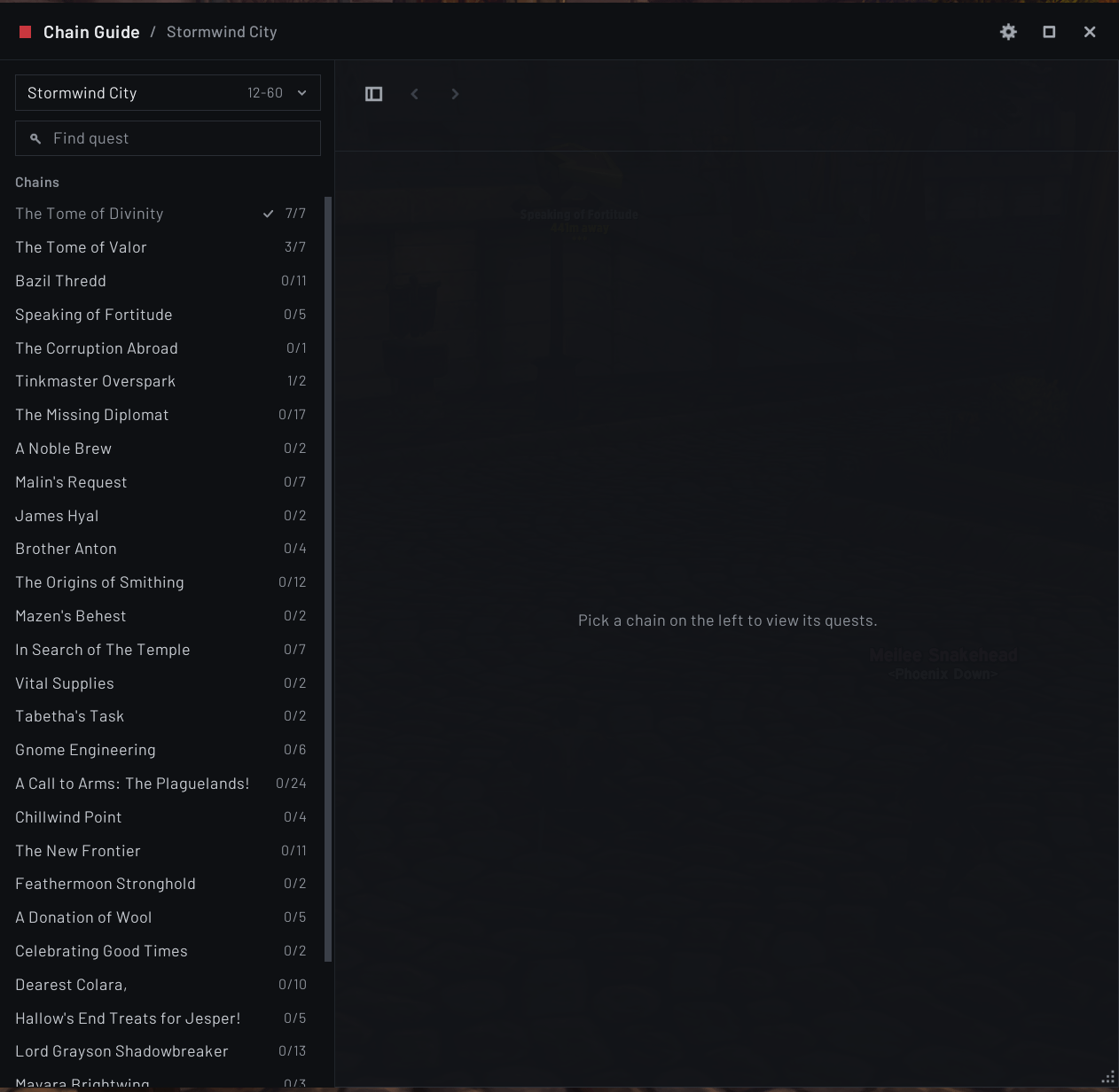
On retail and WoW Forever, /eqs chain opens a redesigned Chain Guide in the same style as the options window and EQ Objective Tracker 2.0.
- Pick a zone, then a chain. A zone picker at the top of the left panel lists every zone that has chains, on WoW Forever with its level range, and the chains of the zone you pick sit in one list below it, each with how many of its quests you have done
- Quest cards that point out your next step. Each quest is a card with its name and its level, and on WoW Forever who gives it. A NEXT tag and an accent edge mark your next step, an ON QUEST tag marks a quest you are on, and the lines between quests run at right angles
- Search answers in the window. Type a quest's name or ID under the zone picker and the Chain Guide jumps to that quest and highlights it, even in the chain already shown. A search that finds nothing says so under the field instead of in chat
- The chain's own header. Its name, level range, how much of it you have done and a progress bar sit above the chain with the Track and Continue buttons, and one button hides the left panel so a long chain gets the whole window
- It stays on your screen. Escape closes it outside combat, and at a large window scale it shrinks to fit your screen instead of running off the top of it
Next up: the same new look for the What's New window, then the Quest Browser on Classic Era, Burning Crusade Classic and WoW Forever, then History on retail.
Recently added
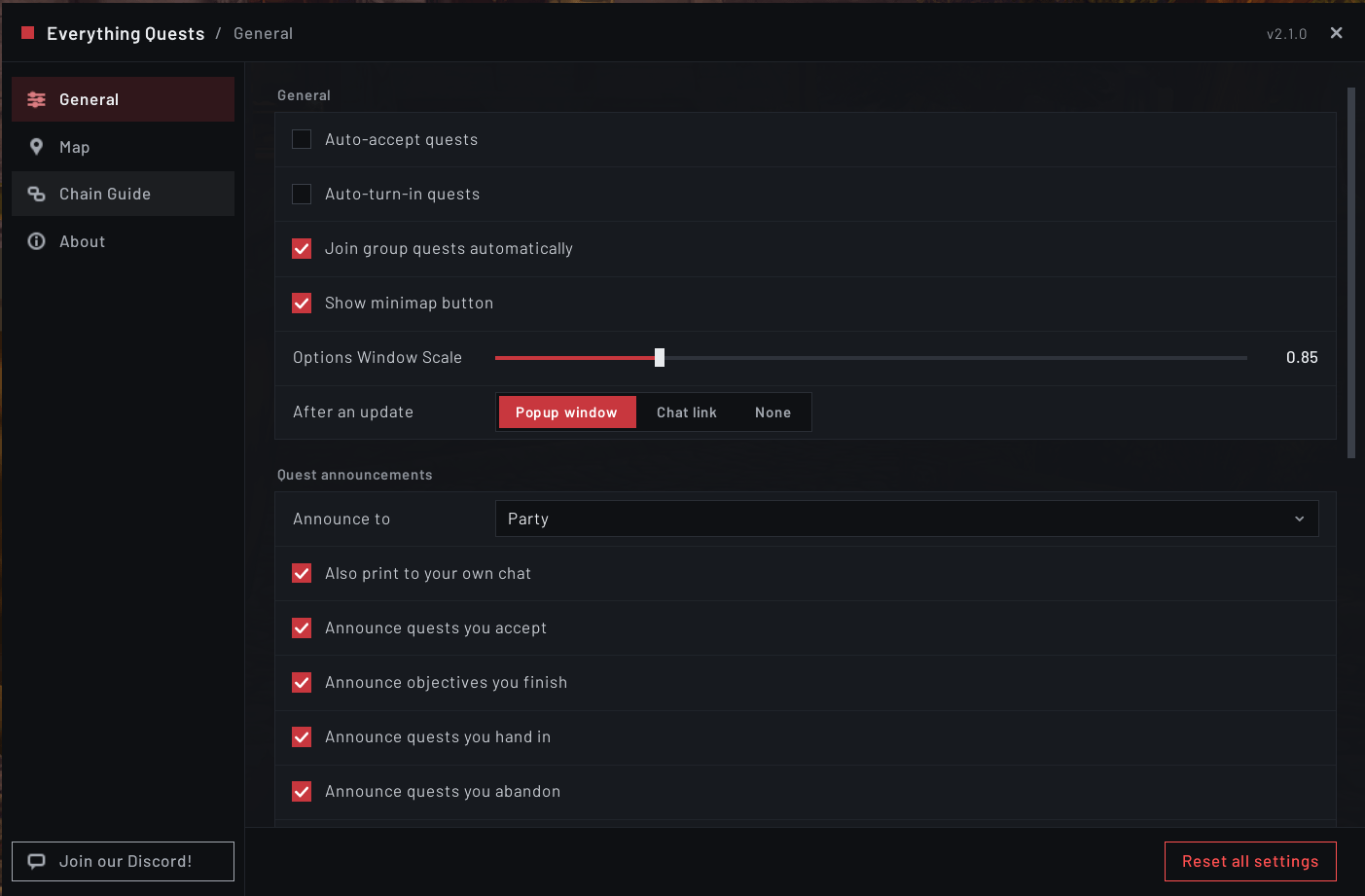
- A new look for the options window (2.0.0).
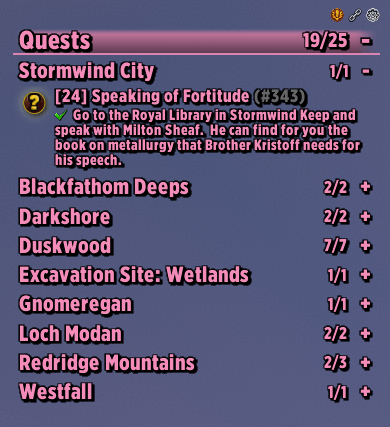
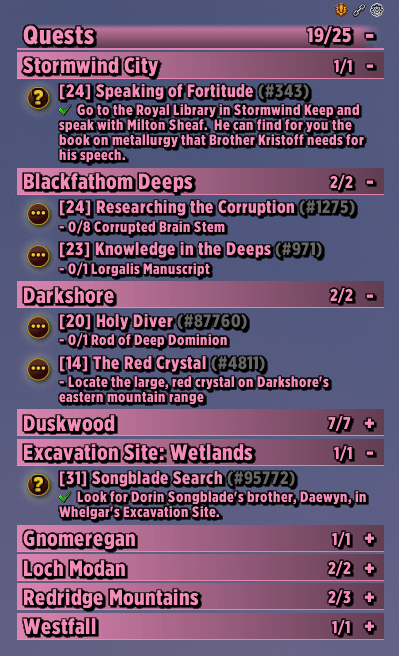
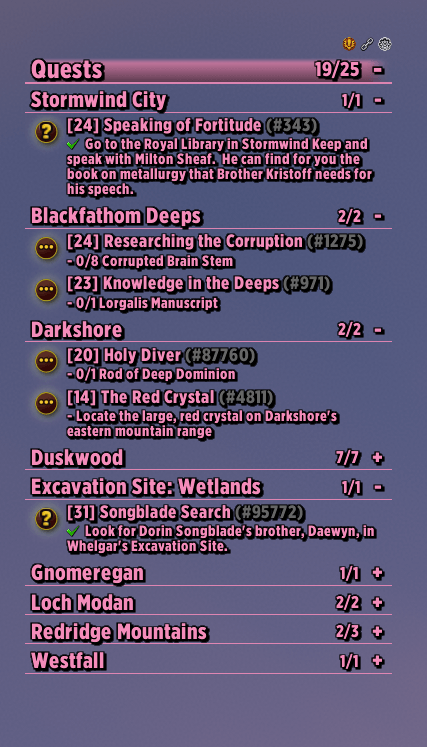
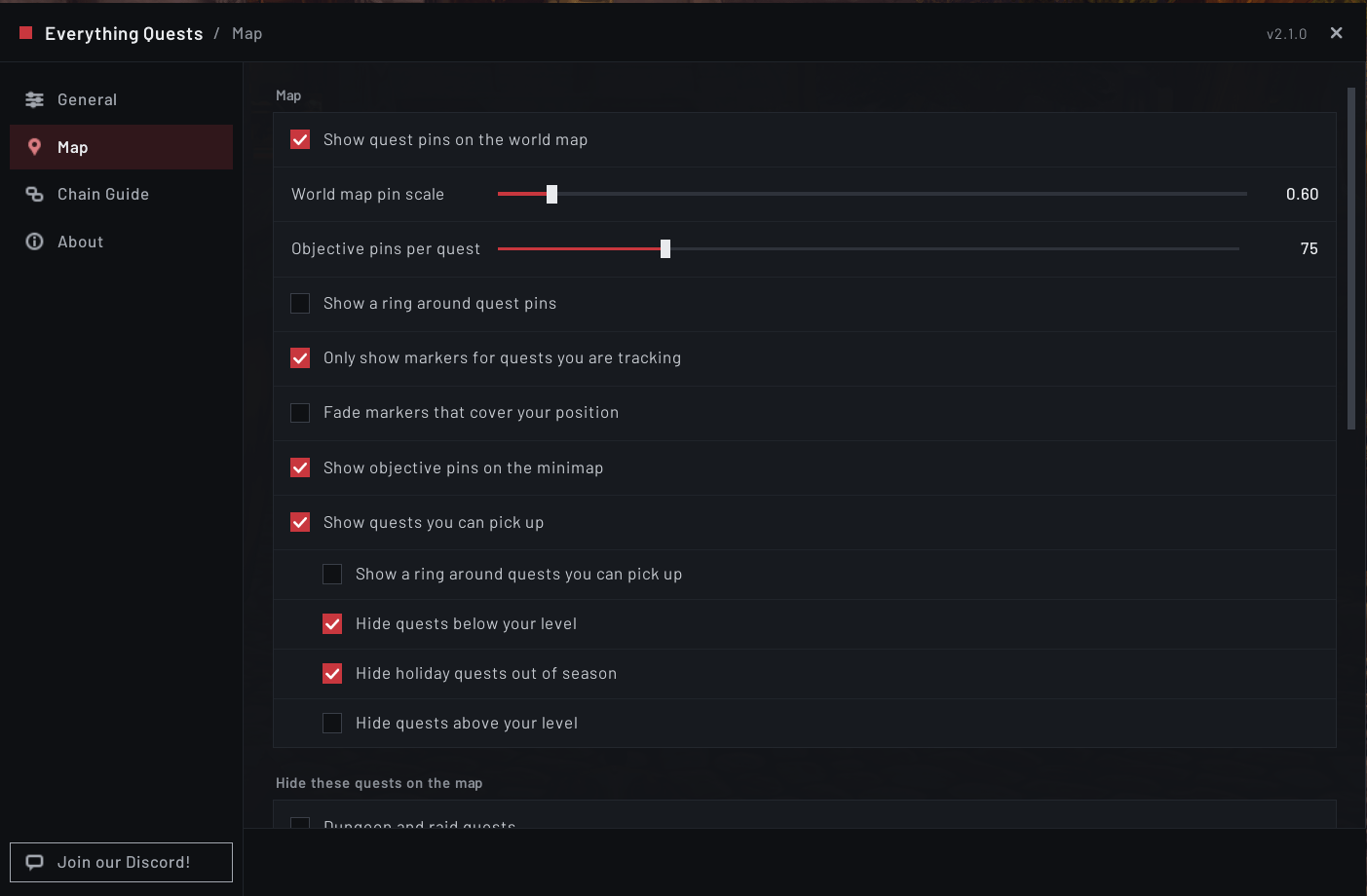
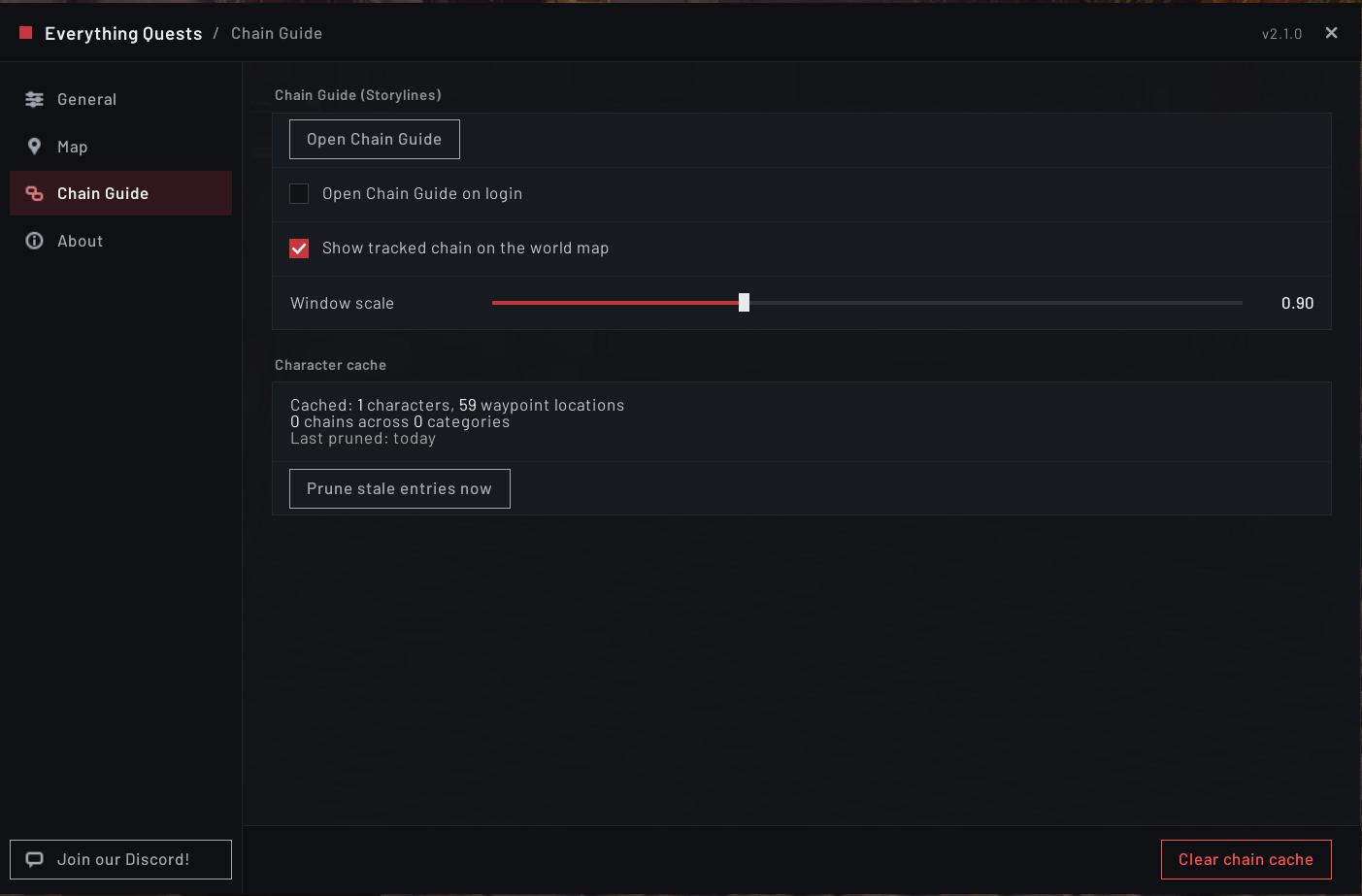
/eqshas a sidebar with an icon for each tab and every setting grouped into cards, a Map tab of its own, settings dimmed while the one they depend on is off, and the actions that cannot be undone in red at the bottom of their tab - The Chain Guide on WoW Forever (1.55.0). Forever has no quest line data for Classic quests, so the Chain Guide builds its chains from Everything Quests' own quest data: every quest your character can take, joined to the quests before and after it, grouped by the zone where they start and opening on your current zone. Each quest shows whether you have done it, have it in your log, can pick it up now or cannot yet, and if not, why
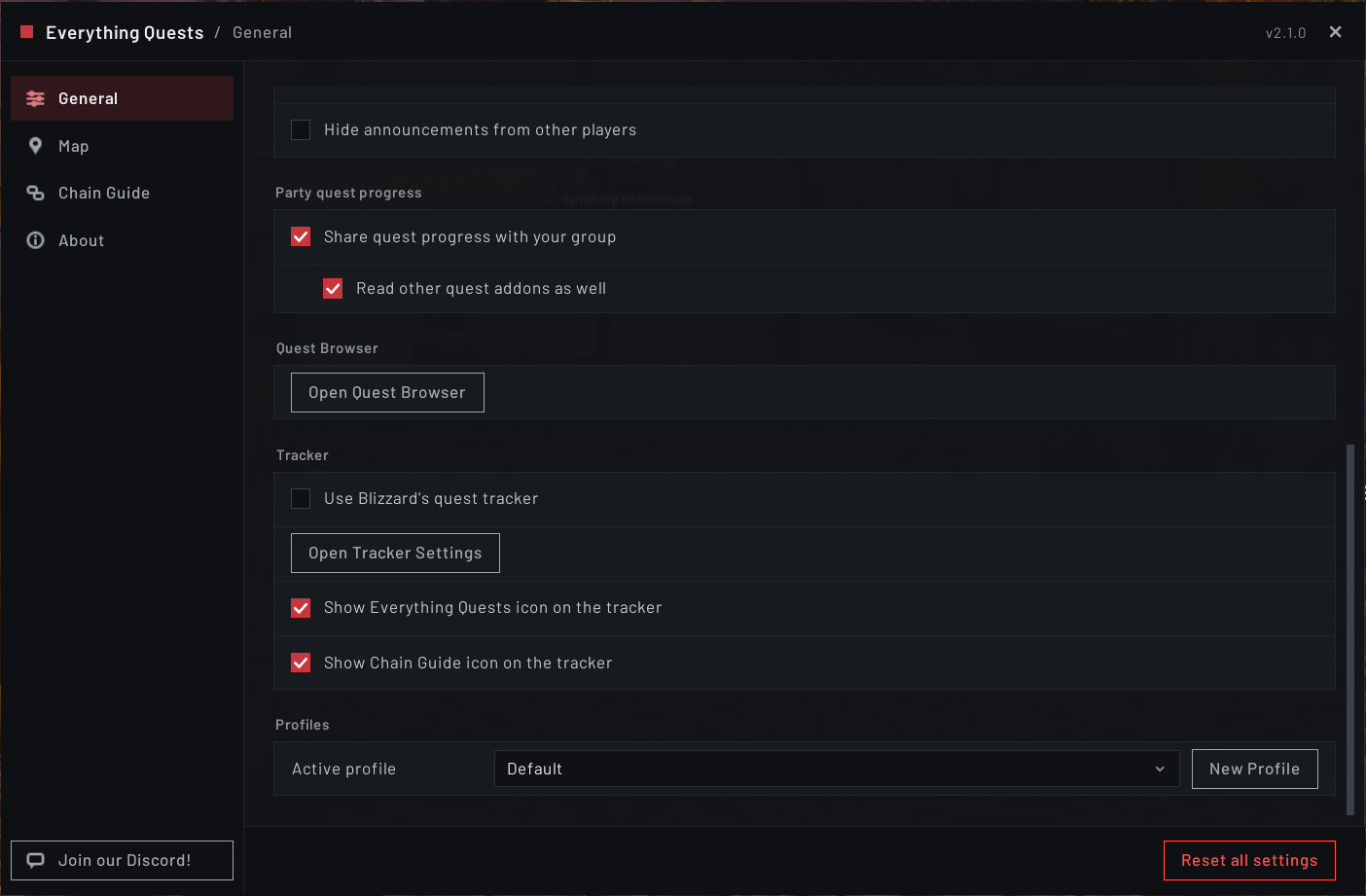
- Use Blizzard's quest tracker (1.54.0). A checkbox under
/eqs> General swaps the EQ Objective Tracker window for the game's own quest tracker, and everything else in Everything Quests keeps working. Thanks to diana_winter for the request - Hundreds of WoW Forever quests (1.53.0 and 1.55.0). Everything Quests now knows 323 quests new to Forever, most of them from the WoW Forever quest data of AllTheThings, used under the MIT License, and the rest gathered by playing Forever. 319 of them are marked where you pick them up, and most know the level, races and earlier quests they need
- See how far along your group is (1.51.0). Hover a quest marker or a quest item and the group members on that quest are listed in their class color, with their progress
- One marker per quest on WoW Forever (1.51.0). Where the game draws its own marker for a quest, Everything Quests no longer draws a second one beside it
- New objective markers (1.50.0). On Classic the markers are redrawn with a color per kind, red to kill, amber to loot and green to use, and a dungeon entrance has an archway of its own
- Tooltip fixes and a loot icon (1.52.0). Quest lines on Burning Crusade Classic tooltips and on WoW Forever item tooltips work for the first time, and an enemy that drops an item you need now shows the Everything Quests logo on its nameplate instead of the kill skull
Six languages, and every one of them is complete
Everything Quests ships French, German, Russian, Korean, Simplified Chinese and Traditional Chinese, and all six cover the whole addon. Nothing falls back to English on a matching client.
Thanks to Zox (French), Stonetwist (German), Malevi4 (Russian), labrie75 (Korean), Keriaovo (Simplified Chinese) and BNS333 (Traditional Chinese). If something in your language reads oddly or isn't formatted properly, tell me on the Discord and I'll fix it.
The Quest Browser on Classic
Classic never tells you anything about a quest you haven't picked up yet. The Quest Browser does. Open it with /eqs quests, from the button under /eqs > General, or by right-clicking any gold quest marker on the map.
Search by name or by quest number, or put "quotes" around a name for a whole-title match. Every quest shows its level, its race and class requirements, where it starts and who gives it, where its objectives are, where it's handed in and to whom, what has to be finished before it, and, if you can't take it yet, the reason why, decided by the same rules that draw the markers on your map. A quest open to every race of a faction simply reads Races: Alliance or Races: Horde, and on WoW Forever the browser names the Chain Guide chain a quest belongs to.
It's clickable throughout: click a location to open the map there and drop a waypoint on it, or click a listed prerequisite or follow-up to jump straight to that quest and walk a chain without typing anything.
Available on Classic Era, Burning Crusade Classic and WoW Forever. Retail already opens any quest in Blizzard's own quest log, so it isn't needed there.
Patch 12.1 ready
The Chain Guide covers The Coiled Isle, patch 12.1's new zone, with all seven of its questlines: Bone Deep, Renown of Midnight, A Fiery Blast from the Past, Something Vile This Way Comes, Strange Friends in Odd Places, Ancient Anthropology, and Living Legend.
The Call of the Void, 12.1's new chapter of The Curse of Ula'tek, sits alongside the campaign's other five. Campaign chapters are read live from the game rather than hand-written, so new ones appear as Blizzard ships them.
Classic support, and it's a work in progress
Everything Quests runs on Classic Era (1.15) since v1.39.0, on Burning Crusade Classic (2.5) since v1.41.0, and on WoW Forever (1.60), which is still in beta, since v1.48.0. Support is deliberately partial: what ships on Classic Era and Burning Crusade Classic is the set of features actually tested in game on a live client, not a claim that the whole addon is there. Treat it as a work in progress that is being actively added to.
Burning Crusade Classic gets its own quest database covering Outland and the Blood Elf and Draenei starting zones as well as the old world, and WoW Forever has one of its own too: the Classic Era data adjusted to Forever's maps, plus quests gathered by playing Forever and, since 1.53.0, the WoW Forever quest data of AllTheThings. The Classic versions share one implementation and differ mainly in their data.
What works on Classic Era and Burning Crusade Classic
- The Quest Browser, letting you look up almost any quest in the game, including ones you've never picked up, with its level, requirements, locations, who gives it and who takes it back, prerequisites, and the reason you can't take it yet
- Objective markers on the world map, every place a quest can be advanced rather than a single spot, colored by what you're there to do: red to kill something, amber to loot something, and green to use an object
- The same markers on the minimap, for the zone you're standing in, with a hover tooltip naming the quest and what it still needs. There's a checkbox for them under
/eqs> Map, and they share the world map's per-quest limit - Markers for quests you can pick up, a gold exclamation mark on every quest giver holding something for you, filtered by your level, race, class, and the quests you have already finished, and for a holiday quest by whether its world event is running. One marker covers a whole quest giver, hovering it lists everything that giver offers, and it names who is standing there
- Turn-in markers, so a finished quest points at the person who takes it, named on the marker, instead of the field you farmed it in, on every map where it can be handed in
- Items you buy are marked at the merchants who sell them, not just items that drop
- Dungeon objectives are marked at the dungeon entrance, with an archway of their own, because the game has no coordinates inside an instance, so you at least know which door to go through
- Quest info on tooltips, on bag items and on enemies alike. Hovering a mob tells you which quest it counts toward and what's left, which a Classic client has no way to tell you on its own, and the group members who still need the same objective are listed under yours
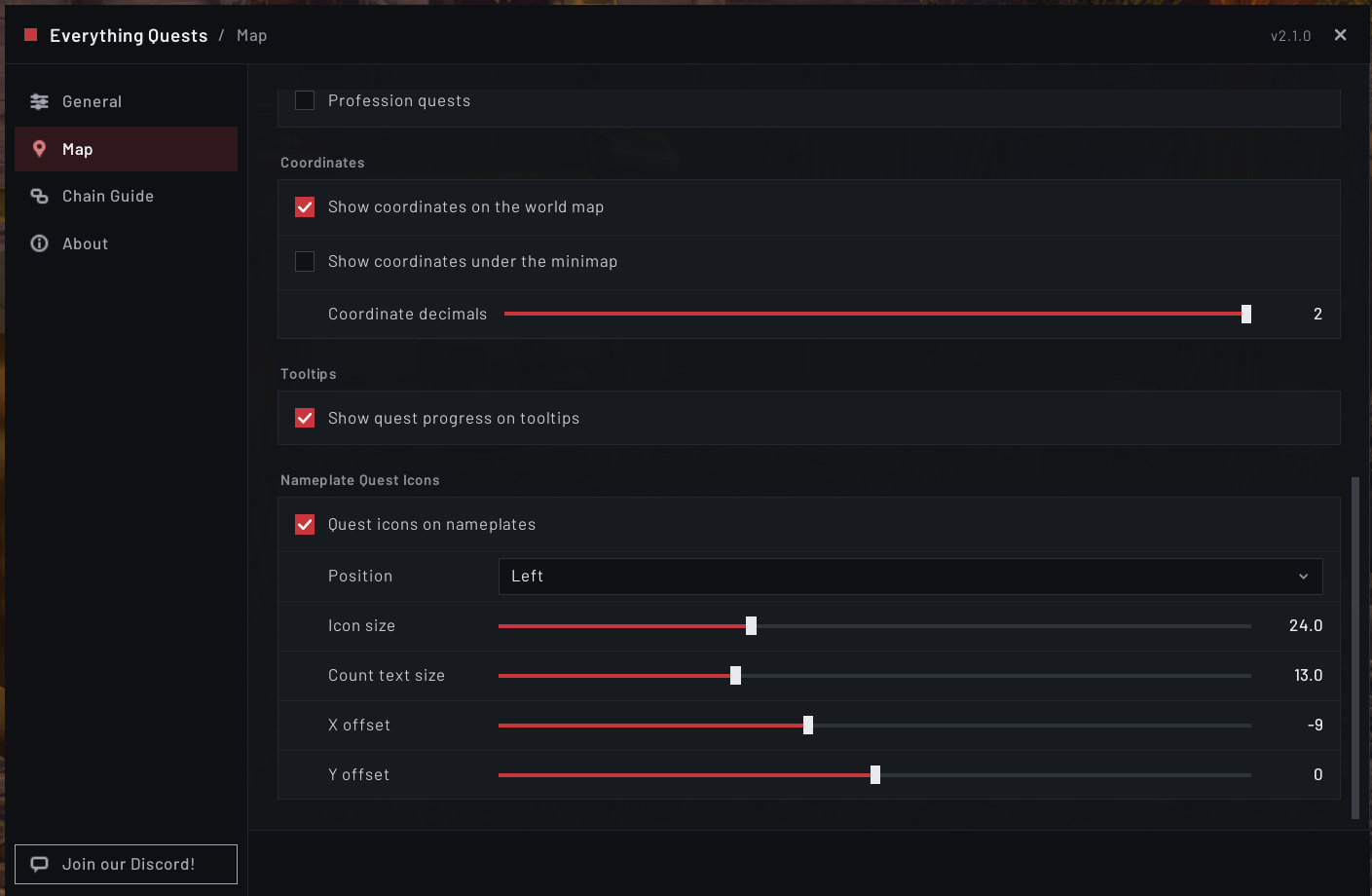
- Coordinates on the world map and, optionally, under the minimap, with a slider for how many decimals to show
- Hide quests by category or level, with checkboxes for dungeon and raid quests, repeatable quests, profession quests, quests below your level, holiday quests out of season, and quests the game colors red for you. These only affect quests you have not picked up yet, so a quest in your log always keeps its markers
- Two more ways to quiet a busy zone, both off by default: leave out markers for quests you've untracked, and fade markers sitting on top of your own position
- Click a marker for a TomTom arrow. These clients have no built-in waypoint of their own, so TomTom is what makes a click useful there
- The tracker's focused quest gets an arrow. Click a quest's icon in EQ Objective Tracker and the arrow lands on it, click again to clear it. Map markers and the tracker share one arrow, so using both retargets instead of leaving two
- Quest icons on nameplates, worked out from the creature itself, because a mob tooltip on these clients carries no quest information at all
- Shareable quest links, with a clickable link on the receiving end that opens the Quest Browser
- Quest announcements in party and raid chat, and your group's quest progress on quest markers and tooltips, which also reads the progress the established Classic quest addon shares. Joining group quests automatically is included too, but has not been checked in game yet
- The objective tracker. EQ Objective Tracker publishes for every Classic version as well, and still installs alongside automatically. If you'd rather have the game's own tracker, Use Blizzard's quest tracker brings it back
- Auto-accept and auto-turn-in, the minimap button, and the
/eqsoptions window (General, Map and About) - All six bundled languages. The interface is translated on Classic exactly as it is on retail
WoW Forever
Forever runs 1.x content on the modern game client, and Everything Quests loads its Classic Era feature set there, plus a Chain Guide of its own. Checked there so far: the world map and minimap markers, for the quests in your log and the ones you can pick up, your group's progress on markers, your quest progress on item tooltips, nameplate icons, the Quest Browser, the Chain Guide and the quest log's Chain button, the TomTom arrow for the quest you follow (with EQ Objective Tracker 1.27.0 or later), and switching to Blizzard's own quest tracker. Everything else, including auto-accept and auto-turn-in, quest links and the rest of the group features, is included but not yet tested there.
Everything Quests knows 323 quests new to Forever, and 319 of them have a marker where you pick them up and a Quest Browser entry, 142 of those on Zephras Isle and the rest across the starting zones, the capitals and beyond. Each is marked where it is actually offered, and they carry the level, races, classes and earlier quests they need where the data knows them. Where the game draws a marker of its own for a quest in your log, Everything Quests leaves it to the game rather than drawing a second one, and keeps its kill, loot and object markers, which the game doesn't draw. Forever draws Stormwind City, Redridge Mountains, Mulgore and Eastern Plaguelands over different ground than Classic Era does, so the markers there are converted to Forever's own maps: Stormwind and Redridge have been checked in game, and Mulgore and Eastern Plaguelands are converted the same way but not yet checked. Skyborne characters are treated as their faction, so a quest open to every race of the Alliance, or of the Horde, is marked for them.
Known issues on WoW Forever
- Some Skyborne quests are marked for other characters. Many Zephras Isle quests can only be taken by Skyborne characters, but Everything Quests can't record "Skyborne only" in its quest data yet, so they are marked for other characters too, and a character who isn't Skyborne can see a Zephras Isle zone in the Chain Guide
- Some Chain Guide zones belong to the other faction. Alliance characters see an Orgrimmar zone holding the Horde's Ahn'Qiraj war effort quests, and Horde characters an Ironforge zone holding the Alliance's, because those quests carry no faction in the quest data. Warlock class chains also list the other faction's warlock trainer
- Many quest givers new to Forever have no name yet. Their markers still show where to go, but the tooltip, the Quest Browser and the Chain Guide can't say who is standing there
- A few Forever quests carry neither a level nor an earlier quest, such as Show of Force, so they can be marked before you are high enough to take them
What isn't there yet
The World Quests panel and Quest History are retail-only, on every Classic version, and the Chain Guide runs on retail and WoW Forever but not yet on Classic Era or Burning Crusade Classic. The game has no world quests on Classic, and History is held back until a backfilled quest can fill in its own name properly on a Classic client.
Expect some rough edges. Quest locations come from a generated database rather than from the game, so a few objectives have no marker at all and some may point you at the wrong spot. The Quest Browser reads that same database, so a small number of older quests aren't in it. If something looks wrong, or if anything throws an error, please report it on the Discord or on GitHub. Typing /eqsprobe prints exactly what the addon found on your client, and pasting that into the report makes it far easier to act on.
Mists of Pandaria Classic is next in line.
At a glance
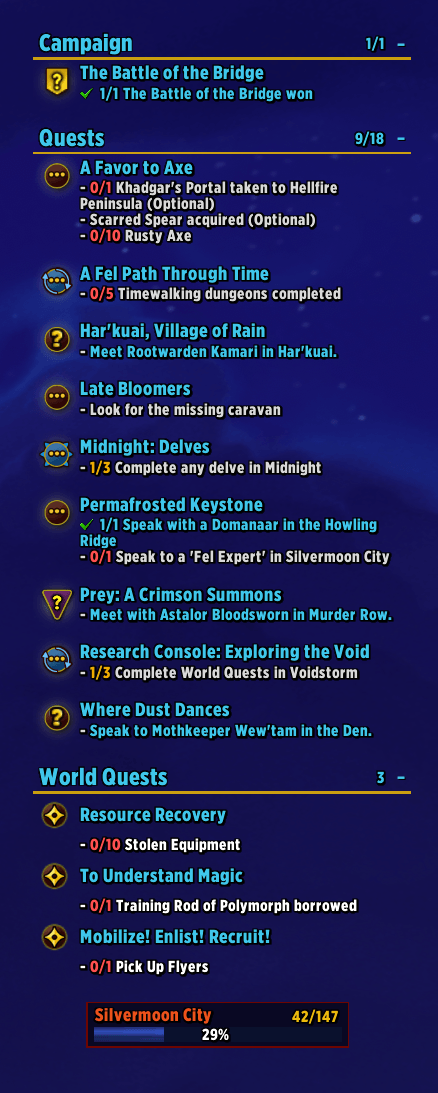
- Custom quest tracker. Move it, resize it, restyle it, with eight sort modes, smart auto-hide, and a live preview of every appearance setting as you change it
- Everything in one tracker, covering quests, campaign, world quests, tracked achievements, Traveler's Log endeavors, tracked profession recipes, and live scenario and delve objectives, each in its own reorderable section
- Plain or Card layout, giving every row its own bordered panel, optionally tinted by quest type
- Zone progress bar, an optional bar (floating or on the tracker) showing how far through your current zone's questlines you are
- Quest info on the tooltips you already hover, telling you which quest wants a bag item and how many you and your group still need, and on Classic Era and Burning Crusade Classic which quest an enemy counts toward
- Nameplate quest icons, with a skull on enemies to kill, the Everything Quests logo on enemies that drop what you need, and the remaining count right on them in the world
- Color-coded world-quest pins, with reward type and time left readable at a glance, plus per-reward and per-faction filters
- Chain Guide, laying out full quest storylines start to finish, Midnight's on retail and every chain your character can take on WoW Forever, with a zone picker, quest cards that mark your next step, per-character completion, search right in the window, and one-click routing
- Account-wide Quest History, covering every turn-in across every character, with six views, trend charts, how long you held each quest, a backfill of past completions, and automatic backups
- Branded map markers, with clear pickup and turn-in pins and tooltips that list every quest sitting at the same spot, naming who is standing there on Classic and listing your group's progress on the quest
- Map coordinates, a cursor and player readout on the world map and an optional one under the minimap, with adjustable precision
- The Quest Browser on Classic Era, Burning Crusade Classic and WoW Forever, letting you look up almost any quest in the game before you ever accept it, and telling you why you can't take it yet
- Objective markers on every Classic version, on the world map and the minimap, marking every place a quest can be advanced with a color per kind, plus markers for quests you can pick up and for where each one is handed in
- Group quest features, with quest announcements in party or raid chat, escorts joined for you, and your group's quest progress on markers and tooltips
- Shareable quest links, readable by anyone and clickable for anyone else running Everything Quests on Classic
- Optional auto-accept and auto-turn-in, opt-in, with an Alt-to-pause gate, standing aside for Immersion
- A redesigned options window, with a sidebar of tabs, settings grouped into cards, and profiles for saving and switching complete setting sets, per character
- Prefer Blizzard's own quest tracker? One checkbox brings it back, and everything else keeps working
- Installs complete and stays safe. The tracker comes with it automatically, and anything that acts for you or posts to chat is off until you turn it on. Open it anytime with the minimap button or
/eqs - Six complete translations. On a matching game client the interface displays in that language, and every bundled language covers the whole addon. Thanks to Zox (French), Stonetwist (German), Malevi4 (Russian), labrie75 (Korean), Keriaovo (Simplified Chinese) and BNS333 (Traditional Chinese)!
The tracker now has its own addon
As of v1.38.0 the objective tracker lives in EQ Objective Tracker, which your addon manager installs alongside Everything Quests automatically. There is nothing extra to download and nothing to set up. It publishes for Classic Era, Burning Crusade Classic and WoW Forever as well, so the tracker is there on all four.
Nothing was lost in the move. Existing users keep their position, size, fonts, colors, section order, filters and sorting, along with pinned quests, hidden quests, collapsed sections and saved world quest watches on every character, all carried across on first login.
The reason for the split is maintenance: the tracker is genuinely useful on its own, and there is now one copy of that code instead of two, so a tracker fix reaches everyone at once.
Prefer Blizzard's own tracker? Tick Use Blizzard's quest tracker in the Tracker section of /eqs > General, or the same checkbox on EQ Objective Tracker's General tab. The interface reloads, the tracker window is gone and the game's own quest tracker is back, while everything else in Everything Quests keeps working. Untick it to get the tracker window back, again after a reload.
| Want | Where |
|---|---|
| Tracker settings (layout, fonts, colors, sorting, filters, sections, sounds) | the cogwheel on the tracker, or /eqot |
| Everything Quests settings | the Everything Quests logo beside it, the minimap button, or /eqs |
| Chain Guide (retail and WoW Forever) | the chain icon on the tracker, or /eqs chain |
| Quest Browser (Classic) | /eqs quests, or right-click a gold quest marker |
🇫🇷 Description en français
Une refonte complète de l'expérience de quête pour Wow: Midnight - un module de suivi personnalisable, des icônes de quête sur les plaques de nom des PNJ, des marqueurs d'expéditions sur la carte du monde, un guide des suites de quête, et un historique des quêtes pour le compte, le tout réuni en un seul addon entièrement traduit en français. Installez-le et cela fonctionne simplement: le module de suivi EQ Objective Tracker s'installe automatiquement avec lui, pas de réglages compliqués, rien à configurer à moins que vous ne le souhaitiez.
(Traduction française par Zox.)
🇩🇪 Beschreibung auf Deutsch
Ein vollständiger Ersatz für das Questerlebnis von WoW: Midnight - ein anpassbarer Tracker, Questsymbole auf den Namensplaketten von NSCs, Weltquest-Markierungen auf der Weltkarte, ein Questreihenführer und ein accountweiter Questverlauf, alles in einem Addon und vollständig ins Deutsche übersetzt. Installieren und es läuft einfach: Das Tracker-Addon EQ Objective Tracker wird automatisch mitinstalliert, keine komplizierten Einstellungen, nichts einzurichten, sofern du es nicht möchtest.
Auf Classic Era und Burning Crusade Classic setzt das Addon außerdem Zielmarkierungen auf Weltkarte und Minikarte und bietet einen Questbrowser, mit dem du fast jede Quest im Spiel nachschlagen kannst, bevor du sie überhaupt annimmst.
(Deutsche Übersetzung von Stonetwist.)
🇷🇺 Описание на русском
Полная замена системы заданий в WoW: Midnight — настраиваемый трекер, значки заданий на полосках имён существ, метки локальных заданий на карте мира, путеводитель по цепочкам заданий и история заданий для всей учётной записи: всё в одном аддоне, полностью переведённом на русский язык. Установите его — и он сразу работает: трекер EQ Objective Tracker устанавливается вместе с ним автоматически, никаких сложных настроек, ничего настраивать не нужно, если вы сами того не пожелаете.
(Перевод на русский язык — Malevi4.)
🇰🇷 한국어 설명
WoW: 한밤의 퀘스트 경험을 통째로 대체하는 애드온입니다 — 맞춤형 추적기, NPC 이름표 위의 퀘스트 아이콘, 세계 지도의 세계 퀘스트 핀, 퀘스트 연계 가이드, 그리고 계정 전체 퀘스트 기록을 하나의 애드온에 모두 담아 한국어로 번역했습니다. 설치하면 바로 작동합니다: 추적기 애드온인 EQ Objective Tracker가 자동으로 함께 설치되며, 복잡한 설정 없이 원하지 않는 한 따로 설정할 것이 없습니다.
(한국어 번역: labrie75.)
🇨🇳 简体中文说明
《魔兽世界:午夜》任务体验的完整替代方案 — 可自定义的任务追踪器、NPC 姓名板上的任务图标、世界地图上的世界任务标记、任务链指南,以及覆盖整个账号的任务历史记录,全部集成在一个插件中,并已翻译为简体中文。安装后即可使用:追踪器插件 EQ Objective Tracker 会自动一并安装,无需复杂设置,除非您想要调整,否则无需任何配置。
在经典旧世和燃烧的远征怀旧服中,本插件还会在世界地图和小地图上显示任务目标标记,并提供任务浏览器,让您在接取任务之前就能查看几乎任何任务的详细信息。
(简体中文翻译:Keriaovo。)
🇹🇼 繁體中文說明
《魔獸世界:午夜》任務體驗的完整替代方案 — 可自訂的任務追蹤器、NPC 姓名板上的任務圖示、世界地圖上的世界任務標記、任務鏈指南,以及涵蓋整個帳號的任務歷史記錄,全部整合在一個插件中,並已翻譯為繁體中文。安裝後即可使用:追蹤器插件 EQ Objective Tracker 會自動一併安裝,無需複雜設定,除非您想要調整,否則無需任何設定。
在經典舊世和燃燒的遠征懷舊服中,本插件還會在世界地圖和小地圖上顯示任務目標標記,並提供任務瀏覽器,讓您在接取任務之前就能查看幾乎任何任務的詳細資訊。
(繁體中文翻譯:BNS333。)
What it does
A quest tracker that stays out of your way. A native-feeling on-screen quest list that replaces Blizzard's tracker: drag it anywhere, resize it, and set the font, size, colors, and spacing to taste. Eight sort modes (Zone, Title, Status, Type, Level, Distance, Recent, or manual drag order), plus per-type filters for normal, daily, weekly, scheduled, campaign, world quest and bonus objective content. Tell it to hide in combat, inside dungeons, raids and delves, during a Mythic+ run, or while the world map is open, and collapse when you've got nothing active. Usable quest items appear as a clickable button right on the quest row, a smart two-tier header names the instance you're in, section headers can stay in view as you scroll, and newly accepted quests can carry a NEW tag for their first hour.
One tracker for everything you're doing. Beyond quests and the campaign, the tracker has its own section for each of:
- Tracked achievements, with every criterion listed with a checkmark or progress count, and an option to show only the unfinished ones
- Endeavors, your Traveler's Log monthly activities and their requirements
- Professions, the recipes you've tracked, with a live reagent count that reads every quality tier from your bags, handles recrafts separately, and shows variable-quantity slots as a range
- Scenarios and delves, with the stage banner, themed artwork, and criteria with real progress bars, plus an optional movable bonus objectives HUD so you don't miss the extra rewards
- World quests, in their own pinned, scrollable panel, placeable above or below the rest, with an option to auto-list every world quest in your current zone
Drag sections into whatever order you like. An optional zone progress bar, floating on its own or docked into the tracker as a reorderable section, shows how far you've come through the current zone's questlines.
Make it look how you want. Choose Plain rows or the Card layout, which gives every quest, achievement, endeavor, recipe and world quest its own panel with an adjustable background, border and padding, and can tint campaign, legendary, dungeon and raid quests in their own colors so you can tell them apart instantly. On top of that: 40+ bundled fonts plus anything from SharedMedia, independent size offsets for titles and headers, quest titles colored by difficulty, in gold, in your class color, in a color of your own or the way Blizzard's own tracker colors them, separate colors for objective text and for counts that are untouched, in progress or done, text shadows with color and distance, gradient header bars with optional soft edges, scroll bar skinning, and line and header spacing sliders. All of it lives in the tracker's own options window, with a live preview beside the appearance settings that changes as you do: the cogwheel on the tracker, or /eqot.
Quest information on the tooltips you already hover. Hover an item in your bags and Everything Quests adds the quest that wants it and how many you still need, along with the group members who still need it too, so you know at a glance what's safe to sell. On Classic Era and Burning Crusade Classic it does the same for enemies, naming the quest a mob counts toward and what's left on it, which those clients can't tell you at all. Nothing is added to a tooltip that has nothing to say, and on retail and WoW Forever the enemy half is left to the game, because it already writes those lines itself.
Quest icons on nameplates. Objective enemies show an icon right on their nameplate, plus the remaining count or percent, so you can spot your targets in the 3D world: a skull on an enemy you need to kill, the Everything Quests logo on one that drops an item you need, a chat bubble for a talk-to objective, and the item's own icon for a quest with an item to use. Position, size and offsets are all adjustable. ElvUI-aware: if you run ElvUI's version, a one-time prompt lets you pick which to use so there's never a duplicate. On Classic Era and Burning Crusade Classic, where the game gives an addon nothing to go on, EQ identifies the creature itself instead. WoW Forever reads the game's own quest lines, as retail does.
World-quest pins you can read at a glance. Every world quest wears a ring colored by its reward: gold for money, blue for gear, purple for reputation, green for resources, orange for artifact power, and more, plus a timer that runs from green through yellow and orange to red as it expires. Click to super-track, right-click for a menu to track or untrack it, super-track it, or look it up on Wowhead, and mute the reward types you don't chase or the factions you're done with, grouped by expansion. Zone maps get their own sortable quest list, a full-height World Quests panel docks beside the world map, and your world quest watches survive logout.
The Chain Guide. A dedicated window that lays out whole quest storylines from first quest to last, so you always know what's next and what you skipped. On retail it covers Midnight, with live campaign data straight from Blizzard, completion tracked per character and completion-date tooltips: the Midnight Campaign, The War of Light and Shadow, The Curse of Ula'tek, Eversong Woods, Zul'Aman, Harandar, Arator, Voidstorm, The Sunstrider Omnium, Void Acropolis, and The Coiled Isle. On WoW Forever it builds every chain your character can take from Everything Quests' own quest data, grouped by the zone where they start and opening on your current zone, and hovering a quest names who gives it, who takes it back where that's known, and, when you can't take it yet, why. Pick a zone at the top of the window and its chains are listed below it. Each quest is a card that marks whether you've done it, have it in your log or can pick it up, with a NEXT tag on your next step, and the lines between quests run at right angles. Click any quest to get pointed straight at it and open the map there, using TomTom's arrow if you run it. Without TomTom, a quest already in your log is tracked for you, and otherwise its coordinates are printed in chat. Search by quest name or ID to jump straight to that quest and highlight it, Track a chain to pin its quests on the world map with your next step highlighted, or press Continue for an arrow to your next step. The window resizes and maximizes, its left panel hides so a long chain gets the whole window, and the quest log's Chain button opens a quest's chain directly.
The Quest Browser, on Classic. The one thing a Classic client can never tell you is what a quest is before you've picked it up, so Everything Quests answers it from its own database. Search almost any quest in the game by name or by quest number, or put "quotes" around a name for a whole-title match. Each result shows its level, its required level, the races and classes that can take it, whether it's a dungeon, repeatable or profession quest, where it starts and who gives it, every map its objectives sit on, where it's handed in and to whom, what has to be finished first, what it leads to, and which branches it rules out. If you can't take it yet, it tells you why, using the very same rules that decide which gold markers appear on your map, so the window and the map can never disagree. Locations are clickable, opening the map there and dropping a waypoint, and so are the listed prerequisites and follow-ups, so you can walk a chain end to end. On WoW Forever it also names the Chain Guide chain a quest belongs to. Reach it with /eqs quests, the button under /eqs > General, or by right-clicking a gold quest marker, on Classic Era, Burning Crusade Classic and WoW Forever.
An account-wide Quest History. A log of every quest turn-in across every character on your account, opened with /eqs history. Six views:
- Quests, a searchable, sortable, filterable list (by character, date, or type). Right-click a row to jump to that quest's chain
- This Session, a live recap of your current play session, covering quests, XP, gold, time played, quests per hour, and level-ups
- Streak, your current and best daily turn-in streaks, account-wide
- Chain Timeline, every chain you've progressed, with per-quest dates and checkmarks on completed chains
- Activity, a 13-week heatmap of your daily turn-ins
- Stats, gold and XP earned per character and your biggest single rewards, a total of quests abandoned and the average time a quest spends in your log, plus a Trends view that charts your quests, XP, and gold over time, daily or weekly, account-wide or for a single character
A quest you accept and later turn in shows how long you held it on its row. A one-time backfill walks the game's record of completed quests and adds your history retroactively, and you can export any view to your clipboard. Your history is backed up automatically every time you log out and restored on its own if it's ever found empty or missing a character, with a manual restore button as a fallback.
Branded map markers. Clean, easy-to-spot quest pins on zone maps. Click one to super-track it, and right-click to open the quest in your quest log, or in the Quest Browser for a quest you haven't picked up. Hovering a marker lists every quest sitting at that spot rather than just the top one, so overlapping markers no longer hide each other, and the tooltip shows the quest level in front of the title, the experience reward underneath and, for a quest in your log, the group members on it with their progress. Markers stay a fixed size at every zoom level instead of shrinking away on large or high-resolution displays, and scale down a little on continent and world maps to match how the map itself scales. A scale slider, a per-quest marker limit, the ring toggles, the category and level filters and the two ways to quiet a busy map all live under /eqs > Map.
Coordinates where you need them. A readout in the bottom left of the world map shows the spot your cursor is pointing at, and your own position when you're looking at the zone you're standing in. A matching readout can sit under the minimap, off by default because plenty of interface addons already put something there, and a slider sets how many decimals both of them show.
Objective markers on Classic. On Classic the game tells an addon nothing useful about where a quest is, so Everything Quests ships its own data: markers on the world map and the minimap for every place a quest can be advanced, colored by what you're there to do (red to kill, amber to loot, green to use or pick up), each with a dark outline so a busy zone stays readable, and objectives inside a dungeon marked at the dungeon entrance with an archway. Quest givers holding something for you get a gold marker of their own, filtered by your level, race and class and naming who is standing there, holiday quests appear only while their event is running, and a finished quest points at whoever takes it. Items you buy are marked at the merchants who sell them. Markers for one quest keep a minimum distance apart, so you get better coverage of a zone with fewer icons, and a marker only names the objectives its own location actually serves. Click one for a TomTom waypoint on Classic Era and Burning Crusade Classic, or right-click a gold one to open it in the Quest Browser. On WoW Forever, where the game draws its own markers for the quests in your log, Everything Quests leaves those to the game and keeps its kill, loot and object markers, which the game doesn't draw. The red ring behind markers starts switched off on Classic, since a zone there can draw hundreds of them, and the icons still tell the states apart on their own.
Group quest features. Everything Quests can post a line to party or raid chat when you accept a quest, finish one of its objectives, hand it in or abandon it. Nothing is sent until you choose a channel, each kind of line has its own switch, abandoned quests stay quiet unless you turn them on, and Also print to your own chat shows you what would go out first. Anyone else running Everything Quests sees those lines marked with its logo. A separate checkbox hides announcements from other players, including the ones other quest addons send, while your own lines always show. When someone in your group starts an escort or another quest the game asks you to join, it can answer yes for you, only for people actually in your group, off by default and paused while you hold Alt. And it shares how far along you are on each quest with group members running it, as hidden addon messages that never reach anyone's chat and pause in battlegrounds and groups larger than 15. For the quests in your own log, hover a quest marker or a quest item and the group members on that quest are listed in their class color with their progress, or "Ready to turn in" once they've finished, and on Classic Era and Burning Crusade Classic a quest enemy lists the members who still need it. On Classic it also reads the progress the established Classic quest addon shares.
Shareable quest links. Shift-click a quest marker on the map, a row in the Quest Browser or a quest in the Chain Guide with a chat box open, and the quest goes into chat as plain text anyone can read, carrying its ID. On Classic, anyone else running Everything Quests sees a colored, clickable link that opens their Quest Browser on that quest, and the text matches the established Classic quest addon's format, so links read correctly in both directions. On retail the game's own quest link is used when it can name the quest. Shift-clicking with no chat box open still sets a waypoint exactly as before.
Small things that add up. Open the flight map and the taxi node nearest your tracked quest lights up. Newly discovered and completed quests can show as popup boxes at the top of their section. Accepted quests can auto-track themselves. A completion sound plays when a quest is ready to turn in. Auto-accept picks the first quest it can actually take at a busy quest giver rather than whatever sits at the top of the list, and passes over a trivial grey quest when there's a real one on offer. Countdown timers use your own language's abbreviations, taken from the game client, so Korean shows 일, 시간 and 분 rather than hardcoded English. And on retail and WoW Forever, Get Directions sits right on a quest's right-click menu in the tracker.
Optional auto-accept and auto-turn-in. Off by default and fully opt-in. When enabled, it accepts and turns in quests for you, but only on single-reward turn-ins (multi-choice screens stay open so you pick), and holding Alt during any interaction pauses it for that one event. With Immersion installed it stands aside so you can read the quest text, after asking you once which you would rather have. Works on the Classic versions as well.
One-click access. Minimap button plus the /eqs command:
| Minimap button | What happens |
|---|---|
| Left-click | Open your quest log |
| Shift + Left-click | Open the Chain Guide (retail and WoW Forever) |
| Right-click | Open Options |
| Drag | Move it around the minimap |
Make it yours. Two in-game Options windows cover everything between them, and they share one look: /eqot for how the tracker looks and behaves (layout, fonts, sizes, colors, spacing, sections, sorting, filters and sounds), and /eqs for the rest of Everything Quests, from nameplate icons and map pins to quest announcements, auto-quest behavior, the Chain Guide and your history. Each has a sidebar of tabs and settings grouped into cards, with descriptions in tooltips, settings dimmed while the one they depend on is off, and anything that can't be undone in red at the bottom of its tab. A button on EQ's General tab opens the tracker's panel, so you never have to remember which is which. Save your setup as a named profile and switch between them per character, scale the options window itself if it's too big or small for your resolution, and choose how you hear about updates: a popup, a quiet clickable chat link, or nothing at all. On Classic the options window only shows the tabs and settings that apply there, so nothing you can change is inert.
Slash commands
/eqs: toggle Options/eqs chain: toggle the Chain Guide/eqs quests: open the Quest Browser (Classic), optionally with a search, as in/eqs quests goldtooth/eqs history: toggle Quest History/eqs session: recap of your current play session (quests, XP, gold, time)/eqs whatsnew: what changed in the latest update/eqs about: open the About tab, with the in-game changelog/eqs discover: show what questlines the game reports for your current zone/eqsprobe: print what Everything Quests found on your client, the most useful thing to paste into a Classic bug report/eqot: tracker settings/eqot status: what the tracker is doing right now, and the most useful thing to paste into a tracker bug report
On Classic Era and Burning Crusade Classic the Chain Guide, History and session commands aren't available, and on WoW Forever History and session aren't, since those features aren't there yet. The Quest Browser is the reverse: it's Classic-only, because retail already opens any quest in Blizzard's own quest log. Everything else works everywhere.
Good to know
- EQ Objective Tracker is required, and it installs itself. Your addon manager pulls it down with Everything Quests on retail, Classic Era, Burning Crusade Classic and WoW Forever alike, so you don't have to find it or configure it. Installing by hand is the only case where you need both folders. Every other library is bundled.
- The tracker works on its own too. If you only want the objective tracker and none of the rest, EQ Objective Tracker is a complete addon by itself. And if you only want the rest, Use Blizzard's quest tracker turns the tracker window off.
- Classic support is a work in progress. World Quests and Quest History are retail-only, the Chain Guide runs on retail and WoW Forever, and Classic quest locations come from a generated database, so a few are missing or imperfect. WoW Forever is a beta and some features there are included but not yet tested. Reports with
/eqsprobeoutput attached are the fastest way to get things fixed. - The bag-item tooltip has been tested on Classic and WoW Forever but not yet on retail. It should behave the same, but if a bag tooltip on retail looks wrong or repeats something the game already says, please tell me and I'll fix it.
- TomTom is optional on retail and WoW Forever but strongly recommended on Classic Era and Burning Crusade Classic. On retail it adds the on-screen arrow when you click a quest in the Chain Guide. Classic Era and Burning Crusade Classic have no built-in waypoint at all, so TomTom is what makes clicking an objective marker, focusing a tracker row, or clicking a location in the Quest Browser do anything. On WoW Forever a marker click uses the game's own quest tracking, and with TomTom installed the quest you follow gets TomTom's arrow too (with EQ Objective Tracker 1.27.0 or later).
- ElvUI users: EQ's nameplate icons default off if ElvUI is detected, and a one-time prompt lets you choose. No conflict either way.
- Safe by default. Anything that acts for you or posts to chat ships switched off: auto-accept, auto-turn-in, joining group quests and chat announcements all wait for you to turn them on. Party quest progress is on by default, and it only ever travels as hidden addon messages to your own group.
- Translated into French, German, Russian, Korean, Simplified Chinese and Traditional Chinese, and every one of them is complete. On a matching game client the interface displays in that language, on retail and on every Classic version. Every other language shows in English. (French by Zox, German by Stonetwist, Russian by Malevi4, Korean by labrie75, Simplified Chinese by Keriaovo, Traditional Chinese by BNS333.)
- Credits. Much of WoW Forever's quest data comes from AllTheThings, used under the MIT License, and the options window's font is Barlow, used under the SIL Open Font License.
- Built for World of Warcraft: Midnight (12.1), Burning Crusade Classic (2.5), Classic Era (1.15) and the WoW Forever beta (1.60). Mists of Pandaria Classic is next.
Found a bug or have an idea?
Report it on the GitHub Issues page or on the Discord. Include the error text if you can grab it (BugSack and BugGrabber make that easy) and what you were doing when it happened. If it involves the tracker, paste in the output of /eqot status too. On Classic Era, Burning Crusade Classic or WoW Forever, please include the output of /eqsprobe. It prints exactly what Everything Quests found on your client and turns a guess into a fix.
Made with care, for Midnight, Classic Era, Burning Crusade Classic and WoW Forever. Got a question or want to hear about updates? Join the Discord! If you like this one, check out my other addons, Everything Delves, Cooldown Master and Loot Pro. Released under the MIT License.
You must be logged in to leave a comment.