

EQ Objective Tracker
Replaces Blizzard's objective tracker completely. Quests, World Quests, Delves, Achievements and Professions, all sortable and filterable, in a frame you can move, resize, re-font, recolor and reorder to taste. Vanilla, TBC, and Forever. 100% Customizable
Details
Expansion
 Forever
 Categories
Developers

Having issues?
EQ Objective Tracker
A standalone replacement for Blizzard's objective tracker. Sort it, filter it, restyle it, and put it where you want it.










WoW Forever support is a work in progress
Retail, Classic Era and TBC Anniversary are all supported. WoW Forever support is newer and still a work in progress, so expect bugs. Please report anything you find rather than assuming it is already known.
The tracker follows your quests on Forever, and with Everything Quests and TomTom installed the quest you follow gets a TomTom arrow, as on Classic. The retail-only sections, such as world quests and scenarios, have stayed empty there so far, and Search on Wowhead opens Wowhead's Forever site.
At a glance
- Replaces Blizzard's objective tracker with a frame you can move, resize and scroll
- Runs on Retail, Classic Era and TBC Anniversary, and on WoW Forever as a work in progress
- Tracks quests, campaign quests, world quests, bonus objectives, scenarios, delves, achievements, professions and endeavors on Retail, and quests on Classic and Forever
- Right click any quest for a menu: pin, track, focus, open the quest log, pop out the details, find a group, look it up on Wowhead, or abandon it
- Shift click a quest to untrack it, or to drop it into chat while a chat box is open
- Focus a quest on Classic, or follow one on Forever, and with Everything Quests and TomTom an arrow points at it
- Pin a quest to keep it on screen no matter how your filters are set
- Hover a quest to see its objectives and full rewards, with item level compared against what you have equipped
- Eight sort orders, including by distance and a manual order you drag into place
- Filter by quest type, or show only the quests with an objective in your current zone, on Retail optionally keeping your campaign quests from every zone
- Collapse, hide and reorder your sections
- Fonts, sizes, spacing, colors, progress bars, the card layout and borders are all yours to change
- Fade the tracker down to as little as 10% opacity, with it coming back to full under the mouse and the quest you are following kept solid
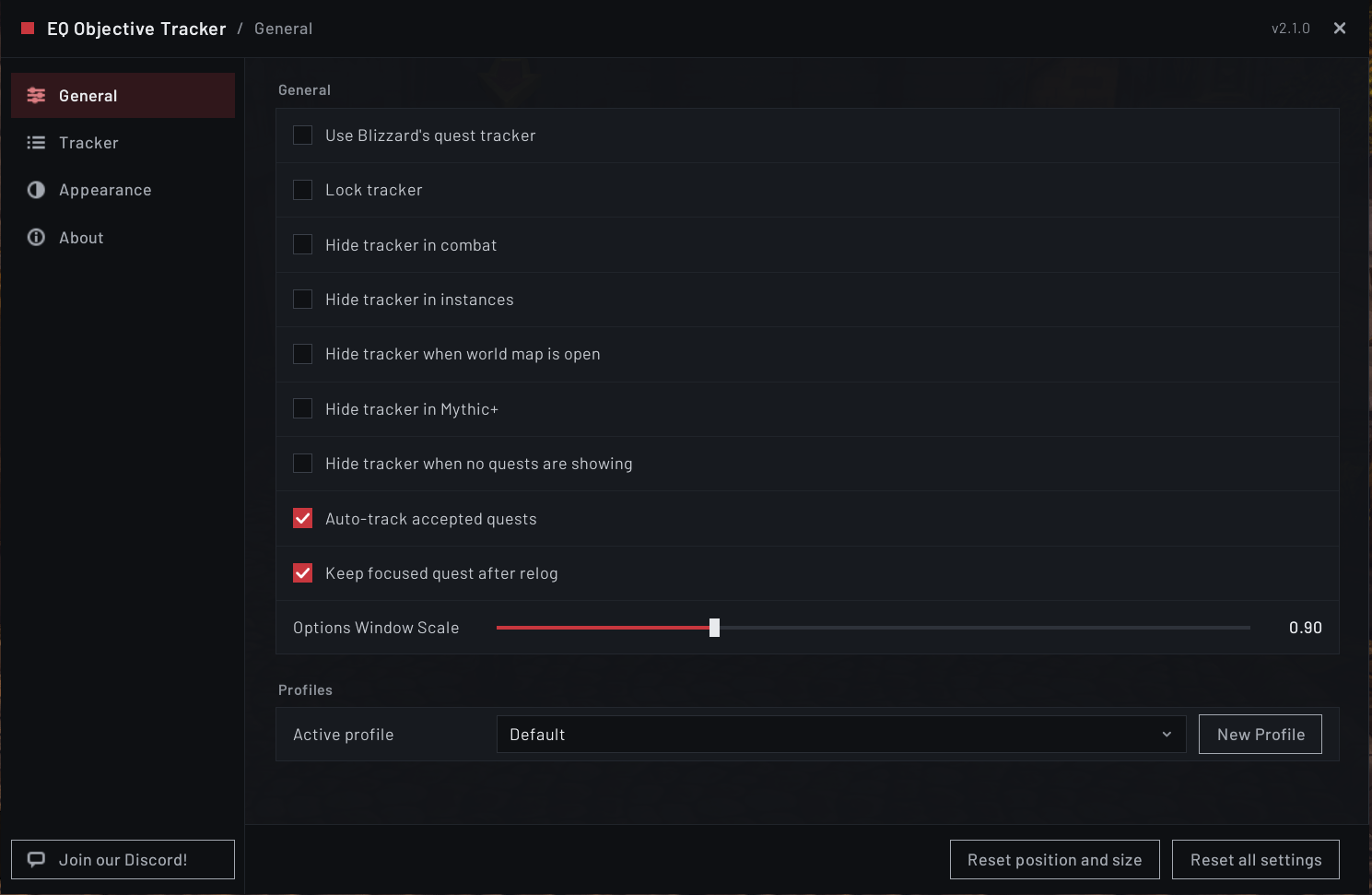
- Hides itself in combat, in instances, on Mythic+ runs, while the world map is open, or when you have no quests showing, each optional
- Reads in German, French, Russian, Korean, Simplified Chinese and Traditional Chinese as well as English, picked up from your game client automatically
- Needs no other addon. Everything it uses is bundled.
Works with or without Everything Quests
On its own. This is a complete tracker. Install it, and it takes over from Blizzard's objective tracker straight away. It does not need Everything Quests, and it never will.
Alongside Everything Quests. Everything Quests is a full replacement for the WoW quest experience. On Retail it brings nameplate quest icons, world quest map pins, a Midnight chain guide and an account-wide quest history, and on Classic it adds quest markers on the map and minimap and a Quest Browser for looking up almost any quest before you pick it up. The tracker you are reading about now is the tracker half of it, split out so people who only want the tracker can have just that.
They are already joined up. As of Everything Quests 1.38.0 there is only one tracker between the two addons, and it is this one. Everything Quests lists it as a dependency, so installing Everything Quests brings this along on its own and both stay updated. There is nothing to set up, and nothing to install twice.
On Classic they work together too. Everything Quests adds the other half of the picture there, map pins and the TomTom arrow among them, and it is what turns a focused quest into an arrow. Its Classic support is still growing, so check its own page for what it covers today.
If you came from Everything Quests, your tracker settings are read across the first time this loads, so it starts out looking the way yours already did. That includes your per-character state, on every character: pinned quests, which sections you had collapsed, and your saved world quest watches. Nothing is changed on the Everything Quests side.
One copy of the tracker code now means a fix lands in both places at once.
What it does
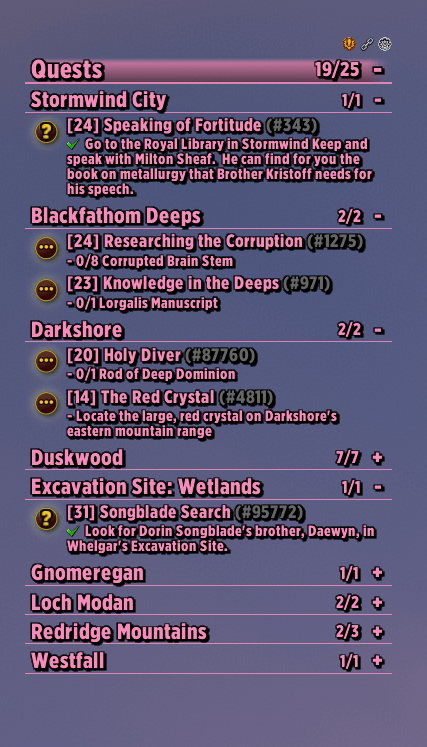
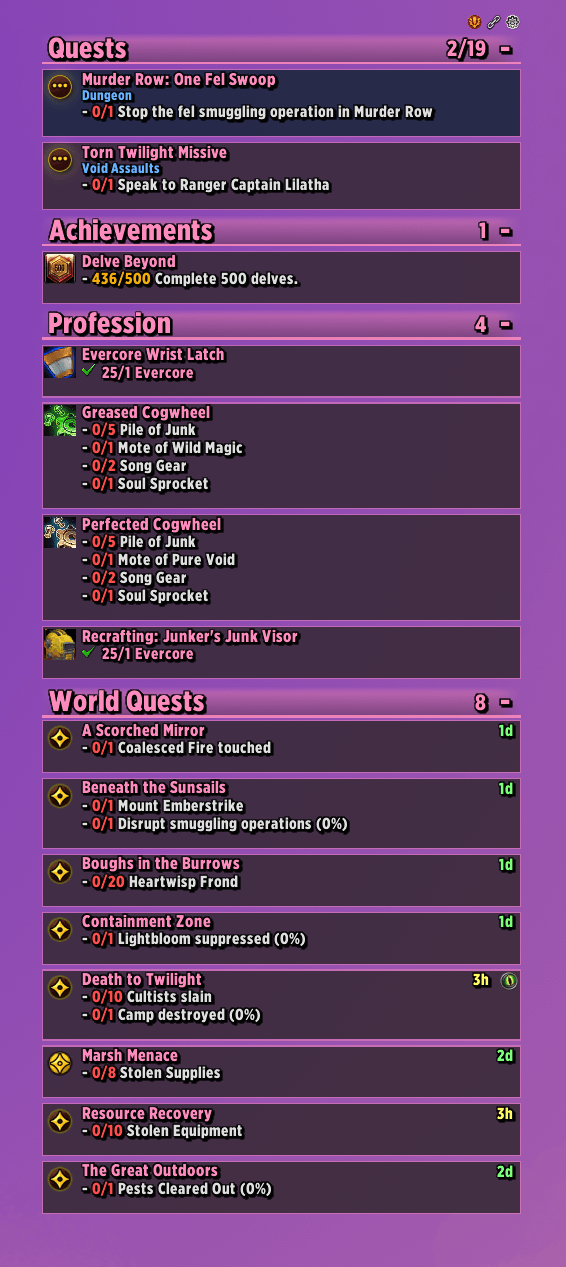
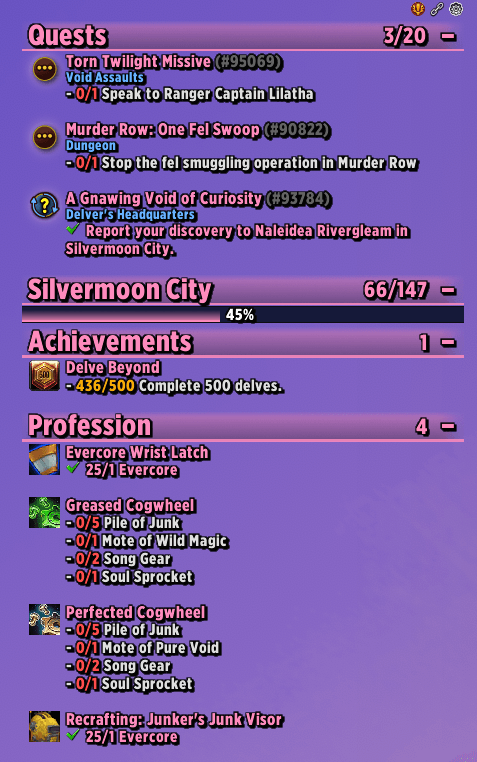
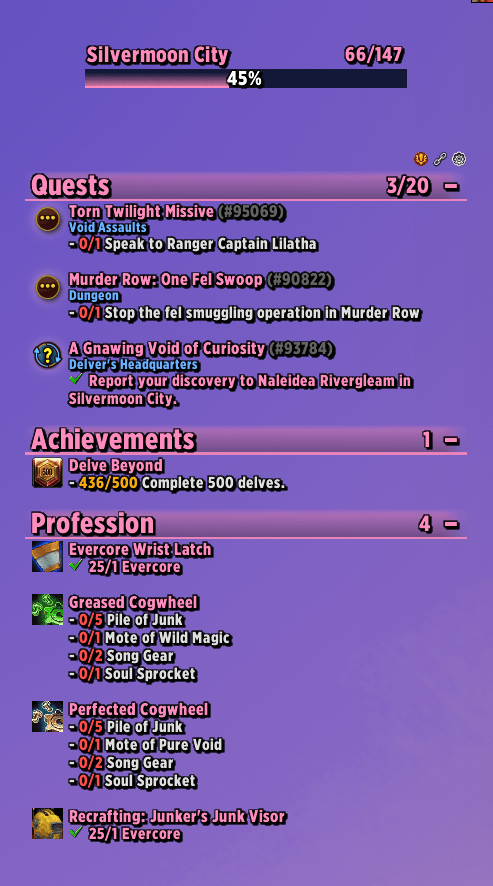
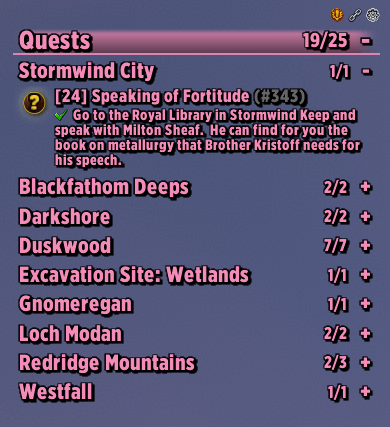
Quests and campaign sit in their own sections, with objectives, progress counts and completion state. Left click a quest to super-track it on Retail, or to focus it on Classic. Shift click it to untrack it, or with a chat box open to drop it into chat. Right click opens a menu to pin, track or untrack, focus, open it in the map and quest log, pop out its details, find a group, search Wowhead, or abandon it. The Classic menu is shorter, since those clients have no group finder and popping out and abandoning need frames they do not have. Any quest the game will form a group for gets a Find Group button on its row as well. A pinned quest carries a star and stays on the tracker whatever your filters say.
Quests you hand in from the tracker. A finished quest that is turned in from the tracker rather than at an NPC, such as a Prey hunt, shows a "click to complete" line, and left clicking it should open the reward window. That could not be tested on a finished hunt before release, so please report anything that looks wrong.
Hovering any quest shows its objectives and everything it pays out: money, experience, currencies, and items with their item level set against what you are wearing.
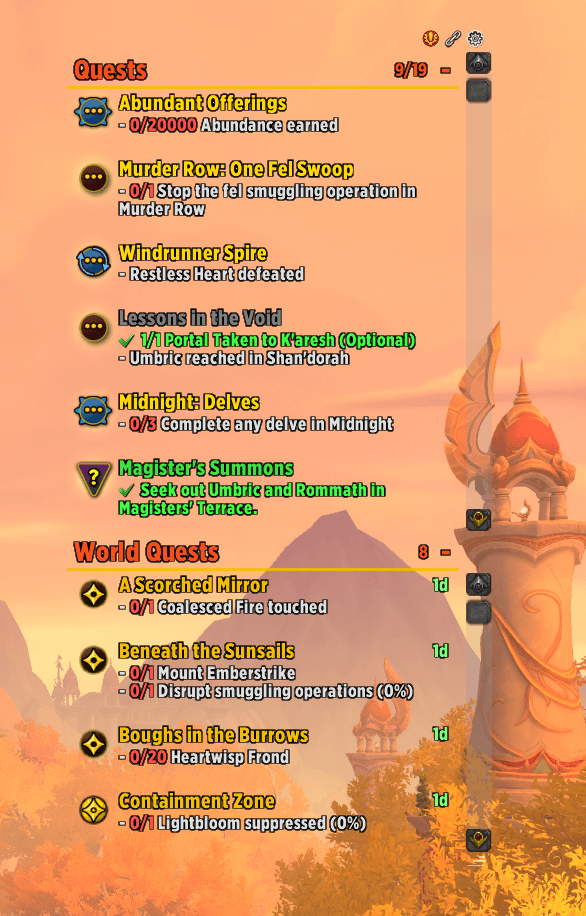
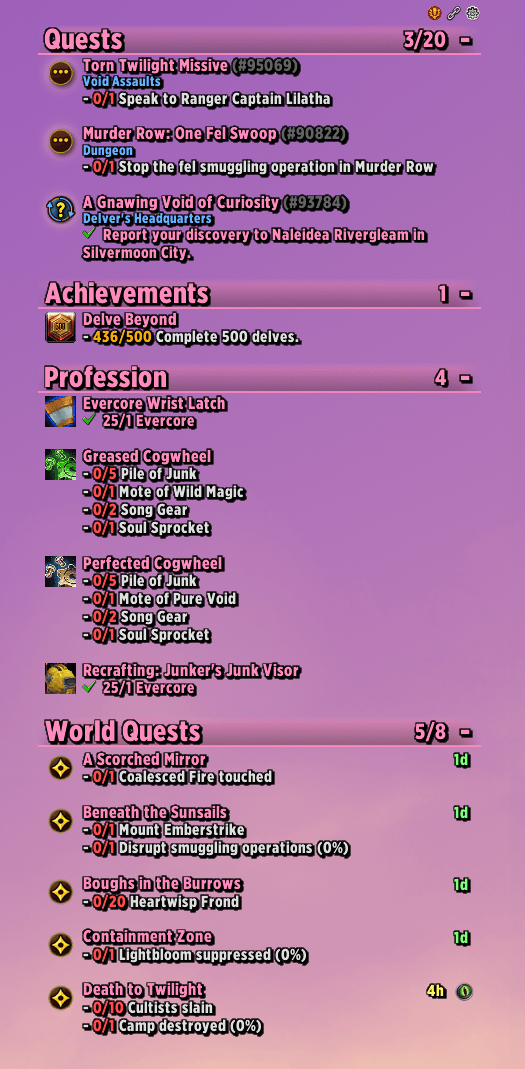
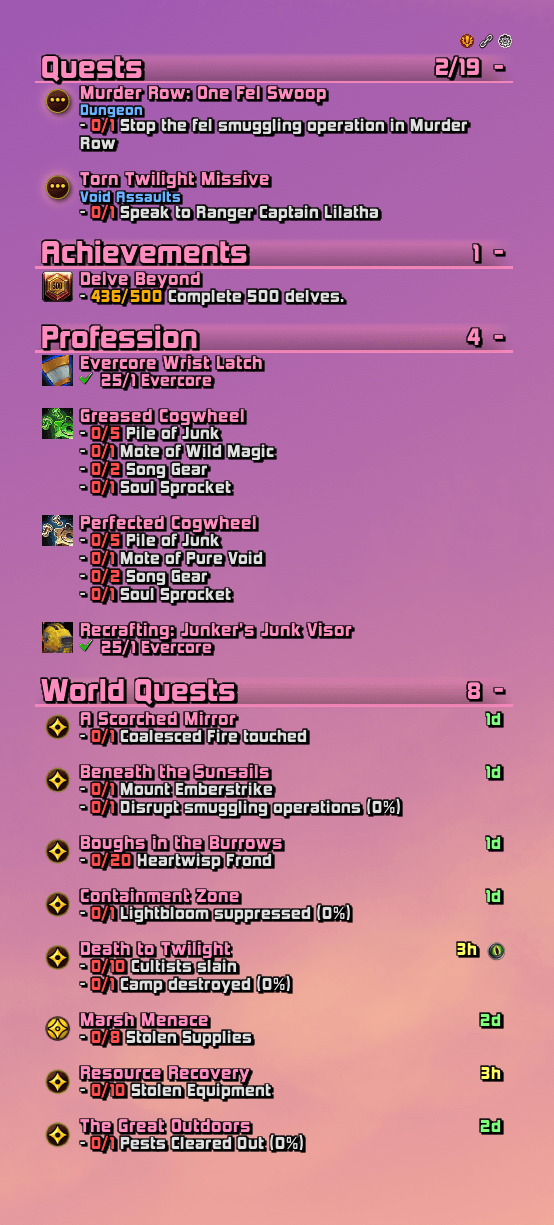
World quests get their own capped area at the top or bottom of the tracker, with the quest type drawn on the marker, a color coded countdown as the timer runs down, and a Find Group button where the game allows one. Every world quest in your current zone is listed automatically, not only the ones you have tracked, and you can turn that off. Pick one on the world map and it stays on the tracker wherever you go, for as long as it is the quest you are following. Hovering one also shows its faction and how long is left. They have their own right click menu too.
Bonus objectives get a section of their own, the way the default tracker gives them one. They appear when you walk into one and go away when you leave, and they have their own filter, so you can turn them off without touching world quests.
Scenarios and delves draw the stage banner and its criteria, including weighted progress bars, along with the stage countdown, the delve tier, and a clickable button for any spell the stage hands you.
The bonus objectives HUD is a separate movable readout covering the bonus loot mechanics inside a delve, with a lives and deaths readout for the run. Its background and border can be recolored, or switched off to leave the text floating. Off by default.
Achievements, professions and endeavors each get a section. Professions count the reagents you have across every quality tier, and endeavors cover both the Traveler's Log monthly activities and the neighborhood tasks you have tracked.
Progress bars are drawn for objectives that report a percentage or a running total, the way the default tracker draws them. Quest rows and scenario criteria each have their own switch, and the bar's texture, fill color, background, border and height are all yours to set.
Quest items appear as a usable button on the row of any quest that carries one, with charges, cooldown and an out of range tint.
Quest popups appear for newly discovered quests and ones you can hand in remotely.
World event bars. The extra bars and status lines the default tracker shows during world events appear here too, where they would otherwise not show up anywhere.
A zone progress bar shows how far through a Midnight zone's questlines you are, either floating on its own or docked into the tracker as a section you can reorder.
Make it yours. 42 bundled fonts plus anything from LibSharedMedia, each shown in its own typeface in the picker, 7 status bar textures, and 31 sounds (27 voice lines and 4 chimes), plus a card layout with quest type tints, border thickness, header bars and scroll bar skinning. Settings live in profiles you can switch between.
Read the changelog in game. The About tab carries the full release history, the commands, a Discord link, and a live view of what each section is currently producing.
Extras: three optional sounds, for when you accept a quest, when it is ready to hand in, and when you hand it in, a highlight on the flight point nearest your tracked quest, and an API other addons can use to add their own right click entries and header icons, or to follow whichever quest you have focused.
On Classic Era and TBC Anniversary
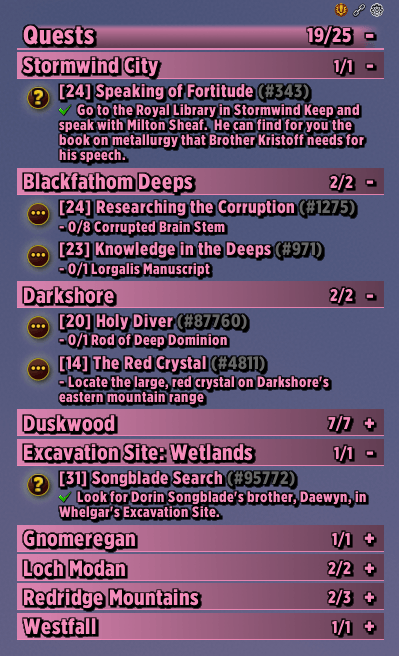
Everything the tracker is actually for works on Classic: quests with zone subtitles, objectives and progress, the sort orders, manual drag ordering, per-quest pinning, filters, section visibility and ordering, the card layout, all 42 fonts, the color options, profiles, row tooltips and the row right click menu. Blizzard's own quest watch frame is hidden, so you do not get two trackers.
No five quest cap. The tracker keeps its own list of the quests you are tracking rather than using the game's, which on these versions is capped at five and cannot track a quest automatically when you accept it. So "Auto-track accepted quests" works, "Show only tracked quests" can show more than five, and shift clicking a quest in the game's own quest log still tracks and untracks it, with its checkmarks showing this tracker's list.
Timed quests count down on the row. An escort or a bombing run shows the time left, counting in seconds through the last minute, and the game's own floating timer box is hidden so you are not left with two timers.
Focus a quest. These clients have no super-tracking, so the tracker brings its own. Click a quest's icon to focus it and click the icon again to clear it, or use Focus in the right click menu. The focused quest's title is tinted so you can see at a glance which one you picked. With the companion addon Everything Quests and TomTom both installed, focusing a quest also drops a TomTom arrow on it, and a quest that is ready to hand in points at the person who takes it rather than at the place you farmed it.
The tracker draws no map pins. Those come from Everything Quests, which carries the quest database. The tracker itself holds no quest coordinates and is not going to, so on its own a focused quest is the tint and nothing more.
What Classic does not have. World quests, bonus objectives, scenarios, achievements, endeavors and tracked recipes have no section there, since most of them need APIs those clients do not have, so those sections simply do not appear rather than sitting there empty. There is no Find Group button, because these clients have no group finder for quests. The zone progress bar stays empty, because its data covers Midnight zones only, and distance sorting does nothing, because the distance API is retail only. A few options still appear that cannot do anything on Classic, for the same reasons.
Running Questie? The tracker notices, offers once to hide Questie's tracker so you are not looking at two, and turns that into a permanent toggle on the General tab. It only hides the frame, and Questie's own disable path is never called. Tracking and untracking from this tracker's row menu go through its own list rather than the game's watch functions, so the hooks Questie places on those do not fire for anything you do here.
Slash commands
/eqotopens the options panel/eqot lockand/eqot unlocklock or unlock moving and resizing/eqot resetrestores the default position and size/eqot toggleshows or hides the tracker/eqot statusprints what each section produced and what reached the screen/eqot debugtoggles entry validation warnings/eqot bonushudprints what the bonus objectives HUD can see, ortestto place it/eqot importeqreplaces this profile with your Everything Quests tracker settings/eqot moduleslists the optional parts and which are switched off/eqot disable <name>switches off one part, orall, to narrow down a fault/eqot enable <name>switches a part back on, orall
Good to know
- Retail, Classic Era, TBC Anniversary and WoW Forever. Retail, Classic Era and TBC Anniversary are supported, and what Classic lacks is listed above. Forever is a work in progress, see the note at the top. Mists of Pandaria Classic is not supported yet.
- No dependencies. Every library it needs is bundled.
- Profiles are supported and shared across all your characters, so you can keep different setups and switch between them.
- Translated into German, French, Russian, Korean, Simplified Chinese and Traditional Chinese, thanks to Stonetwist, Zox, Malevi4, labrie75, 失眠啤酒 and BNS333. Every language covers all 438 of the addon's phrases, and anything a later release adds falls back to English on its own until it is translated, so a partial translation is never a broken one.
- World quests sit in their own pinned area above or below the quest list rather than in the reorderable run, so a long world quest list can never push your quests off screen.
- Drag the strip along the top to move the tracker, and the corner grip to resize it.
Found a bug or have an idea?
Open an issue on GitHub, or come and say so in Discord. Bug reports with a screenshot and the output of /eqot status are the fastest to fix.
You must be logged in to leave a comment.