
Dungeon Quest Tracker Forever
Click a dungeon entrance on the world map to see the quests to pick up, and get guided there with TomTom.
Details
Expansion
 Forever
 Categories
Developers

Having issues?
Dungeon Quest Tracker Forever


Work in progress. WoW Forever (game version 1.60.1) is still being discovered, and not everything about it is known yet: some dungeon entrances, quests and raid positions have not been published. The add-on is built up as that information comes out, so some data is missing or approximate for now. Updates follow as the game is mapped. If you spot an error or know a missing position, please report it on the project page.
For World of Warcraft: Forever. Know which dungeon quests to pick up before you go in, and get guided to every quest giver.
Forever quest data: validation pending. We are waiting for a Questie update to verify that the new Forever dungeon quests appear correctly in the dungeon quest list and are recognized when accepted into the game's quest log. This integration is prepared, but has not yet been confirmed in game with the updated database.
What it does
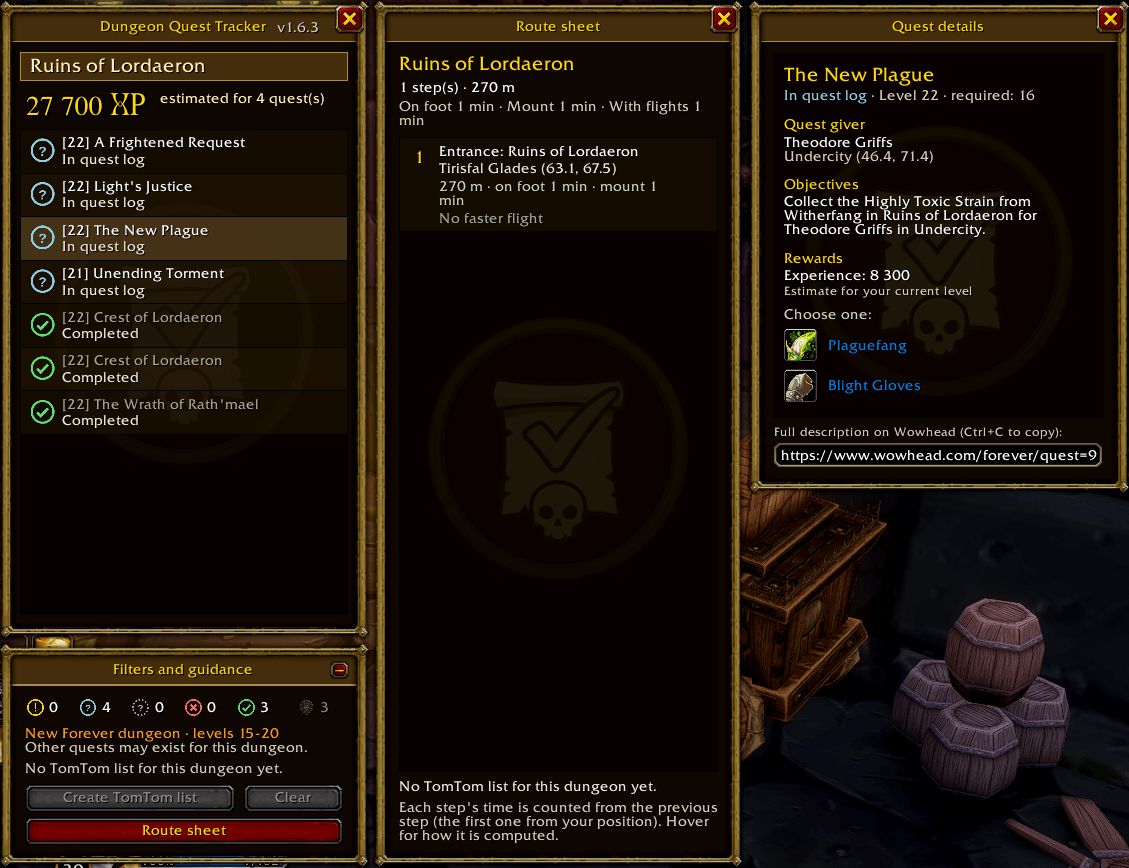
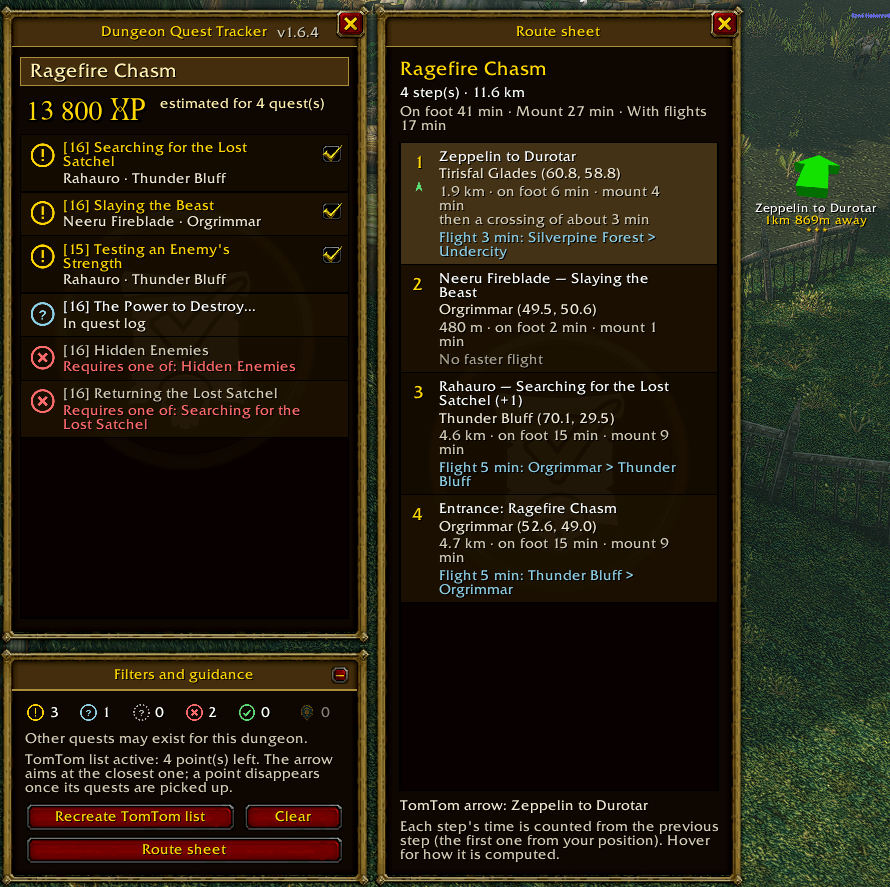
- Click a dungeon entrance on the world map to open the Dungeon Quest Tracker panel: known quests for that dungeon, with their state (to pick up, in your log, completed, not available yet) and the estimated experience for your level.
- Why a quest is not available: wrong faction, level, missing prerequisite (with the quest name), reputation, profession, starting item.
- Quest details: quest giver and where to find them, objectives, experience, money and rewards with the game's own item tooltips, and a Wowhead link in your language.
- Quest chains: view prerequisites in order, with status, objectives and rewards. Use a checkbox to select a quest and TomTom to navigate to its starter, remaining objective or turn-in NPC according to its current state. Long chains use pages and fit within the map frame.
- TomTom route: one waypoint per quest giver in travel order. Untick the quests you want to skip. The route sheet shows each step with travel time on foot, mounted and with flight paths.
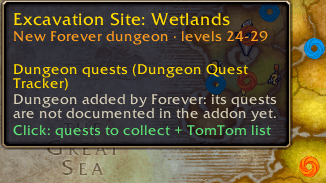
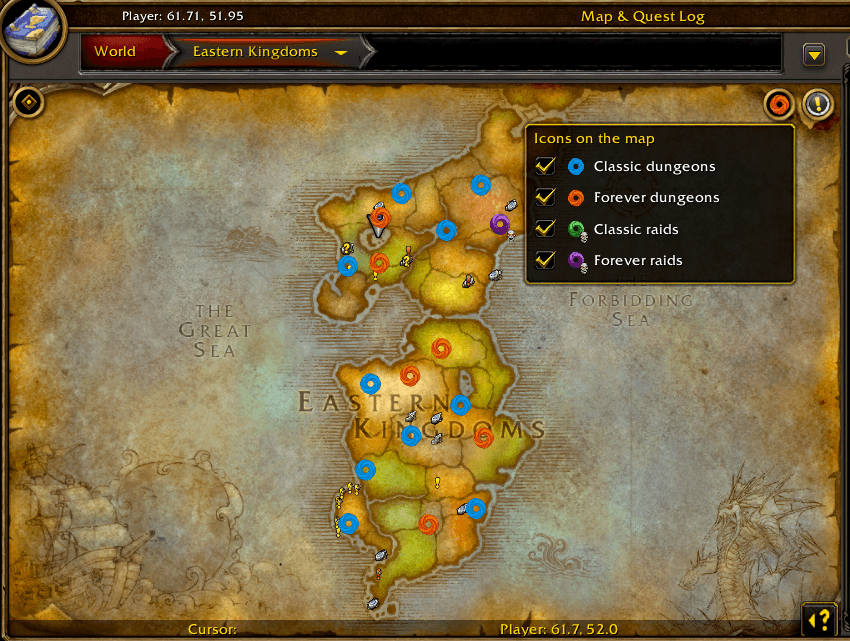
- New Forever dungeons and raids on the map: orange icons for Forever dungeons, purple for Forever raids, blue and green for classic ones. Raids carry a skull. The DQT button at the top right of the world map shows or hides each category.
- Folding panel: the page arrow in the title bar folds the tracker like a book into a narrow vertical spine, windowed or fullscreen. It reopens folded with the world map and opens again when you click anywhere on the folded frame, its page arrow or a dungeon entrance.
- Questie integration: reads quest data from your installed Questie database. Support for importing updated Forever dungeon quest data is prepared; verification is pending the Questie update mentioned above.
- Update notice: a colored chat message tells you when a newer version of the add-on is seen in your guild or group.
- Ten languages: English, French, German, Spanish (EU and Latin America), Portuguese, Russian, Korean, Simplified and Traditional Chinese.
Requirements
- Questie (with its Forever database): quest data.
- TomTom: waypoints and guidance arrow.
- Optional: Leatrix Maps (its dungeon icons are supported).
The setup wizard checks both on first launch.
Usage
- World map (M), click a dungeon entrance.
/dqt(or/dqtf) world map,/dqt roadroute sheet,/dqt clearclear the list./dqt optionsoptions,/dqt setupsetup wizard,/dqt aboutabout.- Options: Game Menu > Options > AddOns > Dungeon Quest Tracker Forever.
/dqt entrance <dungeon>records a Forever entrance at your position when it is not published yet.
Good to know
- Entrances of some Forever dungeons and raids are not published yet: they are placed approximately and the tooltip says so. Two dungeons (The Drowned City, The Shaper's Terrace) have no icon until their entrance is known.
- Quest lists come from Questie and are not guaranteed to be complete for Forever.
- Quest objective guidance requires known locations in Questie. When no location is known, the TomTom button is disabled. The dungeon route is for collecting quests; it does not track every objective inside an instance.
Choose Your Forever
Website: https://choose-your-forever.online/
Discord: https://discord.gg/xdzcTaKxb5
Support the project: https://ko-fi.com/ostie
Credits and sources
The following projects and websites are used or cited as sources. None of them is affiliated with Choose Your Forever or has endorsed it.
- Questie and QuestieDB: the add-on reads their quest database and classic dungeon entrances in game. Nothing from them is copied into Choose Your Forever.
- TomTom: add-on used in game for waypoints and the guidance arrow.
- Wowhead (WoW Forever section): source of the facts recorded for the quests of the new Forever dungeons (level, required level, faction, experience, quest item, quest giver and position), of their titles and one-line objectives in the supported languages, and of the "Every Dungeon Quest Location" guide. Each quest links to its Wowhead page.
- wowforevermap.com: level ranges of the dungeons and raids, and the landmarks used for the approximate position of the Forever raids.
- Entrance guides (Warcraft Tavern, wowforeversite.wiki, wowhandbook.com, theclick.gg, expcarry.com): published coordinates of the Forever dungeon entrances.
- Forever Dungeon Journal by Exehn: consulted as a reference while developing earlier versions. No code or data from it is included in this release.
Disclaimer
Choose Your Forever is an unofficial community project. It is not affiliated with, endorsed or sponsored by Blizzard Entertainment. World of Warcraft and Blizzard Entertainment are trademarks or registered trademarks of Blizzard Entertainment, Inc.
All Rights Reserved: see the LICENSE file included with the add-on.
En français
En cours de construction : WoW Forever se découvre encore et toutes les informations ne sont pas connues (certaines entrées de donjons, quêtes et positions de raids ne sont pas encore publiées). L'add-on se complète au fil des découvertes ; signalez toute erreur ou position manquante sur la page du projet.
Fait partie de la suite d'add-ons Choose Your Forever, développé par MisterPi_, et fonctionne seul.
Quêtes des donjons Forever : validation en attente. Nous attendons une mise à jour de Questie pour vérifier que ces quêtes apparaissent correctement dans la liste du donjon et sont reconnues après leur acceptation dans le journal de quêtes du jeu. L'intégration est préparée, mais cette vérification en jeu avec la base mise à jour reste à faire.
Cliquez sur une entrée de donjon de la carte du monde pour voir ses quêtes, savoir pourquoi une quête n'est pas accessible, estimer l'XP et suivre une route TomTom vers chaque donneur, avec les temps de trajet. Nouveaux donjons Forever en orange, raids Forever en violet. Nécessite Questie et TomTom.
La vue des chaînes affiche les prérequis dans l'ordre, avec leur état, leurs objectifs et leurs récompenses. Cochez une quête puis cliquez sur TomTom : le guidage vise le donneur avant acceptation, un objectif restant pendant la quête, puis le PNJ de validation lorsqu'elle est prête à rendre. Si la position est inconnue, le guidage est indisponible.
Le panneau se replie sur le côté de la carte. Un clic sur le cadre plié le déplie. Les longues chaînes utilisent des pages pour rester dans la hauteur de la carte. Les listes dépendent des données connues et peuvent être incomplètes pour Forever.
Projet communautaire non officiel, ni affilié ni approuvé par Blizzard Entertainment. Sources citées ci-dessus, sans affiliation ni approbation de leurs auteurs. Tous droits réservés.
You must be logged in to leave a comment.