
Dungeon Quest Prep
Shows every quest completed in each WoW Forever dungeon and guides you, stop by stop, to pick them all up before going in.
Details
Expansion
 Forever
 Categories
Developers

Having issues?
Dungeon Quest Prep
Never walk into a dungeon without its quests again.
Dungeon Quest Prep is a WoW Forever addon that tells you which quests are completed inside each dungeon, which of them you can already get, and then guides you, stop by stop, to pick them all up before you go in. When you have every obtainable quest, it celebrates — you are ready for the dungeon.
Features
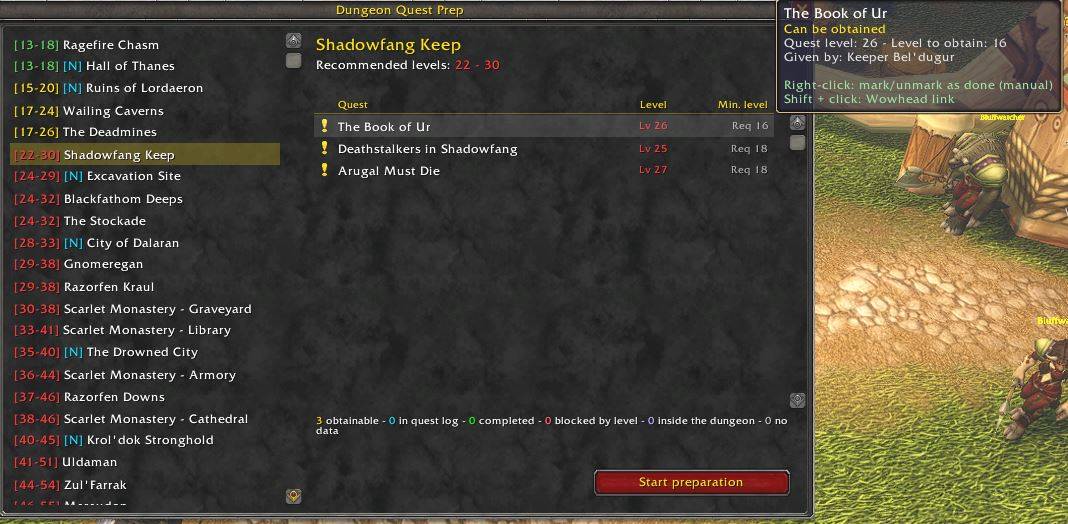
- Dungeon list ordered by level, coloured with Blizzard's difficulty system (grey / green / yellow / orange / red) relative to your character.
- Quests per dungeon for your faction and class, showing the quest level and the minimum level to get it. Quests above your level are flagged.
- Start preparation — the addon:
- checks which quests you already completed (they don't count) or already have in your log,
- resolves the full quest chain of every dungeon quest,
- builds a route optimised from your current position,
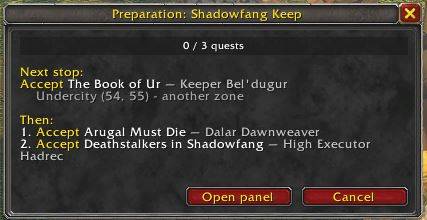
- guides you to each quest giver and turn-in, with TomTom or the in-game map waypoint,
- celebrates (banner, confetti, sound) when you hold every obtainable quest.
- Honest about what can't be prepared: quests that start inside the dungeon, or that need another dungeon quest first, are shown apart and never block your preparation.
- Guide panel with progress bar, next stop (zone, coordinates, distance, direction) and pending objectives.
- Manual override: right-click a quest to mark it as done; Shift-click to copy its Wowhead link.
- Localised: interface in English and Spanish; quest and NPC names in your client's language (deDE, esES, esMX, frFR, koKR, ptBR, ruRU, zhCN, zhTW).
- No dependencies: all quest data ships with the addon. TomTom is optional (for the arrow).
Commands
| Command | What it does |
|---|---|
/dp or /dungeonprep | Open / close the main window |
/dp stop | Cancel the current preparation |
/dp help | Show the command list |
You can also click the minimap button (drag it to move it around the minimap).
How to use
- Open the window with
/dpor the minimap button. - Pick a dungeon on the left. Its quests appear on the right with their status:
- ✔ completed · ? in your quest log · ! can be obtained now
- ⚠ blocked by level · 🔑 picked up inside the dungeon
- Click Start preparation and follow the guide panel.
Data
Quest data covers 244 quests across 29 dungeons, including the new WoW Forever dungeons where quests are known (Hall of Thanes, Ruins of Lordaeron, Excavation Site). It was audited against the Wowhead Forever "Every Dungeon Quest" guide and Questie's database, checking that each quest's objectives or turn-in are really inside the dungeon. Found a missing or wrong quest? Please report it in the comments with the quest name.
Credits
- Quest, NPC and translation data derived from Questie (GPL-3.0).
- WoW Forever quest information from Wowhead.
License: GPL-3.0.
Dungeon Quest Prep (Español)
No vuelvas a entrar en una mazmorra sin sus misiones.
Dungeon Quest Prep es un addon para WoW Forever que te dice qué misiones se completan en cada mazmorra, cuáles puedes obtener ya y te guía, parada a parada, para recogerlas todas antes de entrar. Cuando tienes todas las obtenibles, lo celebra: estás listo para la mazmorra.
Funciones
- Lista de mazmorras ordenada por nivel y coloreada como las misiones de Blizzard según tu nivel.
- Misiones de cada mazmorra para tu facción y clase, con nivel de misión y nivel mínimo para obtenerla.
- Iniciar preparación: comprueba qué tienes, resuelve las cadenas completas, calcula una ruta optimizada desde tu posición, te guía (TomTom o waypoint del mapa) y celebra cuando lo tienes todo.
- Las misiones que se recogen dentro de la mazmorra, o que requieren antes otra misión de mazmorra, se muestran aparte y no bloquean la preparación.
- Clic derecho: marcar una misión como hecha a mano. Mayús + clic: enlace de Wowhead.
- Interfaz en español e inglés; nombres de misiones y PNJ en el idioma de tu cliente.
Comandos
| Comando | Qué hace |
|---|---|
/dp o /dungeonprep | Abre / cierra la ventana |
/dp stop | Cancela la preparación en curso |
/dp help | Muestra los comandos |
You must be logged in to leave a comment.