
DKP Loot Master
DKP Loot Master helps you to watch and auction your loot via 105..110DKP or GDKP.
Details
Expansion
 Forever
 Categories
Developers

Having issues?
Overview
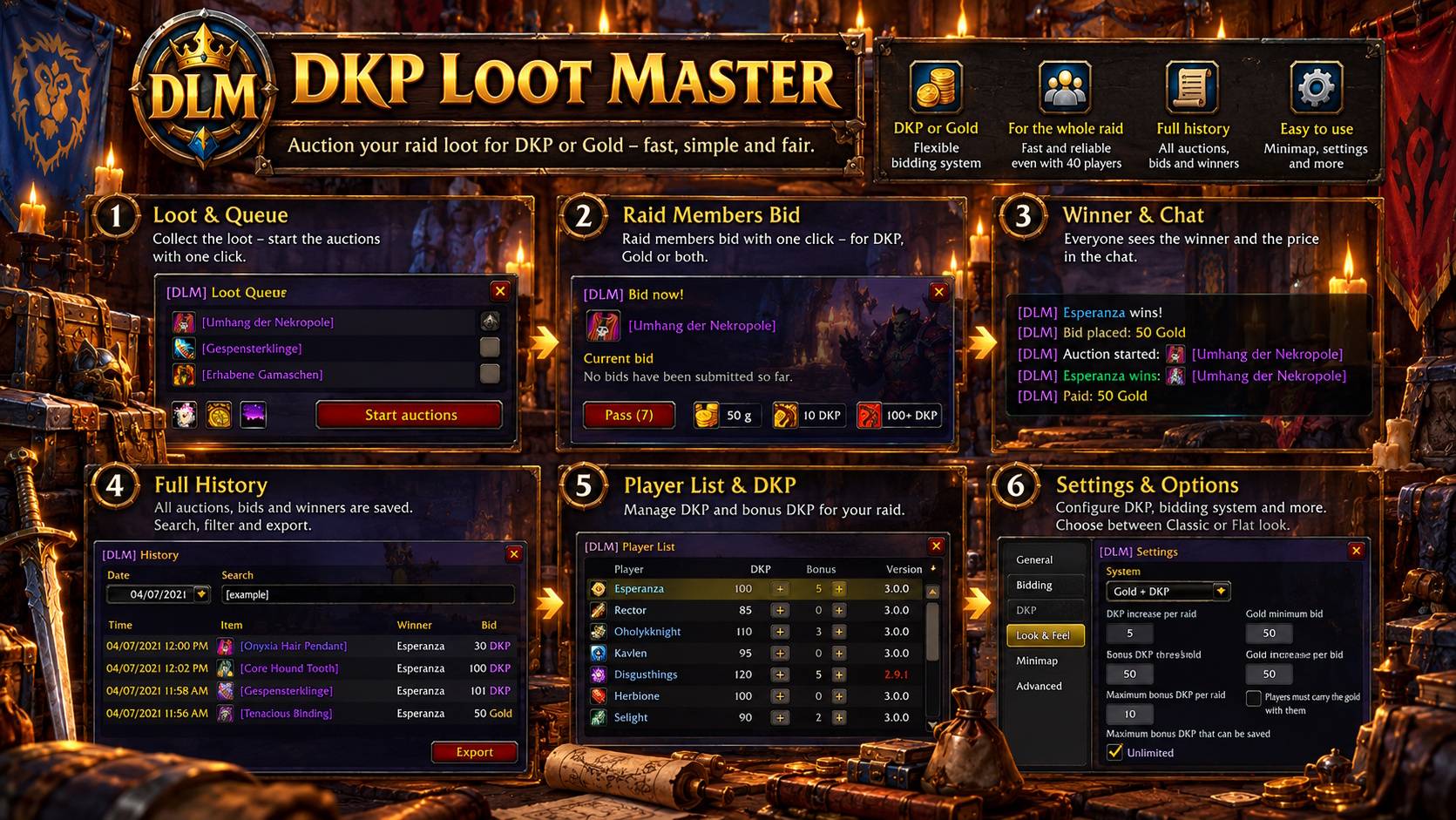
DKP Loot Master auctions the loot of your raid for DKP, for gold as in a GDKP, or for both. The loot master collects the loot, every raid member bids with one click in a small bid window, and the addon keeps the DKP, the history and the winners. Giving away loot becomes faster, simpler and fair.
Every raid member who wants to bid needs the addon. Before the start the loot master sees who has it, and everyone else gets a whisper where to download it.
Supports Classic Era and Season of Discovery, WoW Forever, Burning Crusade, Wrath of the Lich King, Titan Reforged, Cataclysm and Mists of Pandaria. Available in English, German, Spanish, French, Italian, Korean, Portuguese, Russian and Chinese.
New in Version 3.0
- Classic or Flat look, picked once with a preview, and a window scale slider
- Auctions, bids and results reach every raid member at once, even in 40 player raids
- Raid members with an older version can keep bidding
- Minimap button for the history, the player list and the settings
- Runs on WoW Forever and Titan Reforged
- Death Knights and Monks can bid on all their loot
- Traditional Chinese translation
Roadmap, Release Notes, Feedback
Join the Discord server to see the planned features and give feedback.

Loot Master
When you become master looter, DKP Loot Master asks whether it should auction your loot. Once started, it records every item that is looted. Quest items, consumables, trade goods and gray items are left out, and you can drag any other item into the loot master window by hand.
All items wait in a queue until you start the auctions, and you can remove items from it. Then the queue is auctioned item by item to all players who were in the raid or group when it was looted.
A test auction lets the raid try the bidding before the first boss.
Auctions
Players bid gold or DKP with one click. Everyone has 20 seconds for the first bid, and every new bid gives everyone 15 more seconds. Only players whose class can use the item take part, and players who already own it pass automatically.
The auction ends early as soon as nobody can outbid anymore. Equal DKP bids above the bonus threshold roll for the item, and everyone sees the winner and the price in the chat.
Three bid systems are available: gold only, DKP only, or gold and DKP, where the first DKP bid ends the gold bidding.
Main Spec and Second Spec
Optionally every player chooses main or second spec before bidding, and main spec bids win over second spec bids. Several modes decide how gold and DKP bids take part.
History
Every auction is stored with its bids, rolls and winner, by the loot master and by every raid member. The history can be filtered by day, searched by item or player and exported, and the course of every auction can be shown again.
DKP Administration
The player list shows the DKP and bonus DKP of every player, adjustable with plus and minus. By default every player has 100 DKP per raid plus up to 5 bonus DKP, and all amounts can be configured.
Reset the DKP for the next raid with one click, import and export the DKP as text, and let twinks share the DKP of their main character.
Classic or Flat Look
Pick the look of the windows once, with a preview: the Classic look with the golden frame of the game or the modern Flat look. A scale slider in the settings sizes the windows to your screen.
Minimap Button
- Left click shows the history
- Shift + left click opens the loot master settings
- Right click shows the player list with the DKP
- Ctrl + right click hides the button,
/dlm minimapbrings it back
Chat Commands
/dlmlists all commands/dlm startand/dlm stopstart and end the loot master/dlm dkpshows the player list with the DKP/dlm historyshows the history/dlm settingsopens the loot master settings/dlm logsshows the log window/dlm minimapshows or hides the minimap button
Support
To keep this addon alive it would be very helpful to make a small donation. Thank you very much!

You must be logged in to leave a comment.