
CrossCraft
Plan crafting goals, understand material requirements, track production across characters, and keep complex profession workflows organized.
Details
Expansion
 Forever
 Categories
Developers

Having issues?
CrossCraft
| Create Plan | Production Flow |
|---|---|
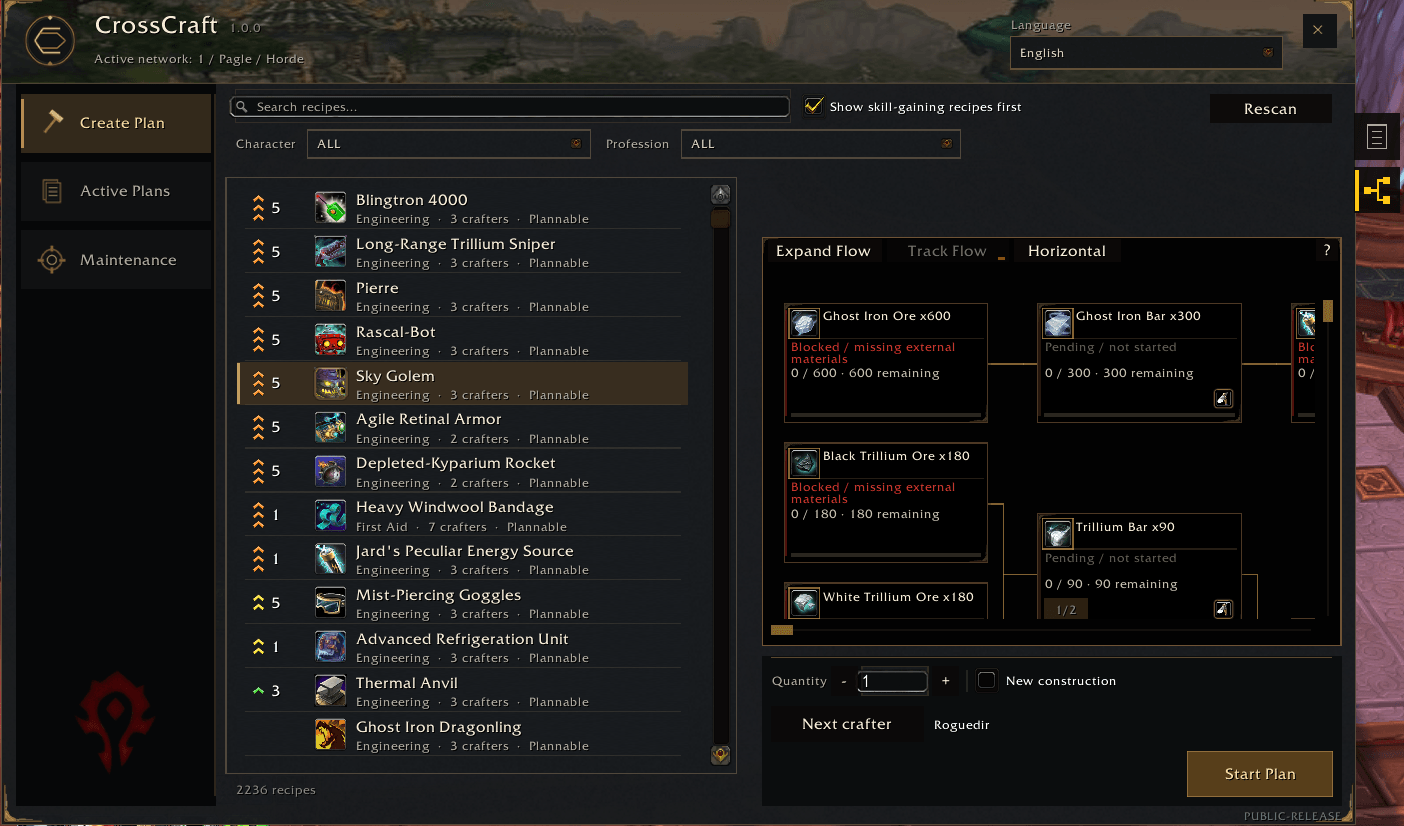 | 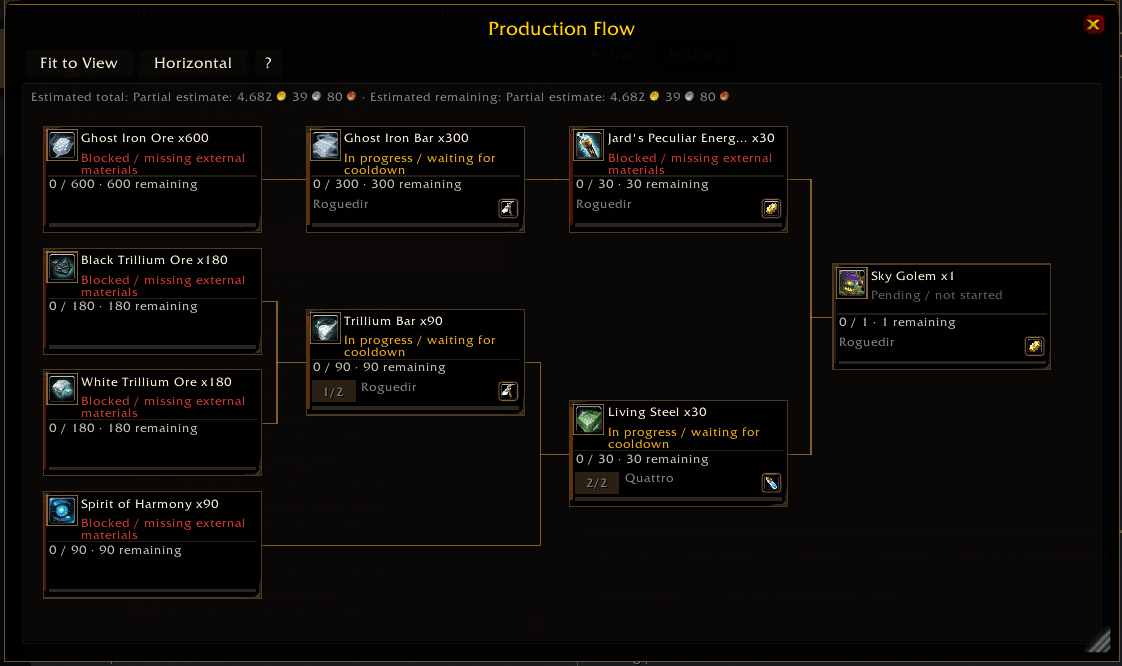 |
Click any image to enlarge.
CrossCraft is an account-wide crafting and production planner for World of Warcraft: Mists of Pandaria Classic and World of Warcraft: Forever Beta.
It brings your known recipes, professions, observed materials, character inventories, production plans, crafting dependencies, progress, shopping needs, and production history into one coordinated workflow.
Plan complex crafts across compatible characters, see what materials you already have, discover what still needs to be crafted or acquired, compare production paths, track progress, protect materials you want to keep, and turn eligible shortages into actionable shopping lists.
CrossCraft is designed to help you make crafting decisions — not make them for you.
Current Release
CrossCraft 1.0.0
Supported clients:
- Mists of Pandaria Classic — Interface
50504 - World of Warcraft: Forever Beta — Interface
16001
CrossCraft 1.0.0 is the first stable release of the 1.0 generation.
This release introduces a major interface modernization while preserving the planning engine developed throughout the earlier beta releases. Navigation, recipe discovery, active-plan management, Summary, Production Flow, Tracking Flow, History, reports, shopping tools, and profession scanning have all been refined into a more cohesive workflow.
The same addon package supports both Mists of Pandaria Classic and Forever Beta.
Main Features
- Account-wide production planning across compatible characters.
- Recursive crafting trees for multi-step recipes and intermediate materials.
- Profession Scan to discover recipes actually known by your characters.
- Search and filtering by character, profession, category, subcategory, and recipe name.
- Recipe Skill-Up guidance with difficulty indicators and potential skill points when the game client provides that information.
- Context-aware Skill-Up sorting that can prioritize useful recipes without hiding the rest of your catalog.
- Modern sidebar navigation for Create Plan, Active Plans, Maintenance, and related planning surfaces.
- Summary, Production Flow, Tracking Flow, History, and Character Reports.
- Inventory-aware planning with conservative handling of incomplete or uncertain information.
- Persistent progress and material reservations while plans are active.
- Alternative production routes presented for explicit player selection.
- Material Protection for items or quantities you want to keep outside freely available planning stock.
- Vendor and Auction House-informed reference costs when verified observations are available.
- Quick Export and Export Manager for Auctionator-compatible shopping lists.
- History archive navigation for completed and cancelled plans.
- 11 interface languages, selectable independently of the WoW client language.
- Mists of Pandaria Classic and Forever Beta compatibility from the same package.
Profession Scanning
CrossCraft builds its recipe catalog from professions actually observed on your characters.
It does not assume that a character knows a recipe merely because the recipe exists in the game.
Mists of Pandaria Classic
On Mists of Pandaria Classic, CrossCraft uses its established profession scanning workflow to discover your known recipes and profession information.
World of Warcraft: Forever Beta
On World of Warcraft: Forever Beta, CrossCraft uses RAPR-FE — Rescan All Profession Recipes, Forever Edition — together with the modern profession APIs available on that client.
RAPR-FE is not a separate addon or a second recipe database. It is the Forever-specific scanning strategy used by CrossCraft's existing profession reconciliation system.
It supports the Forever profession-window model, including:
- Guided Interaction;
- profession-window transitions;
- Mining and Smelting handling;
- modern recipe information;
- recipes whose item information may become available asynchronously;
- conservative reconciliation when information is incomplete.
Guided Interaction
When CrossCraft needs a profession opened, it guides you through the required interaction instead of attempting to perform protected actions silently.
You remain responsible for opening profession windows and performing protected game actions.
CrossCraft does not automatically:
- open professions for you;
- craft recipes;
- buy items;
- select production routes;
- create plans;
- perform protected UI actions.
Recipe Skill-Up Guidance
CrossCraft can provide visual guidance for recipes that may increase your profession skill.
Depending on the client and the information exposed by World of Warcraft, CrossCraft may display:
- recipe difficulty;
- Skill-Up indicators;
- potential skill points when the client reports them.
The visual system helps distinguish useful skill-gain opportunities without removing trivial recipes or recipes whose Skill-Up state is unknown.
The Show skill-gaining recipes first option changes sorting only.
It does not remove recipes from the catalog.
Character Context
Skill-Up information belongs to the character for which the evidence is valid.
When viewing:
- All Characters — valid guidance from the connected character may be shown;
- the connected character — valid guidance may be shown;
- another specific character — connected-character Skill-Up guidance is hidden and excluded from Skill-Up sorting.
This avoids presenting one character's profession progress as though it belonged to another.
Skill-Up information is advisory.
CrossCraft reports the evidence supplied by the game client and does not guarantee that a craft will increase your profession skill.
If Skill-Up information is missing or outdated, rescan the relevant profession.
Search and Recipe Catalog
The recipe catalog can be explored using:
- character;
- profession;
- category;
- subcategory;
- recipe name;
- Skill-Up priority.
CrossCraft preserves the complete known recipe catalog while filters help narrow the list to what you are currently looking for.
Selecting a recipe lets you review its production requirements before creating a plan.
The 1.0 interface keeps recipe discovery and filtering compact while still exposing detailed information when needed.
Production Plans
Choose a recipe, set the quantity you want, review the production requirements, and create a persistent production plan.
CrossCraft expands the recipe into its required materials and intermediate crafts.
It can then determine which parts of the plan may already be covered by observed inventory and which parts still require:
- crafting;
- acquisition;
- character contribution;
- explicit route selection.
When multiple production routes are available, CrossCraft presents them for explicit player selection.
It does not automatically select a route simply because one appears cheaper.
Your selected routes remain part of the plan while you work through production.
Active Plans
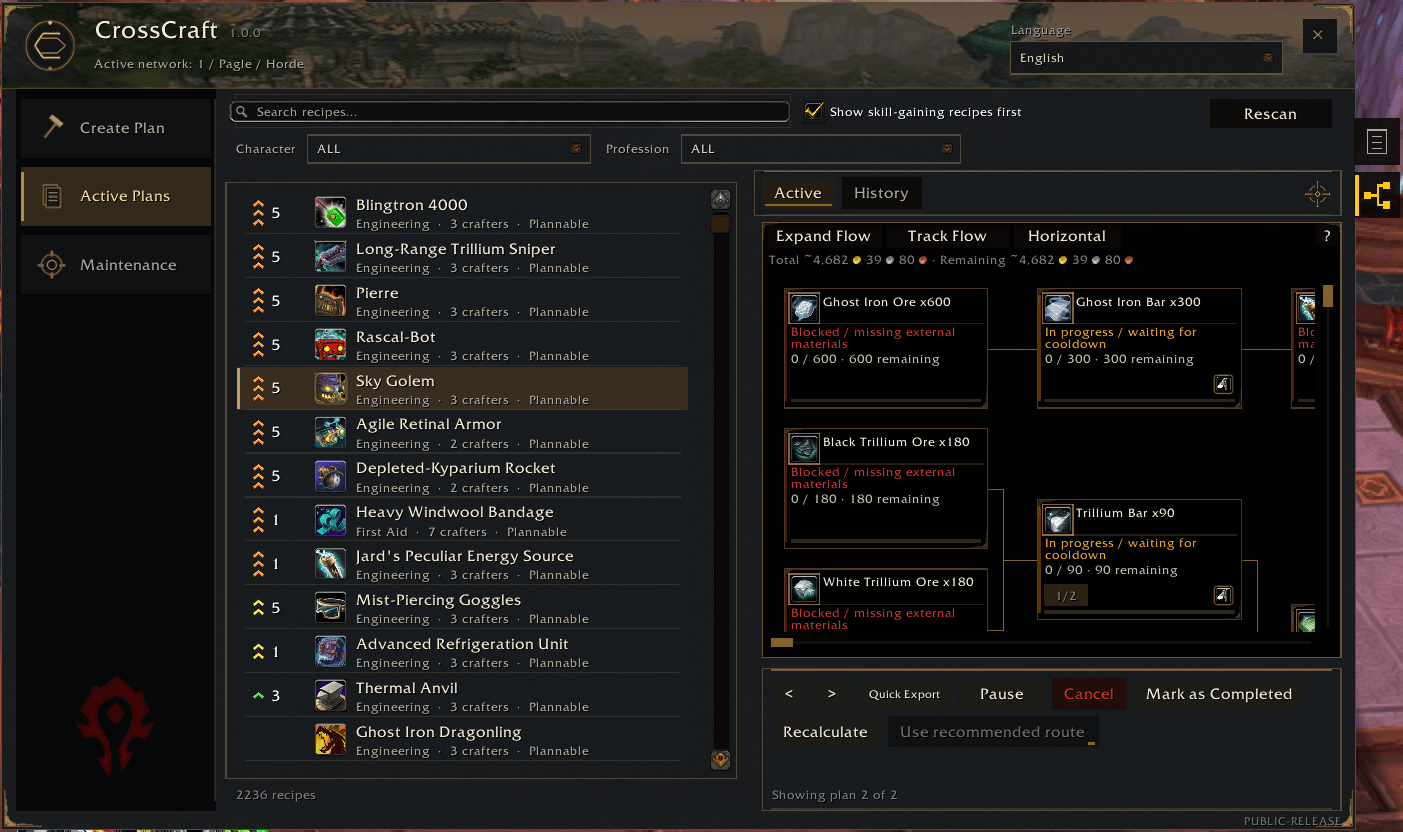
Active Plans is the main workspace for plans that are still in progress.
Plans can preserve:
- selected production routes;
- observed progress;
- material reservations;
- current plan state;
- production history;
- requested quantities.
You can move between plans while preserving the appropriate plan context.
Pausing a plan releases its active material reservations without deleting its historical progress.
Completed and cancelled plans move into History rather than disappearing from the account-wide planning record.
Summary
Summary provides the high-level operational view of the selected plan.
It brings together information such as:
- objective;
- logistics;
- production requirements;
- crafting order;
- material coverage;
- acquisition information;
- export actions;
- warnings;
- next actions;
- plan details.
Its purpose is to answer the practical question:
“What do I need to do next to finish this plan?”
Detailed information remains available without forcing every technical detail onto the primary view.
Production Flow
Production Flow visualizes the dependency tree behind a craft.
It can show:
- final products;
- intermediate crafts;
- required materials;
- dependencies between production steps;
- selected production routes.
The tree supports horizontal and vertical layouts and can be explored through scrolling, interaction, and contextual item information.
The 1.0 presentation improves readability and visual hierarchy while preserving the underlying production model.
The visual position of a node is presentation only.
CrossCraft's production logic does not depend on where an item happens to appear on screen.
Tracking Flow
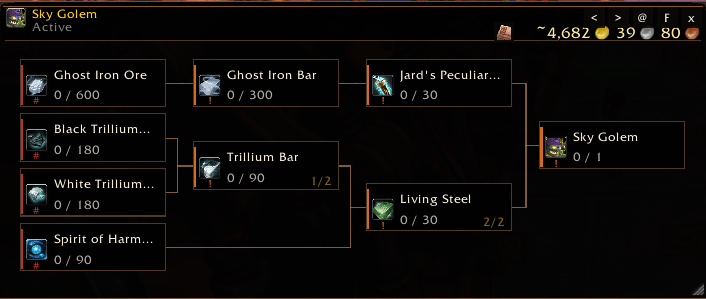
Tracking Flow provides a compact companion view for following an active production plan while playing.
It is:
- movable;
- resizable;
- designed to remain useful alongside normal gameplay;
- able to navigate between applicable plans;
- equipped with Frame Fit for fitting the displayed production flow;
- equipped with Focus on Pending to emphasize work that still remains.
Tracking Flow is read-only with respect to production-route decisions.
It helps you follow the plan; it does not become a second planning authority.
History and Archive Navigator
CrossCraft keeps completed and cancelled production plans available in History.
History is divided into:
- Completed
- Cancelled
The List archive navigator provides a faster way to browse historical plans without turning the archive into a third plan status.
Completed plans are grouped together and ordered by their completion information, followed by cancelled plans.
Selecting an entry opens the appropriate historical section and plan detail.
The archive navigator uses a deployable drawer that remains attached to the main CrossCraft window while it is moved.
Historical plan selection and multi-selection for deletion remain separate concepts so browsing a plan does not accidentally select it for destructive actions.
Inventory and Material Coverage
CrossCraft uses observed character inventory information to determine how much of a production plan is already covered.
Incomplete, delayed, stale, incompatible, or unknown observations are handled conservatively.
CrossCraft does not silently assume that unknown materials are:
- available;
- transferable;
- free;
- craftable;
- purchasable.
This conservative approach is especially important for complex plans involving multiple characters, professions, and crafting layers.
Material Protection
Material Protection lets you reserve selected quantities of items so CrossCraft does not treat them as freely available for current production plans.
This is useful when you want to keep materials for:
- another character;
- another profession;
- another production plan;
- personal use;
- future crafting.
Items can be located by name or item ID while CrossCraft continues to use the item ID internally as the canonical identity.
Protected materials remain visible.
They are simply excluded from freely available planning stock according to the amount you protected.
Quick Export and Export Manager
Auctionator integration is optional.
CrossCraft provides two different shopping-list workflows.
Quick Export
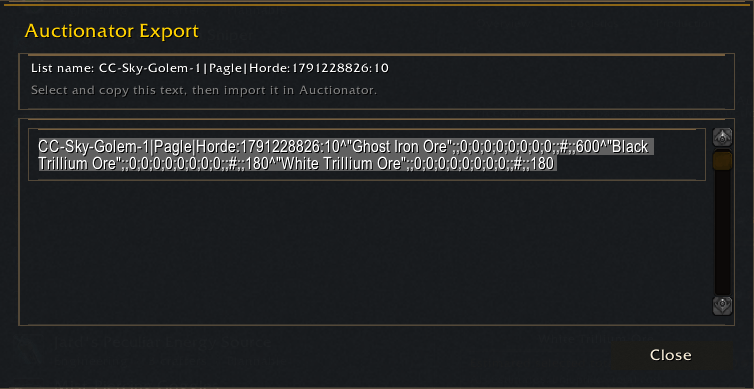
Quick Export creates an Auctionator-compatible shopping-list draft from eligible materials that are naturally missing from the current production plan.
It is the fast path when you simply want to shop for remaining shortages.
Quick Export follows the plan's current natural shortages and does not silently turn every technically purchasable material into a shopping requirement.
Export Manager
Export Manager provides more control.
It lets you:
- review eligible materials;
- choose which materials should be exported;
- adjust quantities manually;
- use
-,+, andMax; - recalculate requirements manually;
- review materials omitted from automatic export;
- manually include eligible Auction House materials even when current stock reduces the suggested purchase quantity to zero.
For example, a material may have:
Suggested = 0
because your observed inventory currently covers the plan.
If that material is otherwise eligible, Export Manager can still allow you to select it manually and enter a positive purchase quantity.
CrossCraft never purchases items automatically.
Pricing and Reference Costs
When verified Vendor or Auction House observations are available, CrossCraft can provide advisory economic information such as:
- estimated acquisition costs;
- effective Auction House unit prices;
- replacement values;
- immediate cash requirements;
- production cost comparisons;
- recipe-route cost comparisons.
Auction House estimates can account for available market depth instead of assuming that every required unit is available at a single price.
These values are reference estimates, not guarantees.
Market conditions can change between observation and purchase.
Missing, incomplete, stale, or unavailable pricing information remains unknown or partial rather than being silently interpreted as zero.
Price information is intended to help you compare options.
It does not automatically choose your production route.
Player-Controlled Planning
CrossCraft deliberately keeps important production decisions in your hands.
It does not automatically:
- choose crafting routes;
- scan professions in the background;
- select recipes;
- buy materials;
- create production plans;
- consume protected resources;
- perform crafting actions;
- move items between characters;
- send mail.
CrossCraft gives you information, structure, and planning tools.
You choose the strategy.
Character Reports and Maintenance
The Maintenance area brings together account and profession-management tools.
Depending on the available information, CrossCraft can help you review:
- known characters;
- professions;
- profession scan status;
- discovered recipes;
- scan/reconciliation information;
- Material Protection;
- account-wide crafting data.
This keeps maintenance and diagnostic-style information away from the main production workflow while still making it accessible when needed.
Interface and Convenience
CrossCraft 1.0 introduces a significantly modernized interface designed around clearer hierarchy and progressive disclosure.
It includes:
- modern sidebar navigation;
- searchable recipe catalog;
- character and profession filters;
- category and subcategory navigation;
- persistent production plans;
- compact active-plan navigation;
- Summary;
- visual Production Flow;
- compact Tracking Flow;
- historical archive navigation;
- Material Protection;
- minimap quick access;
- guided profession scanning;
- contextual tooltips;
- localized interface.
The interface aims to keep powerful planning features available without requiring every technical detail to remain visible at all times.
Supported Languages
CrossCraft currently includes interface localization for:
- English
- German
- Spanish (Spain)
- Spanish (Latin America)
- French
- Italian
- Korean
- Portuguese (Brazil)
- Russian
- Simplified Chinese
- Traditional Chinese
The CrossCraft interface language can be selected independently of the World of Warcraft client language.
Dependencies
CrossCraft is a standalone addon.
It does not require:
- Auctionator
- TSM
- Journalator
Auctionator integration is optional and is used only when you choose to export compatible shopping-list data.
Development, reconciliation, and diagnostic tooling used while building CrossCraft is not required by the public addon.
World of Warcraft: Forever Beta
CrossCraft 1.0.0 includes dedicated compatibility support for World of Warcraft: Forever Beta.
This includes:
- modern profession scanning through RAPR-FE;
- profession-window Guided Interaction;
- Mining and Smelting handling;
- modern item-information support;
- late item-information handling;
- character identity handling across sessions;
- protection against duplicate character representations;
- Forever-compatible planning and recipe discovery;
- Skill-Up guidance using the information exposed by the Forever client.
Forever-specific compatibility is integrated behind the same CrossCraft planning model rather than implemented as a separate addon or separate database.
CrossCraft remains one addon supporting both clients.
World of Warcraft: Forever Beta — Persistence Notice
World of Warcraft: Forever Beta is still an evolving beta client.
Earlier Forever Beta builds have had reported issues affecting addon SavedVariables loading or restoration.
That history does not establish that every current Forever build is affected.
CrossCraft does not include or require an internal persistence workaround.
If profession information or the recipe catalog does not appear as expected immediately after login, a manual /reload followed by another profession scan may be a useful retry step, but it should not be interpreted as a guaranteed fix or proof of the underlying cause.
Normal SavedVariables backups are recommended when using beta game clients.
Current Limitations
CrossCraft deliberately uses conservative evidence instead of pretending uncertain information is known.
Current limitations include:
- planning primarily uses supported observed character stock;
- guild bank, mail, and personal bank stock are not generally treated as freely available planning stock;
- CrossCraft may propose compatible character contributions, but it does not move items or send mail;
- uncertain binding and transfer rules remain conservative;
- incomplete or stale observations remain incomplete or stale;
- random-result crafts do not predict a specific result variant;
- Skill-Up information depends on the evidence exposed by the game client;
- prices and economic estimates depend on the observations available to CrossCraft;
- Auction House estimates are advisory and can become outdated as the market changes.
Installation
Mists of Pandaria Classic
Place the CrossCraft folder in:
World of Warcraft/_classic_/Interface/AddOns/CrossCraft
World of Warcraft: Forever Beta
Place the CrossCraft folder in:
World of Warcraft/_classic_beta_/Interface/AddOns/CrossCraft
Restart World of Warcraft or reload the interface, enable CrossCraft in the addon list, and open it with:
/crosscraft/ccraft- the minimap button
License
CrossCraft 1.0.0
© 2026 EZ-Mouse. All Rights Reserved.
See the included LICENSE file for details.
You must be logged in to leave a comment.