
Classic Calendar – Revived
Forking and maintaining the Classic Calendar addon for WoW Classic
Details
Expansion
 Forever
 Categories
Developers

Having issues?
Classic Calendar (Revived) — A Full-Featured Calendar for WoW Classic Era, Burning Crusade and WoW Forever
The official Blizzard calendar was never ported to Classic Era, and it is switched off in WoW Forever — Classic Calendar fills that gap. It brings the full-featured calendar UI you know from Wrath and Retail into Classic, with accurate holiday schedules, guild event management, raid sign-ups, world buff scheduling, and a P2P sync system that keeps your whole guild in sync automatically.
The Problem
Classic Era has no built-in calendar. There's no way to see when holidays start, plan raid schedules, share world buff drop times with your guild, or get reminded when an event is coming up. Officers end up juggling spreadsheets, Discord pins, and manual whispers to coordinate anything beyond the current raid night.
World buff scheduling is especially painful — drop windows are time-sensitive, anyone in the raid needs to know when to be online and buffed, and without a shared system, drop times get posted in officer chat and immediately lost in the scroll.
The Solution
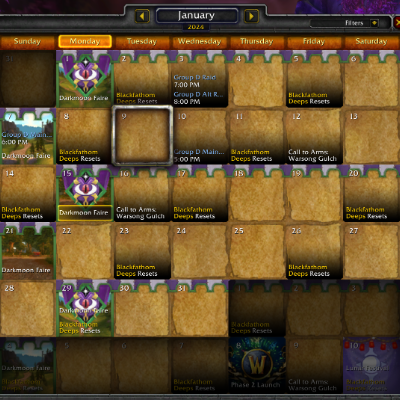
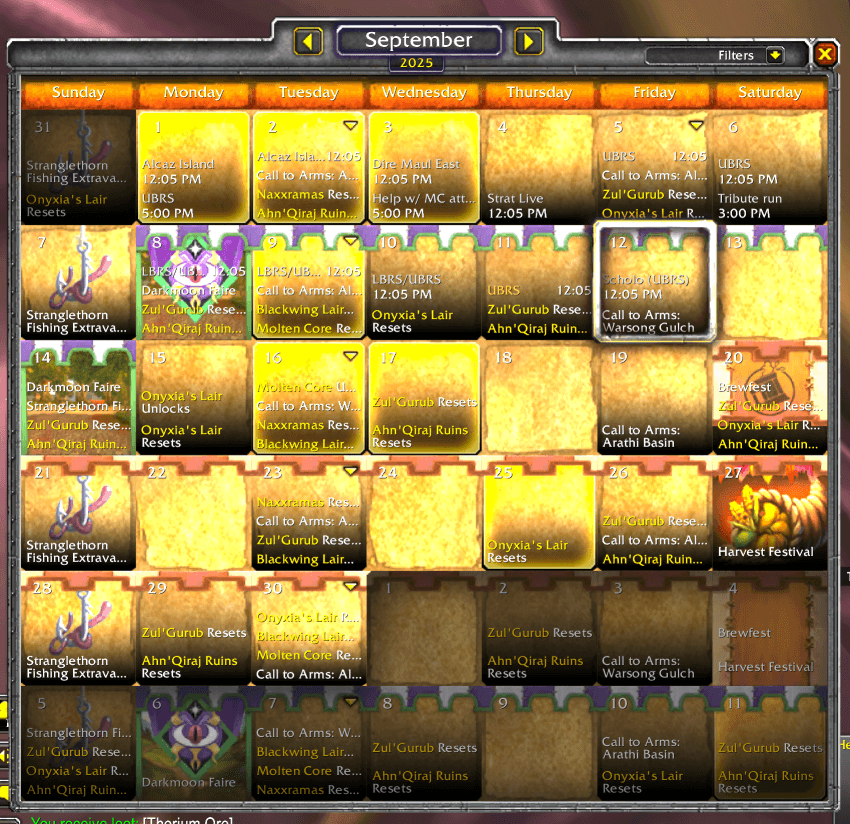
Classic Calendar re-implements the Blizzard calendar for Classic Era. It shows the same monthly grid you're used to, populates it automatically with holiday events and battleground weekends, and lets players and officers create events visible to the whole guild. An integrated world buff scheduler with a peer-to-peer sync system keeps buff drop times shared across every guild member running the addon — automatically, sending only what changed so there's very little network traffic.
Core Features
Calendar UI
- Full monthly calendar grid matching the Wrath/Retail calendar interface
- Navigate months forward and backward; click any day to see its events
- Holiday banner art displayed across the full duration of multi-day events
- Flashing calendar button when you have pending event invitations
- Version check — tells you when a guildmate is running a newer version of Classic Calendar than you are
- Access via the minimap icon, the calendar button beside the minimap,
/cal, or/calendar - Minimap icon — left-click opens the calendar, Shift+left-click opens Today's Events, right-click opens the options. Drag it around the minimap and it stays where you put it; it can be hidden in the options
- The calendar button beside the minimap can be unlocked and dragged anywhere, or hidden. Right-click it to open the options
- Today's Events panel — a compact window listing everything on a single day, with arrows to step between days, its own category filter, and the same right-click menus as the calendar. Open it with
/todayview, Shift+click on the minimap icon, or Shift+click on the calendar's Add Events button; it remembers where you put it
Holidays & Automatic Events
- The Classic Era seasonal holidays, every year: Lunar Festival, Love is in the Air, Noblegarden, Children's Week, Midsummer Fire Festival, Harvest Festival, Hallow's End and Winter's Veil
- Darkmoon Faire schedule with location (Elwynn / Mulgore) shown on the calendar
- Battleground Weekends with the active Call to Arms battleground shown per week
- Stranglethorn Fishing Extravaganza (Sundays 2–4 PM)
- Raid resets and your own raid lockouts. On Season of Discovery the resets for the level-up raids (Blackfathom Deeps, Gnomeregan, Sunken Temple) can be hidden in the options
- Per-holiday banner art toggles — enable or disable each holiday's banner art individually in Options
Event Management
- Player events — create events visible to every invited player
- Guild events — create events visible to your entire guild automatically
- Copy/paste events from one day to another
- Mass-invite all attendees of an event directly to your party or raid
- Mass invite tells a player why nothing happened — anyone already in another group gets a whisper explaining the invite could not go through, instead of silently never hearing from you
- Raid Events picker (officers) — Raid Events in the Add Events dropdown at the top left of the calendar opens a sortable table (Event, Date, Time) of the raid events saved by CalendarHelper; click one to create it on the calendar
- Raid templates — save a guild event as a template (title, raid, time, description, lock) and fill the Create Event window from it in one click. The same menu deletes a template, and its Loot system entry adds the Dibs line to the description
- Extra sign-up statuses — Late, Tentative, Bench and Absent, set from under the event window, shared with your guild, and never moving your place in the sign-up order
- Shared sign-ups — guildmates running Classic Calendar all know who signed up to each raid, without opening the event
- Dibs link — with the Dibs loot addon installed, an event can open the right soft reserve, DKP, loot list or EPGP page
- Deleting an event asks first — press Enter to confirm or Escape to cancel
- In-game mail notification when an event you're attending is cancelled
- Event reminders — a chat message 5 to 55 minutes or 1 to 24 hours before a player event you are going to, plus a raid warning, an alarm sound or a flashing calendar button if you want them
Calendar Filters
- Show or hide each kind of entry on its own: holidays, battleground weekends, the Darkmoon Faire, weekly holidays (the Fishing Extravaganza), raid lockouts, raid resets and world buffs
- The filter is the small arrow at the top right of the calendar
World Buff Scheduling
- Track upcoming world buff drops (Onyxia, Nefarian, Hakkar and Rend) on the guild calendar
- The World Buff window is for officers: they record drops and create the events, and every guild member sees those events on the calendar automatically
- Create Placeholder puts a world buff drop on the guild calendar before you know who is dropping it — the dropper shows as TBD
- Announcing a drop that is already on the calendar won't create a second event — if two officers both announce the same drop, you get one event
- All world buff dates follow server time, not your computer's clock, so a drop is recorded on the same day your guildmates saw it whatever timezone you play from
- The World Buff window docks to the right of the calendar and moves with it — drag it away to place it anywhere, or drop it back beside the calendar to dock it again
- Sortable columns — click a header (Player Name, Main Name, Date Received, Dropped) to sort by it, click again to reverse; the active column shows a direction arrow
- Click anywhere on a row to edit it; right-click to create a guild event for it
- Player Name and Main Name suggest members of your guild and your sister guilds as you type
- Dragged away from the calendar, the World Buff window remembers where you put it
- Officers can clear the whole guild's world buff data to start fresh with the window's Clear All (Guild) button, which asks first
- An event counts as a world buff event when its title says Dropping followed by the buff (Head, Heart, Rend, Onyxia, Nefarian or Hakkar), or contains World Buff. The events the addon creates already do
World Buff Sync
- Automatically shares world buff drop data between all guild members running Classic Calendar
- Only changed entries are sent, and only when something actually differs — very little network traffic
- Sends are throttled so large guilds stay in sync without dropped or corrupted messages
- Any guild member who already has the latest data can share it — you no longer have to wait for one specific person to be online
- After you log in, sharing waits until your guild list has fully loaded, so every record is saved under the right name
- World buff data is shared across all your characters in the same guild, instead of being tracked separately per character
- Officers add and edit entries; every guild member sees them automatically
- Force a sync on demand with
/ccwb sync
Officer & Guild Settings
- Who counts as an officer — anyone whose guild rank your Guild Master has given "View Officer Note" permission to. It follows the permission your GM actually granted rather than guessing from a rank's position in the list, so it works the same however your guild names or orders its ranks
- Officer Settings tab — restrict guild event creation to officers only
- By default any guild member can create guild events; officers can turn on the restriction to limit it to officers
- The restriction reaches members reliably — it no longer matters whether the guild leader is online, and members are never wrongly locked out
- Rank Auto-Confirm — pick which guild ranks are confirmed automatically when they sign up to one of your guild events, from a dropdown on the event window. Set it per event, tick as many ranks as you like, and it applies to sign-ups as they arrive; Re-process Signups runs it over everyone who has already signed up. Ranks can be chosen while you are still creating the event and are saved with it. It only confirms your own guild: a rank number means something different in each guild, so sister-guild members sign up and wait for you
- Sister guilds count as guildmates — if you use sister guilds, their members show their rank and level in your event sign-up list, can be invited by name, are suggested in the name boxes, and can have world buffs recorded for them
- Auto-Moderator list — keep a list of players who should always be a Moderator on your events. When someone on the list signs up to an event you created, they are made Moderator automatically. Manage the list from Auto-Moderators in the dropdown at the top left of the calendar (the same menu as World Buffs), by right-clicking a player in your event's sign-up list, or with
/calmods. It works while you have the event open, which is when the game lets an addon see who has signed up - When an officer changes a guild setting it is sent to every guild member running the addon; anyone can ask for the current settings with Request Guild Settings in the options
- Guild settings sync via the P2P addon message system — no visible chat spam
Options Panel
- General: starting weekday; unlock or hide the calendar button beside the minimap; hide the minimap icon; hide the level-up raid resets (only has an effect on Season of Discovery); debug mode; a button that shows the Discord link to copy
- Guild Settings (General, when you are in a guild): whether your client has the guild's settings, whether you can create guild events, and a Request Guild Settings button
- Event Alarms (General): how long before an event to remind you, and whether to flash the calendar button, show a raid warning or play a sound
- Holiday art (General): a toggle for each holiday's banner art (Battleground Weekends, Children's Week, Darkmoon Faire, Fishing Extravaganza, Hallow's End, Harvest Festival, Love is in the Air, Lunar Festival, Midsummer Fire Festival, Noblegarden and Winter's Veil)
- Officer Settings (officers only): restrict guild event creation to officers, sent to the whole guild
- Right-click the minimap icon or the calendar button to open the options directly
Localization
- Holiday names and descriptions localized for: enUS, deDE, esES, esMX, frFR, koKR, ptBR, ruRU, zhCN, zhTW
- Options UI falls back to English for any untranslated string — no blank labels
How It Works
Calendar Engine
- On load — the built-in holiday dates, the weekly and battleground events for the coming year, and the Darkmoon Faire schedule are placed on the calendar grid
- Day click — the selected day's events are listed; click an event to see details or RSVP
- Event creation — right-click any day cell to open the event creation dialog; choose player or guild visibility
- Reminder system — a background timer checks upcoming events and fires the configured notification type before each one starts
World Buff Sync
- On login — your client compares its world buff data with the guild's and pulls anything newer
- On edit — when an officer adds, edits, or removes an entry, just that change is shared with the guild right away
- Always current — members who were offline catch up automatically the next time they log in
Slash Commands
- /cal or /calendar — open the calendar
- /todayview — open the Today's Events panel
- /caloptions or /calendaroptions — open the options panel
- /worldbuff or /wb — open the World Buff tracker window (officers only)
- /calmods — Auto-Moderator list: add or remove a name, list it, or clear it
- /calranks — Rank Auto-Confirm: show opens the rank menu on the guild event you have open, refresh rebuilds the rank list, debug prints diagnostics
- /ccwb — show world buff sync status; /ccwb sync forces a sync with the guild, /ccwb dedup collapses duplicate entries, /ccwb log shows sync activity in chat as it happens, /ccwb reset zeroes the status counters
- /calwbclear — clear world buff data: /calwbclear confirm clears all world buff data saved on your account, /calwbclear status shows when it was last cleared, and officers can use /calwbclear guild to start the whole guild fresh: it explains what will happen, and /calwbclear guild confirm does it
- /calrefresh or /calreload — rebuild the event cache if recurring events look wrong
- /caldebug — toggle debug output for anyone (persists across
/reload; also a check box in the options) - /ch or /calendarhelper — CalendarHelper commands: /ch list lists the saved raid events, /ch create <number> creates one as a guild event, /ch status shows what CalendarHelper has saved
Requirements
- WoW version: Classic Era, Season of Discovery, Burning Crusade Classic, or WoW Forever. Not for Wrath, Cataclysm or Mists of Pandaria Classic — those already have a working in-game calendar, which is the thing this addon exists to bring back
- Required libraries, installed automatically by the CurseForge app: Ace3, VersionCheck-1.0, CalendarHelper, AceCommQueue-1.0, DeltaSync, LibGuildRoster, LibAceGUIWidgets and LibDBIcon-1.0 (WoW Forever uses a copy of LibDBIcon built into the addon)
- Guild membership required for guild events, world buff scheduling, and sync features
- Officer-only features need the "View Officer Note" guild permission, which your Guild Master grants per rank — not a particular rank number
Known Issues
- Guild event invites are broken as a result of Classic patch 1.15.3 — leaving this as-is in case Blizzard fixes it
- Holiday dates and times are best-guess where no authoritative source exists — please report inaccuracies in the comments
- Holiday dates for 2027 and later follow the same pattern as 2026 (Noblegarden from Easter, Lunar Festival from Chinese New Year, the rest on the same days), and have not been checked against the game
- Holiday dates are calculated for Classic Era; on Burning Crusade Classic some holiday dates may differ
- Battleground Weekends are hidden for Season of Discovery due to inconsistent and overlapping scheduling
- Characters not in a guild may not see created/updated events until after relogging
- No way to disable in-game mail notifications for cancelled events — this is controlled by the game, not the addon
- Pressing Escape closes the entire calendar instead of one panel at a time — uses functionality not available in Classic Era
- Guild Announcements and Community events are unavailable — only present in later WoW versions
- WoW Forever: the right-hand edge of the dark event-window borders can sit a pixel or two out of line with the corners. Cosmetic only; a fix is being worked on
Recent Updates
v1.7.3 (2026-10-05)
New
- Burning Crusade: Brewfest is on the calendar, 20 September to 6 October
- Burning Crusade: raid resets for Karazhan, Gruul's Lair, Magtheridon's Lair, Serpentshrine Cavern, Tempest Keep, Hyjal Summit and Black Temple, each from the week its phase opened, with raid names in your game's language
- WoW Forever: the calendar follows Forever's own events. Battlegrounds show as whole weeks, Tuesday to Tuesday, rotating Darkspear Islands, Arathi Basin and Warsong Gulch. Noblegarden falls on Easter Monday, and US realms get the Fireworks Spectacular on 4 July. Barrow Deeps, Hyjal Summit and Onyxia's Lair show their weekly resets from when they open on 9 December
Changed
- Weekly raid resets now use the reset time the game reports, so they land on the right day and hour for your realm
- Battleground art now sits behind other holidays' art. When a holiday and a battleground share a day, the holiday's banner shows, and days with only a battleground running show the battleground's banner
- Scrolling the calendar is smoother. Each month's holidays are worked out once and kept while you look at nearby months, instead of being worked out again on every redraw
- Season of Discovery: the Darkmoon Faire runs every two weeks, alternating Elwynn Forest and Mulgore, as it does on Season of Discovery realms
- Burning Crusade: the Lunar Festival runs three weeks, 16 February to 9 March
Fixed
- The CurseForge app now installs LibDBIcon for Classic Era and Burning Crusade players. It was being skipped, which could leave a new install without the calendar
- Several holiday dates were wrong. Love is in the Air runs 11 to 15 February, not 7 to 20. Noblegarden is Easter Sunday only, not a whole week. Children's Week and Harvest Festival now use the game's own dates, and Lunar Festival 2027 starts on 2 February. Battleground weekends now end early Tuesday morning, as they do in game
- The Darkmoon Faire would have disappeared from the calendar in 2027. Its dates were only filled in for 2026. The faire now appears every year, opening on the Monday after the first Friday of the month: Elwynn Forest in odd months, Mulgore in even ones. In December you can now also see January's faire
- WoW Forever: every holiday was listed twice. Forever's servers send their own holidays, and the calendar was adding its own copy of each one. Each holiday now shows once, with the server's dates. The Call to Arms and Darkmoon Faire days now have their banner art too
v1.7.2 (2026-10-03)
Fixed
- WoW Forever: dozens of "Unable to load atlas entry" warnings about a scroll bar. The event description and picker scroll bars used a piece of art that WoW Forever does not have. On WoW Forever they now use the same scroll bar as the game's own calendar. Classic Era and Burning Crusade keep the scroll bars they have always had
- The holidays would have disappeared from the calendar in 2027. Lunar Festival, Love is in the Air, Noblegarden, Children's Week, Midsummer, Harvest Festival, Hallow's End and Winter's Veil only had dates for 2026. They now appear every year: Noblegarden follows Easter, Lunar Festival follows Chinese New Year, and the others keep their usual days
Changed
- /calwbclear guild now asks first. Clearing the whole guild's world buff data cannot be undone, so the command now explains what it will do, and you type /calwbclear guild confirm to go ahead. It used to clear straight away
- Removed: an unused Season of Discovery holiday-art option that never appeared in the options panel
v1.7.1 (2026-09-30)
Fixed
- Opening an event showed a Lua error about a scroll bar on Classic Era and Burning Crusade. A change made for WoW Forever in v1.7.0 reached the other versions by mistake. The event windows' scroll bars are back to how they were in v1.6.8
- Event reminders set in hours went off minutes before the event. A 1-hour reminder came 1 minute before the start. It now comes an hour before
- Event reminders went to the wrong people. You were reminded about events you had declined or were out of, and never about events you had signed up to or marked tentative. Now you are reminded about events you are going to, and not about ones you declined
v1.7.0 (2026-09-27)
New
- WoW Forever support. WoW Forever has Blizzard's calendar switched off, so players there have had no calendar at all. Classic Calendar now runs on WoW Forever too. This is its first release there, so please report anything that looks wrong
- Raid templates. When you create a guild event, a Templates button in the bottom corner lets you save the form as a template and fill it again in one click: title, raid, time, description and lock. Pick the day, choose your template, press Create
- Extra sign-up statuses: Late, Tentative, Bench and Absent. Open a guild event and use the My status button under the event window to tell your guild you'll be late, are happy to sit on the bench, and so on. It doesn't change your calendar answer or your place in the sign-up order. Hover the button to see who has set what
- Sign-ups are shared with your guild. Every guildmate running Classic Calendar learns who has signed up to each raid, in sign-up order, without having to open the event
- Links to Dibs. If you use the Dibs loot addon, a template can say which loot system the raid runs (soft reserve, DKP, loot list or EPGP). Everyone with Dibs then gets a Loot in Dibs button under the event that opens the right page. Players without Dibs just see a line in the description saying which loot system is used
Changed
- Classic Calendar now needs the LibDBIcon-1.0 library for its minimap button, instead of carrying its own copy. The CurseForge app installs it for you; if you install addons by hand, download it too. This way the minimap button library stays up to date without waiting for a Classic Calendar update
- The addon's name shows in orange in the game's AddOns list, like our other addons
Fixed
- The "Hide the calendar minimap button" option now stays hidden after you log in, instead of coming back every login. The button's position also stays where you dragged it
- The Create Event window no longer shows the previous event's description when you start a new event. The old text used to stay in the box, but it was not actually what would be saved
- Switching the Create Event window from 24-hour to 12-hour time no longer turns a noon event into a midnight one. A raid set for 12:30 PM used to become 12:30 AM
- The Auto-Moderator list could promote the wrong player on connected realms. A saved name like "Bob-Azuresong" matched a different Bob from your own realm, and a name typed without a realm matched every Bob. A name without a realm now means your own realm, and realm names match however the game spells them (with or without spaces or apostrophes)
- "Remove from Auto-Moderator list" in the right-click menu now always removes the player, instead of sometimes saying they were not on the list. If a name you type into
/calmods removematches players on more than one realm, it tells you which and asks you to add the realm
v1.6.8 (2026-09-26)
New
- Auto-Moderator list. Keep a list of players who should always be a Moderator on your events, and anyone on it who signs up to an event you created is made Moderator automatically. Open Auto-Moderators from the dropdown at the top left of the calendar and start typing a name: members of your guild and your sister guilds are suggested as you type, and you can also type any other name in full and press Enter to add them. You can also right-click a player in your event's sign-up list.
/calmodsworks too. The game only lets an addon see sign-ups for the event you have open, so it happens when you open your event, or while it is open. (Thanks to crimsonmane for the suggestion.) - The World Buff window docks to the calendar. Open it while the calendar is open and it sits right against the calendar's right-hand edge, and it moves with the calendar when you drag the calendar around. Prefer it somewhere else? Drag it away and it stays wherever you put it, and it remembers that next time. Drop it back next to the calendar's edge and it docks again
Changed
- Name suggestions in the World Buff entry window now include your sister guilds. Typing in Player Name or Main Name suggests the same people, in the same order, as the Auto-Moderators search, with sister-guild members labelled with their guild. You can still type any name that isn't suggested
- Sister-guild members are treated as guildmates throughout. When someone from a sister guild signs up to your event, the sign-up list now shows their rank and level instead of two empty columns, and inviting them by name works properly on a connected realm. You can also record a world buff for them. Their rank is shown as their own guild gives it
- Rank Auto-Confirm still only confirms your own guild. A rank number means something different in each guild, so someone from a sister guild is never confirmed automatically just because they hold the same rank number — they sign up and wait for you
- The Raid Events picker is now a table with Event, Date and Time columns. Click a column heading to sort by it, and click an event to create it
- The World Buff and Auto-Moderators windows use the same table style. In the World Buff window you can now click anywhere on a row to edit it, not just the name, and everyone in your guild still sees the entries in the same order. The Auto-Moderators list now has a small remove icon on each row
- The "delete this event?" question matches the rest of the addon, and takes Enter to confirm or Escape to cancel when you are out of combat
- World buff sharing now waits for your guild list to finish loading after you log in. It used to start after a fixed delay. In a large guild or on a slow login that could be too early, and a record could be saved under the wrong name for that player. Nothing changes for you, except that sharing may start a little later in a big guild
- The Options panel does less work while it is open. Every check box used to re-read its setting on every frame. They now update when the panel opens and when you click them
- Classic Calendar now needs the LibAceGUIWidgets library. The CurseForge app installs it for you. If you install addons by hand, download it too
Fixed
- The Raid Events picker no longer prints status lines to chat every time you open it, no longer leaves a "No raid events found" message showing behind the list, and no longer uses more memory each time it opens
Only the last five patches are listed here. Earlier releases are in the full changelog on GitHub.
Credits
Toxiix & LoveDiodes — original authors of Classic Calendar; designed and built the calendar port, holiday engine, and CalendarHelper integration that the addon is built on.
Pimptasty — revival, ongoing maintenance, World Buff scheduling system, delta-sync P2P rewrite, officer settings, guild sync architecture, and new feature development.
Community
Bug reports, feature requests are welcome, reach out on Discord.
You must be logged in to leave a comment.