
ChairCraft
A utility addon with QoL settings, OSD, Threat Meters, Waypoint arrow flight times etc. A lite aura system (in progress), a hotbar/button utility, and a reputation and skill tracker.
Details
Expansion
 Forever
 Categories
Developers

Having issues?
Chaircraft
Chaircraft is a quality-of-life addon It is built for the WoW Forever client.
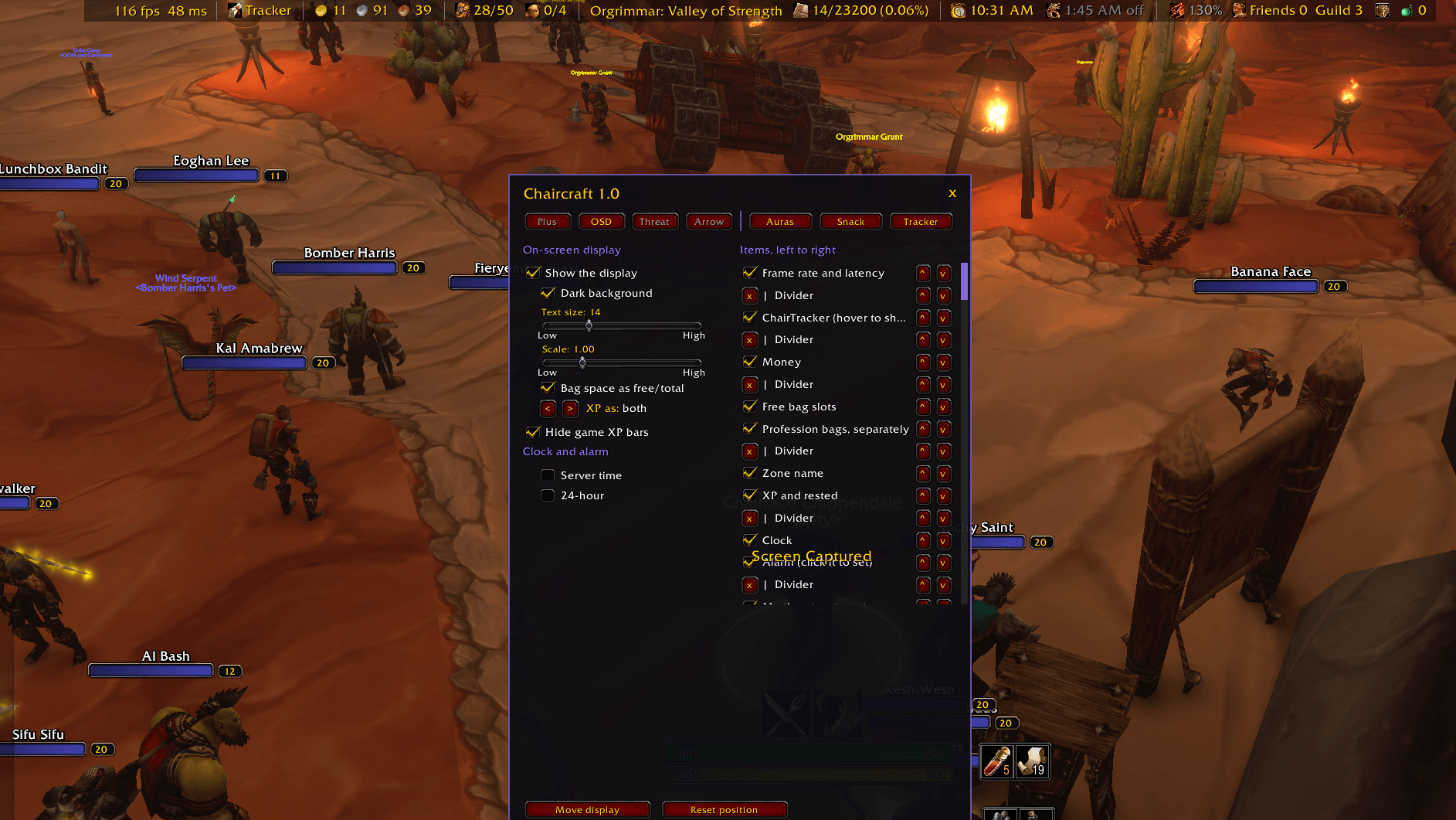
On-screen display: one slim, draggable line with 21 items, including money, bag space, durability, coordinates, XP, threat, clock, frame rate, gold per hour, movement speed and friends online. Hover any item for detail, click it to act. Items from other addon can be shown too.
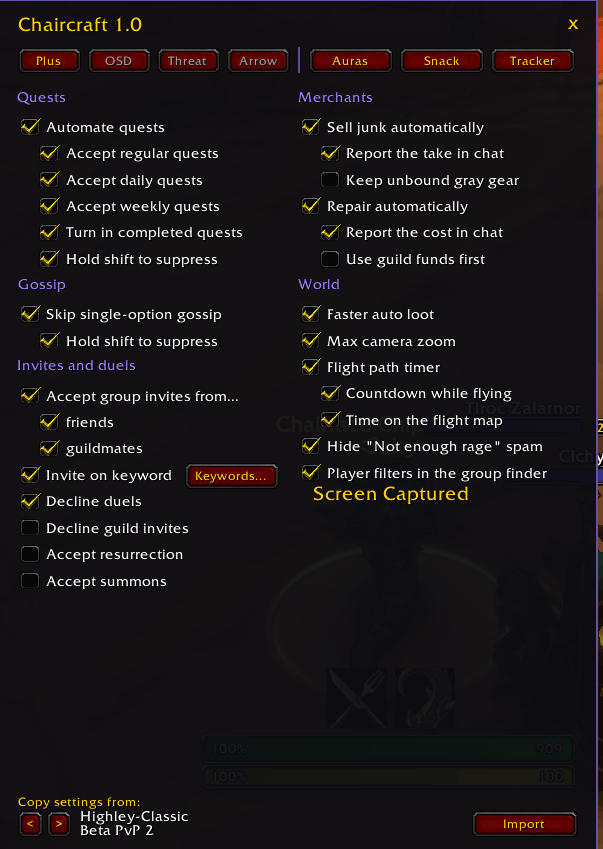
Quest automation: accept and turn in quests automatically, with safety checks that never spend gold, currency, reagents or bound items.
Invite on keyword: invite players who whisper or say your keywords
Merchant helpers: sell gray items and repair automatically, guild funds first if you like.
Flight timers: a countdown while flying and times on the flight map, from more than 2,000 built-in routes.
Waypoint arrow: a large arrow pointing at your selected quest or map pin.
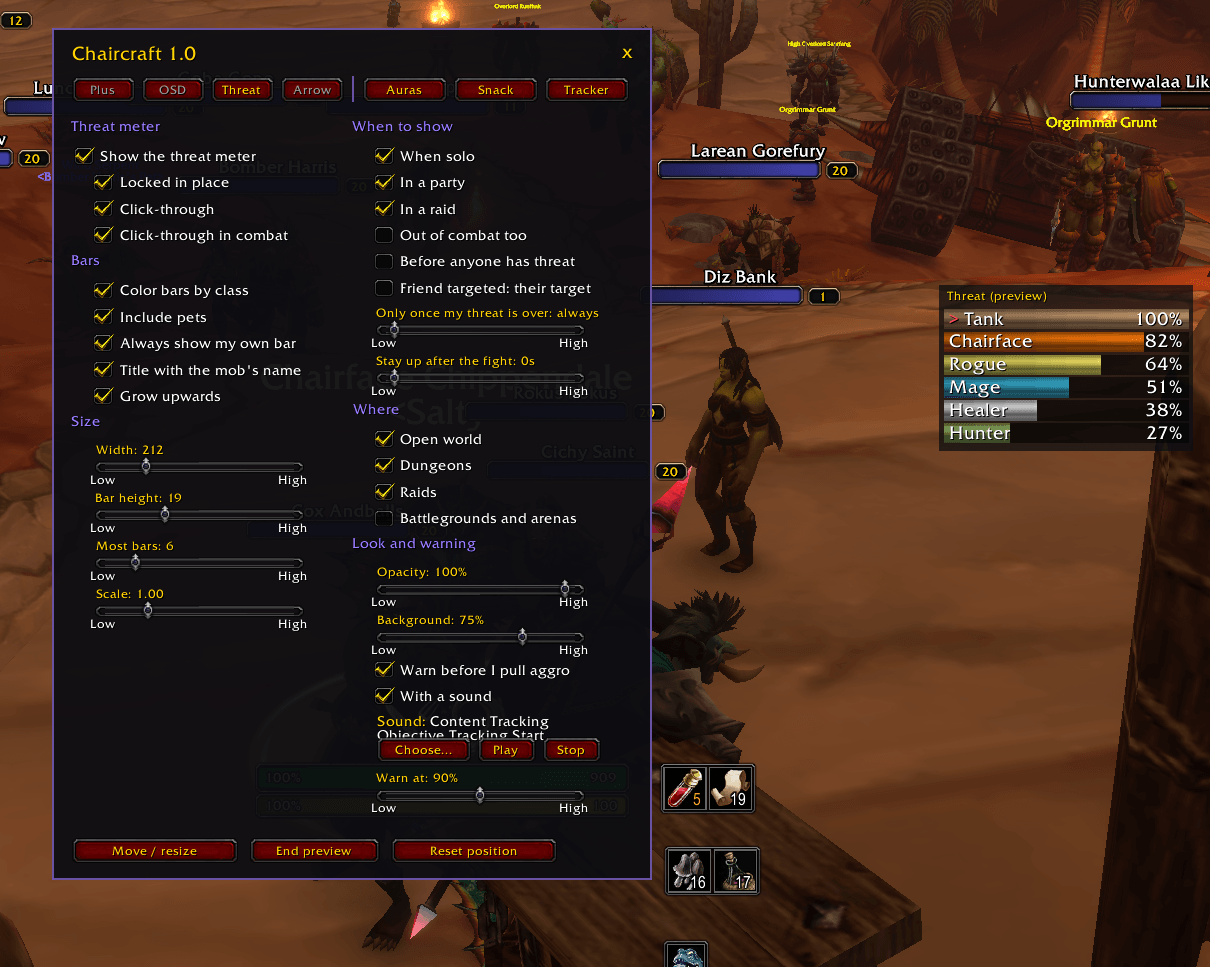
Threat meter: everyone's threat on your target, with a warning before you pull aggro.
Movable windows: drag the character panel, bags, bank, auction house, quest log and other Blizzard windows by their headers.
ChairAuras: icons and bars for buffs, debuffs and cooldowns, with load conditions, sounds and text
export/import.
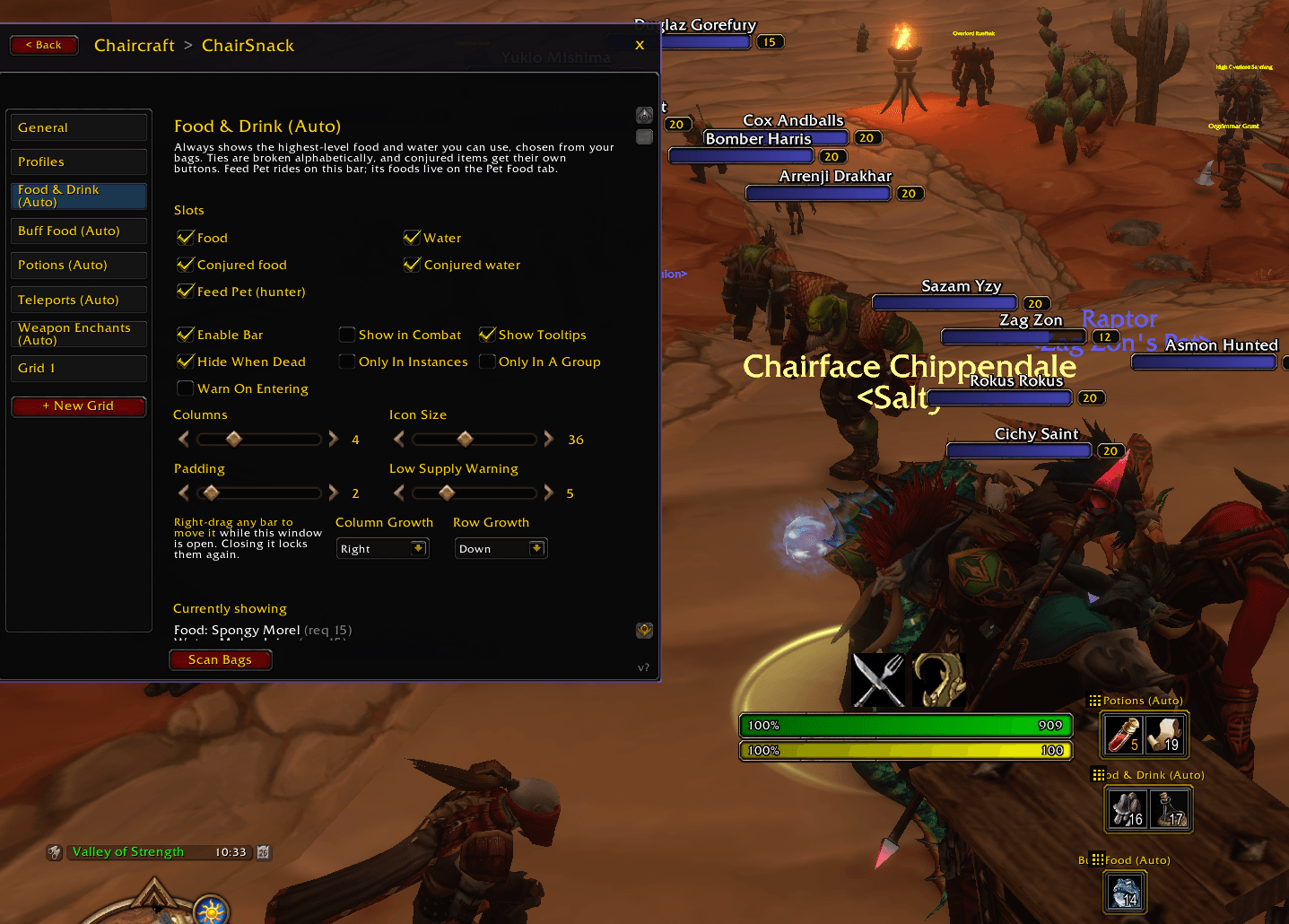
ChairSnack: consumable bars that pick your best food, water, buff food, pet food and ammo from your bags.
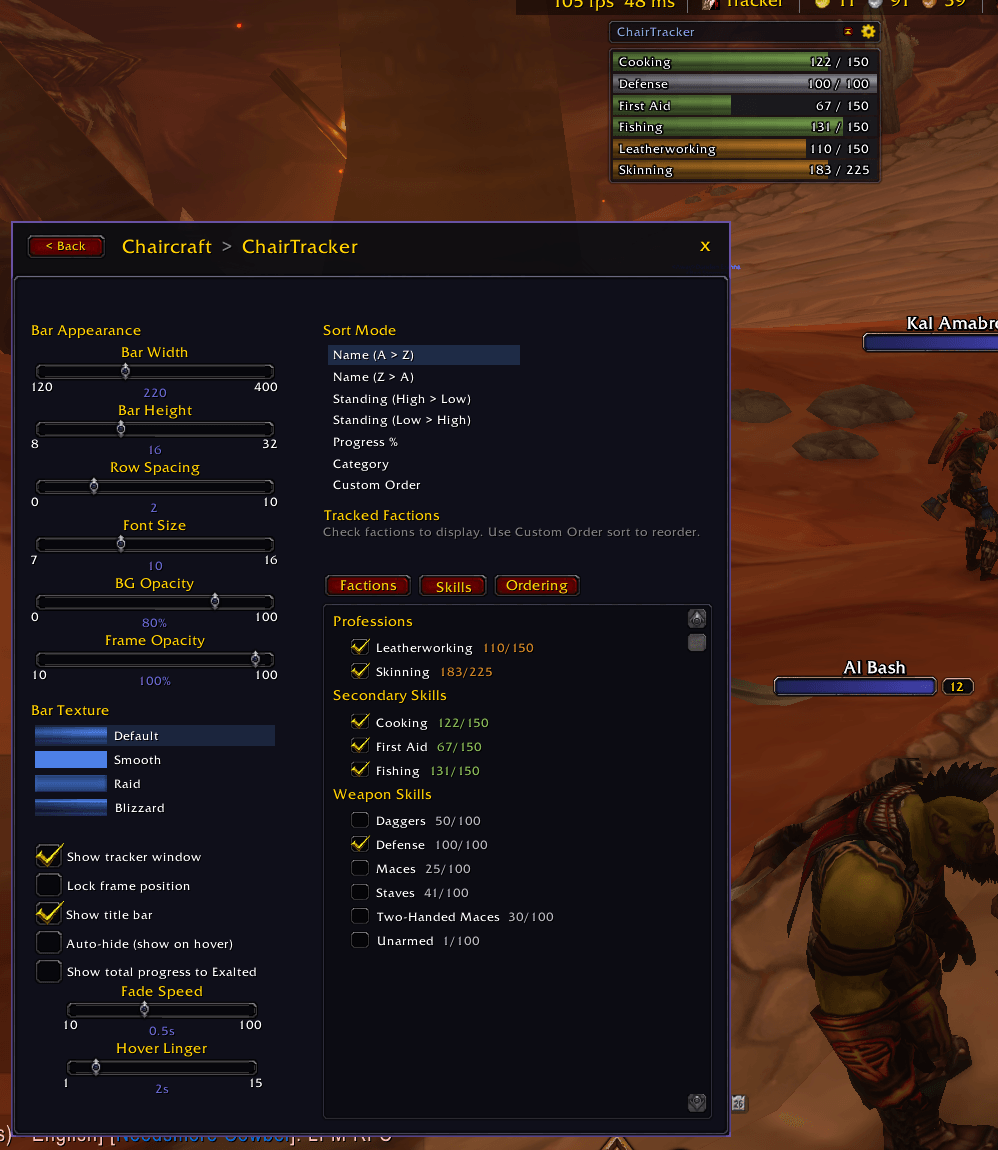
ChairTracker: a compact reputation tracker that can dock into the on-screen display.
Group finder filters: filter group finder results by class, role and level.
And more: auto-accept invites, resurrection and summons, decline duels, faster auto loot, max camera zoom, and copying settings between characters.
Open the menu: type /chair, click the chair on the minimap, or go to Options > AddOns > Chaircraft.
- Commands:
/chair helplists every command.
The on-screen display (OSD)
One slim, draggable line of information. Each item has its own switch. Drag items into any order, add up to 30 dividers between them, and set the text size, scale and background.
Nearly every item is interactive. Hover for detail and click to act:
| Item | Shows | Hover | Click |
|---|---|---|---|
| Money | Gold, silver, copper | Gold made or lost this session | Opens your bags |
| Free bag slots | General slots free (or free/total) | Every bag's free space | Opens your bags |
| Profession bags | Their slots, counted separately | Every bag's free space | Opens your bags |
| Durability | Your most worn piece, colored | Every piece, worst first | Opens your character |
| Ammo | What is left in the ammo slot | Ammo name and count | Opens your character |
| Soul shards | Shards carried (warlocks) | Opens your bags | |
| Coordinates | Your position on the zone map | Opens the map | |
| Zone name | Zone and subzone | Territory (friendly, contested…) and coordinates | Opens the map |
| XP and rested | Percent, XP/total, or both | XP to level, rested amount | |
| My threat on target | Your threat, colored as it climbs | Whether you are tanking | |
| Clock | Local or realm time, 12 or 24 hour | Both times | Opens the clock |
| Alarm | The in-game alarm and its message | Opens the clock to set it | |
| ChairTracker | Your reputation window, dropped down on hover | ||
| Frame rate and latency | fps and ms, colored when high | Home and world latency, the ten heaviest addons by memory | Frees unused addon memory |
| Session time | Time since you logged in (survives /reload) | When you logged in | |
| Gold this session | Green when up, red when down | Gold per hour | Starts the count again |
| Movement speed | Your speed now, 100% being a normal run | Run and swim speed, and everything changing it: buffs, debuffs, gear, mounted, swimming, stealth | |
| Hunter pet | Happiness face, name, health | Damage and loyalty | Opens the pet window |
| New mail | A mail icon while mail is waiting | Who sent it | |
| Friends and guild online | Online counts, Battle.net included | Who is online, and where | Opens the friends list |
| Casino table | The running Chairface's Casino game and its host | Opens the casino lobby |
Other addons on the OSD
Chaircraft includes LibDataBroker, the standard that Titan Panel-style bars use. Any addon that publishes a data feed or a launcher appears at the end of the OSD item list, ready to tick on. Examples are BugSack's error count, Nova Instance Tracker's lockouts, and the Questie and AtlasLoot buttons. Their text updates live, and clicks and tooltips go straight to the addon.
Chaircraft also publishes its own launcher, so other bar addons can show a chair button that opens the menu.
ChairPlus: automation and helpers
Quests and gossip
- Accept and turn in quests automatically: regular, daily and weekly each switchable.
- Safety checks refuse any turn-in that would spend gold, currency, reagents or bound items.
- Skip gossip windows that have only one option.
- Hold shift to handle any of this yourself.
Invites and social
- Accept group invites from friends and guildmates.
- Invite on keyword. A flyout keyword window beside the menu lets you add and remove keywords ("inv", "invite" and anything else).
- Choose where keywords count: whispers, Battle.net whispers, guild chat, say and yell.
- Choose whether the whole message must match.
- Optionally turn a full party into a raid.
- It never invites the same player twice in ten seconds, and never when you are not the leader.
- Decline duels and guild invites.
- Accept resurrection and summons.
- Hide the "Not enough rage" error spam.
Merchants
- Sell gray items on arrival, with the option to keep unbound gray gear. The total is reported in chat.
- Repair automatically, guild funds first if you like, with the cost reported in chat.
Flight paths
- A countdown while flying, and the flight time on each destination on the flight map.
- More than 2,000 routes, for both factions, are built in.
Waypoint arrow
- A large arrow pointing at the quest you selected or your map pin.
- Several styles, colors (by direction or custom), distance and quest name, size and opacity.
Threat meter
- Everyone's threat on your target as bars.
- Shows by group (solo, party, raid) and place (world, dungeons, raids, battlegrounds).
- Click-through options, class colors, pets.
- A warning, with optional sound, before you pull aggro.
And more
- Faster auto loot.
- Max camera zoom.
- Player filters (class, role, level) in the group finder.
- Hide the game's XP bar and status bar 2.
- Drag the character panel, bags, bank, auction house, professions, quest log, spellbook, talents, mail and other Blizzard windows by their headers. Their positions are remembered.
- Copy settings from another character.
ChairAuras: buff, debuff and cooldown tracking
- Icons and bars for the auras and cooldowns you care about, with load conditions: class, zone, combat and more.
- Groups, sounds, and presets.
- Share an aura as a line of text with Export and Import.
- Auras are account-wide.
ChairSnack: consumables at hand
- Configurable grids of consumables, built from what is actually in your bags.
- Automatic bars pick your best food and water, buff food, hearthstone-style recalls, pet food and ammo.
- A keybind mode, and a minimap button.
ChairTracker: reputation
- A compact, draggable reputation tracker with colored progress bars, sorting and auto-hide.
- It can dock into the OSD and drop down when hovered.
Installing
- Put the
Chaircraftfolder inWorld of Warcraft/<client>/Interface/AddOns/. - If you still have the standalone ChairPlus, ChairAuras, SnapSnack or WOW Forever Tracker, disable them. Chaircraft warns you if they are running alongside it.
- Log in and type
/chair.
Saved settings from the standalone addons carry over: the saved-variable names are unchanged. Settings are per character, except auras, which are account-wide.
Credits
By Chairface. LibStub, CallbackHandler-1.0 (Ace3, see Libs/Ace3-LICENSE.txt) and LibDataBroker-1.1 are embedded under their own licenses. Chaircraft is released under the GNU GPL v3; see LICENSE.
You must be logged in to leave a comment.