
CC Nameplate Auras
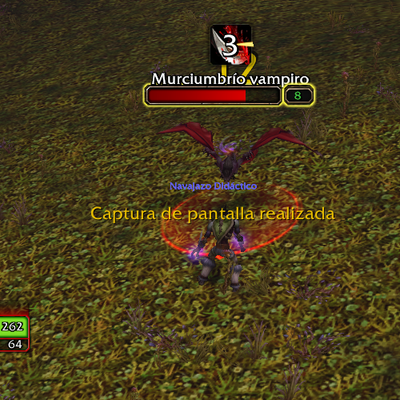
Moves and enlarges enemy nameplate debuff and crowd control icons above the name.
Details
Expansion
 Forever
 Categories
Developers

Having issues?
Moves and enlarges the debuff and crowd control icons on enemy nameplates, placing them right above the enemy's name so they are easy to read at a glance.
## What it does
- Moves the crowd control (CC) icons that the game already shows on enemy nameplates to just above the name.
- Moves the debuff icons above the CC icons.
- Makes the icons larger (1.8x by default).
## How it works
Recent clients restrict addons from reading aura data on enemy nameplates. This addon does not read any aura information. It only repositions and rescales the aura lists that the game itself draws on each nameplate, using frame methods only. This keeps it free of taint errors.
## Settings
Open ForeverCCNameplate.lua with any text editor. The two values at the top can be changed for your own use:
- LIST_SCALE: icon size (1 = normal, 2 = double). Default 1.8.
- Y_OFFSET: gap between the name and the icons. Default 2.
Restart the game after changing them.
## Installation
Extract the ForeverCCNameplate folder into your Interface/AddOns folder (for example World of Warcraft/_classic_beta_/Interface/AddOns) and restart the game completely. A /reload is not enough the first time.
## Compatibility and limitations
- Built and tested on the Classic beta client, Interface 16001. It is not guaranteed to work on Retail or other clients.
- Tested with debuff icons. Crowd control icons use the same method but have not been tested in-game yet.
- It cannot choose which spells are shown. It only displays what the game decides to show on the nameplate.
- Icons are not arranged in custom rows or a pyramid. The layout follows the game's own aura lists.
## Feedback
If something does not look right or you get an error, please leave a comment with a screenshot and the exact error text.
## License
All Rights Reserved. This addon is for personal use only. Please do not re-upload, redistribute or repackage it on other sites or addon managers without the author's permission. The only official download is this CurseForge page.
You must be logged in to leave a comment.