
BoTD Companion
Compact party, friend and guild tools, shared quests and profession materials, party vitals and a docked damage meter for Forever beta.
Details
Expansion
 Forever
 Categories
Developers

Having issues?
BoTD Companion — Forever Beta
Remember the "BoTD Companion" Addon works best when all party members have the add-on and when guild members have the add-on installed as well.
Keep your party, friends, guild and combat information together in a compact, resizable window with a classic gold-and-charcoal look. This is the Forever beta update to BoTD Guild Addon, from its original author.
This addon is in beta and is maintained by one developer, working on it in spare time. Bugs and unfinished behavior are expected; fixes and replies may take time. Your clear bug reports help improve it.
Current build: 0.4.0-beta.33. Targets WoW Forever beta 1.60.1.70009 (Interface 16001). Older 0.3.x files are historical Classic releases, not the Forever update. Please choose the file for your client.
Five useful screens
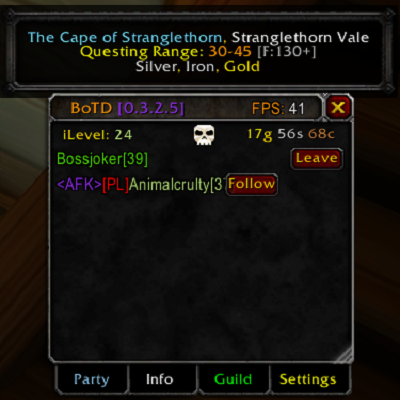
- People: refreshed friends, guild and party lists; merged player entries; invites, Trade, manual Follow, target markers and party management. Left-click a party row to target outside combat; right-click for Blizzard's unit menu.
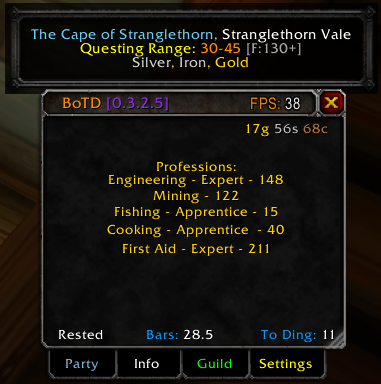
- Character: expandable profiles for you and online party members, with health/resources, professions, equipment and leveling information where available. Detailed party sharing is optional.
- Meter: Blizzard's native damage meter stays docked in BoTD and appears only on Meter. Compact party vitals, buffs/debuffs, readable distance/direction and Follow/Trade controls sit alongside it. Drag the divider or select Fit party.
- Shared: a party quest board, profession-material bag counts shared by friends, and BoTD connection/version status. Quests default to nearest-first sorting with approximate distances that refresh as you move; A–Z is also available. Missing locations stay last in Nearest mode. Eligible quests have a Share button in their collapsed title bar, greyed out when everyone in your party already has the quest.
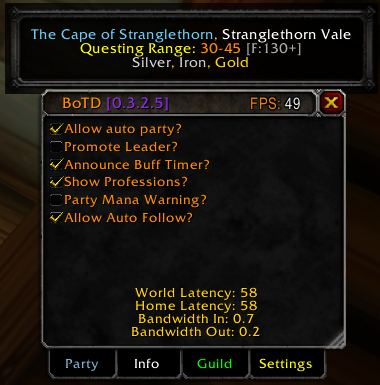
- Settings: appearance, sharing, party requests and individual alert controls. Guides is hidden; useful zone information stays in the header.
The header shows your current area, readable coordinates, questing-range information and reported/observed resources, plus FPS and a centered Follow Me All button available on every screen. Live location text and recorded material names come from the game. Hover for complete lists and sources: recorded loot and partial gathering references are separately labeled, with loading/unverified states when information is missing. Historical ore lists are not used in the header. Resource reports do not guarantee a live gathering node. Quest distances are client-supplied estimates, not travel routes; some party-only quests may have no available distance.
Encounter information on Meter
See available boss targets and target changes, casts, interruptible-cast cues, removable debuff types, and source-backed ability timers/cooldown forecasts. Optional supported movement/mechanic warnings and boss timers. All encounter alert controls start enabled and can be disabled individually, including sound and the overall master switch.
This is optional and installed separately, including the appropriate encounter modules. Coverage depends on Blizzard's available encounter data or a supported DBM module. It cannot universally detect ground attacks, guarantee personal impact countdowns, choose a correct dispel/interrupt for you, or reveal combat information the game restricts.
Getting started
Install the BoTD folder in your Forever beta client's Interface/AddOns folder, then restart or /reload an existing installation. Open with /botd or /menu. Enable the game's damage meter before enabling docking.
Install compatible BoTD versions on each party member's client for shared features. Character and material sharing are opt-in. Remote commands are opt-in too. A Follow me request asks the other player to confirm with a click; this addon does not provide unattended movement. Use Blizzard's party frames to target during combat.
Beta feedback
Report a bug or get support: email [brandon@yetty.tech](mailto:brandon@yetty.tech?subject=BoTD beta bug report), or leave a comment on this project. Please include:
- BoTD version and WoW client build from
/botd diagnostics. - Steps to reproduce, what you expected, and what actually happened.
- Any Lua error text and a screenshot if helpful.
- Whether you were in combat or grouped, and whether DBM was installed.
Please remove private chat/account details from screenshots and never send passwords or account credentials. Automated regression tests pass; full live dungeon/raid acceptance is still in progress. This is a solo, spare-time project, so there is no guaranteed response or fix schedule.
License and support
The addon and every feature are free. Release 0.4.0-beta.28 begins the included All Rights Reserved / Personal Use License. Older releases and code already supplied under GPLv3 keep those rights. Third-party rights are unchanged. See the LICENSE and NOTICES.md files inside the download.
If you would like to support development, the project's Donate button is optional. Donations never unlock features. BoTD is an independent community addon, not an official or endorsed Blizzard product.
You must be logged in to leave a comment.