
BetterQuestTracker
Lightweight Quest tracker for WoW Forever
Details
Expansion
 Forever
 Categories
Developers

Having issues?
BetterQuestTracker
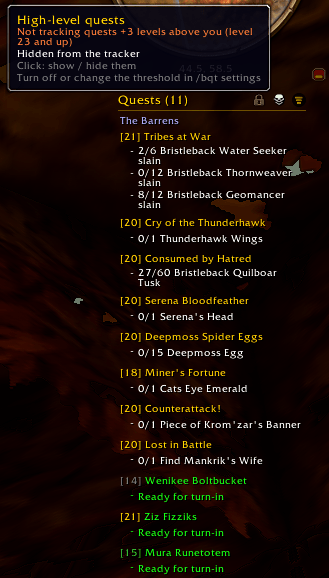
BetterQuestTracker replaces Blizzard's objective tracker with one that shows the quests for the zone you're in, nearest first.
What it does
- Shows the quests for your current zone, grouped under the zone headings from your quest log. Click the filter icon in the header to switch to all quests and back.
- Sorts quests by distance, nearest first, and re-sorts as you move. If you like, quests that are ready to turn in can go to the bottom of their zone instead.
- Follows the checkboxes in your quest log: uncheck a quest there and it leaves the tracker.
- Can uncheck newly accepted quests that are 3 or more levels above you, and check them again once you've caught up. This is off by default; turn it on and set the threshold in the settings.
- Adds a button next to each quest with a usable quest item, showing its cooldown and charges.
- Shows the quest text and objectives on hover, including the progress of your party members.
- Colours each quest's level by difficulty, like the quest log does.
- Lists the recipes you track in the profession window below your quests, with each reagent as "in bags/needed", turning green once you carry enough.
Mouse
On a quest:
| Click | Action |
|---|---|
| Left | Set or remove the waypoint arrow |
| Shift + left | Remove from the tracker, or link the quest while typing in chat |
| Ctrl + left | Open the quest in the quest log |
| Right | Quest options: waypoint, open in quest log, share, remove, abandon |
| Middle | Collapse or expand the objectives |
Middle-click a zone heading to collapse or expand the whole zone.
On a recipe, left-click opens it in the profession window, shift-click removes it from the tracker, and right-click shows the recipe options.
Header
The header uses small Blizzard icons that light up when you hover them.
- The padlock unlocks the tracker. Drag to move it and use the mouse wheel to scale it; right-click resets the scale. It only shows while your mouse is over the header.
- The skull shows while high-level quests are being unchecked and kept out of the tracker. Click it to show those quests anyway, and again to hide them. While they show, it turns grey and only appears when your mouse is over the header.
- The filter switches between quests in your zone and all quests. It turns grey while all quests show.
- The button just outside the top-right corner collapses or expands the tracker.
Once the list is taller than the maximum height, the mouse wheel scrolls it from anywhere over the tracker, header included. A shorter tracker lets the wheel through to the camera.
Settings
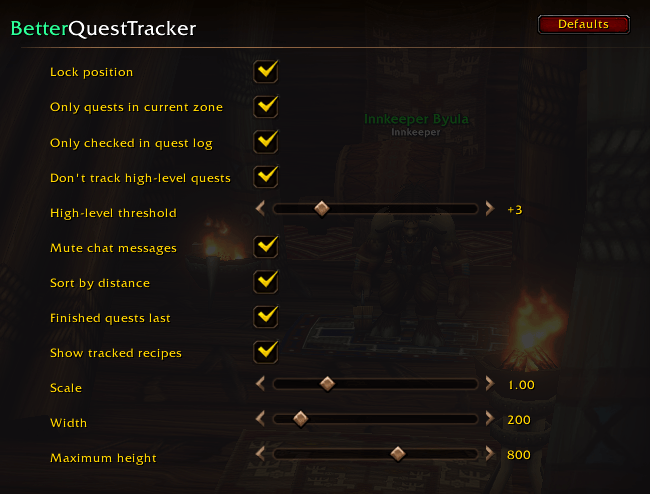
Open Options > AddOns > BetterQuestTracker, or type /bqt. You can set the position lock, zone filter, distance sorting, finished quests last, quest log checkboxes, the high-level threshold, tracked recipes, chat messages, scale, width and maximum height.
Commands
/bqt: opens the settings/bqt move: locks or unlocks the tracker/bqt scale <0.5-2.5>,/bqt width <150-600>,/bqt height <150-1200>/bqt zone,/bqt sort,/bqt watch,/bqt quiet: toggle the zone filter, distance sorting, following the quest log checkboxes, and chat messages/bqt reset: resets position, scale, width and height/bqt perf: memory and CPU usage
Good to know
Blizzard's tracker stays hidden while the addon is loaded; disable the addon to get it back. Quest item buttons keep working in combat, but WoW doesn't let addons move them during a fight, so they realign when combat ends. Menus, headings and the lock and filter tooltips use the game's own strings, so they follow your client language; the remaining hints are English. Built for the WoW Forever beta.
You must be logged in to leave a comment.