

BC Bar
A slim, customizable status bar for WoW Forever with mob XP/h, gold/h, honor points, movement speed, bags, durability and more. Automatic English/German text.
Details
Expansion
 Forever
 Categories
Developers

Having issues?
BC Bar
BC Bar is a slim, standalone status bar for WoW Forever. Keep useful character and session information in one compact row, and choose exactly which fields you want to see.
Features
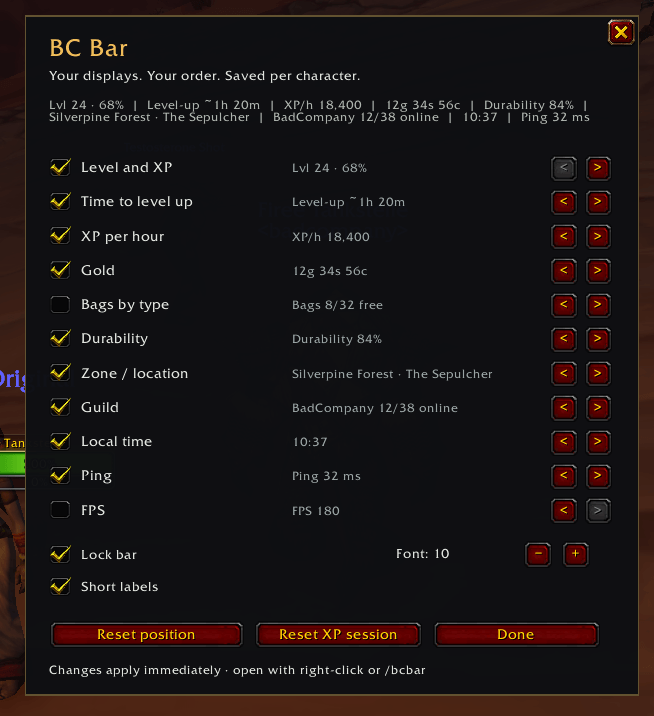
- Fourteen optional fields: level and XP, estimated time to level, mob XP per hour, gold, gold per hour, honor points, bag space, equipment durability, movement speed, zone, guild members online, local time, world latency and FPS.
- A compact single-row layout with adjustable font size, short labels and concise tooltips.
- Enable, disable and reorder fields, unlock the bar to move it, and save the layout separately for each character.
- Automatic English and German text based on your WoW client's language. Other client languages currently use English addon text.
- No external libraries or other addons required.
Mob XP and time to level
Mob XP per hour and time-to-level estimates use recognized mob-kill XP from the last five minutes. Quest turn-ins still advance your level progress and reduce the XP remaining, but no longer inflate your farming rate.
Estimates appear after at least 60 seconds and three recognized kills that award XP. Group and rested XP are included without double-counting bonuses. Breaks reduce the rate; after five minutes without mob XP, the rate is zero and no level estimate is shown.
Gold, honor and movement speed
Gold per hour shows the net change in your carried money per session hour, after at least 60 seconds. Income, purchases, repairs, mail and trades all count, so spending can produce a negative rate. The tooltip shows the exact net change and session duration.
Honor points shows your current spendable honor balance and updates when you earn or spend points. Its short tooltip includes the cap reported by the client. Rank Points are separate from this balance.
Movement speed uses normal running as 100%, following the character panel even while standing still. Mounts, speed bonuses, slows, swimming and flying are reflected.
Bag space and durability
Normal bag space is counted separately from specialized bags. Specialized bags are grouped by type, and reagent bags remain separate when present. Full bags stay included; bank storage is excluded. Hover over the field to see each bag.
Durability is calculated from total remaining durability divided by total maximum durability across equipped items. Undamaged, damaged and broken equipped items all count. Items in bags and bank do not count. Broken equipment is highlighted in red.
Getting started
Right-click the bar or type /bcbar to open settings. Toggle fields, move them left or right, adjust the font size, or unlock the bar to drag it. Hover tooltips show only the key values. Active fields that do not fit are available in the +N overflow area; the bar stays in one row.
After updating from the initial CurseForge version, restart WoW and enable Gold per hour, Movement speed and Honor points in /bcbar. These added fields are initially off; existing choices, order and position are retained.
XP and gold tracking survive zone changes and /reload, excluding reload loading time. A new login starts fresh. Reset them separately with /bcbar xpreset and /bcbar goldreset.
Other useful commands: /bcbar unlock, /bcbar lock, /bcbar position and /bcbar debug.
Compatibility and feedback
Version 0.1.0-beta6 targets WoW Forever client 1.60.1, Interface 16001. API definitions and currency data were checked against build 70009; 191 offline regression checks passed using a simulated WoW API/UI. In-game validation of this update is still pending. Please report issues with your client version, client language and any Lua error message.


You must be logged in to leave a comment.