
BattleText Forever
Scrolling combat text for WoW: Forever. Your hits and heals, the damage you take, and loot, experience and kills, in three areas you can move.
Details
Expansion
 Forever
 Developers

Having issues?
BattleText Forever
Scrolling combat text for World of Warcraft: Forever.
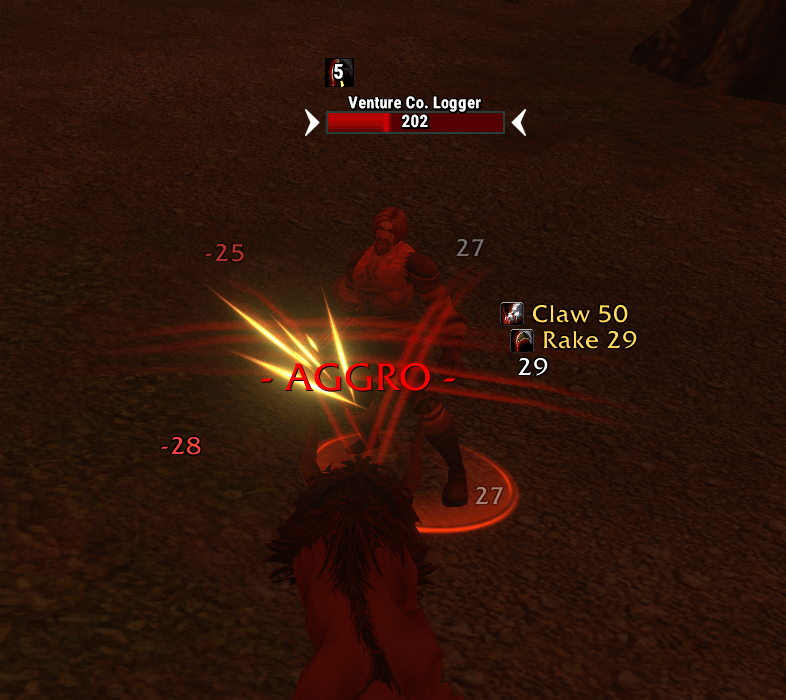
BattleText Forever puts the fight on your screen: your hits and heals scroll on one side, the damage you take on the other, and loot and experience in the middle. It's built for Forever's addon rules, in the spirit of the classic scrolling combat text addons.
Features
- Your hits and heals, tinted by school, with the spell's name and icon when the game lets BattleText tell which spell it was. Crits are bigger and hold in place for a moment, and rapid hits of one spell add up ("Swipe 135 (x3)").
- What happens to you, in its own area: damage and heals you take, and the attacks you dodge, parry, block or resist.
- Notifications: combat, experience, reputation, honor, loot, money and skill ups.
- Three text areas you can drag anywhere on screen.
- Your look: 20 fonts to pick from, text and crit size, scroll speed and distance, straight or curved scrolling.
- Your choice of what's shown. Turn any kind of text off, hide small hits, and hide the game's own numbers so nothing shows twice.
Installation
- Download the latest release.
- Unzip it into your WoW: Forever
InterfaceAddOnsfolder so you end up with anAddOnsBattleTextForeverfolder. - Restart the game, or type
/reloadif it's already running.
Using it
- Your hits show as soon as you log in: on your target, and on the mobs attacking you or your pet.
- Click Start BattleText (the button at the top of the screen) once after you log in. With it, BattleText can name the ticks of your bleeds and, in a group, tell your hits from everyone else's (see Good to know). You can also bind a key to it. If you haven't clicked it ten seconds after logging in, a line in chat reminds you (untick Remind me to click Start in the options to stop that).
- Move the text. Tick Move the text areas in the options (or type
/btf unlock) and drag the three boxes where you want them. Closing the options locks them again. - See it without fighting. Type
/btf test, or right-click the minimap button. - Open the options. Type
/btf, or left-click the minimap button.
Options window
| Side | What's there |
|---|---|
| Text (left) | Show BattleText, move the text areas, spell names, spell icons, crits pop and hold, curved scrolling, add up rapid hits, hide the game's own numbers, minimap button, remind me to click Start, font (a dropdown of 20), text size, crit size, scroll time, scroll distance |
| What you do | Damage, heals, misses, pet, damage shields, hide hits below a number |
| What happens to you | Damage, heals, avoids, power gains |
| Notifications | Combat, killing blows, experience, reputation, honor, loot, money, skill ups |
Keybindings
Go to Options → Keybindings → BattleText Forever:
| Binding | Does |
|---|---|
| Start BattleText | Same as clicking the Start button |
| Open options | Opens or closes the options window |
Slash commands
| Command | Does |
|---|---|
/btf | Open or close the options |
/btf test | Show sample text |
/btf lock · /btf unlock | Lock or unlock the text areas |
/btf reset | Put the text areas back where they started |
/btf on · /btf off | Turn the text on or off |
/btf debug | Start or stop recording the combat lines the game sends (for bug reports) |
/btf copy | Show the recorded lines in a box you can copy from |
/battletext works too.
Good to know
WoW: Forever doesn't let addons read the combat log. The game tells an addon what happened to a unit (it took 27 damage, it dodged), but not who did it or with which spell. BattleText works from that:
Your hits are read from the unit you hit: your target, and the mobs attacking you or your pet. Turn on enemy nameplates to see your hits on the ones you aren't targeting.
Alone, every hit on those units is shown as yours, your pet's hits included (they can't be told apart, so they aren't marked).
Click Start BattleText once per login. It opens the Combat Log tab and switches back for you. From then on the game tells BattleText when you did something. In a group, only that many hits are shown, so other people's are left out (now and then a number may still be a groupmate's hit that landed at the same moment as yours). Keep the Combat Log's filter on My actions (the default).
Spell names and icons show for:
- hits that land the instant you cast (instant attacks and spells with no travel time);
- the ticks of your damage-over-time spells (Rake, Rip, Rend, Moonfire, Corruption, Shadow Word: Pain and the like). Bleeds need Start BattleText clicked;
- your damage shields: buffs (Thorns, Lightning Shield, Retribution Aura, Fire Shield), once BattleText has seen one answer two blows, and gear that hurts whoever strikes you (named after the item). Untick Damage shields in the options to hide these.
Other hits show as a plain number in their school's color.
The last swing on a mob may not show: the game stops reporting a unit the moment it dies.
Damage you take has no spell names.
When the game does let BattleText read the Combat Log's lines, they're used instead: every hit then has its spell, and your pet's hits are marked.
Troubleshooting
- No numbers for your hits. Target what you're hitting, or turn on enemy nameplates. In a group, click Start BattleText.
- A bleed's ticks have no name. Click Start BattleText.
- Other people's hits show as mine. In a group, click Start BattleText and keep the Combat Log's filter on My actions.
- Numbers show twice. Tick Hide the game's own numbers in the options.
- Something isn't shown. Type
/btf debug, fight for a moment, then type/btf copyand copy the lines into a bug report. Type/btf debugagain to stop. - The text is in the wrong place. Type
/btf unlockand drag the boxes, or/btf reset.
Feedback and bug reports
Found a bug or have an idea? Please submit it on GitHub. A short form asks for your class, your Combat Log filter and any error message. You'll need a free GitHub account. Otherwise, feel free to leave a comment on the CurseForge page.
Support the addon
BattleText Forever is free. If you enjoy it, you can leave a small tip on Ko-fi. Thank you!
Also by me
- TauntMaster Forever: one-click taunts off your healers and DPS, for tanks. Free on CurseForge.
- ToppedOff Forever: reminds you when buffs, food, reagents, ammo or gear need topping off. Free on CurseForge.
- Outfitter Forever: the classic Outfitter gear manager, ported to WoW Forever. Free on CurseForge.
License
MIT
The fonts in the Fonts folder are open fonts, unmodified, each under its own licence (in Fonts/Licenses): Anton, Archivo Black, Bangers, Barlow Condensed, Bebas Neue, Fira Sans, Lato, Poppins, Press Start 2P, PT Sans Narrow, Rajdhani and Russo One (SIL Open Font License 1.1), Luckiest Guy and Permanent Marker (Apache License 2.0), and Ubuntu (Ubuntu Font Licence 1.0).
You must be logged in to leave a comment.