
BagMover4eva
Allows the user to move the native Blizzard Bags.
Details
Expansion
 Forever
 Categories
Developers

Having issues?
BagMover4eva
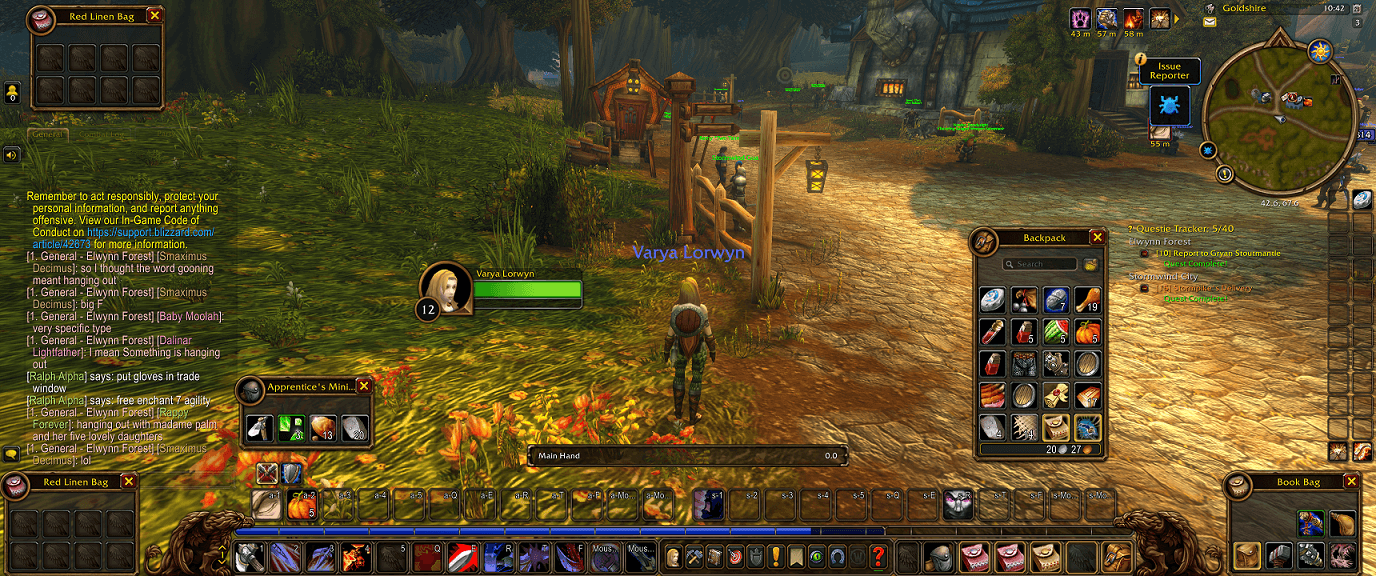
Put your backpack and each equipped bag where you want them. BagMover4eva keeps Blizzard's native inventory windows and gives each one its own saved position, with a separate layout for every character.
Built for World of Warcraft: Forever 1.60.1. By Lorwyn.
AI disclosure: The project logo and in-game logo were generated with AI using ChatGPT. They are branding artwork, not gameplay screenshots or replacement bag graphics. The addon code and documentation were generated and revised using OpenAI Codex under Lorwyn's direction.
Features
- Move bags individually. Drag a bag's handle without moving the other open bags.
- Keep the native inventory. Use Blizzard's existing item slots, tooltips, bag menus, search, sorting, and close buttons.
- Save a layout per character. Bag positions and the locked/unlocked state are stored separately for each character.
- Close just the backpack. Its individual toggle and X button leave other bags open. Explicit Toggle All Bags retains its normal behavior.
- Keep bags open with Esc. Close the vendor or other windows without losing your open bag selection. Revisiting the vendor keeps those bags open instead of opening the full set.
- Use a settings page. Open the page to see your layout status, unlock or lock the handles, or reset the current character's positions with confirmation.
- Keep bags on screen. Positions adjust for UI scale and screen-size changes, with screen-edge clamping.
- No required libraries or other addons. The native keyring can also be moved when available and opened separately.
Getting started
- Install BagMover4eva for your Forever client and enable it in the AddOns list.
- Open Settings > AddOns > BagMover4eva, or type
/bmf settings. - Click Unlock & arrange. This selects native individual-bag mode and opens your backpack and equipped bags.
- Drag the teal handle at the top of each bag to place it.
- Type
/bmf lockto hide the handles and keep your layout.
Positions follow the bag's equipment slot, so replacing a bag or opening bags in a different order keeps the layout associated with that slot.
Commands
| Command | Action |
|---|---|
/bmf settings | Open the settings page. |
/bmf unlock | Open individual bags and show their drag handles. |
/bmf lock | Hide the handles and keep your layout. |
/bmf reset | Immediately clear this character's saved positions and restore the default layout. |
/bmf status | Show the addon version, client build, and saved-position count. |
/bmf | Show command help. |
/bagmover4eva is an alias for /bmf. The Reset button in settings asks for confirmation; the chat reset command takes effect immediately.
Compatibility
Use the mouse/keyboard interface and Blizzard's native individual bags. Forever's gamepad interface uses combined bags. Replacement bag windows and other addons that reposition the same native bags may conflict. The main bank window and bank tabs are outside this addon's scope.
Arrange or reset your layout outside combat. WoW saves the per-character settings through its normal SavedVariables system on reload, logout, or a clean exit. Persistence depends on the client correctly loading and saving those variables.
Unlocking switches the native combined-bags preference off. You can select combined bags again through Blizzard's bag menu. A key bound to Toggle All Bags will still affect every bag; use the backpack-specific binding to toggle only the backpack.
Esc also leaves the native combined bag and keyring open. If all bags are closed when you first visit a vendor, the client's usual automatic bag opening still applies. Other addons that replace Escape or bag behavior may conflict.
Beta status and feedback
Version 1.1.1 targets Forever 1.60.1, interface 16001. The update passed 45 offline behavioral checks; live-client verification of this fix is still pending. Other WoW flavors are not currently supported.
Report issues in this project's comments. Include the output of /bmf status, steps to reproduce the problem, any Lua error, and which other bag or UI addons are enabled.
Author: Lorwyn. License: All Rights Reserved.
You must be logged in to leave a comment.