

AutoLayer – Layer Switcher for Forever
See your current layer and switch to a new one with one click. AutoLayer pairs you with AutoLayer players in your zone, joins the party, confirms the switch and leaves for you. New addon: the more players who use it, the faster switching gets!
Details
Expansion
 Forever
 Categories
Developers

Having issues?
AutoLayer
⚠️ Please read first: AutoLayer needs other players to work
AutoLayer switches your layer by putting you in a party with another AutoLayer user in your zone who is on a different layer. Until enough players are using it, there may be times when nobody in your zone can switch you.
AutoLayer is new and still gaining users. If you download it, keep it running and give it some time. Every player who installs it makes switching faster for everyone else. Listing yourself as a Party Leader now and then helps most of all.
*Due to limitations put in by Blizzard to combat abuse, you can only switch layers once every 5 minutes.
What it does
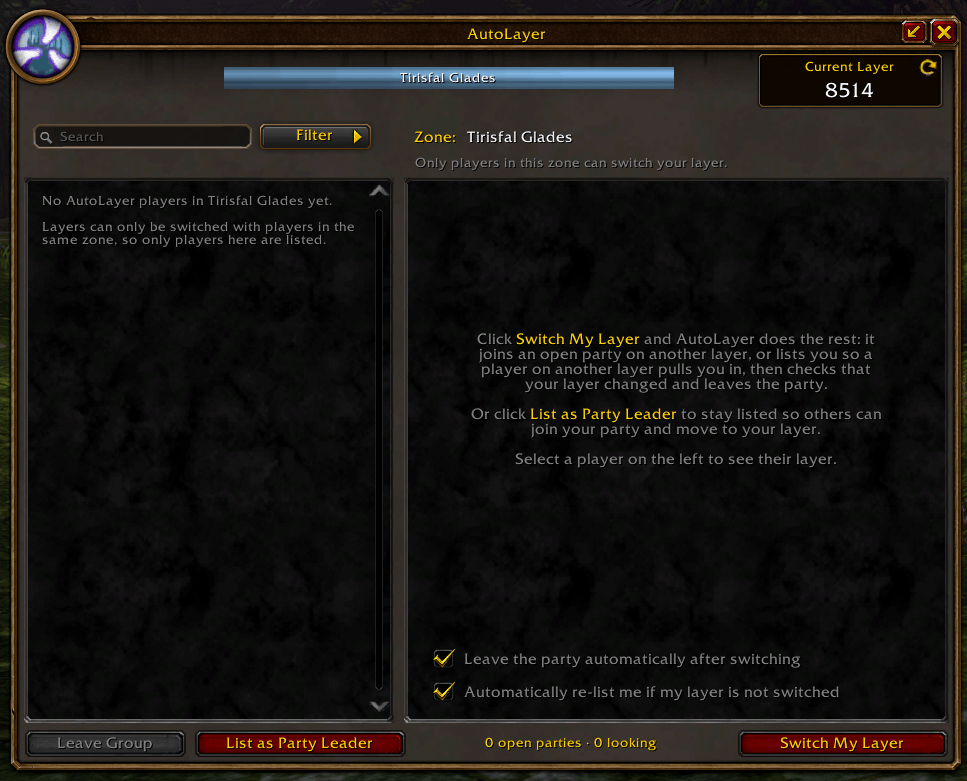
AutoLayer shows you which layer you're on and switches you to a different layer in your zone with one click. You don't need to post in chat, whisper strangers or wait for invites.
Features
- Current Layer display: AutoLayer reads your layer ID as soon as you open the window. It finds it by looking at NPCs around you (nameplates, your target, mouseover). If no NPCs are in view, target any NPC and the number appears.
- One-click "Switch My Layer": AutoLayer handles the rest:
- It joins an open party led by a player on a different layer in your zone.
- If none are available, it lists you automatically and pairs you with another player who is also looking.
- It watches your layer ID. As soon as it changes, AutoLayer stops searching, unlists you and leaves the party.
- If your layer doesn't change, it leaves and tries again. You can turn this off with the "Automatically re-list me if my layer is not switched" checkbox.
- List as Party Leader: stay listed so other players can join your party and move onto your layer. Invites are automatic, with no popups to accept. You stay listed, even after logging out, until you unlist. This is what keeps layer switching available for everyone.
- Fair pairing: players who have waited longest, or who have already helped someone else switch, are more likely to be the one who switches next.
- Player list with layer IDs: see every AutoLayer player in your zone and their layer. The colour shows whether they're on a different layer from you or the same one.
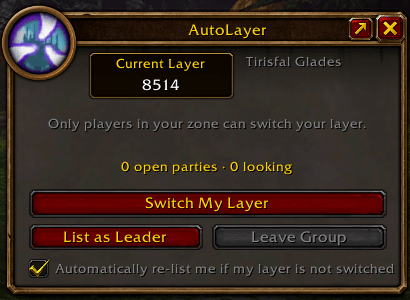
- Compact window: click the arrow next to the X to shrink AutoLayer to a small window you can move anywhere. It keeps the important controls while you play and the addon searches in the background.
- Minimap button: left-click opens AutoLayer, right-click starts Switch My Layer, and you can drag it around the minimap.
Good to know
- Same zone only: layers can only be switched between players in the same zone, so AutoLayer only matches you with players where you are. If you change zones during a search, click Switch My Layer again.
- Nothing happens without you: AutoLayer never invites players while you're in combat or in an instance, and never puts you in a group unless you've clicked Switch My Layer or listed yourself as a Party Leader.
- Automatic invites need AutoLayer on both sides: only players who also have AutoLayer can switch you or be switched by you.
Commands
| Command | What it does |
|---|---|
/al or /autolayer | Open or close AutoLayer |
/al switch | Switch My Layer, or cancel a switch in progress |
/al leader | List or unlist yourself as a Party Leader |
/al layer | Print your current layer |
/al compact | Switch between the full and compact windows |
/al minimap | Show or hide the minimap button |
Help it grow: install it, leave it running, and tell your guild and friends. The more players who use AutoLayer, the faster everyone can switch.

You must be logged in to leave a comment.