
ATT-Search
Search bar for the All The Things main list: type a name and jump straight to it.
Details
Expansion
 Forever
 Categories
Developers

Having issues?
Find anything in All The Things
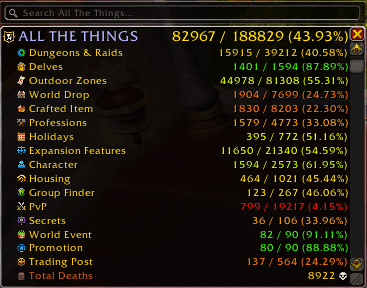
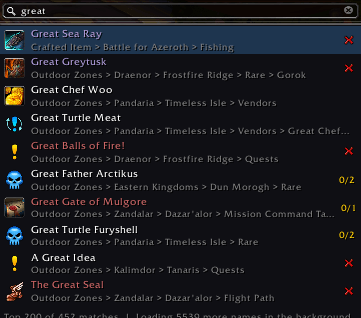
ATT-Search adds a search bar to the top of the All The Things main list. Type any name (a zone, NPC, vendor, item, mount, quest, achievement…), pick a result, and the list expands to it, scrolls to it and highlights it. No more clicking through layers of headers.
Unofficial companion for All The Things, made with the ATT author's blessing. Not affiliated with the ATT team. Requires All The Things.
Features
- Results as you type, each with its icon and where it sits in the list (e.g. Northrend > Borean Tundra > Quests).
- See what you have at a glance: a green check when it's collected or completed, a red cross when it's not, and progress like 5/12 for zones, NPCs and vendors. Same data as ATT's own list.
- Know why something is hidden: results your ATT settings hide are greyed out and name the exact filter, e.g. "Horde only (Race filter)" or "Already collected (Show Collected Things is off)". Results you can see in the list come first.
- Waypoints: Shift+click a result to set a waypoint to it, using TomTom if you have it or the map pin otherwise. Works for NPCs, treasures, quest givers and anything else ATT has coordinates for.
- Move the ATT window by dragging the search bar.
- Fast and safe: the index builds in the background after login without stutters, survives /reload, and never floods the server.
- Works on every game version ATT supports: Retail, MoP Classic, Cata Classic, Wrath Classic, TBC Classic Anniversary, Classic Era and Forever.
How to use
- Open the ATT main list. The search bar sits on its top edge.
- Type 3 or more letters.
- Arrow keys or Tab to move, Enter or click to show it in the list, Shift+Enter or Shift+click for a waypoint, Esc to close.
Commands
- /atts: open the main list and focus the search bar
- /atts <text>: search right away
- /atts warmup: load item names the game hasn't loaded yet, slowly in the background
- /atts clearcache: forget the saved names and rebuild the index
- Key binding: Options > Keybindings > AddOns > ATT-Search
Good to know
- Indexing starts a few seconds after login; the bottom of the results shows its progress. Names that are slow to look up are saved, so after a /reload the index is ready again in moments.
- Names the game hasn't loaded yet fill in gradually: at most 25 server requests per second, paused in combat. Items appear once the game has loaded them, or use /atts warmup.
- ATT-Search uses parts of ATT's internal code, so a big ATT update may need an ATT-Search update too.
⚠️ Known issue: Party Sync (Retail)
Party Sync doesn't fully get along with ATT-Search yet. Starting or leaving a sync can make the game slow to load quest data. You may see "Retrieving data" or "Quest #1234*" in the ATT list, an empty quest log, or quest objectives missing from tooltips and the map for a while.
1.1.7 fixes the main cause and pauses all background loading during sync. I'm still testing it with sync, so please report anything you still run into.
If it happens to you: • Type /atts lookups off before syncing. ATT-Search then stops asking the server for names (search still finds everything the game has already loaded). Turn it back on later with /atts lookups on. • If quests already went missing, give it a few minutes or relog. The game catches up once its queue clears. • Bug reports are very welcome. The output of /atts status while it's happening helps a lot.
You must be logged in to leave a comment.