

Arbitrage
Spot craft-and-flip profits: Compare market value vs cheapest crafting cost
Details
Expansion
 Forever
 Categories
Developers

Having issues?
Arbitrage
Note: still under pretty heavy development, things could break. Hoping to be stable by WoW Forever release!
Arbitrage targets World of Warcraft: Forever.
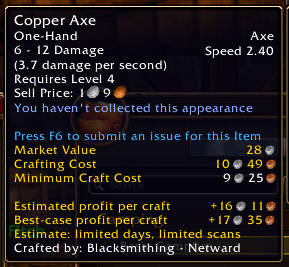
Find profitable crafts and flips on the Auction House. Arbitrage shows what an item's "market value" is and the cheapest way to craft it, making it easy to spot ways to turn a profit.
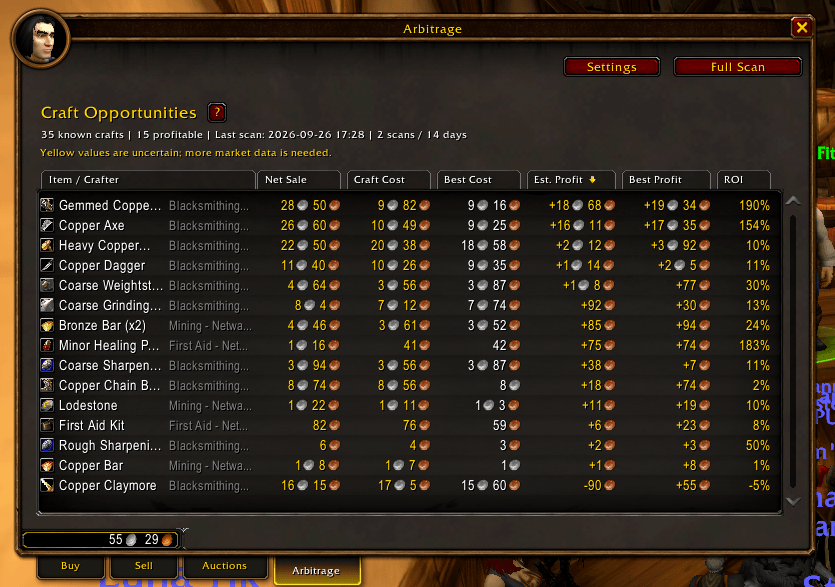
Open the Arbitrage tab at the Auction House, run a scan, then hover items.
The Arbitrage Auction House tab ranks known craftable items by estimated net profit per craft. It uses rolling market values for the primary estimate and shows the latest scan's minimum material cost as a best case. Crafts appear when either estimate is profitable. Auction House cuts are included; listing deposits, available material depth, sale rate, inventory, and recipe cooldowns are not. Its sortable table separates normal and minimum crafting costs and their corresponding estimated and best-case profits.
Spotting Profits
- Market Value — what the item currently sells for.
- Crafting Cost — the cheapest way to make it, choosing between vendor, Auction House, and crafting at every intermediate step.
- Minimum Craft Cost — the same, using the cheapest per-unit buyouts from the latest full scan.
Hold Shift to see the exact cheapest recipe.
Recipes
Open each character's profession window once to record its learned recipes (I didn't want to manually compile all the new Forever recipes). Arbitrage combines recipes recorded for all characters on the realm, then compares buying and crafting each intermediate material to find the cheapest route.
Vendor prices are learned when you visit merchants and shared by same-faction characters on the realm. Only unlimited-stock, coin-priced offers are used. The addon does not account for inventory, cooldowns, or listing depth.
Commands
/arbor/arb help- show all commands/arb status- show stored data and settings status/arb settings- open the Arbitrage settings
Also in development, a companion app: Arbitrage Companion
It will sync your data across multiple PCs, and eventually will allow you to share and receive other people's scans to have more accurate market data
You must be logged in to leave a comment.