
AltPost
Mail items to your alts in one click, with a list of every alt right at the mailbox.
Details
Expansion
 Forever
 Categories
Developers

Having issues?
See all your characters at the mailbox and send them what they need in one click.
Built for World of Warcraft: Forever.
What it does
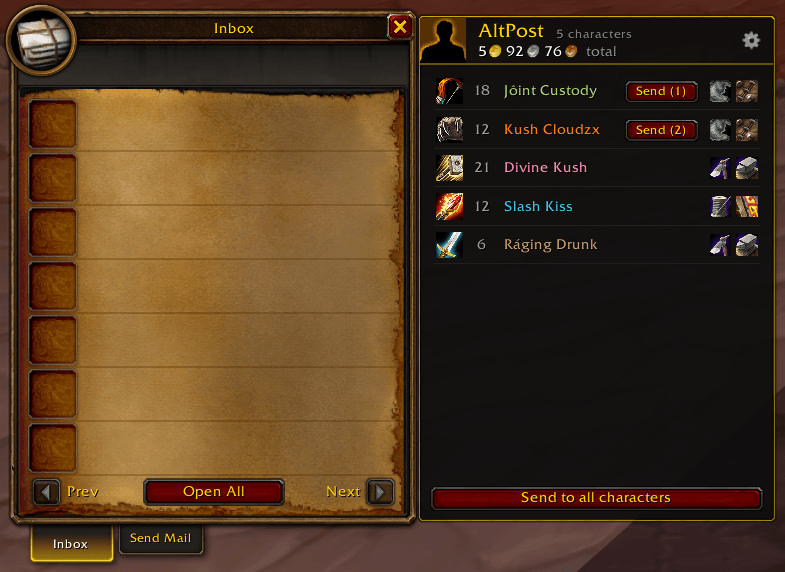
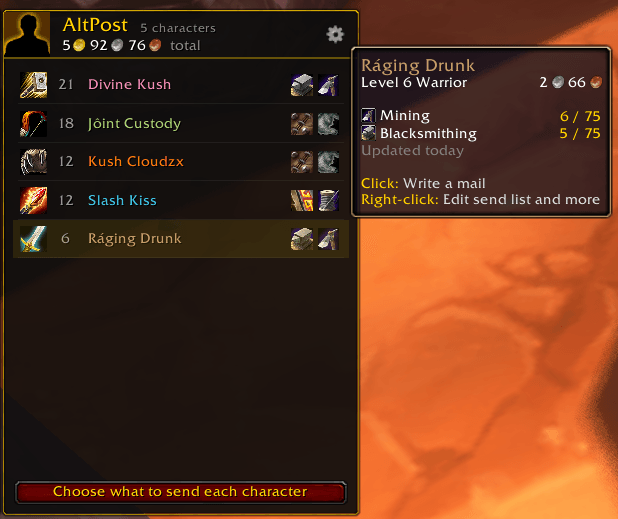
Your characters at the mailbox Open a mailbox and click the AltPost button at the top right. It opens into a short list of your characters on this realm and faction, with level, class, and profession icons, plus your total gold. Hover a character to see their gold, skill levels, and anything waiting to be sent to them.
Know when a trip to the mailbox is worth it A small gold number on the minimap icon and the AltPost button shows how many characters have items ready to send. Right-click the minimap icon to see exactly what's waiting, from anywhere in the world.
Mail a character in one click Click a character and the Send Mail tab opens with their name already filled in.
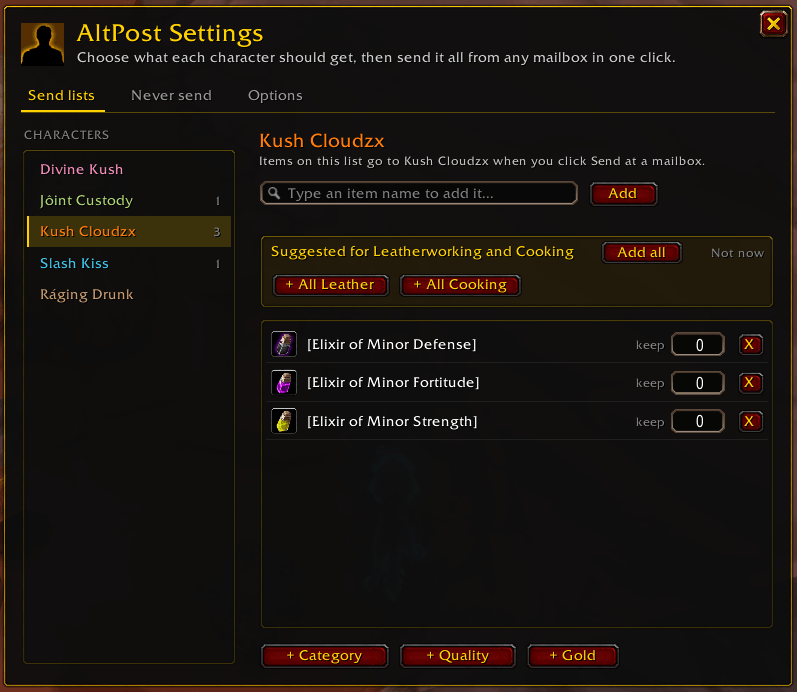
Send lists Pick what each character should get, once, and AltPost remembers it:
- Specific items: start typing a name like "Linen" and pick it from the list
- Whole categories: all Cloth, all Herbs, all Metal & Stone
- Quality: for example, all green items, only green cloth and leather, or all greens except your armor type (great for your enchanter: your Warrior keeps plate and sends the rest)
- Gold: keep a set amount on each character and send the rest to one character
Set a keep amount on any item, for example "keep 20 Linen Cloth," and AltPost keeps exactly that many and sends the rest.
Not sure where to start? AltPost suggests lists from each character's professions. A Tailor gets "All Cloth," an Alchemist gets "All Herbs," an Enchanter gets greens to disenchant, and so on. One click adds them.
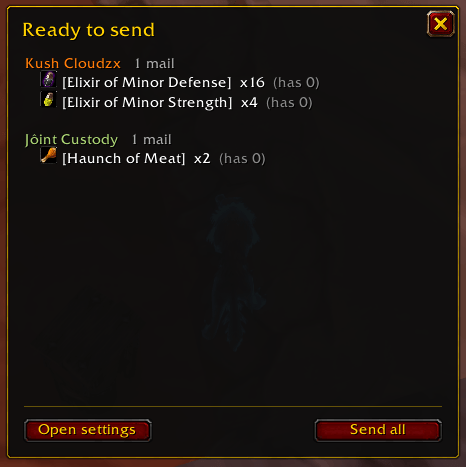
One-click sending When your bags hold something on a character's list, they move to the top with a Send button. Click it, check the preview, and send. Send to all characters does everyone at once.
Never send Add items you always want to keep, like gear you are saving. AltPost will never send them, even if a category would match.
Works with Baganator If you use Baganator, characters show up right away without logging into each one, item search includes what's in all your characters' bags and banks, and previews show how many of each item a character already has.
How to open AltPost
| Where | What it opens |
|---|---|
| AltPost button at the top right of any mailbox | Your character list |
| Minimap icon or the addon menu: left-click | Settings |
| Minimap icon or the addon menu: right-click | What's ready to send, from anywhere |
| Options > AddOns > AltPost | Settings |
Type /ap in chat | Your character list at a mailbox, or settings anywhere else |
Getting started
- Log into each of your characters once with AltPost turned on. If you use Baganator, you can skip this.
- Open settings (minimap icon or
/ap), pick a character, and add the items they should get. The suggestions from their professions are a quick start. - Go to any mailbox, click the AltPost button, and click Send next to the character.
Safe by design
- Nothing is ever sent unless you click Send.
- You always see a preview first: every item, how many mails, and the postage.
- Soulbound items, quest items, and anything on your Never send list are never sent.
- Each mail holds up to 12 stacks. Larger sends are split into several mails, one click each.
- If your bags change, a mail fails, you run low on gold for postage, or you close the mailbox, sending stops right away.
Questions
Why don't I see one of my characters? Log into that character once with AltPost turned on, or install Baganator. The list only shows characters on your current realm and faction, because mail can't go to the other faction.
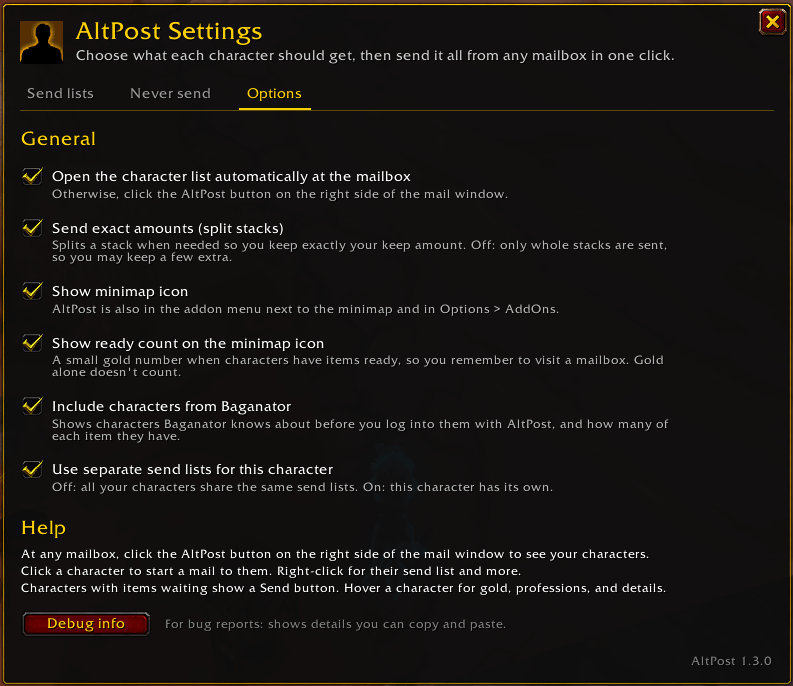
Will it keep exactly the amount I set? Yes. If needed, AltPost splits one stack so you keep exactly your keep amount. Prefer whole stacks only? Turn off "Send exact amounts" in Options.
What does "except my armor type" mean? It keeps gear you'd actually wear and sends the rest: plate for a level 40+ Warrior, leather for a Rogue, cloth for a Mage, and so on. Shields count as yours if your class uses them. Rings, cloaks, and weapons still get sent unless you uncheck them with the Filter button.
Can the character list open by itself at the mailbox? Yes. Turn on "Open the character list automatically at the mailbox" in Options.
Can each character have different lists? Yes. Turn on "Use separate send lists for this character" in Options. Otherwise all your characters share the same lists.
How do I hide the minimap icon? Uncheck "Show minimap icon" in Options. AltPost stays available in the addon menu next to the minimap and with /ap.
Found a bug? Open Options > Debug info, copy the text, and include it in your report on the AltPost CurseForge page.
You must be logged in to leave a comment.