

Allemano Raid Tools (ART)
Raid tools for WoW Forever: shared notes and drawings, raid check for flasks, food and buffs, invites and rosters, mob marking, pull and break timers, and a pull log. Made for raid leaders.
Details
Expansion
 Forever
 Categories
Developers

Having issues?
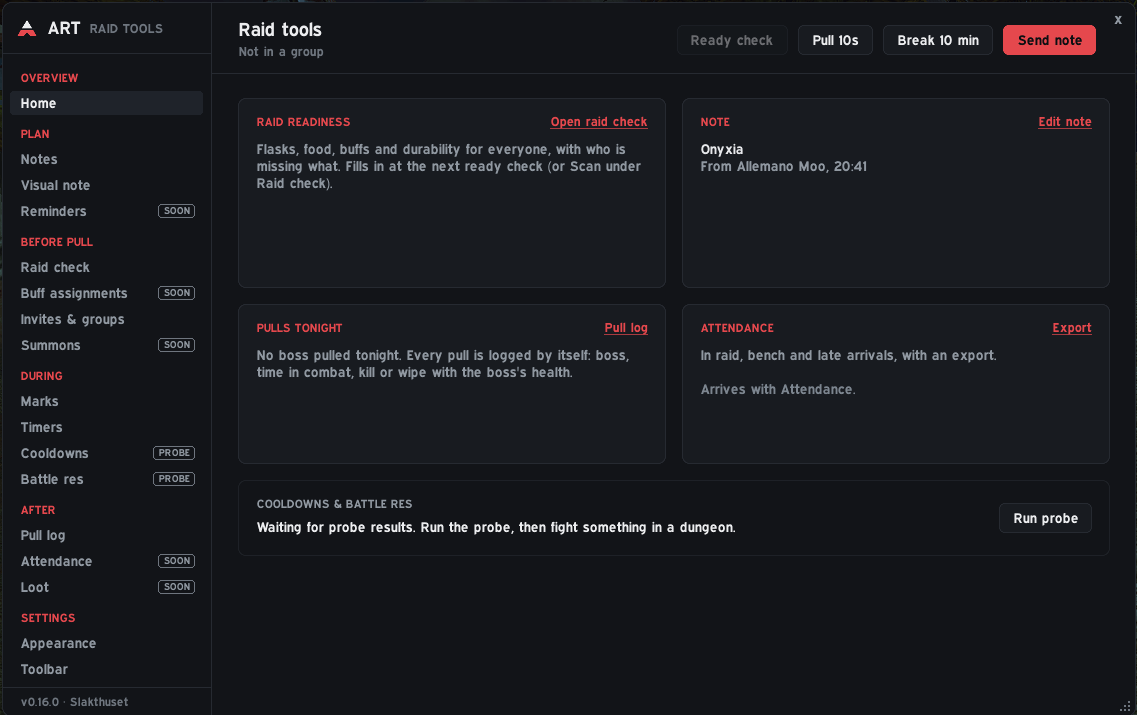
Everything a raid leader needs before and during the pull, in one addon. ART is a raid toolkit for WoW Forever: notes everyone can read, drawings on a map, a raid check for flasks and food, invites and rosters, fast mob marking, pull and break timers and a log of every boss pull. Notes, ready check info and timers are shared between everyone in the raid who runs ART, so it works best when the whole raid has it.
Alpha. ART is used in real raids but still growing. Tools marked "SOON" in the sidebar are not built yet.
The raid leader writes a note and sends it; everyone gets it in a small note window (/art note). Use raid icons like {skull}, see names in class color, and write {p:Name}...{/p} lines that only that player sees, for example personal assignments inside the shared note. You also have a personal note of your own.
Example: "Tanks: {skull} first, then {cross}" for everyone, and a private line only the healer sees with their assignment.
Draw on a map or picture with a pen, lines, arrows, icons and text, and share it with the raid (/art vn). Everyone sees the same drawing, so "stand here, move there" needs no explaining. Add your own pictures (a dungeon map, a boss layout): there is a small script to convert a screenshot into a picture the game can use.
See at a glance who is missing flasks, elixirs, food, buffs, weapon oil or has low durability. When a ready check starts, a small window shows every raid member's buff icons (hover for details). The categories are editable, so you decide what "ready" means for your raid.
- Invite by guild rank or by a whisper keyword you choose (players whisper it and get invited); automatically convert to raid and give assist.
- Roster profiles: keep several saved rosters by name. Paste a roster (names from top to bottom, five per group) and ART sorts everyone into groups.
- Drag players between groups, press Apply groups to move the raid into place, or Invite roster to invite everyone on the list.
Hold Ctrl and scroll the mouse wheel over a mob and it gets a raid icon. Give mobs their own icon lists ("Add target"): before the pull every mob gets the next free icon on its list, and a marked mob keeps its icon, so marking a whole pack is just scrolling over it.
Start a pull timer (/art pull 10) or a break timer (/art break 5) with one click. Save your own timers as presets ("Buffs 5:00", "Soulstone 15:00") and start them with a click. When the raid leader or an assistant starts a timer, it shows for everyone who runs ART.
Every boss pull is recorded: how long you were in combat, whether it was a kill or a wipe, and the boss's health at the end. Good for spotting which attempt was the best one.
A small toolbar at the top of the screen (settings > Toolbar) with raid icons, world markers, ready check, pull and break timers and the note. A small ART button on the screen opens the addon.
ART can start /combatlog by itself when you enter a raid, so you never forget it before the first boss.
- Install it, restart the game, and type
/art. - Ask the raid to install it too.
/art versionshows who has ART and which version. - As raid leader: set up your roster in Invites & groups, check the categories in Raid check, and try Notes with a short message.
/art open or close · /art note note window · /art vn visual note · /art check raid check · /art pull 10 · /art break 5 · /art rc ready check · /art bar toolbar · /art log combat log · /art button launcher button · /art version who runs which version · /art errors recent errors · /art help everything
ART is made for WoW Forever (interface 16001). If the CurseForge app does not install it into the right folder, download the file from the Files tab and unzip it so that the folder is World of Warcraft_classic_beta_InterfaceAddOnsAllemanoRaidTools, then restart the game. Pictures for visual notes are files in AllemanoRaidToolsImages; everyone who should see a picture needs the same file, since only its name is sent.
WoW Forever hides Lua errors. Type /art errors and send a screenshot of what it says, together with what you were doing.
Part of Allemano Addons. Source code and issues: https://github.com/Allemano-Addons/AllemanoRaidTools
You must be logged in to leave a comment.