

Twitch Emotes v2
Twitch Emotes addon for 3.3.5a


Details
Expansion
Categories
Developers

Having issues?
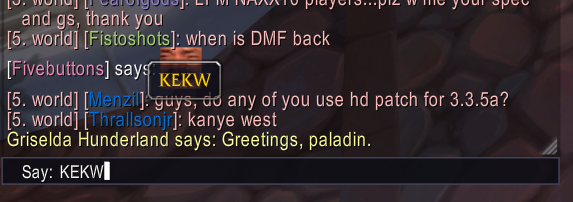
Shows Twitch emotes in your chat by typing them as you would into Twitch.
Simply type peepoHappy and peepoHappy will be in your chat, no Kapp.
If you'd like to request more emotes, please suggest them in the comments and if they're good I'll consider adding them!
There's a minimap dropdown that has a preview of some emotes, but typing an emote as you would on Twitch or Discord with a colon prefix will create a dropdown in your chat that has access to all emotes in the AddOn.
This works by using Tab and Shift-Tab to rotate through options, hit space to select, or click for quick send.
Shift-clicking the minimap also opens a statistics page, where you can see your most used and viewed emotes.
If you see an emote you like and are curious what it was, you can hover over an emote to see its name or shift-click to repost it in your chat.
If you experience green boxes, please reinstall the AddOn; historically this is an issue with AddOn managers having issues downloading all image files.
If you use experience issues in WIM, disable emoji in WIM.
This addon does not access the Twitch API and thus emotes have to be added manually.
Increase performance (hopefully)
- Delay and throttle icon preloading, only preload enabled favourite groups
- Remove global FontString SetText hook; scan chat bubbles only after chat events
- Replace emotes in a single gsub pass
- Cache chat filter result per message (was run and counted once per chat frame)
- Fix duplicate dropdown button creation in UIDropDownMenu
- Precompute lowercase names for autocomplete - Remove unused TwitchEmotes.xml
No changelog available.
Comments (2)
You must be logged in to leave a comment.