

PulseFlash
PulseFlash — Lightweight WoW 3.3.5a (WotLK) rotation assistant & combat HUD. Features dynamic action bar glowing, 3-icon action queue, dedicated buff reminders, custom APL, combat analysis, boss simulator, healer advisor, proc alerts, minimap icon, modern GUI config, 5 visual themes, and per-spec profiles.
Details
Expansion
 Wrath of the Lich King
Categories
Developers

Having issues?
# PulseFlash
**Always know what to press next.**
PulseFlash is a rotation assistant for **World of Warcraft 3.3.5a (Wrath of the Lich King)**. It reads your class, your talent spec and the state of the fight, and shows you the next ability to cast, both on your action bars and in a clean on-screen HUD.
It never presses anything for you. It only tells you what to press, so you stay in full control.
***
## How it works
* **Glow on your action bars:** the right button lights up. Gold means press it now, cyan means it is next, and green means interrupt, defensive or utility.
* **Damage HUD:** three icons show the ability to cast now and the next two, each with its keybind and cooldown.
* **Buff HUD:** a second, separate HUD shows only the buffs you are missing (aspects, seals, auras, armors, poisons, totems and more), with a pulse and golden glow animation.
The damage HUD only shows damage abilities. Buff reminders live in their own HUD.
***
## Rotations for all 10 classes
Every class and spec follows a strict priority rotation built for maximum damage: DoTs and debuffs are kept up before procs, resources and cooldowns are tracked, and the filler spell is repeated when everything else is done.
| Class | Specs |
| :--- | :--- |
| Death Knight | Blood / Frost / Unholy, plus a dedicated tank mode |
| Druid | Balance / Feral (cat and bear) / Restoration |
| Hunter | Beast Mastery / Marksmanship / Survival |
| Mage | Arcane / Fire / Frost |
| Paladin | Retribution / Protection / Holy |
| Priest | Shadow / Discipline / Holy |
| Rogue | Assassination / Combat / Subtlety |
| Shaman | Elemental / Enhancement / Restoration |
| Warlock | Affliction / Demonology / Destruction |
| Warrior | Arms / Fury / Protection |
Smart behavior built in:
* Adapts to the spells your character has already learned at every level.
* Takes glyphs and talents into account.
* Does not recommend DoTs or long cooldowns on targets that are about to die.
* Long cooldowns and damage trinkets are only suggested on bosses (switchable).
* Only instant-cast abilities are recommended while you are moving.
* Automatic **AoE mode** with its own enemy-count thresholds per class.
* **Healer advisor** for Holy, Discipline and Restoration specs: recommends the right-sized heal for the right target, with dispels, tank awareness, raid cooldowns and mana recovery.
* **Multidot assistant** tells you when to switch targets to spread your DoTs.
***
## Features
### Projected queue
Icons 2 and 3 of the HUD are simulated forward using your real rotation (resources, combo points, auras, cooldowns and runes), so they show what you will actually need next.
### Custom APL
Write your own priority list and PulseFlash uses it instead of the class rotation. It is saved per character and per talent spec, and you can import and export lists. The text is parsed safely and never executed as code.
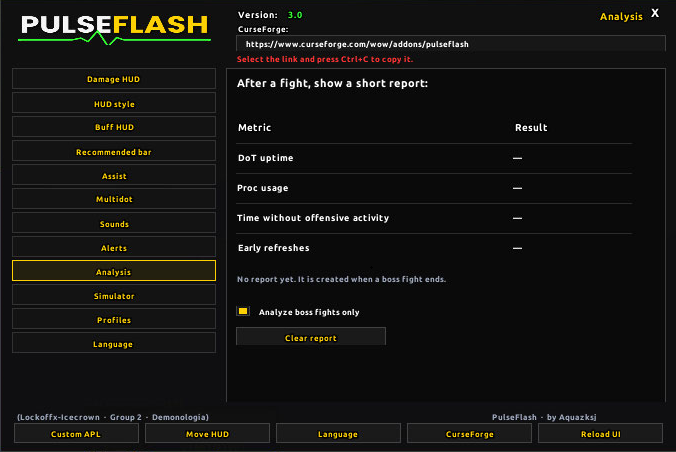
### Combat analysis
After a boss fight you get a report with DoT uptime, proc usage, idle time and early refreshes.
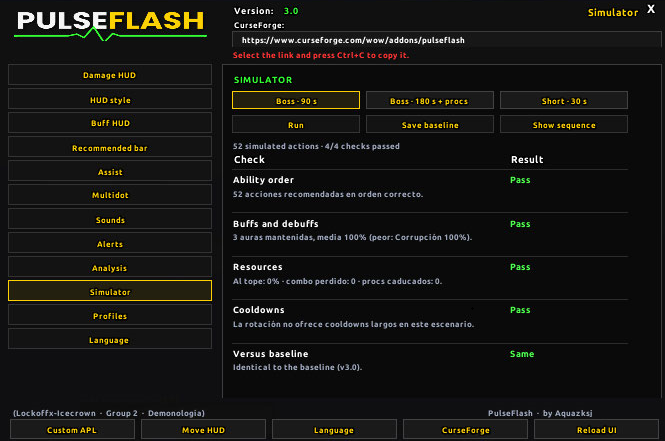
### Scenario simulator
Runs simulated combat scenarios with your class's real rotation and checks ability order, buff and debuff upkeep, wasted resources and cooldown coordination. It also compares against a saved reference, so you can tell whether a change made a rotation worse.
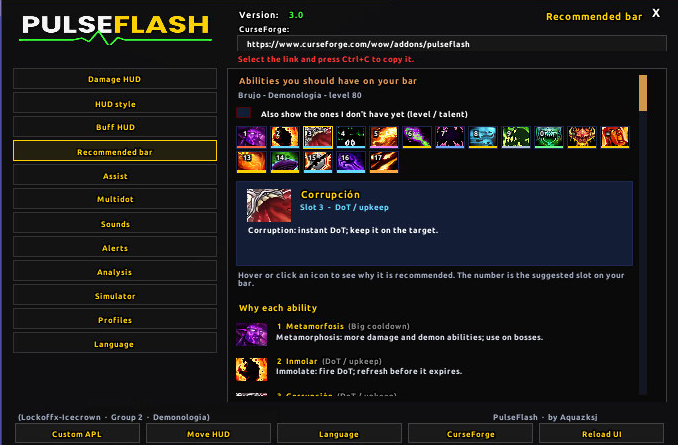
### Recommended bar
A tab that shows the abilities worth having on your action bar for your class and spec, with the reason for each one.
### Extra precision
Stable suggestions with no flicker, a real cooldown countdown, latency compensation, automatic AoE detection and effect timers under the HUD.
### Procs: sounds and on-screen alerts
Configurable sounds for your class procs, plus on-screen alerts with adjustable size and position, and up to 4 custom alerts for any buff or trinket.
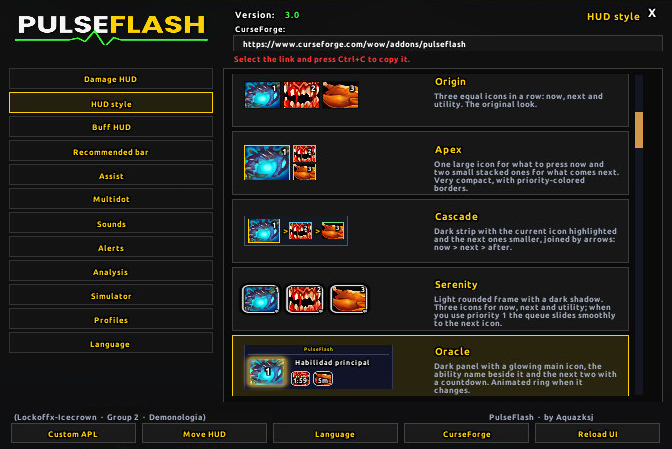
### Five HUD styles
Origin, Apex, Cascade, Serenity and Oracle. Pick the look you like and it applies instantly.
### More
* Per-character and per-spec **profiles**, with cloning between characters.
* **Minimap button** and a dark, modern settings panel.
* Combo point bar for Rogues and Druids.
* Racial reminders, rogue poison reminders, positioning alert for behind-the-target abilities.
* Death Knight **tank mode** (`/pf tank`).
* Interface in **6 languages**: English, Spanish, Russian, Portuguese, German and French.
***
## Lightweight by design
PulseFlash loads on demand. Only the module for **your** class is loaded, and heavy parts such as the settings panel, analysis, simulator, APL and language packs load only when you use them. Use `/pf mem` to see the memory used by each module.
***
## Installation
1. Close the game.
2. Unzip the download. It contains **23 folders**: `PulseFlash` (the core) and 22 modules (`PulseFlash_Config`, `_Loadout`, `_Sim`, `_Analysis`, `_APL`, `_ComboBar`, `_Healer`, the 10 class modules and the 5 language packs).
3. Copy **all of them** to `World of Warcraft\Interface\AddOns\`.
4. Start the game and make sure PulseFlash is enabled on the character screen.
5. Type `/pf` in chat to see the commands.
Your settings are saved on your account, so you keep them when updating. To update, replace all the `PulseFlash*` folders.
> **Important:** do not leave any folder out. If your class module is missing, there will be no rotation.
***
## Main commands
| Command | What it does |
| :--- | :--- |
| `/pf config` | Open the settings panel |
| `/pf lock` / `/pf move` | Lock or unlock the HUD |
| `/pf buffs` | Toggle the buff HUD |
| `/pf aoe` | Toggle AoE mode |
| `/pf tank` | Death Knight tank mode |
| `/pf boss` | Mark or unmark the target as a boss |
| `/pf cds` | Cooldowns: bosses only / always |
| `/pf apl` | Custom APL |
| `/pf lang` | Change language |
| `/pf mem` | Memory per module |
Type `/pf` with no arguments for the full list.
***
## FAQ
**Nothing is glowing.** Select a hostile target, make sure the addon is on (`/pf on`) and that the abilities are on your action bars.
**I cannot see long cooldowns or trinkets.** They are only recommended on bosses. Mark your target with `/pf boss` or use `/pf cds` to see them always.
**Does it press buttons for me?** No. It only shows suggestions.
**The HUD will not move.** Unlock
it first with `/pf lock` or from the minimap button.
CurseForge: https://www.curseforge.com/wow/addons/pulseflash
PulseFlash 3.0
Note: This release jumps three versions ahead of 2.7 because of the sheer amount of content added. It brings new systems, a redesigned interface and a full rotation overhaul.
Rotations
Rotations for every class and spec have been optimized for maximum damage.
DoT and debuff maintenance now always takes priority over procs.
Recommendations no longer depend on distance to the target.
DoTs and long cooldowns are not recommended if the target is about to die.
The rotation adapts to the spells each character has learned at each level.
Glyphs and talents are taken into account.
While moving, only instant-cast abilities are recommended.
Improved AoE mode, with its own enemy-count thresholds per class.
New tank rotations: Bear Druid, Protection Paladin and Warrior, Tank Death Knight.
Feral Druid with optional Cat + Bear weaving (/pf bearweave).
Healers get a new support layer: dispels, tank awareness, raid cooldowns and mana recovery.
New systems
Projected queue: HUD icons 2 and 3 simulate what the rotation will actually recommend after the current ability.
Custom APL: write your own priority list and the addon uses it instead of the class rotation.
Combat analysis: a report after a boss fight (DoT uptime, proc usage, idle time, early refreshes).
Scenario simulator: checks ability order, buffs and debuffs, resource waste and cooldown coordination, and compares against a saved reference.
Recommended bar: the abilities worth having on your action bar, with the reason for each one.
Extra precision: stable suggestions with no flicker, real cooldown countdown, latency compensation, automatic AoE and effect timers.
On-screen proc alerts with configurable size and position, plus more sounds.
Menu in 6 languages: Spanish, English, Russian, Portuguese, German and French.
Interface
Redesigned settings panel: dark theme with a sidebar, logo and a bottom button bar.
New sections: Recommended bar, Assist, Alerts, Analysis, Simulator and Language.
New minimap button icon.
Performance
On-demand loading: each module loads only when needed (your class, the settings panel, languages, etc.).
Optimized core: fewer action bar scans per second and a throttled glow update.
/pf mem shows the memory used by each module.
Fixes
Fixed the error when opening the settings from Interface > AddOns or from the minimap.
Fixed a loading error in a rotation file.
You must be logged in to leave a comment.