

Minimap Button Stash
Collects all addon minimap buttons into one minimap button with a dropdown list (icon + addon name)
Details
Expansion
 Wrath of the Lich King
Categories
Developers

Having issues?
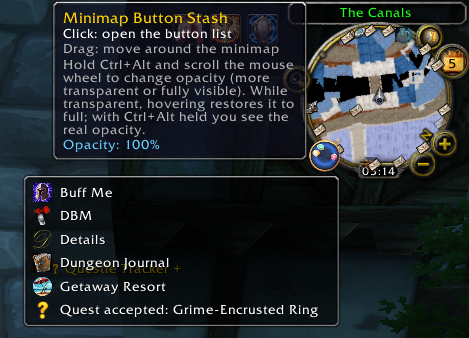
Minimap Button Stash collects all the round addon buttons around your minimap into ONE minimap button. Click it and you get a simple dropdown list:
[icon] Addon name
[icon] Addon name
[icon] Addon name
Features
- One button instead of many: addon minimap buttons are hidden and listed in a single dropdown, sorted alphabetically.
- Buttons keep working: click a row to trigger the original button (left or right click). Hovering a row shows that addon's own tooltip.
- Finds buttons automatically, including LibDBIcon buttons and buttons nested in other frames (for example Atlas). Late-loading buttons are picked up by a periodic rescan.
- Leaves Blizzard's own elements (zoom, tracking, mail, calendar, clock) alone.
- Works with minimap replacements such as DragonUI.
- Drag the launcher button to move it around the minimap.
- Ctrl + Alt + mouse wheel over the launcher changes its opacity (10% to 100%). Hovering a transparent button restores full opacity, unless Ctrl + Alt is held so you can see the real value. The setting is saved.
Commands
/mbs - rescan and show how many buttons were found
/mbs list - list every stashed button with its frame name
/mbs show - put the buttons back on the minimap (until /reload)
/mbs hide - stash them again
/mbs reset - reset launcher position and opacity
Installation
Unzip so you get Interface\AddOns\MinimapButtonStash\MinimapButtonStash.toc, then restart the game or /reload.
Source code and issue tracker: https://github.com/Stradios/MinimapButtonStash
Initial release.
- Collects addon minimap buttons into one dropdown list (icon + addon name).
- Click a row to trigger the original button; hover to see its tooltip.
- Finds LibDBIcon buttons and buttons nested in other frames (e.g. Atlas). Works with DragonUI.
- Draggable launcher button.
- Ctrl + Alt + mouse wheel over the launcher changes opacity; hovering restores full opacity.
- Commands: /mbs, /mbs list, /mbs show, /mbs hide, /mbs reset.
You must be logged in to leave a comment.