
Minimap Button Frame Enhanced
this is a bug free enhanced MBF
Details
Addon ID:
23310
Addon Version:
2.0
Expansion:
3.3.5
Upload date:
Aug 10, 2026
Last Updated:
Aug 10, 2026
Downloads:
149
Website:
Source Link
Expansion
 Wrath of the Lich King
 Categories
Developers

Having issues?
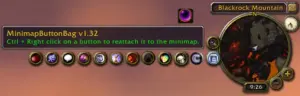
Minimap Button Frame Enhanced collects your cluttered minimap addon icons into a single, clean, movable frame. This enhanced fork adds drag-and-drop icon reordering, 8-direction layout control, smooth reorder animations, and fixes a long list of icon-visibility and stability bugs from the original — while keeping everything that made the original addon simple and reliable.
Minimap Button Frame Enhanced v3.0 Readme.txt

This is an enhanced fork of "Minimap Button Frame" originally created by Bachlott.
All credit for the original addon's design and functionality belongs to Bachlott.
This fork is maintained by Angelouss. See the "Enhanced Fork Changelog" section
below for what's different from the original.

Installation is the same as it is for most other WoW addons.
Unpack the files to your  Worldofwarcraft/Interface/Addons   directory.


This addon will gather up most of your minimap addon buttons and put them into a movable frame.

If a button is not automatically gathered use the /mbf add command to attempt to gather it.
If you want to remove a button from the frame use the /mbf remove command to remove it.
If you would like to return it to the frame just use /mbf add on the button.

MBF Will not gather buttons the do not have a name.  Currently I have only discovered two addons that create their minimap buttons this way.
OnRaid and Enchantrix.

Blizzard minimap buttons that are not always visible (Battleground, LFG) will only appear on the frame when they are normally shown.

Key Bindings can be setup for both add and remove as well as for hiding and showing the frame.

The Minimap Icons and Button Override settings are more advanced features.
The Minimap Icons setting is for icons such as the nodes in GatherMate and gatherer that shouldn't be collected.
The Button Override is for buttons that will not gather automatically and a manual add gives the "Cannot add.  Protected or already included!" error.

Commands:

   /mbf			- displays the command line options in the chat frame
   /mbf add <button>	- adds a non gathered button to the frame.  <button> is optional.
			  If it's not included then the item under the cursor will be gathered.
   /mbf remove <button> - removes a gathered button from the frame.  <button> is optional.
			  If it's not included then the item under the cursor is removed.
   /mbf show		- shows the Main MBF Frame
   /mbf hide		- hides the Main MBF Frame
   /mbf info		- shows information about the object under the cursor
   /mbf config		- shows the configuration screen
   /mbf help		- shows command help and information

Minimap Button:

<Left-click>           - to show / hide the frame and all the buttons.
<Shift-click>          - to show the config screen.
<Right-click> and drag - to move the minimap button anywhere.


History


Enhanced Fork Changelog (Angelouss)

2.0  -	New    - Renamed to "Minimap Button Frame Enhanced".
	New    - Drag icons directly on the frame to reorder them (Custom sort
		 order). Off by default for safety - enable via Config > Sorting
		 or the right-click menu on the minimap icon, so an ordinary
		 click can never accidentally move something.
	New    - Smooth slide animation when icons get rearranged.
	New    - "Fill Order" setting: choose any of 8 directions (Left/Right/
		 Up/Down, primary + wrap) instead of the old separate Grow Up
		 and Sort By Rows toggles.
	New    - Columns and Rows are now two independent settings instead of
		 one shared value whose meaning changed based on a toggle.
	Fixed  - Several addons' minimap icons (WeakAuras, Grid2, BugSack,
		 NotPlater, Details, Saved Instances, Method Raid Tools, and
		 others) could appear black or missing depending on how that
		 addon draws its own icon texture.
	Fixed  - Alphabetical sort was case-sensitive, so lowercase-leading
		 addon names could sort in the wrong place.
	Fixed  - Custom sort order could keep stale entries for buttons no
		 longer gathered, throwing off the whole layout.
	Fixed  - A locale-loading error could crash the entire addon on load
		 for some users.
	Fixed  - The frame could size itself larger than the icons actually
		 visible, if any gathered Blizzard button (LFG, Battleground)
		 was temporarily inactive.
	Fixed  - The drag/restore handle could still appear even while the
		 frame was Locked.
	Fixed  - Several Interface Options panel bugs (wrong category nesting,
		 About panel showing incorrect text, config not opening from
		 shift-click, /mbf, or the minimap icon's right-click menu).
Main Variation
You must be logged in to leave a comment.