
MacroForm
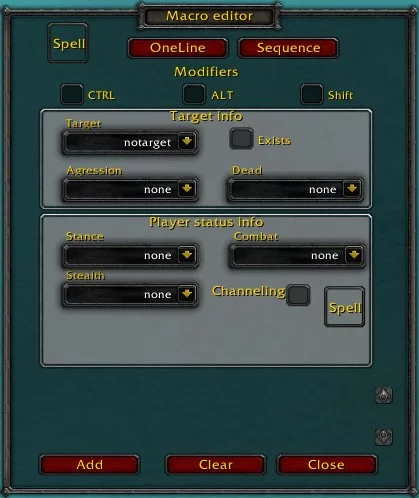
This addon helps the user write conditional macros using only the mouse.
Details
Expansion
 Wrath of the Lich King
 Categories
Developers

Having issues?
This addon helps the user write conditional macros using only the mouse.
Not all available conditions have been implemented but the ones that are used the most are.
No more spelling errors when creating macros.
Usage:
type “/mf” to bring up the UI.
Drag a spell/ability from the spellbook to the spell button in the main frame.
Select the conditions that you want to use.
Press add.
Select a new set of conditions (and a new spell if needed).
Press add again.
Repeat until the macro is complete.
Copy and paste into the normal macro window.
For castsequence hit the Sequence button at the top (OneLine to go back).
Set the conditions and reset conditions for your macro.
Drag in a spell from you spell book to the spell button.
Press add.
Drag in a new spell.
Press add and so on until you’re done.
Copy the script from the bottom of the window and paste it in to the macro.
Colours will show the role that a specific part of the macro plays – command,
ability, condition and so on. Red indicates that something is wrong and that the
macro most likely will not work.
You must be logged in to leave a comment.