

Johnny’s Warmane Addon Hub
One tidy launcher for all of Johnny's addons - a slim drawer on the screen edge that slides out on hover.
Details
Expansion
 Wrath of the Lich King
 Categories
Developers

Having issues?
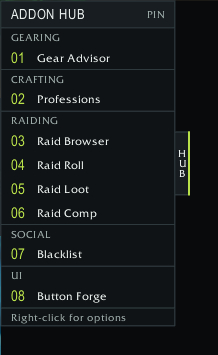
Johnny's Warmane Addon Hub is a single launcher for all of Johnny's addons. Instead of a row of minimap buttons, you get a slim "HUB" tab on the edge of your screen. Hover it and a drawer slides out with a button for each of Johnny's addons you have installed, grouped by type.
What it opens
- Gearing: Gear Advisor
- Crafting: Professions
- Raiding: Raid Browser, Raid Roll, Raid Loot, Raid Comp
- Social: Blacklist
- UI: Button Forge's edit mode (if you use Button Forge)
Only addons you have installed and enabled are shown, so the drawer always matches your setup.
Features
- Hover the tab to slide the drawer out, or click it to pin it open.
- Dock it to the left, right or top edge, and drag the tab to move it along that edge.
- Right-click for options: keep open, open on hover, which edge, and which launchers are listed.
- While it's installed, Johnny's other addons hide their own minimap buttons, so your minimap stays clear.
/hub shows or hides it. /hub left, right or top moves it, and /hub reset puts it back to default.
Made for Warmane 3.3.5a. It does nothing on its own; install it alongside any of Johnny's addons.
Feedback and bug reports: https://github.com/JohnnyL1993/JohnnysAddonHub/issues
2.3
- Right-click the tab or drawer for an options menu: keep open, open on hover, dock to left, right or top, and tick which launchers are listed.
2.2
- New blue-black "workshop" look with a lime accent.
- The always-on launcher bar is replaced by a slim drawer on the screen edge that slides out on hover or click-to-pin.
- Update checks from all of Johnny's addons share one slow queue, so logging in with several no longer trips the chat mute.
2.1
- New Professions button.
- Chat notice when a newer version is available.
2.0
- First release.
You must be logged in to leave a comment.