Details

Addon ID: 24127
Addon Version: 1.2.0
Expansion: 3.3.5
Upload date: Sep 28, 2026
Last Updated: Oct 04, 2026
Downloads: Less than 100
Website: Source Link


ItemTracker

A configurable, movable, action-bar-style item tracker addon for World of Warcraft 3.3.5a (Wrath of the Lich King).

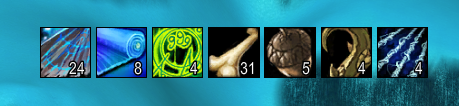
Create as many tracker bars as you want, each showing live bag+bank counts for whatever items you care about — flasks, enchanting mats, quest tokens, whatever — right on your screen, styled to match your UI (with optional ElvUI support). Pick each bar's items by hand, or let a bar auto-populate from a whole item category instead.


Features

  • Multiple bars — create, rename, and delete as many independent tracker bars as you want, each with its own items, position, lock state, and layout, all managed from one config window with a bar selector.
  • Live counts — bag + bank totals, updated automatically as you loot, use, trade, or visit the bank.
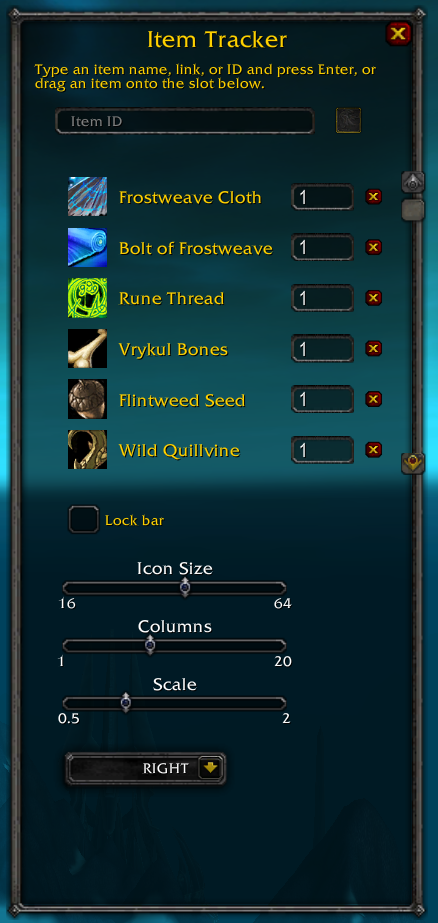
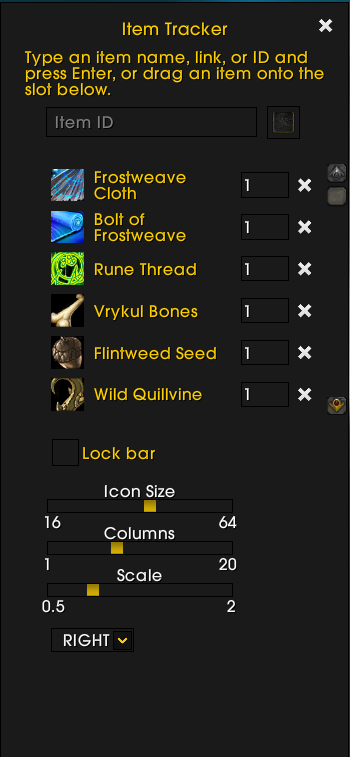
  • Add items your way — type a name, paste an item link, type a numeric item ID, or just drag the item onto the config window.
  • Category filters — instead of picking items by hand, auto-populate a bar from the game's own item classification (e.g. "Trade Goods → Enchanting"); it live-updates as matching items are acquired or lost.
  • Low-stock warnings — set a threshold (per item on a manual bar, one shared threshold on a filtered bar); the icon and count turn red when you're running low.
  • Optional bar title — show a bar's name next to its icons, with a choice of side, a position nudge, and an adjustable font size.
  • Fully configurable bar — icon size, items per row, maximum rows (0 = show all), growth direction (right/left/down/up), scale, and lock-in-place.
  • Movable — drag the bar (or any icon on it) to reposition; position is remembered per character.
  • Optional ElvUI skin — automatically matches ElvUI's flat style if you have it installed; looks and works fine without it too.


Installation

  1. Grab the latest zip from the Releases page (see CHANGELOG.md for what's new), or copy/symlink the ItemTracker/ folder from this repo directly.
  2. Extract (or place) it into your WoW Interface/AddOns/ directory, so you end up with Interface/AddOns/ItemTracker/ItemTracker.toc.
  3. Make sure it's enabled at the character-select AddOns list.
  4. Log in — that's it, no configuration required to get started.

Usage

Open the config window with:

/itemtracker

or the shorter

/itr

From there:

  • Use the bar dropdown at the top to switch which bar you're editing, rename it, or add/delete bars.
  • Manual bars: type an item's name, paste its link (shift-click it), or type its numeric ID into the box and press Enter — or just drag the item onto the slot next to it. Set a threshold on any tracked item; its count turns red once you drop below that number.
  • Category-filtered bars: pick a Category (and optionally a narrower Subcategory) instead of adding items by hand — the bar shows every matching item you currently own and keeps it live-updated. Set one shared Low Stock Threshold for the whole bar.
  • Optionally check "Show Title" to display the bar's name next to its icons, and pick which side it sits on, nudge its exact position, and adjust its font size.
  • Adjust icon size, items per row, maximum rows, growth direction, and scale with the sliders/dropdown — the bar updates live as you change them.
  • Drag the bar (or click-drag any icon on it) to reposition it, then check "Lock bar" to keep it in place.
  • Press Escape or click the × to close the config window.

[3.3.5-v1.2.0] - 2026-10-04

Added

  • Category filters — a bar can auto-populate from the game's own item type/subtype classification (e.g. "Trade Goods > Enchanting") instead of a manually curated list, live-updating as matching items are acquired or lost.
  • Bar title — optionally show a bar's own name next to its icons, with a choice of side (top/bottom/left/right), a position nudge, and an adjustable font size.
  • Maximum Rows — cap how many rows of items a bar displays at once (0 = show all, however many rows that takes).

Changed

  • The config window's bar-options section is now two columns (parameters on the left, items on the right) instead of one long stacked list.
  • The "Columns" slider is now labeled "Items per Row" (same setting, clearer name).

[3.3.5-v1.1.0] - 2026-10-04

Added

  • Multiple bars — create, rename, and delete any number of independent tracker bars from one config window with a bar selector. Each bar has its own tracked items, position, lock state, icon size, columns, growth direction, and scale.

Changed

  • Existing single-bar saved data is migrated automatically into a bar named "Bar 1" the first time you log in after updating — no data loss, no action needed.

[3.3.5-v1.0.0] - 2026-09-27

Added

  • Initial release: configurable, movable, action-bar-style item tracker.
  • Add tracked items by name, item link, numeric ID, or drag-and-drop.
  • Live bag + bank count updates.
  • Per-item low-stock threshold with a red warning color.
  • Configurable icon size, columns, growth direction, scale, and lock-in-place.
  • Optional ElvUI skin support.

Initial release

You must be logged in to leave a comment.

Comments (0)