

GuildNotes
An easy-to-use DKP top list addon that instantly ranks online and offline guild members by their officer notes
Details

Expansion
 Wrath of the Lich King
 Categories
Developers

Having issues?
# GuildNotes & DKP Top List (WotLK 3.3.5a)
### Overview
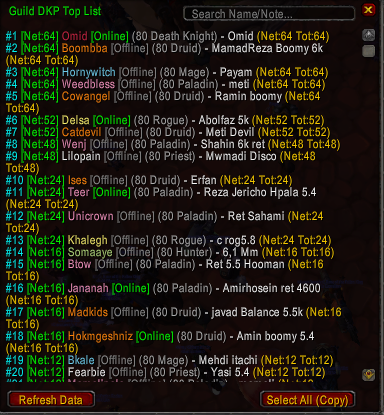
**GuildNotes & DKP Top List** is a lightweight, clean, and essential utility addon designed for World of Warcraft (Wrath of the Lich King 3.3.5a). It allows Guild Masters, Raid Leaders, and members to effortlessly browse guild notes and instantly view a sorted leaderboard of member DKP directly from Officer Notes.
No more tedious manual checking of the default Blizzard guild panel—view everything in a sleek, movable, and searchable interface.
---
### Key Features
- **Automatic DKP Ranking:** Automatically parses `Net` and `Tot` values from Officer Notes and sorts players in descending order (highest to lowest DKP).
- **Online & Offline Support:** Seamlessly displays both online and offline guild members so nobody is left out of the standings.
- **Real-Time Live Search:** Quickly find any member or filter by specific keywords in real time.
- **Class Colored Names:** Visual clarity with authentic class colors for each guild member.
- **Public & Officer Notes:** Easily switch between regular guild notes and competitive DKP leaderboards.
- **Lightweight & Fast:** Minimal memory footprint, smooth scrolling, and zero FPS drops during raids.
---
### How It Works
1. **Officer Note Parsing:** The addon looks directly into member Officer Notes for standard DKP formats (such as `Net: 24 Tot: 24`).
2. **Instant Sorting:** It automatically reads the current (`Net`) balance and arranges every member on the leaderboard from top earner to lowest.
3. **Movable UI:** Open the window anywhere on your screen, drag it where you need it, and use the search bar to filter on the fly.
---
### Slash Commands
- `/dkptop` — Opens the Guild DKP Leaderboard sorted from highest to lowest DKP.
- `/gn` or `/guildnotes` — Toggles the main Guild Notes window.
---
### Installation
1. Download the addon folder.
2. Extract or place the `GuildNotes` folder inside your WoW directory:
`World of Warcraft\Interface\AddOns\`
3. Restart your game or reload your UI (`/reload`).
---
No changelog available.
You must be logged in to leave a comment.