Details

Addon ID: 24176
Addon Version: 0.40.0-wotlk
Expansion: 3.3.5
Upload date: Oct 01, 2026
Last Updated: Oct 10, 2026
Downloads: 168
Website: Source Link


Gather Alee is a standalone gathering addon designed for World of Warcraft: Wrath of the Lich King 3.3.5a, with compatibility focused on Warmane and other compatible 3.3.5a servers.

It provides gathering-node tracking on the World Map and Minimap, farming-session tools, profession-based filtering, gathering guides, a configurable radar and a persistent learned-node database.

Main Features

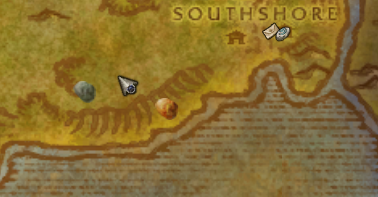
  • Gathering nodes on the World Map
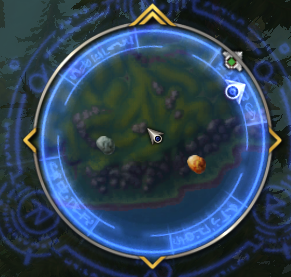
  • Gathering nodes on the Minimap
  • Static Classic and The Burning Crusade gathering database
  • Learned and saved Northrend / WotLK gathering locations
  • Automatic profession detection
  • Profession-specific node filtering
  • Optional filtering of nodes above your current gathering skill
  • Optional filtering of low-level nodes
  • Profession-level detection for filtering
  • Farming Radar
  • Farming Session HUD
  • Session timer with start, pause and resume controls
  • Gathered-material counters
  • Per-profession counters
  • Last gathered item display
  • Shared learned-node database between characters
  • Estimated and adaptive respawn tracking
  • Custom node tooltips
  • Configurable World Map and Minimap icon size
  • Independent opacity controls
  • Customizable UI themes
  • Customizable window borders
  • Minimap button
  • English, Spanish and Latin American Spanish support

Supported Gathering Types

Gather Alee currently supports:

  • Herbalism
  • Mining
  • Fishing
  • Skinning
  • Gas Clouds / Engineering
  • Treasure

The addon can automatically detect your gathering professions and only display the categories relevant to your character.

Profession filtering can also be customized manually from the addon settings.

Static and Learned Gathering Nodes

Gather Alee uses two different node systems depending on the expansion content.

Classic & The Burning Crusade

Mining, Herbalism and Fishing locations use a bundled static gathering database.

These nodes are available immediately and do not need to be discovered manually.

Wrath of the Lich King

Northrend gathering locations can be learned while playing.

When a supported gathering location is discovered through normal gameplay, Gather Alee can store the location in its persistent database so it remains available later.

Learned data is shared between your characters through the addon's SavedVariables.

Skinning and Gas Cloud locations can also use learned data.

Profession Skill Filtering

Gather Alee can detect your current gathering skill level.

Two optional filters are available:

  • Hide nodes above my gathering skill
  • Hide low-level nodes

The low-level filter automatically hides gathering nodes that are significantly below your current profession skill, helping reduce map clutter while leveling.

Farming Session

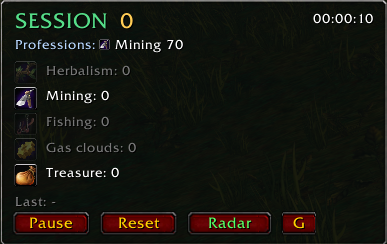
The Session window provides a compact overview of your current farming activity.

It can display:

  • Session timer
  • Total gathered materials
  • Individual profession counters
  • Last gathered item
  • Active gathering professions

The timer can be controlled directly from the Session window.

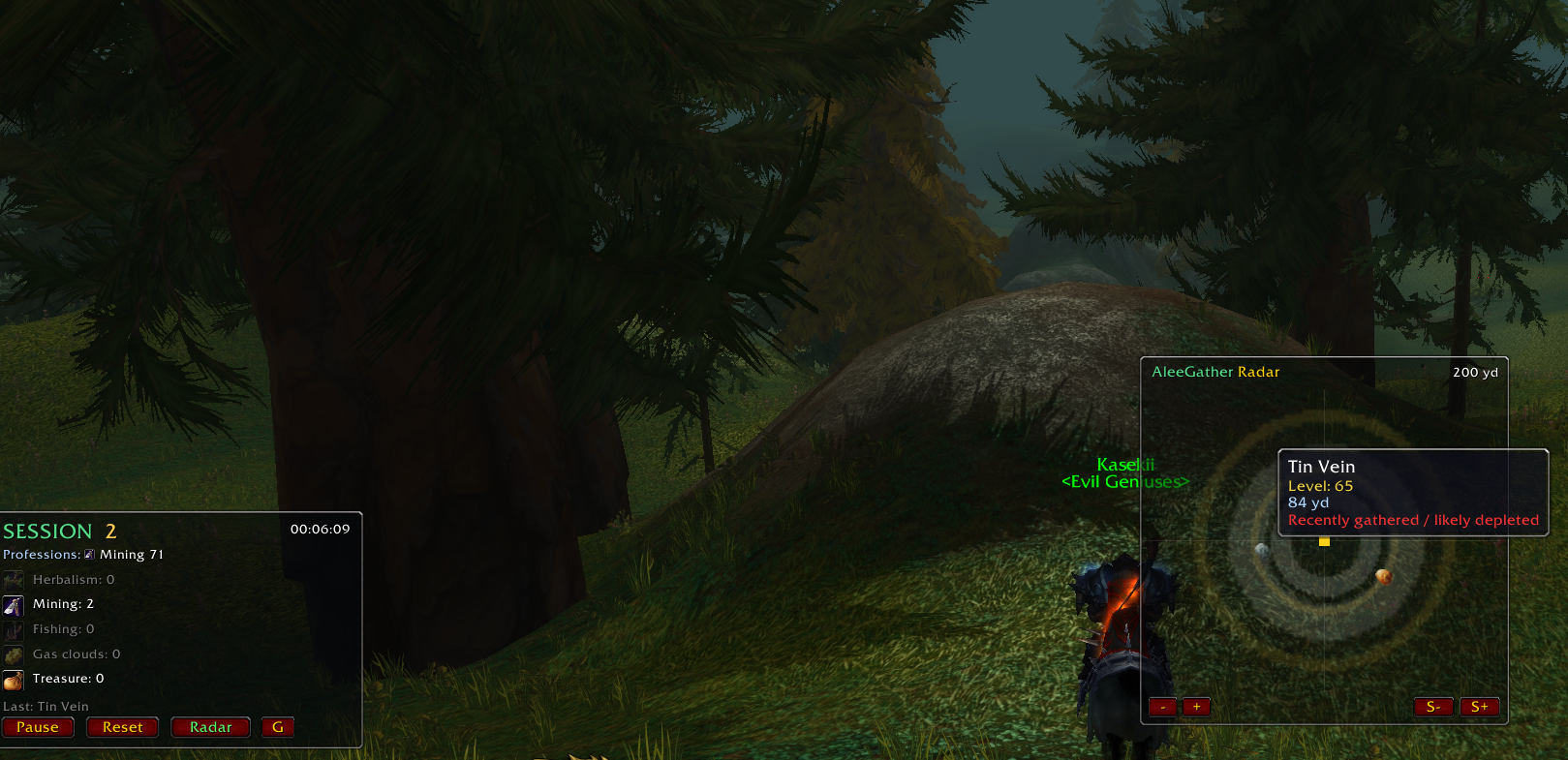
Farming Radar

The Radar provides a compact view of nearby gathering locations.

It includes:

  • Adjustable range
  • Adjustable radar size
  • Zoom controls
  • Profession filtering
  • Node icons
  • Adjustable opacity

The Radar uses the same gathering database and profession filters as the World Map and Minimap.

Gathering Guides

Gather Alee includes profession leveling guides with recommended gathering ranges and route maps.

Current guide support includes:

Mining

  • Skill progression from 1 to 450
  • Recommended zones
  • Node requirements
  • Multiple farming routes

Herbalism

  • Skill progression from 1 to 450
  • Recommended herbs
  • Recommended zones
  • Multiple farming routes

Skinning

  • Skill progression from 1 to 450
  • Recommended zones
  • Suggested creatures
  • Outland and Northrend progression

Guide stages and route maps can be changed directly from the Guide window.

Customizable Interface

Gather Alee includes several selectable UI styles.

Available themes include:

  • Classic
  • Retail
  • WoW Forever
  • The Burning Crusade
  • Midnight
  • Pandaria

Window borders can be selected independently from the UI theme, allowing different combinations.

The interface also includes configurable opacity for:

  • World Map nodes
  • Minimap nodes
  • Guide
  • Radar

Node Tooltips

Gathering-node tooltips can display:

  • Node name
  • Gathering category
  • Required profession skill
  • Distance when available

Tooltips are designed to remain readable near the edges of the screen and while using the Minimap or World Map.

Commands

  • /ag — Open AleeGather settings
  • /aleegather — Open settings
  • /ag hud — Toggle Session HUD
  • /ag radar — Toggle Radar
  • /ag guide — Open Gathering Guide
  • /ag reset — Reset the current farming session
  • /ag import — Import compatible gathering data
  • /ag debug — Toggle debug mode

Compatibility

Designed for:

  • World of Warcraft: Wrath of the Lich King 3.3.5a
  • Interface 30300
  • Warmane
  • Other compatible 3.3.5a servers

Gather Alee is standalone and does not require Ace3.

Limitations

WoW 3.3.5a does not provide addons with direct access to the server's complete live gathering-node spawn database.

Static markers represent known gathering locations, while learned markers represent locations recorded through gameplay.

Actual node availability and respawn times can vary depending on the server.

Credits & Licenses

Gather Alee contains or uses data, artwork references and compatibility work derived from or designed to work with established WoW addon projects.

Relevant third-party portions retain their original licenses and attribution requirements.

Included license and notice files should be kept with the addon distribution.

Projects or data sources used by Gather Alee may include:

  • pfQuest — gathering-location data and compatible gathering artwork
  • GatherMate / GatherMate_Data — compatible import support and related legacy data structures where applicable

All World of Warcraft names, icons and game assets are property of Blizzard Entertainment.

AleeGather-specific code, interface work and original addon assets are maintained as part of the Gather Alee project.


Changelog — v0.98

Gather Alee v0.98

This update focuses on UI improvements, profession filtering, gathering-node handling and general usability.

Interface

  • Added multiple selectable UI themes
  • Added independently selectable window-border styles
  • Redesigned Session, Radar, Guide and Config windows
  • Added thinner customizable window borders
  • Improved button layout and Blizzard-style button artwork
  • Improved node tooltips
  • Improved tooltip positioning near screen edges
  • Added ESC support for closing supported addon windows
  • Improved layout and spacing throughout the interface

Gathering Nodes

  • Added bundled static Classic/TBC gathering locations
  • Improved pfQuest-based node artwork
  • Improved gathering-node skill requirements
  • Added persistent learned-node support for Northrend
  • Improved duplicate-node handling
  • Learned WotLK gathering locations persist between sessions
  • Improved static-node skill detection

Profession Filtering

  • Automatic gathering-profession detection
  • Manual profession category selection
  • Added Hide nodes above my gathering skill
  • Added Hide low-level nodes
  • Low-level filtering automatically uses detected profession skill

Session

  • Improved Session HUD layout
  • Profession counters dynamically adapt to enabled categories
  • Improved session timer controls
  • Gathering counters remain independent from timer state

Radar

  • Improved Radar design
  • Adjustable range
  • Adjustable size
  • Zoom and size controls
  • Profession-based filtering

Guide

  • Improved Mining guide
  • Improved Herbalism guide
  • Added Skinning guide
  • Improved route navigation
  • Improved guide window layout
  • Added profession-specific route information

Languages

  • English
  • Spanish
  • Latin American Spanish

No changelog available.

Changelog - v0.40

Added

  • Added full Skinning support.
  • Added Skinning profession detection for both English and Spanish clients.
  • Added support for the Spanish skill name "Desollar".
  • Added Skinning route guides from 1 to 450.
  • Added Skinning route images for Classic, Outland, and Northrend zones.
  • Added short route descriptions explaining which creatures to kill and skin.
  • Added Skinning to the farming session HUD.
  • Added a dedicated Skinning icon.
  • Added profession-based filtering for Skinning.
  • Added an option to unlock profession filtering manually.
  • Added separate opacity controls for World Map nodes, Minimap nodes, Radar, and Guide window.
  • Added adaptive respawn learning based on player gathering activity.
  • Added shared learned node data across characters on the same account.

Improved

  • Improved profession detection for:
    • Mining
    • Herbalism
    • Fishing
    • Engineering
    • Skinning
  • Improved support for English and Spanish 3.3.5a clients.
  • Improved the Gathering Guide structure.
  • Improved route navigation between skill ranges and maps.
  • Improved session tracking to count gathered item quantities.
  • Session counters now continue working while the timer is paused.
  • Improved the Session HUD layout and spacing.
  • Improved WoW-style borders for Session, Radar, and Guide windows.
  • Improved profession filtering behavior so it is enabled by default.
  • Improved Gas Cloud labeling to clearly identify it as an Engineering gathering resource.

Fixed

  • Fixed Skinning not being detected on Spanish clients.
  • Fixed Herbalism guide route images not loading.
  • Fixed the Guide button after the Herbalism guide update.
  • Fixed several guide image path issues.
  • Fixed session counters incorrectly counting only one item per gathering action.
  • Fixed hidden or misaligned Session HUD elements.
  • Fixed profession filter inconsistencies.
  • Fixed several outdated and unused code paths.

Cleanup

  • Removed unused helper functions.
  • Removed obsolete configuration code.
  • Removed unused assets and legacy references.
  • Cleaned and reorganized the addon for public release.
  • Updated addon metadata for WotLK 3.3.5a / Interface 30300.
  • Added release-ready documentation for CurseForge.

Compatibility

  • World of Warcraft: Wrath of the Lich King 3.3.5a
  • Interface 30300
  • Warmane
  • Other compatible WotLK 3.3.5a private servers

No changelog available.

You must be logged in to leave a comment.

Comments (0)