
EasyCopy
EasyCopy


Details
Addon ID:
14585
Addon Version:
EasyCopy v3.2
Expansion:
3.3.5
Upload date:
Nov 04, 2025
Last Updated:
Nov 04, 2025
Downloads:
550
Expansion
Categories
Developers

_ForgeUser55723
Creator
Having issues?
This is an AddOn designed to easily copy chat. The focus of this work was to use as little system ressources as possible. In version 3 most of the core code was revisited and optimized.
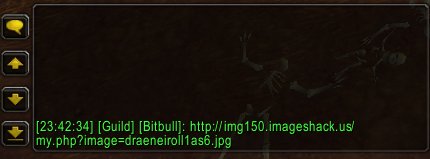
The main feature of this AddOn is obviously copying chat. To do so, you have to click on the timestamp created in front of each line. You can of course replace the timestamp with any custom word / letter.
Timestamp behavior:
- normal click: Opens a small window containing the chat line. You can then mark the text and copy it using [Ctrl]+[C] to paste it later, or in different Applications (paste: [Ctrl]+[V] )
- normal click while the chatbox is opened: will paste the line into the chatbox
- shift click: Instantly pastes the line to the last "sticky" chat-type (guild, raid, party...)
- shift click while the chatbox is opened: Instantly pastes the line to the whatever chat-type your editbox is set to (especially usefull for pasting in whisper)
Additional features:
- remember how clicking a character name opens the chatbox to whisper the character? EasyCopy adds similar behavior to any chat-type-identifier ( [Guild], [Raid], [6. btrogues], ...)
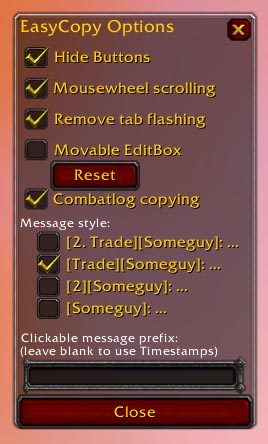
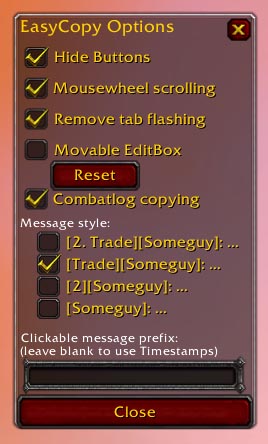
- hide the buttons for scrolling next to the chat
- mousewheel scrolling
- shorten chat-type-identifiers ( [Guild] => [G] ), or completely hide them
- Move the Edit box and Options box around by clicking left-mouse button on the top/header part.
Type /ec to bring up the options frame. You can monitor the memory usage by typing /ec memory .
If you like my work, please donate!

The main feature of this AddOn is obviously copying chat. To do so, you have to click on the timestamp created in front of each line. You can of course replace the timestamp with any custom word / letter.
Timestamp behavior:
- normal click: Opens a small window containing the chat line. You can then mark the text and copy it using [Ctrl]+[C] to paste it later, or in different Applications (paste: [Ctrl]+[V] )
- normal click while the chatbox is opened: will paste the line into the chatbox
- shift click: Instantly pastes the line to the last "sticky" chat-type (guild, raid, party...)
- shift click while the chatbox is opened: Instantly pastes the line to the whatever chat-type your editbox is set to (especially usefull for pasting in whisper)
Additional features:
- remember how clicking a character name opens the chatbox to whisper the character? EasyCopy adds similar behavior to any chat-type-identifier ( [Guild], [Raid], [6. btrogues], ...)
- hide the buttons for scrolling next to the chat
- mousewheel scrolling
- shorten chat-type-identifiers ( [Guild] => [G] ), or completely hide them
- Move the Edit box and Options box around by clicking left-mouse button on the top/header part.
Type /ec to bring up the options frame. You can monitor the memory usage by typing /ec memory .
If you like my work, please donate!

You must be logged in to leave a comment.