

coolstats
Raid Logs In-Game. A faster way to understand a player before the pull.
Details

Expansion
 Wrath of the Lich King
 Categories
Developers
Having issues?
coolstats
coolstats brings UwU Logs lookups, a searchable player browser, cached gear and talent inspection, and an optional character-panel overhaul together inside the game.
Supported realms:
OnyxiaLordaeronIcecrown
It is built for raid formation and pugging: instead of repeatedly leaving the game to look players up, you can quickly see their parses, rankings, available specializations, and any equipment or talent snapshots you have previously cached.
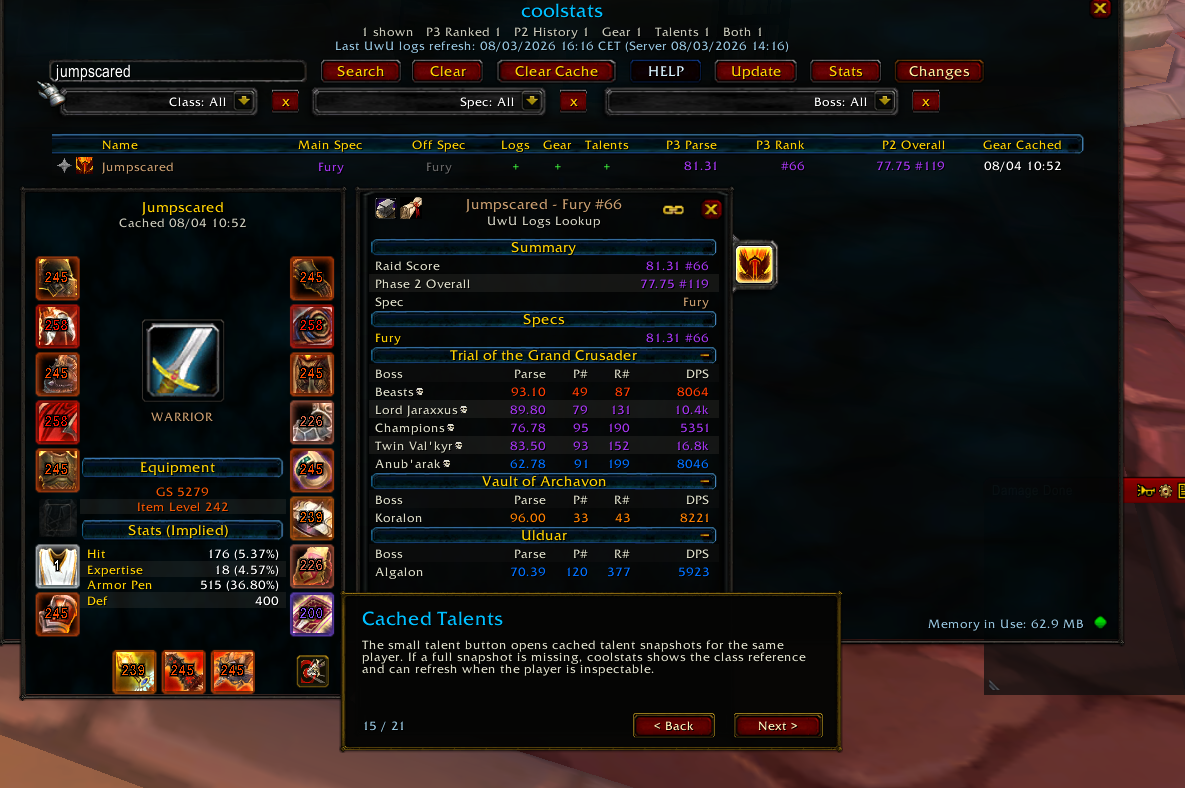
NEW UPDATE! FEATURE TUTORIAL! (08/04/2026 - v.38)
- Guides first-time users through the core features of coolstats via a guided click-through pop-up tutorial
- Added the first-run feature guide with delayed startup, tell-message sounds, a pulsing welcome glow, and character-aware completion.
- Added a new CHANGELOG section to the browser, allowing for a brief overview of new updates.
UPDATED MEMORY USAGE OPTIMIZATION! (08/03/2026 - v.37)
- Each Raid has its own chunking infrastructure now, helping us reduce overall memory load and heap
- Restructured addon architechture, introduced new log sharding and optimized memory usage
- Enriched the SETTINGS to reflect latest chunking changes: Players can now actively disable logs for specific raids (i.e., disable VOA, TOGC, Ruby Sanctum, etc. pp.)
- Shipped refreshed dynamic ranked chunk tranches for the in-game data-load slider: Onyxia 17,108 total players in 6 chunks, Lordaeron 15,199 total players in 6 chunks, and Icecrown 34,703 total players in 12 chunks.
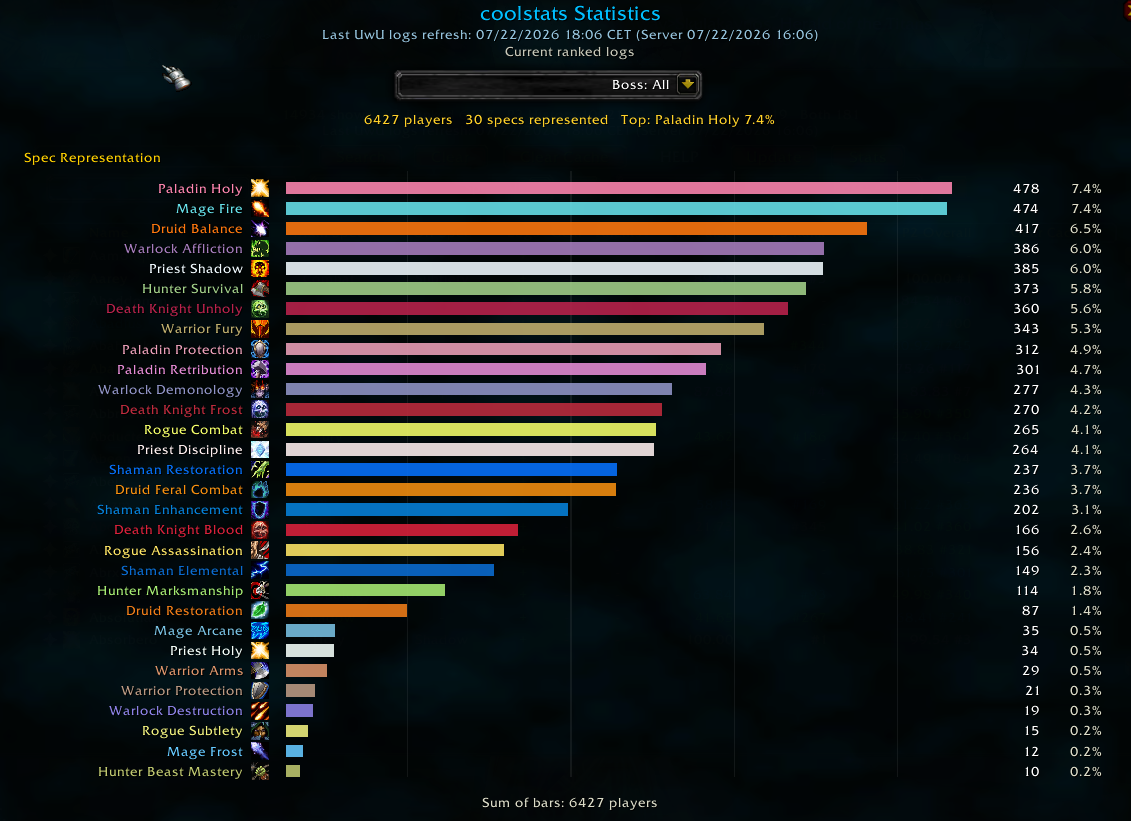
NEW FEATURE! Class Representation Statistics in the Player browser (07/22/2026 - v.34)
- Added the Statistics panel from the player browser, with class/spec representation bars, counts, percentages, a bottom sum, and a realm-aware boss drilldown selector.
- Right-aligned class/spec labels into their spec icons for a cleaner chart layout.
- Fixed browser and logs panel tabard backgrounds so the tabard texture stays visible above the black fallback backdrop.
Icecrown and Lordaeron Coverage Update (07/11/2026 - v.26)
- Expanded Icecrown ICC data to the top 1,500 ranked players per specialization, shipping 33,784 current ranked players without importing boss-only or rankless rows.
- Expanded Lordaeron ICC data to the top 1,000 ranked players per specialization, shipping 14,978 current ranked players without importing boss-only or rankless rows.
- Kept Icecrown and Lordaeron boss parses limited to players with current ranked ICC coverage to avoid the oversized rankless-player data issue from 0.2.24.
New Major Feature in 0.22! Log Linking and Sharing
- Players who have the addon can now share and link player logs inside of the in-game chat.
- Clicking the link opens up the logs of said player if present in the database of both the person linking and the person opening the link
- Added compact
[coolstats: Player]chat tokens that open logs for players running 0.2.22 or later.
Core Features
- Bundled UwU Logs database containing up to the top 400 players for every class specialization.
- Overall raid score, best rank, and specialization-specific parse data.
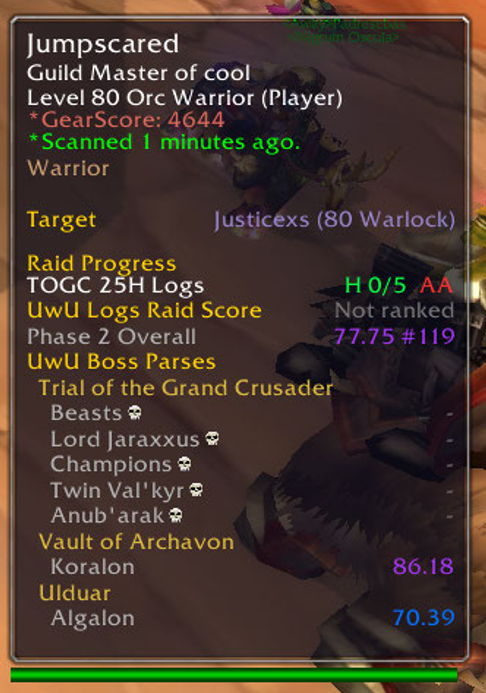
- Individual boss parses directly inside player tooltips by holding
ALT. - Parse colors and specialization icons make results easy to scan.
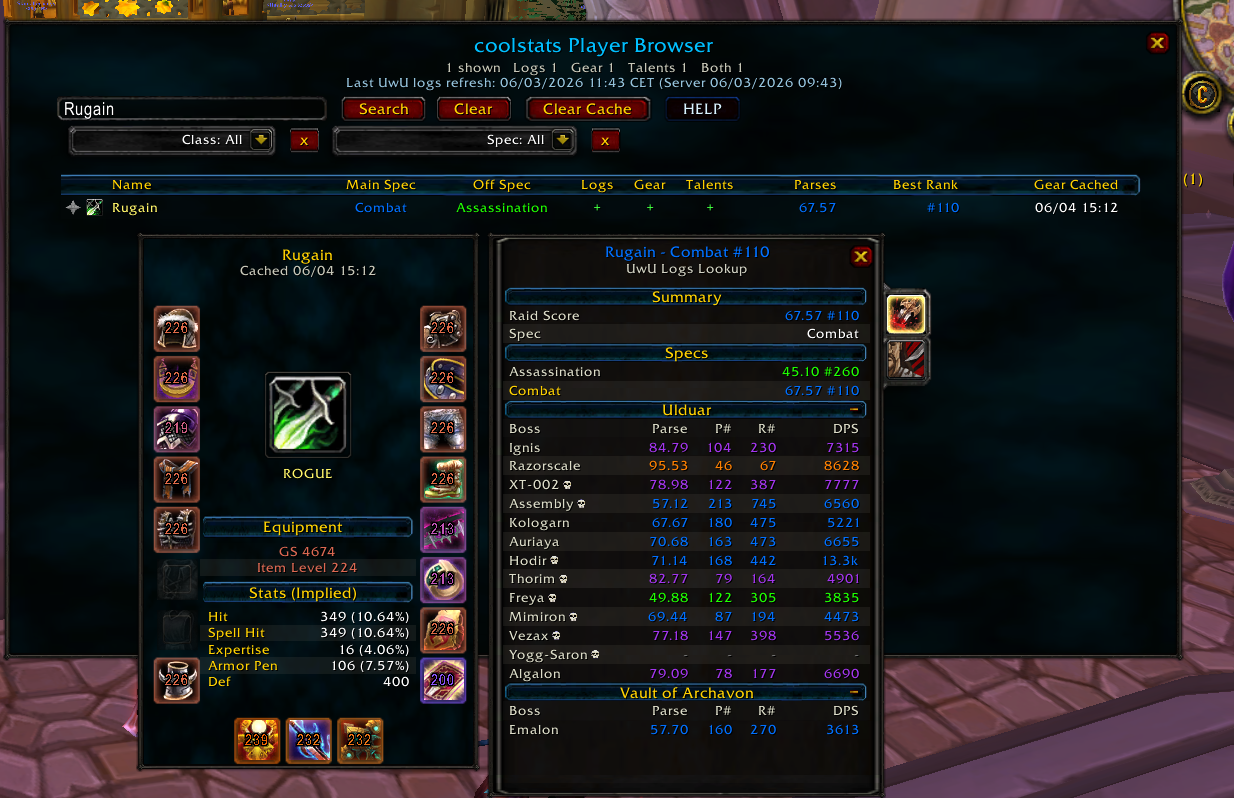
- Dedicated logs panels show every available specialization for a player.
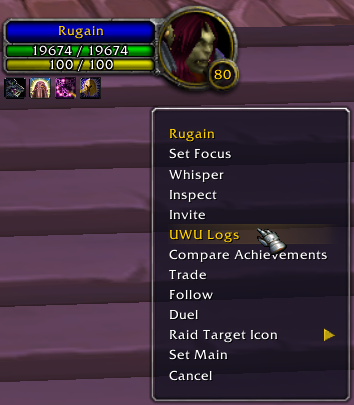
- UwU Logs action added to supported player and chat-name right-click menus.
The logs database is bundled with each addon release. coolstats does not make web requests while the game is running.
Player Browser
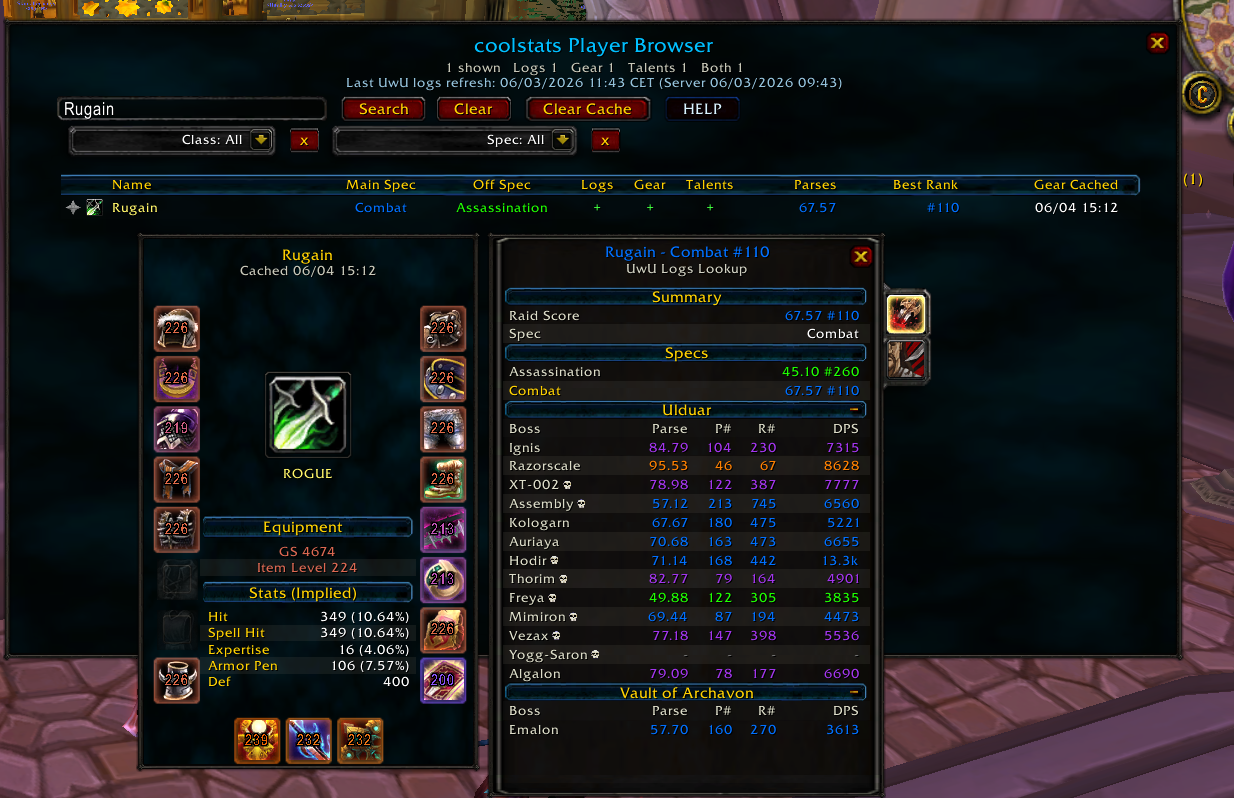
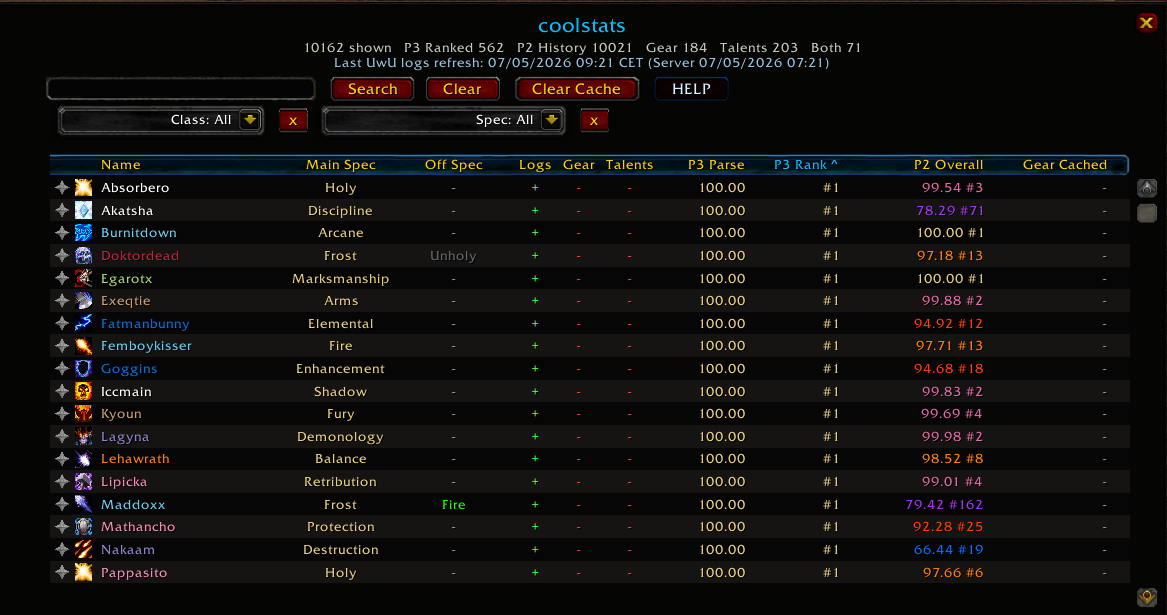
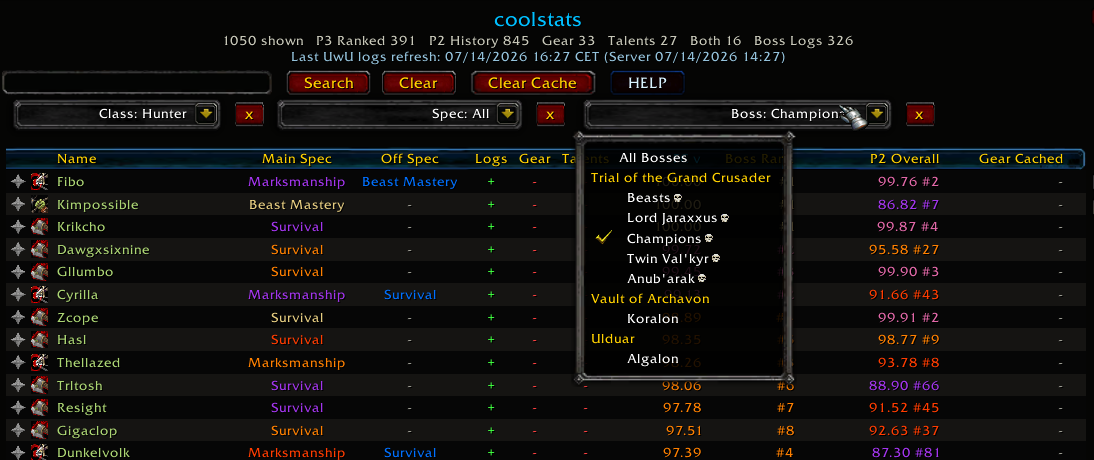
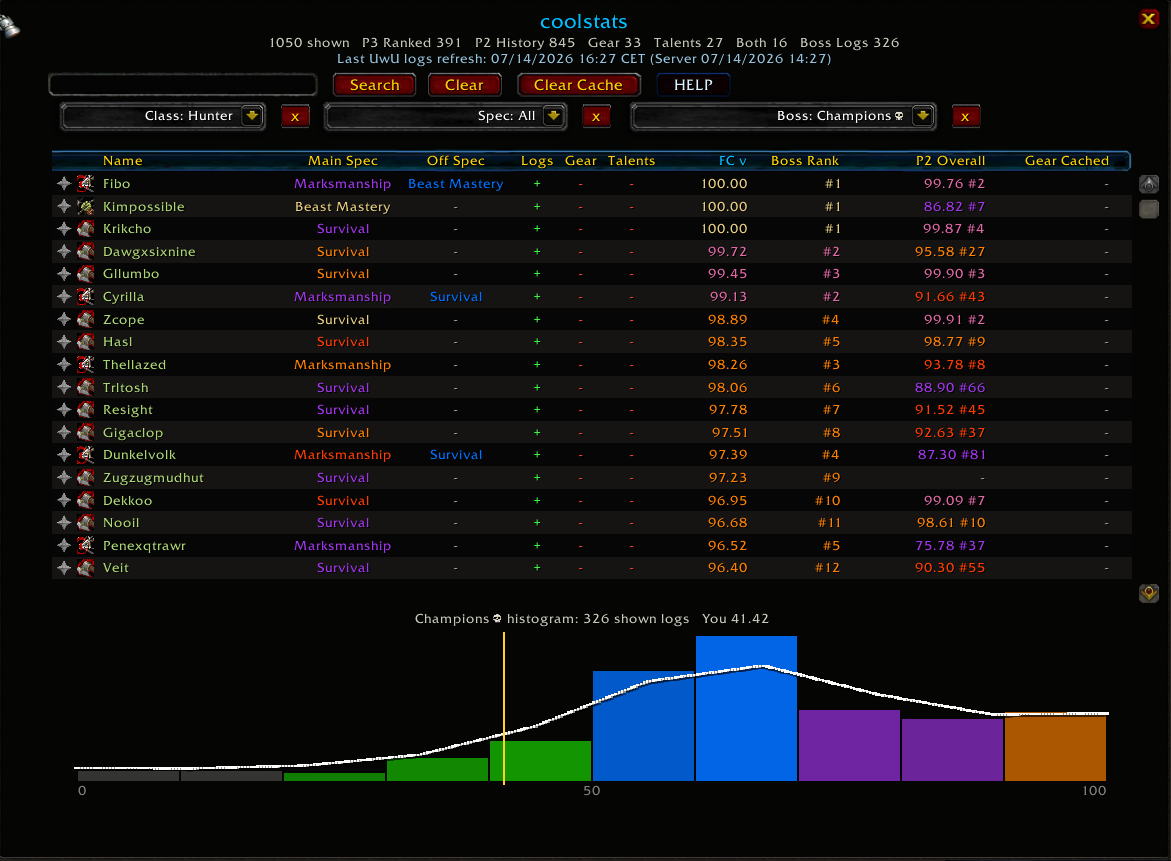
The player browser brings all available player information into one searchable table:
- Search players by name with responsive, delayed filtering.
- Filter by class, favourites, or main specialization.
- Sort columns in ascending, descending, or default order.
- View main spec, off spec, parses, best rank, and cache availability.
- See whether logs, gear, and talents are available before opening a player.
- Favourite players so they remain at the top of the default list.
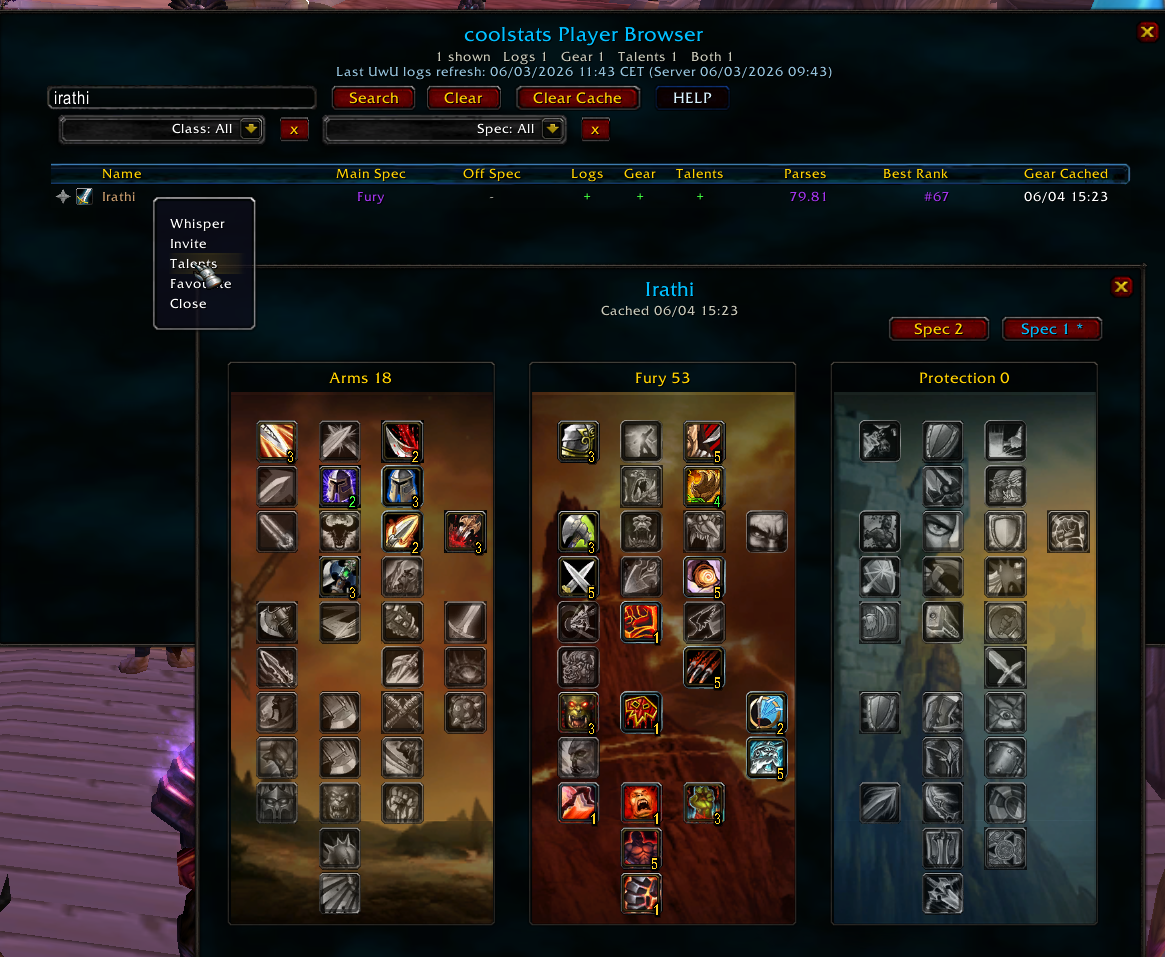
- Right-click players to whisper, invite, view cached talents, or favourite them.
- Open the normal logs and cached-armory panels by clicking a player.
- Clear the locally stored inspection cache from inside the browser.
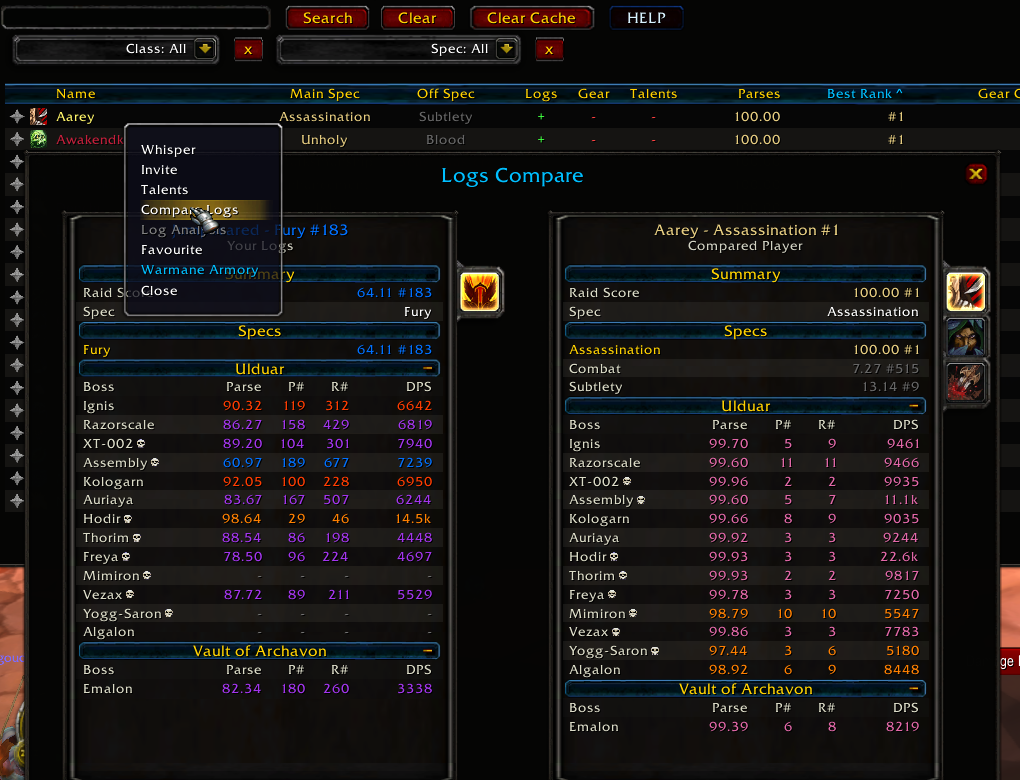
- Comparison mode - compare your logs to any other player side by side.
Cached Gear And Talents
When a player is available within inspection range, clicking, inspecting, or looking them up can store a local snapshot of their equipment and talents. Those snapshots can then be viewed later, even when the player is no longer nearby.
- Paperdoll-style cached gear view with item icons, rarity borders, and item levels.
- Cached GearScore, equipped item level, and implied combat ratings.
- Cached talent builds with specialization backgrounds, rank indicators, specialization switching, and Blizzard-style talent tooltips when available.
- Up to 1,500 recent player snapshots are retained.
- Snapshots older than 14 days are automatically removed.
Cached gear statistics are estimates derived from item data. Some effects, gems, enchants, talents, buffs, and other character-specific modifiers may not be represented accurately.
Optional Character Panel Improvements
coolstats also includes an optional overhaul of the default character panel:
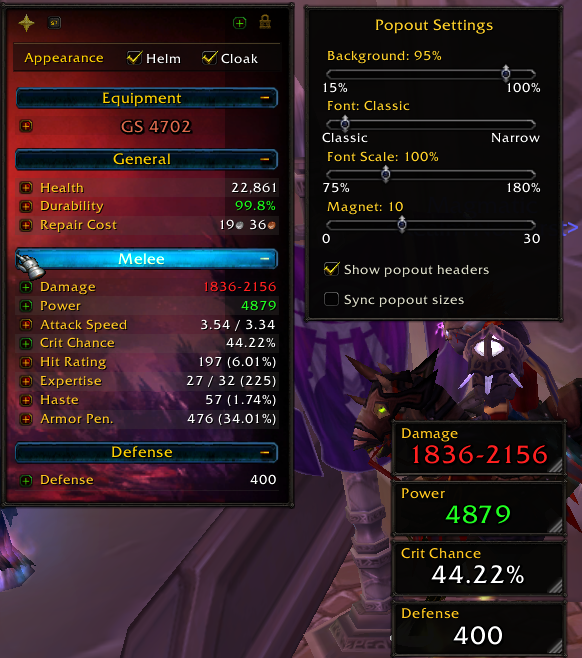
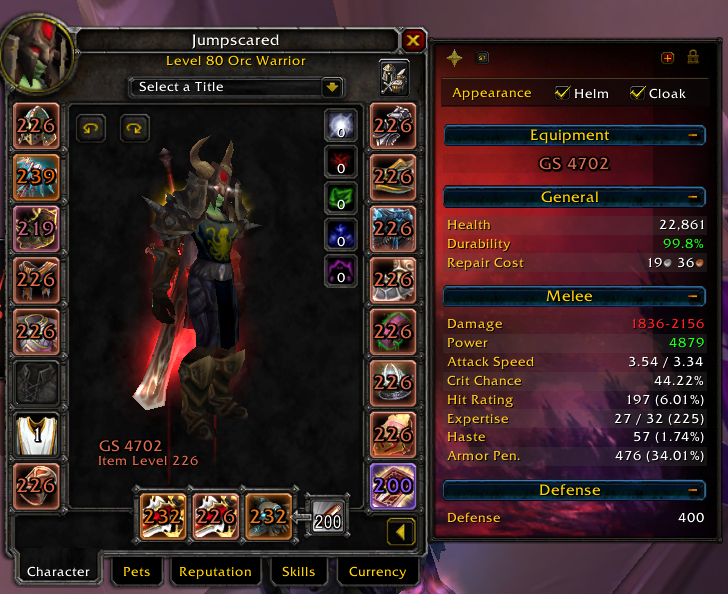
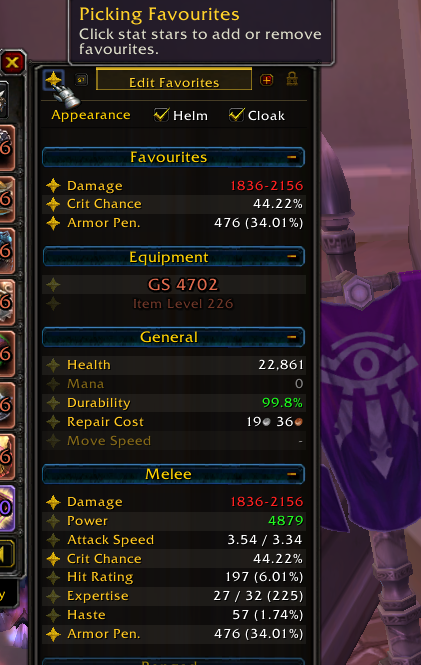
- Extended stats panel with GearScore, item level, ratings, durability, repair cost, movement speed, and additional class-relevant statistics.
- Reorderable stat rows and configurable sections with quick bulk toggles.
- Favourite important statistics.
- Detachable stat popouts.
- Configurable backgrounds, opacity, zoom, contrast, and text palettes.
- Item-level badges and rarity-colored equipment-slot borders.
- Cleaner item tooltips when GearScore is installed.
- Configurable loot-alert toasts for looted items, roll wins, and crafts.
Character-panel features can be disabled in settings while keeping the logs browser, tooltip parses, and lookup functionality enabled. Changing this option requires a UI reload.
Quick Start
- Download the repository as a ZIP and extract it.
- Place the addon folder inside
Interface/AddOns/. - Ensure the final path is
Interface/AddOns/coolstats/coolstats.toc. - Restart the game or run
/reload. - Left-click the coolstats minimap button to open the player browser.
On login, coolstats confirms that it loaded successfully and shows the freshness date of the bundled UwU Logs data. If the data is more than seven days old, the addon displays a red update warning.
Minimap controls:
- Left-click: open the player browser.
- Right-click: open the coolstats menu.
- Left-click and drag: move the minimap button.
Using Player Data
- Hover a player: view their overall UwU Logs result.
- Hold
ALTwhile hovering: view individual boss parses. - Right-click a supported player name: open their UwU Logs panel.
- Click a player in the browser: open their logs and cached gear.
- Right-click a browser row: whisper, invite, view talents, or favourite.
- Inspect or interact with a nearby player: update their local gear and talent snapshots when inspection data is available.
Commands
| Command | Action |
|---|---|
/coolstats or /cs | Open settings |
/coolstats settings | Open settings |
/coolstats browser | Open the player browser |
/coolstats uwu [player name] | Open UwU Logs for a player |
If no name is supplied to /coolstats uwu, the current target is used. If there is no target, coolstats uses your character.
Settings And Optional Dependencies
Most visual and quality-of-life features can be configured or disabled from the coolstats settings panel.
- GearScore: optional. coolstats includes its own GearScore calculation; installing GearScore additionally enables compatibility and tooltip-cleanup behavior.
- BonusScanner: optional. Without it, the addon still works normally, but some detailed gear-contribution lines in stat tooltips are unavailable.
Neither dependency is required for logs, the player browser, cached gear and talents, loot alerts, or the character-panel improvements.
Data And Privacy
- coolstats does not make web requests or send telemetry from inside the game.
- Bundled logs are updated by installing a newer addon release.
- Cached gear, talents, favourites, and settings are stored locally in
coolstatsDB. - Cached inspection data can be cleared from the player browser.
Support
Use the blue HELP button inside the player browser for any questions, suggestions, or bug reports.
Onyxia-only ICC and Toravon UwU Logs refresh with 5,493 active ranked players, 6,920 boss-only players, and 17,924 total player records. Icecrown and Lordaeron logs were not refreshed.
All 9,864 locked Phase 3 Overall history rows remain intact. Duplicate rankings were verified and ambiguous reused-name records were excluded
- Onyxia-only ICC and Toravon UwU Logs refresh with 2,067 active ranked players, 4,552 boss-only players, and 14,581 total player records. Icecrown and Lordaeron logs were not refreshed.
- All 9,864 locked Phase 3 Overall history rows remain intact. Reused-name class collisions now preserve the immutable historical character and exclude the ambiguous current record.
- Onyxia ICC and Toravon UwU Logs refresh: 818 active ranked players and 12,955 total player records. The locked 9,864 Phase 3 Overall history rows remain unchanged. Icecrown and Lordaeron logs were not refreshed.
- Gear caching now retries when a selected player becomes inspectable, including after moving into range without changing targets. Talent caching continues through the normal inspect request.
No changelog available.
- Refreshed Lordaeron and Icecrown through the weekly UwU Logs pipeline using
the realm-aware top 1,000 and top 1,500 players per class/spec caps, with
duplicate-name verification and targeted boss-row repair. - Shipped Lordaeron with 15,101 current ranked players and 15,654 total players
in 6 chunks, and Icecrown with 33,976 current ranked players and 36,279 total
players in 13 chunks. - Checked Onyxia with the top-600 weekly profile and preserved the existing
Phase 4 dataset after the updater found only 101 fresh active players, below
the safety floor for overwriting generated data.
GUILDS ARE HERE!
0.2.46 → 0.2.47
- Added local guild-link caching after successful gear or talent inspection.
Browser search now matches cached guild names, UwU player panel guild
subtitles are clickable, and clicking a guild opens the browser filtered to
cached members of that guild. - Added a browser Guild dropdown, a Guild column, and manual guild assignment
from the player row right-click menu with known-guild selection plus manual
input. - Replaced the guild filter and manual assignment guild lists with a bounded
10-row scrolling picker, and added prefix autofill for manual guild
assignment. - Made manual guild assignment autofill respect backspace/delete instead of
immediately restoring the completed guild name. - Kept recorded and manually assigned guild links when clearing local
gear/talent caches, and prevented passive guild-only rows from tooltip hover. - Cached paperdoll socket parsing and throttled repeated same-player inspect
refreshes to prevent FPS drops while hovering inspected gear. - Made inspect paperdoll gem overlays non-interactive and skipped GearScore
tooltip cleanup on Blizzard inspect slot hovers to reduce sustained item
hover FPS loss. - Closing the Player Browser now clears temporary search/class/spec/guild/boss
filter state and releases browser query/index tables. - Reset Player Browser sort state on close and restored forced gear refreshes
when opening UWU Logs from a live player unit. - Stopped passive gear-cache refreshes from player tooltip hover, kept
GearScore suppression active on Blizzard inspect item tooltips, and restored
hover tooltips for inspect paperdoll socket gems.
0.2.45 → 0.2.46
Player Browser
- Added an account-wide Show only Favourites preference in Tooltip & Cache
settings and a matching star toggle in the browser's lower-left corner. - The star is gold when enabled and gray when disabled, with a star-shaped
hover highlight, pressed feedback, and a detailed tooltip. - Favourites-only combines with name, class, specialization, and boss filters.
Clear resets those filters while keeping this saved preference enabled.
Removing a favourite updates the visible list immediately. - Realm data loading and tooltip lookups are unchanged; this is a visual browser
display filter only.
Data
- Refreshed Lordaeron and Icecrown through the weekly UwU Logs pipeline using
the top 1,000 and 1,500 players per class/spec respectively, with duplicate-name
verification and targeted boss-row repair. - Shipped Lordaeron with 15,106 current ranked players and 15,611 total players
in 6 chunks, and Icecrown with 33,946 current ranked players and 36,093 total
players in 13 chunks. - Checked Onyxia with the top-600 weekly profile. UwU still returned no current
Phase 4 rankings, so the existing 9,864 locked Phase 3 Overall rows and empty
ICC/Toravon database are preserved.
0.2.45 - 2026-09-03
Welcome to Phase 4, Onyxia!
Data
- Refreshed all Warmane UwU Logs datasets with realm-aware caps and shipped Onyxia ICC handoff data.
- Onyxia now keeps the locked Phase 3 Overall history while using an empty Phase 4 ICC/Toravon boss database until live leaderboards exist.
- Overall Rankings were locked Tuesday evening.
Interface
- Added paperdoll socket gem display for player and inspect frames, with empty sockets, socket colors, prongs, sparkle, hover states, socketing clicks, and sizing/layout settings.
- Restored default level-80 tooltip raid progress and Alt boss detail rows while keeping ICC achievement/stat fallback inspection disabled.
- Added ranged hit percent display, heroic ICC skull markers, current-player browser highlighting, and safer third-party dropdown compatibility.
No changelog available.
No changelog available.
- Refreshed all Warmane UwU Logs datasets on 2026-08-28.
- Includes the latest paperdoll gem display and inspect gem changes.
- Added some small QoL stuff
- Refreshed all Warmane UwU Logs datasets using realm-aware weekly caps: Onyxia top 600 per class/spec, Lordaeron top 1,000 per class/spec, and Icecrown top 1,500 per class/spec.
- Updated dynamic ranked chunk tranches: Onyxia 20,091 players in 7 chunks, Lordaeron 15,426 players in 6 chunks, and Icecrown 35,502 players in 12 chunks.
- Introduced even more memory usage optimizations.
- Refreshed all Warmane UwU Logs datasets on 2026-08-16 using the
realm-aware weekly caps: Onyxia top 600 per class/spec, Lordaeron top 1,000
per class/spec, and Icecrown top 1,500 per class/spec. - Shipped refreshed dynamic ranked chunk tranches for the in-game data-load
slider: Onyxia 19,079 total players in 7 chunks, Lordaeron 15,313 total
players in 6 chunks, and Icecrown 35,190 total players in 12 chunks.
- Added in the ability to completely skip the Features Tutorial Guide.
- Refreshed Warmane UWU weekly logs for Icecrown, Lordaeron, and Onyxia.
- Added character panel settings refinements for item level placement, item rarity colors, and grouped panel controls.
No changelog available.
- Refreshed all Warmane UwU Logs datasets with weekly realm caps: Onyxia top 600 per class/spec, Lordaeron top 1,000 per class/spec, and Icecrown top 1,500 per class/spec.
- Updated dynamic player chunks: Onyxia 17,836 players in 6 chunks, Lordaeron 15,222 players in 6 chunks, and Icecrown 34,846 players in 12 chunks..
UI
- Changed the first-run feature guide completion flag to be account-wide. Once the guide is completed on any character, it will stay completed for every character on that WoW account.
- Added migration from the previous per-character guide completion table into the new account-level completion version.
UI
- Added the in-game changelog window and browser Changes button.
- Added the first-run feature guide with delayed startup, tell-message sounds, a pulsing welcome glow, and character-aware completion.
- Expanded guide callouts across browser filters, boss drilldowns, Statistics, Update Center, changelog, UwU Logs, cached gear/talents, Log Analysis, sharing tools, and memory controls.
- Fixed tutorial step ordering and close-button progression for the new panels.
- Fixed Warmane Armory and plain-text log summary copy dialogs so they open above the UwU Logs panel and cached gear panel
Documentation
- Expanded the README install guide for the multi-addon data shard layout.
- Added a technical README section explaining ranked chunks, raid layer shards, runtime browser cleanup, and
/cs perfdiagnostics.
Performance
- Coalesced character-panel refresh events so repeated stat/aura/inventory
bursts queue one short-delayed update instead of forcing synchronous full UI
refreshes. - Added a bounded 64-entry LRU for rendered UwU tooltip lines to prevent
session memory growth from hovering many unique players. - Cached the merged player-browser base index between searches, filters, and
sorts, with invalidation on gear/talent cache changes and realm-data reloads. - Added
/cs perffor lightweight in-game diagnostics covering Lua heap,
coolstats memory, loaded UwU players/chunks, tooltip cache size, and browser
index size. - Updated the UwU data generator so future log refreshes can emit direct
player assignments per chunk, avoiding the temporary outer chunk table during
load.
Data
- Refreshed all Warmane UwU Logs datasets on 2026-08-03 using the realm-aware
weekly caps: Onyxia top 600 per class/spec, Lordaeron top 1,000 per
class/spec, and Icecrown top 1,500 per class/spec. - Shipped refreshed dynamic ranked chunk tranches for the in-game data-load
slider: Onyxia 17,108 total players in 6 chunks, Lordaeron 15,199 total
players in 6 chunks, and Icecrown 34,703 total players in 12 chunks. - Verified the weekly bulk boss refresh completed with zero failed bulk
leaderboard requests and no failed ranking leaderboards across all three
realms. - Ran duplicate-character-name verification and targeted boss-row repair during
the refresh so resolved ambiguous names keep current boss parses without
doing full per-player boss fetching.
UI
- Removed the always-visible peer status lines from the Update Center while
keeping manual group checks available. - Added extra spacing around the Tooltip & Cache player-load slider labels so
the selected player count no longer overlaps the slider.
- Coalesced character-panel refresh events so repeated stat/aura/inventory
Player browser
- Reworked the player right-click UWU Logs action into a detached coolstats
button attached to Blizzard's menu, preserving the quick action while avoiding
protected Focus Target menu taint. - Fixed the detached right-click action so it can detect chat-name player menus
and remain clickable after Blizzard closes the dropdown. - Added a short close grace so the detached UWU Logs action disappears after
clicking away instead of sticking on screen; it now only uses that grace when
the cursor is moving through the dropdown-to-UWU-button lane. - Hooked the actual dropdown-open path so the detached UWU Logs action appears
on the initial player menu, not only after opening a submenu. - Prevented secondary Blizzard menu hover refreshes from hiding an already shown
detached UWU Logs action. - Tracked open dropdown submenus so expandable menu interactions no longer make
the detached UWU Logs action flicker. - Hid the detached UWU Logs action immediately when Blizzard's Cancel menu item
is pressed, without hiding it merely on Cancel hover. - Hid the detached UWU Logs action immediately when any Blizzard dropdown action
row is clicked. - Changed Statistics chart labels to show specialization before class, matching
the intended representation-chart layout. - Restored the original Log Analysis window dimensions after the compact layout
caused the comparison chart to overflow. - Added a copyable plain-text UwU log summary button to individual player log
panels, generating a single compact line instead of auto-sending chat spam. - Moved the copyable log-summary button beside the Armory button and changed
copied hard-mode markers to{skull}chat tokens.
Data
- Refreshed all Warmane UwU Logs datasets on 2026-07-27 with realm-aware
coverage caps: Onyxia top 600 per class/spec, Lordaeron top 1,000 per
class/spec, and Icecrown top 1,500 per class/spec. - Shipped refreshed dynamic chunk tranches for the in-game data-load slider:
Onyxia 15,916 total players in 6 chunks, Lordaeron 15,140 total players in 6
chunks, and Icecrown 34,427 total players in 12 chunks. - Verified the weekly bulk boss refresh completed with zero failed bulk
leaderboard requests across all three realms. - Added duplicate-character-name safeguards to the Warmane UwU Logs generator:
ambiguous ranking rows are confirmed through the character endpoint and
automatically receive targeted boss-row repair after bulk leaderboard refresh. - Made the weekly refresh wrapper realm-aware by default so a normal all-realm
update preserves the intended per-realm caps instead of applying one cap to
every realm. - Updated the generator to prefer
coolstats_publish/as the canonical output
tree from this workspace and shortened duplicate-repair console logs to a
count plus preview.
Cached Gear And Talents
- Always show the cached-talents button in the standalone UWU gear panel when a
player name is available, even if that player has no UwU log history yet. - Refreshed the standalone UWU gear panel after talent inspect data arrives so
newly cached talents are reflected without reopening the panel. - Stored gem IDs from cached item links and guarded client gem API calls, without
resolving gem item stats during tooltip rendering. - Added small per-slot gem indicators so cached gear snapshots visibly confirm
stored gems when the server exposes them. - Restored the older gear-link refresh behavior for real inspected/targeted
units, so fresh cache entries still pick up full gemmed item links from the
current player without requiring a cache clear. - Fixed the restored gear-link refresh path so it no longer calls the cached
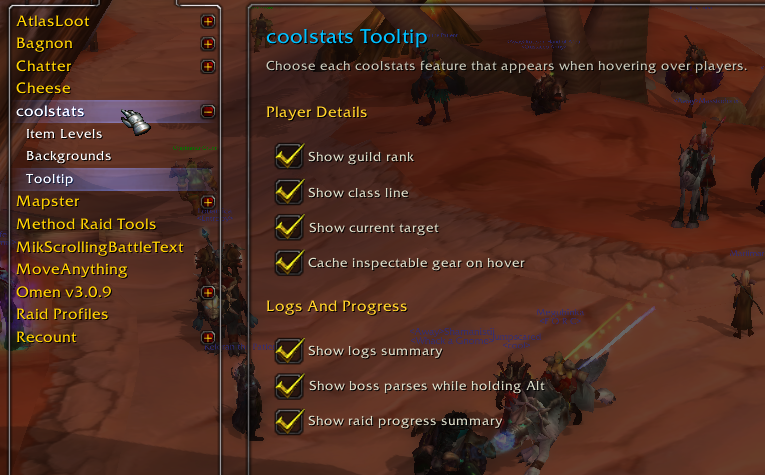
gear summary builder out of scope, and made per-slot item reads fail-soft. - Added separate Tooltip options for cached gear and cached talents so users can
disable either inspect cache path independently. - Renamed and reorganized the settings page into Tooltip Lines, Inspect Cache,
and Logs And Progress sections so cache-related troubleshooting controls are
easier to find. - Added a lightweight player-browser cache/memory indicator with a Social-icon
info button that explains core, realm-data, and cache memory, then opens
Tooltip & Cache settings for lag troubleshooting. - Replaced the browser-only cap with a realm-aware UwU data load slider that
snaps to generated data chunks, trims the lowest-ranked tranche first, and
skips disabled chunks before their Lua tables are built after/reload. - Made the UwU data load slider default/reset state explicitly load every
current-realm player, and added the same efficiency hint to the browser memory
tooltip. - Made generated UwU data chunking dynamic by realm size, keeping smaller
realms at 6 chunks while splitting Icecrown into 12 finer load tranches. - Reused recently captured gear and talent snapshots for 15 minutes and nudged
incremental garbage collection after browser rebuilds to reduce memory churn
while clicking, sorting, and filtering. - Added a cached-talents button to the cached gear panel beside standalone UwU
Logs lookups. - Fixed talent capture to retry safely across
INSPECT_READYandINSPECT_TALENT_READY, preventing the talent panel from staying empty when
gear inspection succeeds first.
Options
- Split Loot Toasts into its own options page with separate sections for the
global toggle, loot sources, quality threshold, sounds, and glow animations. - Simplified the root coolstats options page so it focuses on core character
panel settings and points detailed controls to the child settings pages.
NEW FEATURE! Class Representation Statistics in the Player browser
- Added the Statistics panel from the player browser, with class/spec representation bars, counts, percentages, a bottom sum, and a realm-aware boss drilldown selector.
- Right-aligned class/spec labels into their spec icons for a cleaner chart layout.
- Fixed browser and logs panel tabard backgrounds so the tabard texture stays visible above the black fallback backdrop.
Data
- Increased the Onyxia coverage to 500 players per class per spec.
- Carries forward the refreshed 0.2.33 Warmane datasets, including expanded Onyxia top-500-per-specialization coverage.
- Refreshed weekly Warmane UwU Logs datasets for Onyxia, Icecrown, and Lordaeron.
- Onyxia TOGC/Koralon: 6,142 active players, 14,541 total players, 33,311 boss rows
- Icecrown ICC profile: 33,819 active players, 34,201 total players, 319,634 boss rows
- Lordaeron ICC profile: 14,990 active players, 15,092 total players, 142,141 boss rows
- Individual player panels now align the Link UwU Logs icon with the close button and add a small Warmane Armory button.
Data refresh
- Refreshed Warmane UwU Logs datasets for Onyxia, Icecrown, and Lordaeron.
- Icecrown: 33,808 active ranked players, 34,063 total players, 319,616 boss rows, 0 failed requests.
- Lordaeron: 14,983 active ranked players, 15,040 total players, 142,077 boss rows, 0 failed requests.
- Onyxia: 5,607 active players, 13,965 total players, 29,247 boss rows, Phase 2 Overall and locked Algalon history retained.
Data refresh
- Refreshed weekly Warmane UwU Logs datasets for Onyxia, Icecrown, and
Lordaeron. - Rebuilt all configured boss leaderboards with no failed ranking requests, no
failed bulk-boss requests, and no missing configured encounters. - Updated split Lua data chunks for all three load-on-demand realm data addons.
Realm coverage
- Kept Icecrown capped at the top 1,500 ranked players per specialization,
shipping 33,804 current ranked players and 33,988 players total with no
boss-only/rankless ICC players added. - Kept Lordaeron capped at the top 1,000 ranked players per specialization,
shipping 14,982 current ranked players and 15,026 players total with no
boss-only/rankless ICC players added. - Kept Onyxia on the TOGC/Koralon phase profile, shipping 5,340 current active
players and 13,605 players total with Phase 2 Overall and locked Algalon
history retained.
Data refresh
- Refreshed Warmane UwU Logs data for Onyxia, Icecrown, and Lordaeron.
- Rebuilt all configured boss leaderboards with no failed ranking or bulk-boss requests.
- Preserved Onyxia Phase 2 Overall history and locked historical Algalon records while refreshing current TOGC/Koralon data.
ICC coverage
- Removed Toravon/Vault of Archavon from the Icecrown and Lordaeron bundled ICC datasets.
- Kept those realms focused on Icecrown Citadel, Halion, and Anub'arak only; no extra Trial of the Grand Crusader bosses are included.
- Kept Icecrown and Lordaeron ranked-player-only: 33,794 active Icecrown players and 14,978 active Lordaeron players, with no boss-only/rankless rows added.
0.2.26 - 2026-07-11
ICC coverage
- Expanded Icecrown ICC data to the top 1,500 ranked players per specialization, shipping 33,784 current ranked players without importing boss-only or rankless rows.
- Expanded Lordaeron ICC data to the top 1,000 ranked players per specialization, shipping 14,978 current ranked players without importing boss-only or rankless rows.
- Kept Icecrown and Lordaeron boss parses limited to players with current ranked ICC coverage to avoid the oversized rankless-player data issue from 0.2.24.
Stability
- Hardened the achievement-comparison fallback initialization so first-hover raid progress checks do not break when Blizzard_AchievementUI has not finished loading.
- Added Lua 5.1 release validation to catch Wrath-client syntax/chunk issues before packaging.
Locked all 6,970 per-spec Algalon records across 5,972 players for Onyxia's TOC phase.
- Kept every boss parse strictly separated by specialization.
- Imported current boss-leaderboard players even when they have no overall TOGC ranking or Phase 2 history.
### Interface
- Added a Blizzard-style chain-link button to UwU Logs panels for inserting the displayed player into chat.
- Removed the duplicate Historical Algalon row from the panel summary.
### New Feature: Log linking and Sharing
- Players who have the addon can now share and link player logs inside of chat
- Clicking the link opens up the logs of said player if present in the database of both the person linking and the person opening the link
- Added compact `[coolstats: Player]` chat tokens that open logs for players running 0.2.22 or later.
### Onyxia Logs
- Refreshed Onyxia Phase 3 rankings and all five TOGC 25H boss leaderboards plus Koralon.
- Retained Phase 2 overall rankings and Algalon historical parses, including across specialization changes.
- Disabled the unreliable TOGC achievement/statistics fallback and show one verified logs row.
### Interface and stability
- Made Phase 3/Phase 2 browser labels specific to Onyxia TOGC.
- Fixed stale achievement comparison state and added class coloring to UwU Logs panels.
0.2.9 -> 0.2.14
- Weekly Logs update for Onyxia, Lordaeron and Icecrown.
- Some minor UI tweaks
- Significantly reduced memory load from gear and talents caching
- Previously, we cached both the talent point allocation and the visual assets once per every player, causing a bloat in the saved variables. That should not be the case anymore.
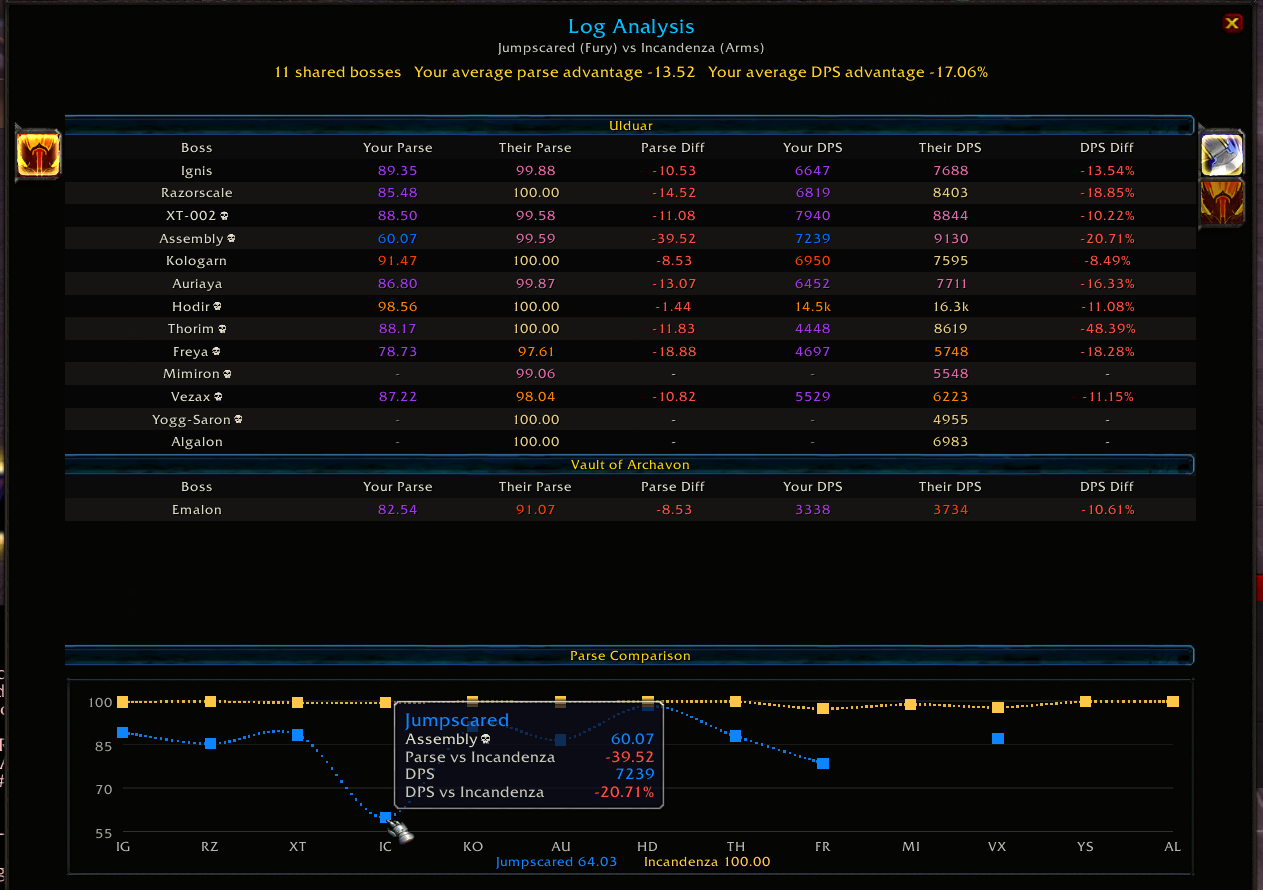
Included a new test feature: Log Analysis
It compares you to a player of the same class both numerically and graphically. More changes on that panel will follow.
Available variations


Comments (5)
that made the thing with gems/enchants working.
it seems that elemental resistances should be removed from the character frame (like in the AllStats window) to have a clear overview .
-Oh and if the global GS and iLvl can be moveable too in the settings 🤩
Hope it'll help
and if it's possible to add enchants+gems on the inner side of all items (with tooltip to know wich gem/enchant is used) that would be awesome !!
NB: getting enchant's name seems impossible, but effects works, maybe a database will be needed just for this

- Each Raid has its own chunking infrastructure now, helping us reduce overall memory load and heap
- Restructured addon architechture, introduced new log sharding and optimized memory usage
- Enriched the SETTINGS to reflect latest chunking changes: Players can now actively disable logs for specific raids (i.e., disable VOA, TOGC, Ruby Sanctum, etc. pp.)
- Shipped refreshed dynamic ranked chunk tranches for the in-game data-load slider: Onyxia 17,108 total players in 6 chunks, Lordaeron 15,199 total players in 6 chunks, and Icecrown 34,703 total players in 12 chunks.
You must be logged in to leave a comment.