

coolstats – Rising Gods
A faster way to understand a player before the pull.
Details
Expansion
 Wrath of the Lich King
 Categories
Developers

Having issues?
coolstats - rising gods
coolstats brings UwU Logs lookups, a searchable player browser, cached gear and talent inspection, and an optional character-panel overhaul together inside the game.
Supported realms:
Rising Gods
It is built for raid formation and pugging: instead of repeatedly leaving the game to look players up, you can quickly see their parses, rankings, available specializations, and any equipment or talent snapshots you have previously cached.
NEW UPDATE! FEATURE TUTORIAL! (08/04/2026 - v.38)
- Guides first-time users through the core features of coolstats via a guided click-through pop-up tutorial
- Added the first-run feature guide with delayed startup, tell-message sounds, a pulsing welcome glow, and character-aware completion.
- Added a new CHANGELOG section to the browser, allowing for a brief overview of new updates.
UPDATED MEMORY USAGE OPTIMIZATION! (08/03/2026 - v.37)
- Each Raid has its own chunking infrastructure now, helping us reduce overall memory load and heap
- Restructured addon architechture, introduced new log sharding and optimized memory usage
- Enriched the SETTINGS to reflect latest chunking changes: Players can now actively disable logs for specific raids (i.e., disable VOA, TOGC, Ruby Sanctum, etc. pp.)
- Shipped refreshed dynamic ranked chunk
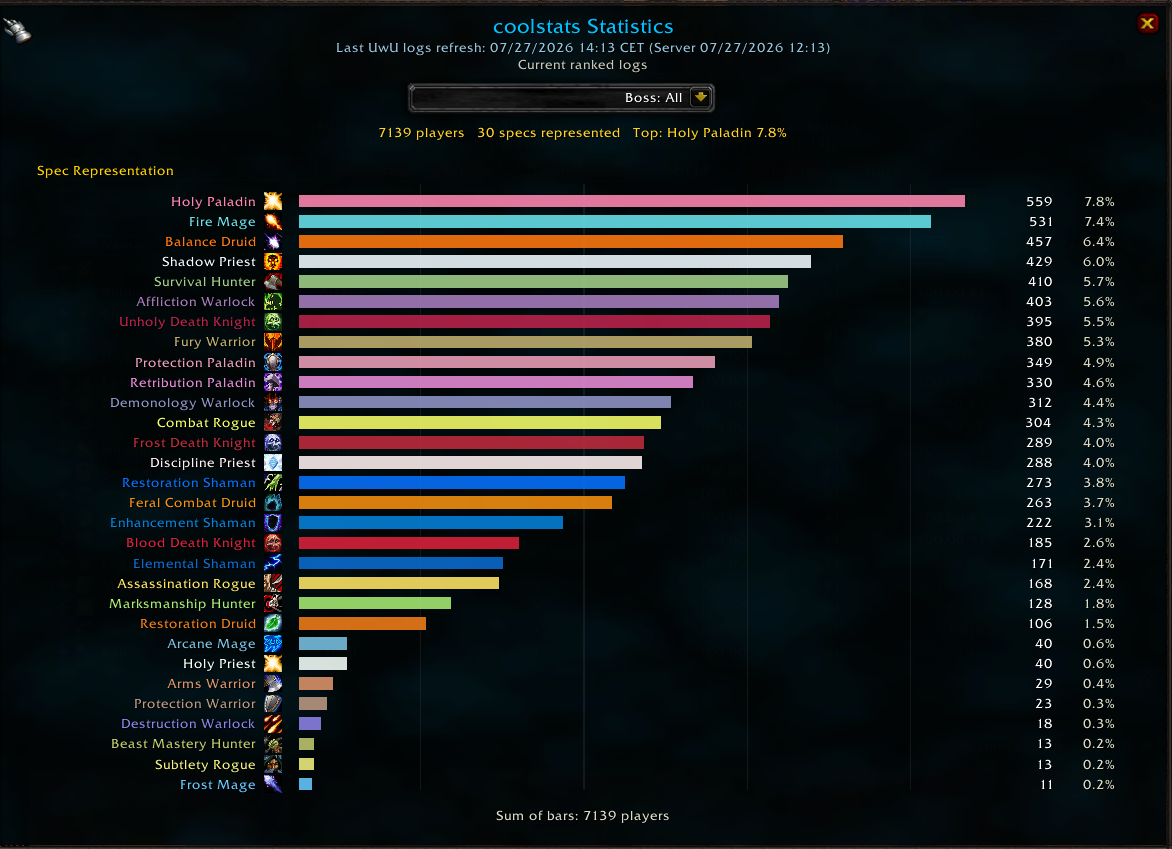
NEW FEATURE! Class Representation Statistics in the Player browser (07/22/2026 - v.34)
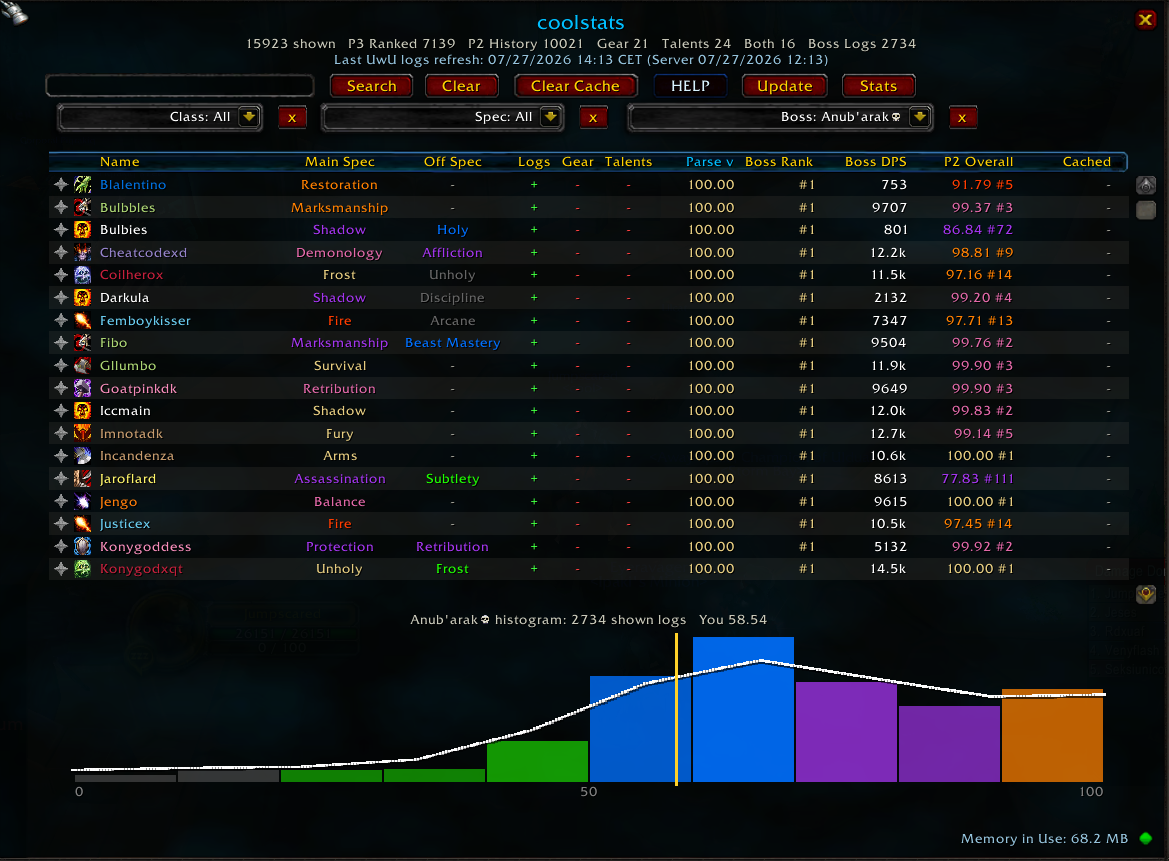
- Added the Statistics panel from the player browser, with class/spec representation bars, counts, percentages, a bottom sum, and a realm-aware boss drilldown selector.
- Right-aligned class/spec labels into their spec icons for a cleaner chart layout.
- Fixed browser and logs panel tabard backgrounds so the tabard texture stays visible above the black fallback backdrop.
New Major Feature in 0.22! Log Linking and Sharing
- Players who have the addon can now share and link player logs inside of the in-game chat.
- Clicking the link opens up the logs of said player if present in the database of both the person linking and the person opening the link
- Added compact
[coolstats: Player]chat tokens that open logs for players running 0.2.22 or later.
Core Features
- Bundled UwU Logs database containing up to the top 600 players for every class specialization.
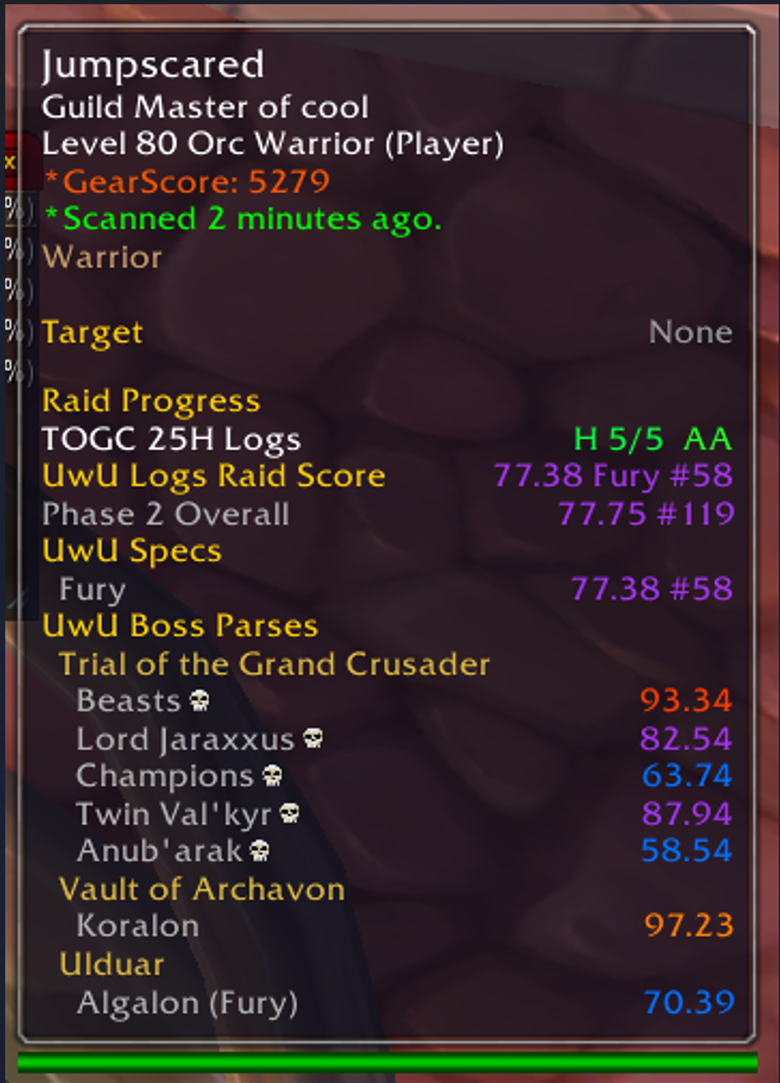
- Overall raid score, best rank, and specialization-specific parse data.
- Individual boss parses directly inside player tooltips by holding
ALT. - Parse colors and specialization icons make results easy to scan.
- Dedicated logs panels show every available specialization for a player.
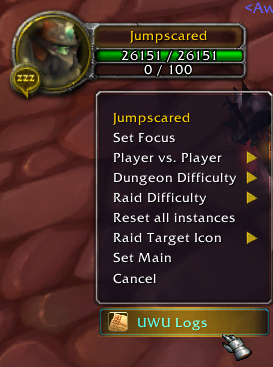
- UwU Logs action added to supported player and chat-name right-click menus.
The logs database is bundled with each addon release. coolstats does not make web requests while the game is running.
Player Browser
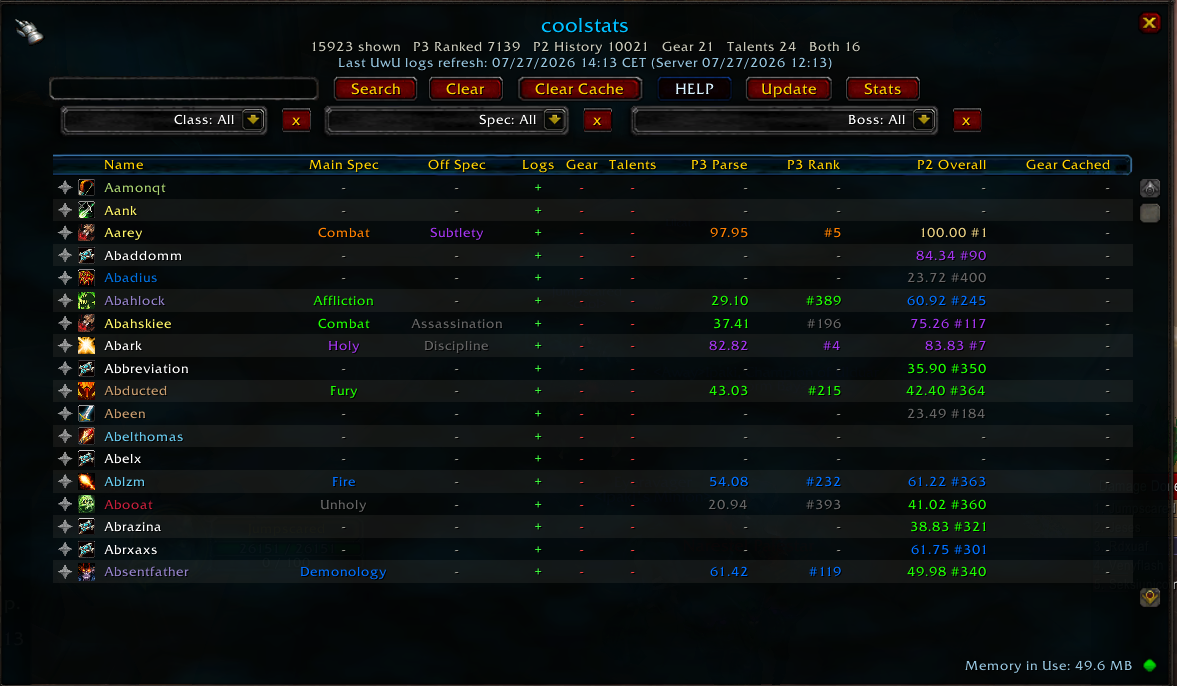
The player browser brings all available player information into one searchable table:
- Search players by name with responsive, delayed filtering.
- Filter by class, favourites, or main specialization.
- Sort columns in ascending, descending, or default order.
- View main spec, off spec, parses, best rank, and cache availability.
- See whether logs, gear, and talents are available before opening a player.
- Favourite players so they remain at the top of the default list.
- Right-click players to whisper, invite, view cached talents, or favourite them.
- Open the normal logs and cached-armory panels by clicking a player.
- Clear the locally stored inspection cache from inside the browser.
- Comparison mode - compare your logs to any other player side by side.
Cached Gear And Talents
When a player is available within inspection range, clicking, inspecting, or looking them up can store a local snapshot of their equipment and talents. Those snapshots can then be viewed later, even when the player is no longer nearby.
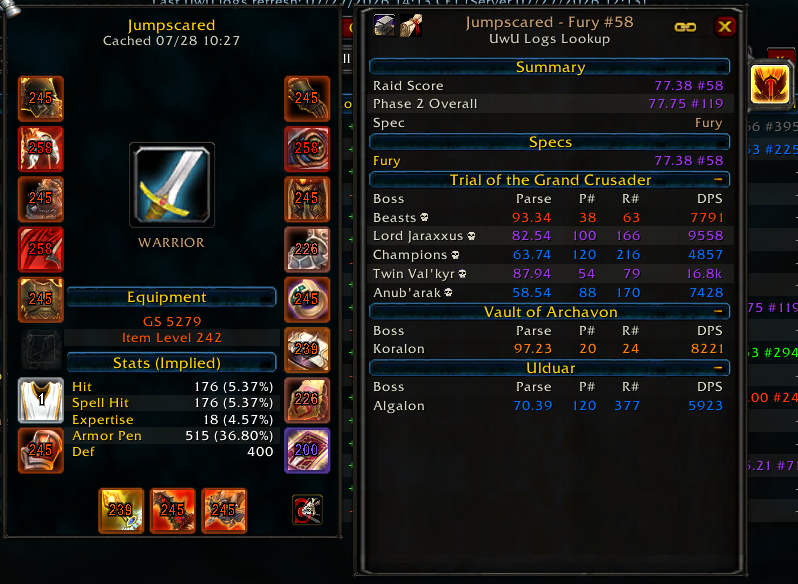
- Paperdoll-style cached gear view with item icons, rarity borders, and item levels.
- Cached GearScore, equipped item level, and implied combat ratings.
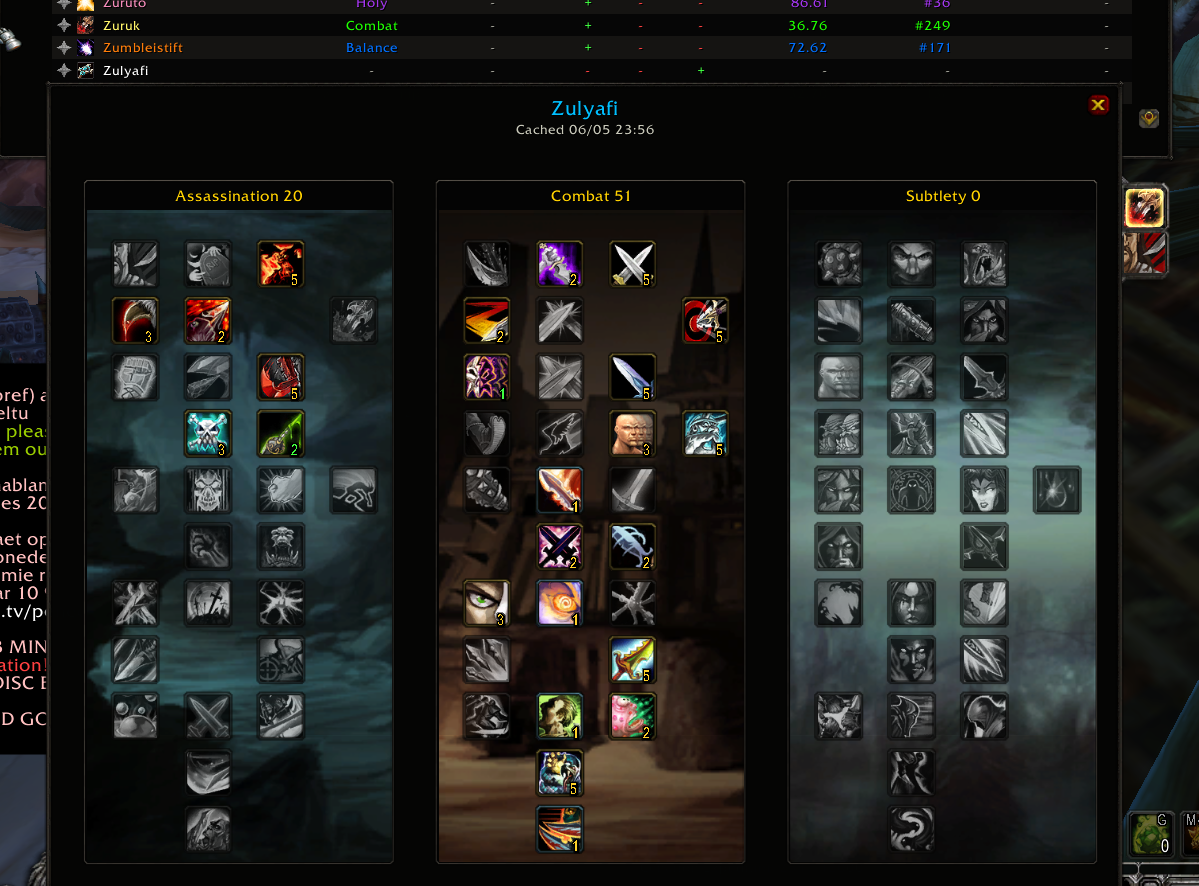
- Cached talent builds with specialization backgrounds, rank indicators, specialization switching, and Blizzard-style talent tooltips when available.
- Up to 500 recent player snapshots are retained.
- Snapshots older than 14 days are automatically removed.
Cached gear statistics are estimates derived from item data. Some effects, gems, enchants, talents, buffs, and other character-specific modifiers may not be represented accurately.
Optional Character Panel Improvements
coolstats also includes an optional overhaul of the default character panel:
- Extended stats panel with GearScore, item level, ratings, durability, repair cost, movement speed, and additional class-relevant statistics.
- Reorderable stat rows and configurable sections with quick bulk toggles.
- Favourite important statistics.
- Detachable stat popouts.
- Configurable backgrounds, opacity, zoom, contrast, and text palettes.
- Item-level badges and rarity-colored equipment-slot borders.
- Cleaner item tooltips when GearScore is installed.
- Configurable loot-alert toasts for looted items, roll wins, and crafts.
Character-panel features can be disabled in settings while keeping the logs browser, tooltip parses, and lookup functionality enabled. Changing this option requires a UI reload.
Quick Start
- Download the repository as a ZIP and extract it.
- Place the addon folder inside
Interface/AddOns/. - Ensure the final path is
Interface/AddOns/coolstats/coolstats.toc. - Restart the game or run
/reload. - Left-click the coolstats minimap button to open the player browser.
On login, coolstats confirms that it loaded successfully and shows the freshness date of the bundled UwU Logs data. If the data is more than seven days old, the addon displays a red update warning.
Minimap controls:
- Left-click: open the player browser.
- Right-click: open the coolstats menu.
- Left-click and drag: move the minimap button.
Using Player Data
- Hover a player: view their overall UwU Logs result.
- Hold
ALTwhile hovering: view individual boss parses. - Right-click a supported player name: open their UwU Logs panel.
- Click a player in the browser: open their logs and cached gear.
- Right-click a browser row: whisper, invite, view talents, or favourite.
- Inspect or interact with a nearby player: update their local gear and talent snapshots when inspection data is available.
Commands
| Command | Action |
|---|---|
/coolstats or /cs | Open settings |
/coolstats settings | Open settings |
/coolstats browser | Open the player browser |
/coolstats uwu [player name] | Open UwU Logs for a player |
If no name is supplied to /coolstats uwu, the current target is used. If there is no target, coolstats uses your character.
Settings And Optional Dependencies
Most visual and quality-of-life features can be configured or disabled from the coolstats settings panel.
- GearScore: optional. coolstats includes its own GearScore calculation; installing GearScore additionally enables compatibility and tooltip-cleanup behavior.
- BonusScanner: optional. Without it, the addon still works normally, but some detailed gear-contribution lines in stat tooltips are unavailable.
Neither dependency is required for logs, the player browser, cached gear and talents, loot alerts, or the character-panel improvements.
Public Data Updaters
Rising Gods log data can be refreshed without waiting for a full addon feature release. The public updaters update only coolstats_Data_RisingGods.
| Platform | Launcher | How to run |
|---|---|---|
| Windows | Update_Rising_Gods_Logs.bat | Double-click it, or run it from Command Prompt/PowerShell. |
| Linux, Bazzite, Ubuntu, SteamOS | Update_Rising_Gods_Logs.sh | Run bash ./Update_Rising_Gods_Logs.sh from the extracted release folder. |
Both launchers show a confirmation screen before replacing live addon files and use numbered progress steps while they work. The Linux launcher is run through bash, so it does not rely on the ZIP preserving executable permissions. Refreshes also include duplicate-name safeguards for reused Rising Gods character names: ambiguous ranked rows are confirmed through the UwU Logs character endpoint, and affected boss rows are automatically repaired. Generated data uses the same dynamic chunk metadata as official releases, so the in-game player data-load slider can avoid loading lower-ranked chunks after the next /reload.
Python 3 Requirement
The public log updaters rebuild the Rising Gods data from UwU Logs on your machine, so they require Python 3. The Windows .bat file launches the PowerShell updater, and that updater calls Python during the data refresh. The Linux .sh launcher calls python3 when it is available, then falls back to python.
Install Python only from the official Python website:
- Download Python: https://www.python.org/downloads/
- Windows setup guide: https://docs.python.org/3/using/windows.html
- Linux and Unix setup guide: https://docs.python.org/3/using/unix.html
On Windows, the easiest setup is the official installer from python.org. During installation, enable the option that adds Python to PATH, then open a new Command Prompt or PowerShell window and run:
python --version
On Linux, most distros already ship Python 3. To check:
python3 --version
If Python is installed under a custom command or path, set it before running the launcher:
$env:COOLSTATS_PYTHON = "C:\Path\To\python.exe"
.\Update_Rising_Gods_Logs.bat
COOLSTATS_PYTHON=/custom/path/python3 bash ./Update_Rising_Gods_Logs.sh
Available modes:
1: preview the UI and validate the currently bundled data.2: refresh this working folder only, with no live WoW install.3: refresh and install into a liveInterface/AddOnsfolder.
When the official ZIP is extracted directly into Interface/AddOns, both launchers auto-detect the current folder as the live AddOns folder and ask only for confirmation.
The updater is intentionally readable source instead of a compiled executable. It performs no GitHub publishing, uses no credentials, requests no administrator rights, and ships no maintainer-local paths or saved install folders. It stages new data, audits Rising Gods metadata, encounter coverage, chunk balance, player-load metadata, duplicate keys, duplicate-name repairs, ranked-player count, and rankless-row guards, then backs up the old live data addon before replacement. The installed data addon is audited again after replacement.
If your WoW install is under a Windows protected folder such as Program Files, Windows may deny write access to Interface/AddOns. In that case, run the official updater from an elevated terminal or move the WoW/addon folder to a normal writable location. The updater checks this before downloading data and will leave the existing live addon untouched when writes are denied.
Examples:
.\Update_Rising_Gods_Logs.bat
.\Update_Rising_Gods_Logs.bat -NoInstall
.\tools\update_rising_gods_live_logs.ps1 -ValidateOnly
bash ./Update_Rising_Gods_Logs.sh
bash ./Update_Rising_Gods_Logs.sh --no-install
python3 ./tools/update_rising_gods_live_logs.py --validate-only
Data And Privacy
- coolstats does not make web requests or send telemetry from inside the game.
- Bundled logs are updated by installing a newer addon release.
- Cached gear, talents, favourites, and settings are stored locally in
coolstatsDB. - Cached inspection data can be cleared from the player browser.
Support
Use the blue HELP button inside the player browser for any questions, suggestions, or bug reports.
- Ported latest Warmane gem/paperdoll/inspect/player-menu/settings/sound changes into Rising Gods.
- Refreshed Rising Gods ICC UwU Logs data.
- Updated both public RG log updaters in the release.
- Pushed
main, tagv0.2.44-rg1, GitHub Release asset, and rebuilt/pushedwarperia.
- Ported shared Warmane 0.2.40-0.2.42 runtime updates to Rising Gods.
- Added first-run guide skipping, item rarity colors for item-level overlays, and upper-corner item-level badge positions.
- Reorganized Character Panel settings for orientation, advanced options, item level, equipment sets, professions, micro menus, and expandable PvP controls.
- Refreshed Rising Gods ICC UwU Logs data with 10,247 players across 6 ranked-player chunks plus ICC/VOA/RS/TOGC raid layers.
- Revalidated both public data-only updaters: Update_Rising_Gods_Logs.bat and Update_Rising_Gods_Logs.sh
- Changed the first-run feature guide completion flag to be account-wide. Once the guide is completed on any character, it will stay completed for every character on that WoW account.
- Added migration from the previous per-character guide completion table into the new account-level completion version.
UI
- Added the in-game changelog window and browser Changes button.
- Added the first-run feature guide with delayed startup, tell-message sounds, a pulsing welcome glow, and character-aware completion.
- Expanded guide callouts across browser filters, boss drilldowns, Statistics, Update Center, changelog, UwU Logs, cached gear/talents, Log Analysis, sharing tools, and memory controls.
- Fixed tutorial step ordering and close-button progression for the new panels.
- Fixed Warmane Armory and plain-text log summary copy dialogs so they open above the UwU Logs panel and cached gear panel.
Documentation
- Expanded the README install guide for the multi-addon data shard layout.
- Added a technical README section explaining ranked chunks, raid layer shards, runtime browser cleanup, and
/cs perfdiagnostics.
0.2.35-rg1 - 2026-07-27
Warmane parity port
- Ported the shared addon runtime from upstream coolstats
v0.2.35. - Added the player-browser memory indicator, cache guidance tooltip, and
player data-load slider for lower-memory setups. - Added boss-filter browser improvements, boss DPS visibility, Statistics
drilldowns, and the updated tabard-style browser/log/statistics backdrops. - Added the plain-text log summary button and Rising Gods profile button flows.
- Brought over the gear/talent cache fixes, including gem display recovery and
separate gear/talent cache toggles. - Brought over the safer detached UWU Logs right-click menu behavior for
player frames and chat names.
Rising Gods data architecture
- Rebuilt generated UwU data around dynamic player chunks. The data TOC now
writesX-coolstats-PlayerCountandX-coolstats-PlayerChunks, and chunk
files include skip guards so the in-game data-load slider can avoid loading
lower-ranked chunks after/reload. - Kept Rising Gods ranked coverage at the established top 600 players per
class/specialization. - Updated the Windows and Linux public updaters, release validator, and data
integrity audits for dynamic chunk metadata. - Changed duplicate-name ranking repair to use bounded parallel workers and
capped preview logging, then run targeted character boss repair only for
resolved ambiguous names.
Data refresh
- Refreshed Rising-Gods ICC data on 2026-07-27 with 10,075 active ranked
players. - Generated 6 dynamic player chunks with 10,075 total player rows.
- Ran bulk boss refreshes for Icecrown Citadel, Toravon, Halion, and Anub'arak,
followed by targeted duplicate-name and Pentendo boss-row repair.
Main Variation

Available variations

You must be logged in to leave a comment.