

AutoJunkDelete
Automatically deletes junk and blacklisted items from your bags on loot and bag open.
Details
Expansion
 Wrath of the Lich King
 Categories
Developers

Having issues?
AutoJunkDelete keeps your bags clean without breaking your flow. It scans for grey and low-value
items, lets you build a personal blacklist, and silently deletes unwanted items every time you
open a bag or loot an enemy — no extra clicks needed.
Key Features:
- Junk Scanner — Scans all 5 bags for grey or white items below your sell-price threshold
- Blacklist System — Any item on your blacklist is auto-deleted the moment a bag opens or loot is taken
- Whitelist Protection — Mark items as "never delete". Hearthstone is always protected by default
- Shift + Right Click — Instantly toggle any bag item on or off the blacklist
- Smart Socket Popup — Socketed items show a choice dialog before blacklisting, so you never lose a gemmed piece by accident
- Bank Support — Blacklist deletions also run against open bank slots
- One-by-one Confirmation — Each junk item gets its own confirm dialog before deletion
- Movable Button — Drag the AJD button anywhere on screen
- In-game Settings Panel — Esc > Interface > AddOns > AutoJunkDelete
Usage:
Left-click the AJD button to scan bags and delete blacklisted items immediately.
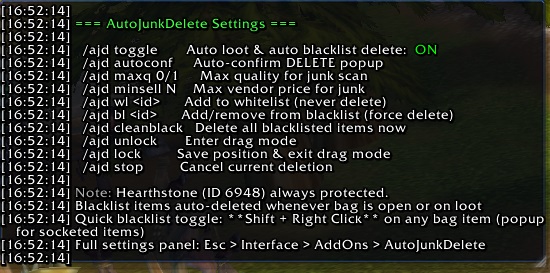
Right-click the AJD button to view current settings in chat.
Shift + Right Click any bag item to add or remove it from the blacklist.
Slash Commands:
/ajd toggle — Toggle auto-loot and blacklist delete on/off
/ajd bl <itemID> — Add or remove an item from the blacklist
/ajd wl <itemID> — Add an item to the whitelist (never deleted)
/ajd cleanblack — Delete all blacklisted items in bags right now
/ajd help — Show all available commands
You must be logged in to leave a comment.