
SnowfallKeyPress
Modify key bindings to work on key press rather than key release.


Details
Expansion
Categories
Developers

Having issues?
This addon accelerates key bindings so that they are activated by key press rather than key release. This allows you to activate your abilities faster than you could otherwise. This can really make a difference for situations where you need to react quickly, like when casting heals, when dispelling, when interrupting spells, or in PvP.
In these situations, the addon can have an effect similar to reducing your network latency by 100ms. Of course, the exact impact depends entirely upon how much time you personally spend between key press and release.
Configuration
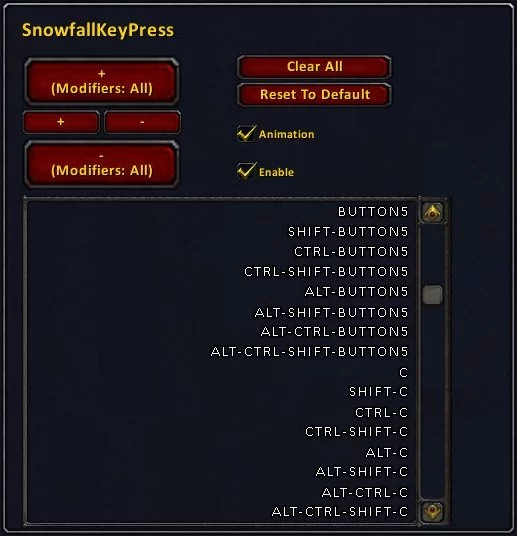
There is an in-game configuration GUI accessible through the usual Options->Interface->Addons menu. From this panel, you can add or remove keys and mouse buttons to be accelerated. You can also globally enable or disable all key acceleration.
The GUI provides exceptionally fast entry–you can enter your whole keyboard in seconds and all your mouse buttons in a few more seconds. The easiest way to understand this GUI is to start by hitting the “Clear All” button and then adding and removing some keys. In order to add just one key or mouse button, hover over the “+” button and type the key or press the mouse button (including whatever modifiers you desire). In order to remove that key, hover over the “-” button and type that same key with its modifiers. In order to enter all 8 of a key’s modified and unmodified combinations with just one key press, hover over the “+ (Modifiers: All)” button and type the key.
If you want to do mass entry of modified and unmodified keys and mouse buttons, hit the “Clear All” button. Then hover over the “+ (Modifiers: All)” button and face-roll your way across keyboard and mouse buttons. You’re done.
The default configuration accelerates all the modified and unmodified keys on a standard 104-key US keyboard (except PRINTSCREEN) plus mouse buttons 3-5. If you’d like to get back to this configuration at any time, simply hit the “Reset To Defaults” button.
Mouse Buttons
SnowfallKeyPress accelerates key bindings of mouse buttons, but it doesn’t accelerate mouse button clicks that interact directly with frames without any associated key binding. This means that although SnowfallKeyPress is compatible with click-casting addons like Clique and Vuhdo, it won’t accelerate their mouse clicks.
Vuhdo already provides its own mouse click acceleration, though, and perhaps Clique will at some point, as well. Until then, you can add support yourself by navigating to Interface\Addons\Clique, editing Clique.lua and CliqueOptions.lua, searching for instances of “AnyUp”, and replacing them with “AnyDown”.
Mouse scroll-wheel bindings do not need any acceleration, so don’t be concerned that SnowfallKeyPress offers no way to accelerate them. Each “tick” of the mouse scroll wheel is, in effect, already a simultaneous press and release.
You must be logged in to leave a comment.