

World Quest Assistant
WQA helps you find world quest groups easily. Works after the 4/28 group finder changes.
Details
Addon ID:
18162
Addon Version:
v0.6.4-nolib
Expansion:
7.3.5
Upload date:
Dec 12, 2025
Last Updated:
Dec 12, 2025
Downloads:
Less than 100
Expansion
 Legion
 Categories
Developers

Ardentvark
Creator
Having issues?
WQA helps you find world quest groups quickly and easily.
With just a couple of clicks, you can easily find and join a group, or create your own. When you are in proximity of a world quest, WQA will offer to find or create a group for you. One click of the button finds all open groups and another click will start applying to join them. Or, you can create your own group with a single click.


Key features:
- One-click support to find a group, create a new group, or join existing groups
- Keybinding support for full automation - just set the bind and then tap it to find or apply to groups, accept a group invite, create a new group, or leave a group after quest completion.
- Allows you to create a new group on demand - no waiting for group finder timeouts. Open up your quest to others without having to wait for a server jump.
- Allows you to prefer to connect to groups on your home realm, completely avoiding server jumps.
- Can leave groups automatically after a configurable delay on quest completion, or stay in the group with a keybind you set.
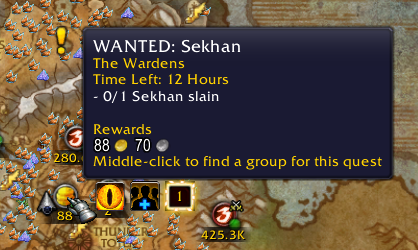
- Can find groups for quests by middle-clicking their icons on the map. Handy when you're sitting around waiting for that mob to spawn! Works with both the base UI and World Quest Tracker.

You must be logged in to leave a comment.