

TributeLoot
Loot management tool
Addon Details
Expansion
 Legion
 Categories
Developers

Having issues?
TributeLoot is a World of Warcraft mod that links raid boss loot, players then whisper the mod if they are interested in winning an item. The mod silently records the information and then prints the results in chat afterwards.
Usage:
/tl
This command prints the current mod version and all possible slash options.
/tl link
/tl l
This command links loot in raid warning, starts the countdown, and prints the results when finished. If items were added using the "addloot" command, then it links those, otherwise it links the current loot window.
/tl addloot
/tl a
This command adds a mob's loot to the item table without linking it in chat. It is useful for encounters that have loot on multiple bosses so it only has to be linked once. (i.e. Illidari Council, Twin Val'kyr). You can also link an item at the end of this command to manually add a specific item (/tl addloot [Eskhandar's Collar]).
/tl results
/tl r
This command prints the loot results again.
If a number is listed (/tl results 1), then it will print out optional comments players whispered about that item (see Example 2 below).
/tl clear
This command clears the previous loot results.
/tl options
/tl o
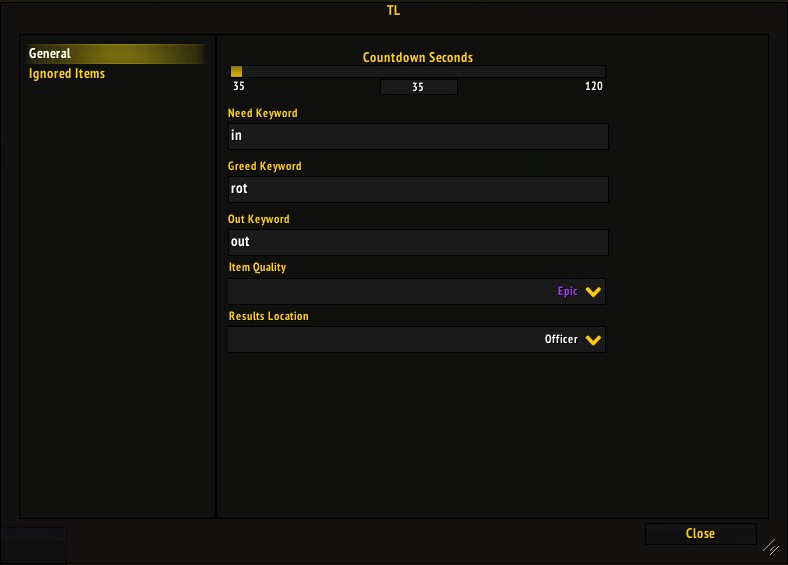
This command opens the options window. This configures where results are printed, how long people have to decide on items, minimum item quality, etc.
/tl ignore [item]
/tl i [item]
This command adds items to the ignored items list. Ignored items will not be linked as loot.
[item] is expected to be an item link (/tl ignore [Eskhandar's Collar]), if this parameter is omitted then the ignored items menu will open.
/tl unignore [item]
/tl u [item]
This command removes items from the ignored items list. Ignored items will not be linked as loot.
[item] is expected to be an item link (/tl unignore [Eskhandar's Collar]), if this parameter is omitted then the ignored items menu will open.
- - - - - - - - - - - - - - - - - - - - - - - - - - - - - - - - - - - - - - - - - - - - - - - - - - - - - -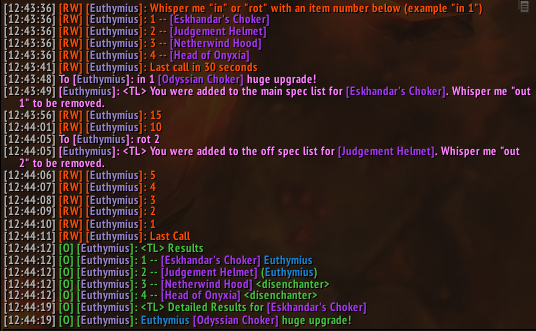
Items are linked with a number to the left of them. If someone is interested in winning an item, then whisper "in" for Need or "rot" for Greed with the item number.
Players that went in for greed will have their names appear in parenthesis. You can change these keywords in the options.
Example 1:
John whispers "in 1" to go in on [Eskhandar's Collar] for need
Jane whispers "rot 2" to go in on [Judgement Helmet] for greed
John changes his mind and whispers "out 1" to be removed from the [Eskhandar's Collar] list.
Jane changes her mind and whispers "out 2" to be removed from the [Judgement Helmet] list.
- - - - - - - - - - - - - - - - - - - - - - - - - - - - - - - - - - - - - - - - - - - - - - - - - - - - - -
Players may optionally specify a comment after the item number.
Giving an item number after /tl results will print the detailed list for a specific item.
Example 2:
John whispers "in 2 [Lawbringer Helm] is a huge upgrade"
Jane whispers "in 2 bidding 300 DKP lol"
Panda whispers "rot 2 is a minor upgrade [Lionheart Helm] so whatever"
The person running the mod types /tl results 2
<TL> Detailed Results for [Judgement Helment].
John [Lawbringer Helm] is a huge upgrade
Jane bidding 300 DKP lol
(Panda) is a minor upgrade [Lionheart Helm] so whatever
- - - - - - - - - - - - - - - - - - - - - - - - - - - - - - - - - - - - - - - - - - - - - - - - - - - - - -
Players can only be on one list at a time, so whispering "in" will remove the player from the "greed" list if they exists there and vice versa.
Players can whisper multiple times to update their comment.
Example 3:
John whispers "in 2 first comment"
John whispers "in 2 second comment overwrites the first"
Panda whispers "in 2 might need"
Panda whispers "rot 2 whispering rot automatically removes me from the need list"
The person running the mod types /tl results 2
<TL> Detailed Results for [Judgement Helmet].
John second comment overwrites the first
(Panda) whispering rot automatically removes me from the need list
- - - - - - - - - - - - - - - - - - - - - - - - - - - - - - - - - - - - - - - - - - - - - - - - - - - - - -
The whisper keywords, results channel, and countdown seconds can be customized in the options.
More addons for Legion
Discover other addons that might interest you
BuyEmAll for The War Within
BuyEmAll
CurrencySorter
Adds buttons to make you change order of the categories on your currency window.
CornerToggle
A simple addon to toggle the visibility of frames by the screen corner
LibSharedMedia-3.0
Shared handling of media data (fonts, sounds, textures, ...) between addons.
HandyNotes – Legion Class Order Halls
Shows the NPC locations and major POIs in Class Order Halls
SmexyGMO(SGMO)
Delay your Guild Message of the Day
LegionTreasures
LegionTreasures
GoPost
GoPost is a lightweight alternative for your Inbox with special features for Auction House mail.