


Details
Addon ID:
18361
Addon Version:
RaidAchieveFilter 1.9.8
Expansion:
7.3.5
Upload date:
Dec 12, 2025
Last Updated:
Dec 12, 2025
Downloads:
Less than 100
Expansion
Categories
Developers

dist_
Creator
Having issues?
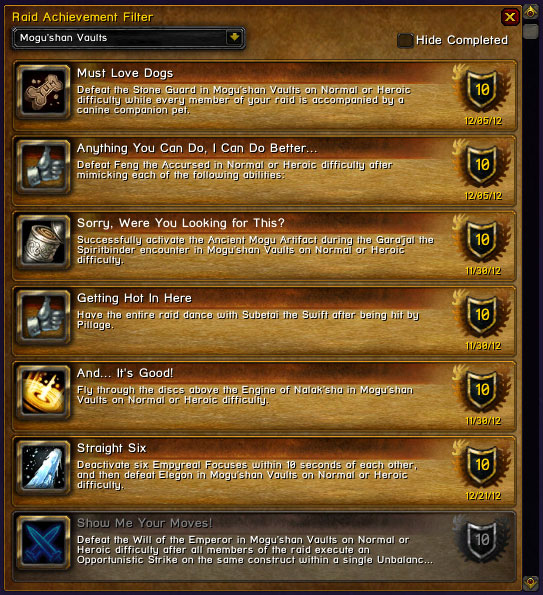
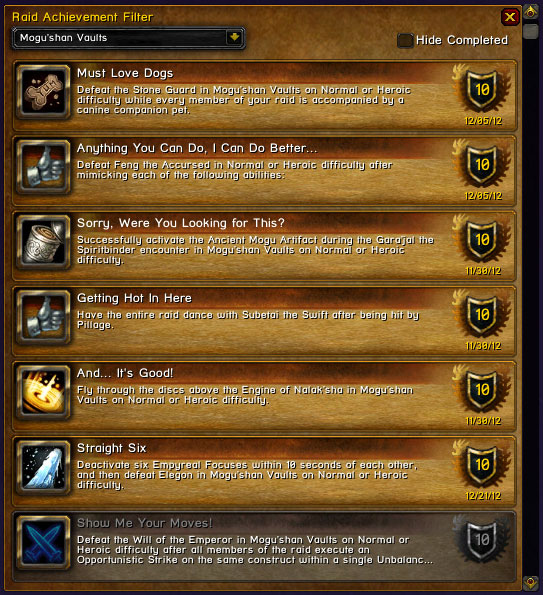
RaidAchievementFilter allows you to look through your raid, dungeon, and scenario achievements, filtered by instance. They are also sorted into typical boss order.
You can link achievements in chat, add them to tracking, open them in the Blizzard achievement UI and hide achievements you have already completed (by character or by account). It will also automatically switch to the instance you are in when you zone in.
Commands:
- /rachf to toggle the main window, or use the minimap icon.
- Mouseover the achievement icon to see the criteria you have completed, if applicable.
- Shift+Left-Click will add an achievement to tracking, or if the chat editbox is open, it will add an achievement link.
- Left-click an achievement to open in the Blizzard achievement UI. (Note - You must have opened the achievement UI prior to this since logging in.)
- Tick the "Hide Completed" by account or by character tick boxes to filter out achievements completed by only that character or your entire account.
You must be logged in to leave a comment.