
Molinari
One-click Milling, Prospecting, Disenchanting and Lockpicking!


Details
Addon ID:
17221
Addon Version:
70300.53-Release
Expansion:
7.3.5
Upload date:
Dec 12, 2025
Last Updated:
Dec 12, 2025
Downloads:
Less than 100
Expansion
Categories
Developers

p3lim
Creator
Having issues?

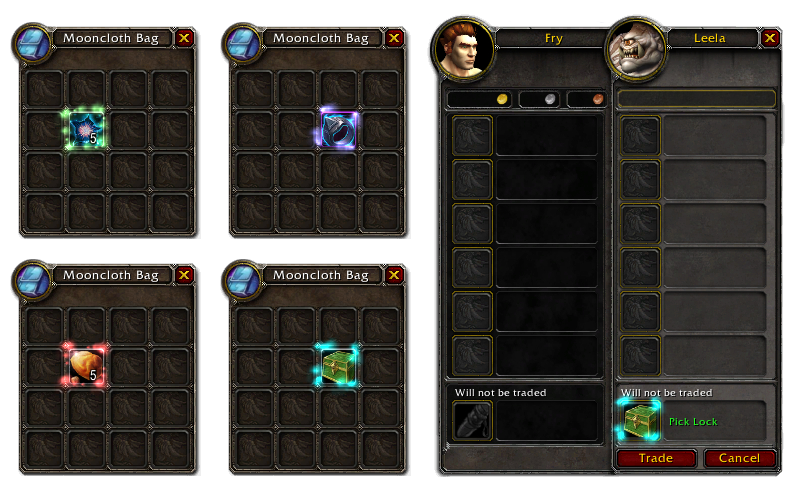
Molinari allows the player to easily "salvage" items directly from the inventory by holding down the Alt key and clicking on the item in their bags, instead of dealing with the tradeskill UI, spellbook, macros or actions.
The following "salvaging" is supported:
- Milling
- Prospecting
- Disenchanting
- Lockpicking
- Skeleton Pinkie (Mechagnome racial)
- Kevin's Keyring (Necrolord soulbind ability)
- Blacksmithing picks
- Jewelcrafting picks
- Inscription picks
- [Engineering picks](https://www.wowhead.com/items/consumables?filter=107:99;0:5;lock:0#0 2 18)
- Scrapping
- Crushing
- Shattering
- Transmuting
In addition, Molinari also works for lockpicking in the trade window.
Translations
If you want to help translate Molinari, please go here:
https://legacy.curseforge.com/wow/addons/molinari/localization
Feedback & issues
If you have a question, please use the discussion section on GitHub.
If you would like to report a bug or contribute to the project, please visit GitHub:
https://github.com/p3lim-wow/Molinari/issues/new/choose
Legal
Please see the LICENSE file.
You must be logged in to leave a comment.