
Zio Korean Tools
Korean whisper input, optional Questie tracker tools, and beta reporter hiding for Forever.
Details
Expansion
 Forever
 Categories
Developers

Having issues?
Zio Korean Tools — Korean companion tools for WoW Forever
A Korean addon dashboard and compatibility collection for WoW Forever 1.60.1. It connects quest tools, dungeon maps and loot, bags, gathering, party/raid frames, everyday automation, threat display and ranged-weapon sound controls in one settings window.
Install with the CurseForge app Select your WoW Forever game instance and allow Beta releases. Install Zio Korean Tools; the following nine original projects are required dependencies, supplied by their own authors:
- Questie (project 334372), including QuestieDB
- Atlas (fork) (1115649), dungeon maps
- Forever Atlas (1706497), AtlasLootClassic-based loot data
- Leatrix Plus (94855), selling, repair and chat utilities
- Leatrix Maps (298842), world-map utilities
- Bagnon (1592), unified bags
- GatherLite (334918), gathering records
- Grid2 (15226), raid frames
- Forever Unit Frames (1708698), player, target and party frames
The project does not silently include modified copies of those addons. Their original addons and data are installed through the required dependency links; version-gated companion modules supply the supported localizations and fixes.
Manual ZIP installation A website ZIP download does not install dependencies automatically. Extract all five included folders into your Forever Interface/AddOns directory, install the nine original projects separately, and fully restart the game after adding new addons, font files or sound files.
Included folders
- ZioKoreanTools 0.1.13-beta: dashboard, macro library and compatibility helpers
- ZioThreat 0.1.4-beta: public-API threat meter
- ZioWeaponVolume 1.1.2: gun/bow volume controls and gun-to-bow switch
- ZioUIErrorLog 1.0.0: bounded UI-action-block diagnostics
- ZioDrinkNotify 0.1.0-beta: editable drink start/end announcements
What you can do
Configure drinking-water announcements from Other Addons > 물 마시기 알림 > gear, or /ziodrink. Set your own start/end text and separate Party, Raid, Guild and nearby Say (/s) checkboxes. Defaults to Party end-only notifications; optional start notifications can be enabled if your macro does not already announce them.
Open options using the gear on every Other Addons row. Native or parent settings are used where linked; other modules have common enable/disable options. Version 0.1.11 fixes options failing to reopen after chat use and Auto Repair checkbox discovery at fractional UI scales.
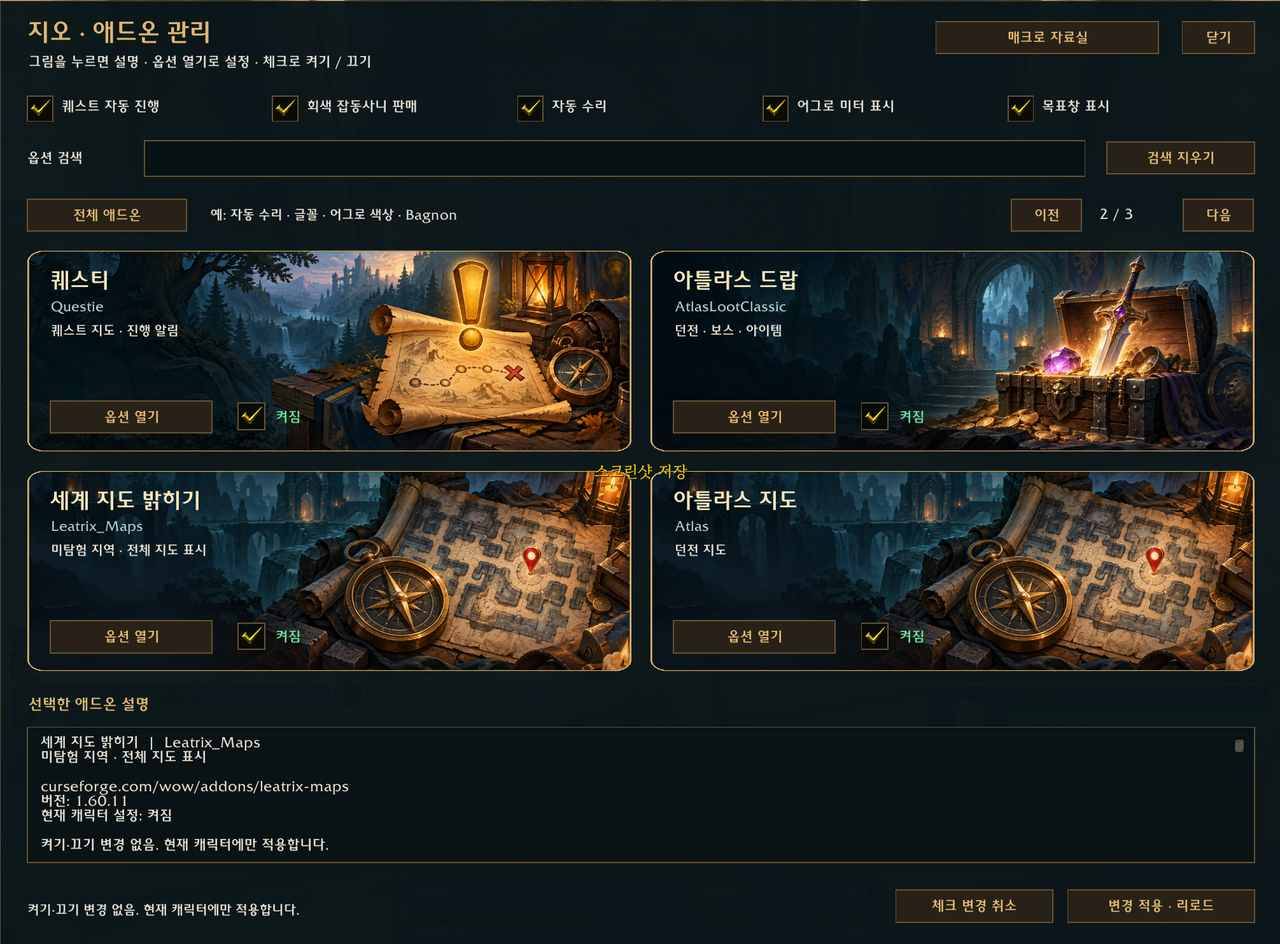
Open /zio or drag its minimap button around the border. Browse two-column addon cards with Korean/original names, search registered settings, open each addon's options and apply addon enable/disable changes with a reload.
Use the top-row switches for combined quest acceptance/completion, grey-junk selling, automatic repair, threat display and objective-tracker visibility. Leatrix controls work with the original supported addon, without a separate local source patch.
Ctrl-click a chat tab such as General to open Leatrix's copyable recent-chat window. Enabled for fresh installations; existing user choices are preserved.
Open /ziomacro for 51 general references plus 27 level-based examples: nine classes at levels 10, 20 and 30. Select, copy and paste into WoW's macro editor. These require your repeated key presses and modifier choices; they are not an automated combat rotation.
Use version-gated Korean option-label support for Forever Unit Frames and locale/settings support for GatherLite. Typed input, profile data and explicit language choices are respected. A built-in 2002 font bridge replaces known Western defaults for Korean unit names through FUF's own settings command; other custom font selections are retained.
Use Grid2's ZioRaid preset for raid-only frames, leaving regular party frames to your normal setup. Established profiles are not overwritten.
Configure /zt threat colors, size and locking; /zwv gun/bow shot, reload and draw volume in five steps, including mute and gun-to-bow conversion; /zioerror for recent UI-action-block records.
Fonts and preferences Version 0.1.13 bundles seven font choices with their source, copyright and license notices: Gowun Batang Bold (multilingual fallback), Noto Sans CJK KR Regular, Nanum Gothic Bold, Nanum Myeongjo Bold, Gmarket Sans Medium, MapleStory Bold and The Jamsil Medium. The game’s built-in 2002 font is the default selection; the seven bundled typefaces are optional alternatives. Existing explicit font selections are retained. Select independent fonts for Chat, General UI, Quest text and Combat numbers at /zio > 지오 도구 설정 > 글꼴 선택 · 미리보기. Each purpose has its own checkbox and defaults OFF; existing explicit chat/system preferences are retained. Fully restart the game after first installing the files; reload after changing a choice, and restart if combat numbers retain their previous font. Other addons may require their own font settings. No Blizzard font file is bundled. Existing addon choices are retained; account settings, chat logs, personal macros and the external Windows translator are not included.
Quest and loot compatibility After a confirmed quest turn-in, the companion retries the same NPC's still-open dialog to accept a follow-up quest. Closed conversations are not reopened; manual reward choices and modifier pauses are preserved. The companion preserves the existing quest-progress announcements, seven missing Forever quest supplements, missing-name quest-link handling and default-tracker support. Supported targets include Questie 12.0.3, QuestieDB public contract 2 / 1.0.4 and AtlasLootClassic 1.0.53. Protected information is skipped instead of bypassed. Multiple reward choices, money costs and unavailable information remain manual; configured mute/channel and quest filters are respected.
Lean quest mode disables the known extra nameplate/target-icon and NPC-availability inference paths while retaining map/progress functions. Re-enabling upstream features may restore their compatibility issues. Classic loot references remain labeled separately. 'Forever confirmed' reflects upstream dataset classification, not a claim that this tool independently tested every drop. Data with unknown or already-patched provenance is not relabeled.
Compatibility and validation Leatrix Plus 1.60.10/1.60.11, Leatrix Maps 1.60.11, Forever Unit Frames 0.20.0, GatherLite 8.1.6/8.1.9 and Grid2 4.1.3-beta variants have targeted adapters. Unsupported versions retain upstream behavior. Lua 5.1, mock UI and database tests do not replace live gameplay or combat-taint testing. The complete configuration, every macro and weapon-sound timing are not yet fully verified in game. There is no guarantee that every UI error, taint issue or performance problem is fixed.
Credits and sound sources Dashboard illustrations and companion code were prepared for Zio. Third-party addon code/data remain with their original projects. ZioWeaponVolume retains the existing attenuated copies of Blizzard game effects; these are not original Zio recordings, and Blizzard retains its rights. See its source and rights notices for FileDataIDs and origin details. Independent community addon; not affiliated with Blizzard or the original addon authors.
한국어 안내 포에버 통합 편의 도구입니다. 리트릭스·퀘스티·아틀라스·가방·채집·일반 파티/공격대 프레임을 원본 프로젝트와 연결하고 어그로 미터, 기존 총/활 소리, 9개 직업의 10·20·30레벨 매크로 자료실을 제공합니다. 0.1.13에는 고운바탕 볼드·본고딕·나눔고딕 볼드·나눔명조 볼드·G마켓 산스·메이플스토리 볼드·더잠실체의 실제 서체 파일 7종이 포함됩니다. 기본 선택은 게임 내장 2002체입니다. 기존에 직접 고른 서체는 유지합니다. 글꼴 선택 · 미리보기에서 채팅·일반 UI·퀘스트·전투 숫자를 각각 선택하고 체크로 켤 수 있습니다. 기본은 모두 꺼짐이며 기존 설정은 유지합니다. 처음 설치한 뒤에는 게임을 완전히 종료하고 다시 실행하세요. /zio로 통합 관리창을 여세요. 새 설치에서는 일반 채팅 탭 Ctrl+클릭으로 최근 채팅을 복사할 수 있습니다. CurseForge 앱에서는 포에버와 Beta 파일을 선택하세요. 웹 ZIP만 받으면 원본 9개 프로젝트는 직접 설치해야 합니다. 전체 게임 플레이·전투 오류가 모두 검증됐다는 의미는 아닙니다.
0.1.11 추가: 물 마시기 시작·종료 문구와 파티·공격대·길드·주변 일반(/s) 알림을 각각 설정합니다. 기본은 파티 종료 알림만 켜짐입니다. 기타 애드온 옆 톱니바퀴에서 설정하며, 채팅 후 설정창이 다시 열리지 않던 문제와 자동 수리 체크 연결 문제를 수정했습니다.
0.1.12 settings hotfix: Corrects Bagnon 12.1.6 General/Slot panels retaining a missing settings reference after early configuration loading. Also prevents that Bagnon error from appearing when opening Library Books or another addon through the shared settings window. Existing bag settings and character profiles are preserved; no upstream files are replaced. The user confirmed the fix works in game. Reload after updating.
0.1.12 수정: 바그논 설정창의 sets 오류와 북스 등 다른 설정을 열 때 함께 뜨던 동일 오류를 수정했습니다. 기존 가방 설정은 유지하며 인게임 정상 동작을 확인했습니다. 업데이트 후 /reload 하세요.
0.1.13 font initialization fix: Registers Korean fonts before unit-frame initialization, reapplies the saved Zio 2002 choice when needed, and supports /fuf commands after chat imports them. Korean name font support also works with English options labels. Default 2002 and custom choices are preserved. Tested against pristine Forever Unit Frames 0.20.0 and LibSharedMedia; recipient in-game rendering remains unverified. Keep a dependency supplying LibSharedMedia, such as Grid2 or Questie, enabled.
0.1.13 수정: 캐릭터·대상·파티 프레임에서 한글 이름이 네모로 표시될 수 있는 글꼴 초기화 누락을 보완했습니다. 기본 2002 및 개인 글꼴 선택은 유지합니다. 수정 후 실제 이용자 환경의 화면 확인은 남아 있습니다. 업데이트 후 /reload 하세요.
You must be logged in to leave a comment.