
XIV Exp
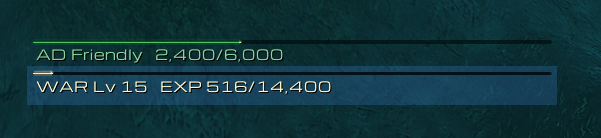
An FFXIV-style experience bar: a thin gold line with rested XP in blue, your watched reputation above it
Details
Addon ID:
27386
Addon Version:
0.3.2
Expansion:
1.60
Upload date:
Oct 06, 2026
Last Updated:
Oct 06, 2026
Downloads:
Less than 100
Website:
Source Link
Expansion
 Forever
 Categories
Developers

Frog_Wizard
Creator
Having issues?
XIVExp
An experience bar in the style of Final Fantasy XIV: a thin gold line across your screen with a short line of text beneath it, in place of Blizzard's chunky XP bar.
Part of a small family of FFXIV-style add-ons, alongside XIVPlayer (your HP and MP gauges) and XIVTarget (your target's bar). Each works on its own.
Features
Experience
- A thin gold gauge, with your rested XP shown in blue running on from your current XP.
- FFXIV-style text underneath: a three-letter class tag, your level and your progress, e.g.
DRU Lv20 EXP 4,210/12,800. - Write your own text with the words
class,level,value,max,percentandrested. - Shows
MAXat max level, or hides itself if you prefer.
Reputation
- The reputation you're watching gets its own gauge above the XP bar, e.g.
AD Friendly 2,400/6,000, using the faction's initials (Argent Dawn becomes AD). - Coloured by standing, from red at Hated to green at Exalted, or in a colour you choose.
- At Exalted it shows just the faction and standing.
- At max level, if you hide the XP bar, the reputation gauge takes its place.
- To choose the reputation, open the Reputation tab in your character window, click a faction and tick Show as Experience Bar.
Replaces Blizzard's bars
- Hides Blizzard's XP bar, and its reputation bar while XIVExp is showing yours. Each can be turned back on.
Make it yours
- Drag it anywhere; unlock it in the settings to move it.
- Change its width, height, scale, bar texture, colours, font, outline and text size.
- Uses fonts and textures from EllesmereUI and other shared-media add-ons when they're installed.
Settings
Type /xivexp, use the AddOn compartment button beside your minimap, or go to Options > AddOns > XIVExp.
Notes
- Built and tested for WoW Forever.
- The space Blizzard's bars took up stays empty, so your action bars don't move. You can rearrange them in Edit Mode.

You must be logged in to leave a comment.