
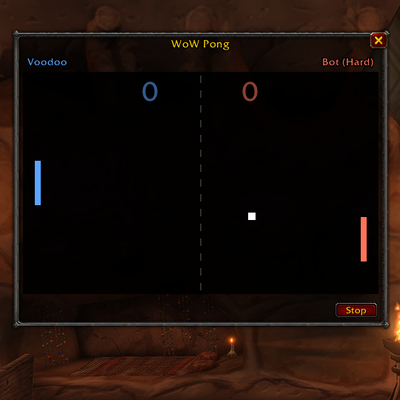
WoW Pong
Pong, as a WoW addon. Play against bots or friends. Perfect while sitting at campfires.
Details
Expansion
 Forever
 Categories
Developers

Having issues?
WoW Pong
1v1 Pong inside World of Warcraft: Forever, with a lobby, spectators, bots, stats and friendly gold bets.
Type /pong and pull up a chair. WoW Pong gives you a table list where you can challenge other players, watch matches in progress, or practice against a bot.
Early version: everything is covered by automated tests outside the game, but WoW Pong hasn't been played in-game yet. Expect rough edges, especially in matches between players. Bug reports are welcome in Issues.
How it plays
Pong, but with click-to-move paddles. Click anywhere on the board and your paddle glides toward that spot at a fixed speed. You can't jerk it into place at the last second, so the skill is in reading the ball: predicting where it will arrive and getting there first.
- Everyone sees the same board: the table's host plays on the left, the challenger on the right.
- Where the ball hits your paddle sets its exit angle. The edges send it off at up to 60°.
- The ball speeds up with each hit, up to a cap, so long rallies get tense.
- Miss and your opponent scores. Matches are first to 7 by default, and the host can pick first to 1, 3, 5 or 7.
- A rally counter runs during play, and the longest rally is shown when the match ends.
- You see both players' target markers, so spectators (and your opponent) can tell where each paddle is heading.
Features
Lobby and tables
- Browse open tables with their players, status and live score (Open seat, Ready, Playing 4–2, Finished 7–5).
- Sit to play or Watch to spectate, straight from the list.
- Open a Table to host your own. Either seated player presses Play Now to start a 3-second countdown.
- Spectators can join a match that's already underway and catch up within a few seconds.
- Idle tables close on their own after 10 minutes.
Bots
- Three difficulties: Easy, Normal and Hard.
- Practice vs Bot on your own, or Watch Bots play each other.
- Hosts can add a bot to their table, or put bots in both seats so other players can watch and bet.
Invites
/pong invite <name>, or just target someone and type/pong invite.- They get an Accept/Decline popup, and accepting seats them at your table.
- The options let you choose who can invite you: everyone, only friends and guild, or nobody.
Stats
- A per-character record against players: wins, losses, forfeits, current and best streak, points, and your longest rally.
- A separate record against each bot difficulty.
- Head-to-head records against every opponent.
- Open them with the lobby's Stats button,
/pong stats, or a right-click on the minimap button.
Gold bets (honor system)
- Offer an even-money bet on yourself, and anyone at the table can click Take.
- Betting closes when Play Now is pressed. The table host referees and settles the result.
- If the seats change or the host disappears before the result, the bets are voided.
- The Ledger keeps track of who owes whom. When you open a trade with someone you owe, WoW Pong fills in the amount for you.
- The addon can't move gold itself. Bets are on your honor.
Options
Open the options with the lobby's Options button, /pong options, a middle-click or shift-click on the minimap button, or the game's Settings > AddOns page.
- Display: window size and lock, paddle colors (blue vs red, me vs them, class colors, retro white), target markers, ball trail, hit flash, board darkness, center line.
- Play: bot difficulty, match length, hold the mouse button to steer, open the window automatically when your match starts.
- Social: who can invite you, a chat notice when a table opens, hiding tables that run a different version, the bets panel, the trade fill-in.
- General: minimap button, reset window position, reset stats, restore defaults.
Options are shared by every character on your account. Stats and the bet ledger are kept separately for each character.
Minimap button
- Left-click opens the lobby, right-click opens your stats, and a middle-click or shift-click opens the options.
- The tooltip shows your record. The addon is also listed in the addon compartment.
Commands
| Command | What it does |
|---|---|
/pong | Open the lobby (or close the window) |
/pong practice [easy|normal|hard] | Play against a bot |
/pong demo [level] [level] | Watch two bots play |
/pong stop | End the current match |
/pong points 1|3|5|7 | Set the match length for your table and for practice |
/pong host | Open a table (you take seat 1) |
/pong join <name> / /pong watch <name> | Sit at someone's table, or watch it |
/pong bot [level] | (Host) put a bot in seat 2 |
/pong start / /pong leave | Play Now / leave the table |
/pong invite [name] | Challenge someone (or your target) |
/pong tables | List the tables you can see |
/pong stats / /pong ledger | Show your record / who owes whom from bets |
/pong options | Open the options window |
/pong minimap | Show or hide the minimap button |
/pong ping / /pong net | Check who can hear you / show message stats |
/wowpong works too.
Good to know
- Both players need WoW Pong installed, and so does anyone who wants to watch. The lobby marks tables running a different version.
- There's no server: players talk through addon messages on a hidden channel. Nothing is posted to chat, and results appear only in the Pong window.
- Leaving, disconnecting or reloading mid-match counts as a forfeit.
- Combat doesn't interrupt anything. Play in town, on a boat, or wherever you like.
- There are no sounds.
Compatibility
Built for World of Warcraft: Forever (Interface 16001).
You must be logged in to leave a comment.