
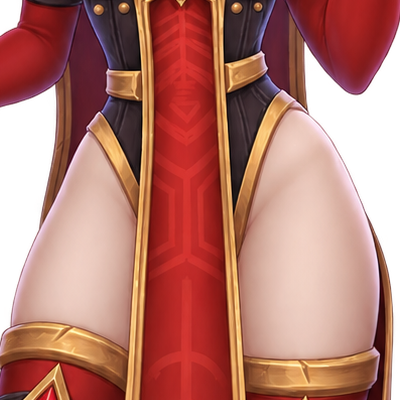
Whitemane Motivator
Inquisitor Whitemane ensures you will purge the heretic and kill the unworthy. For the light!
Details
Expansion
 Forever
 Categories
Developers

Having issues?
Inquisitor Whitemane ensures that you purge the heretic and slay the unworthy. For the Light!
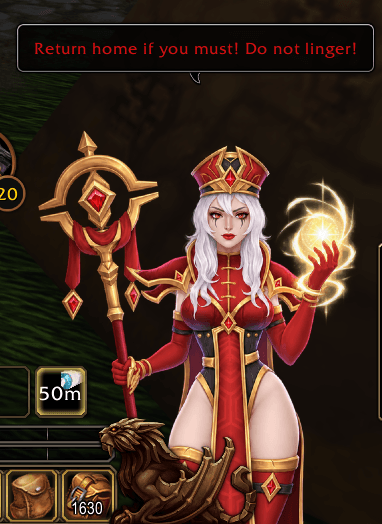
Whitemane Motivator is a cosmetic addon for World of Warcraft Classic Era that places Inquisitor Whitemane directly on your UI as your personal, fanatical and frequently disappointed motivational companion.
Whitemane remains visible on your screen and reacts to what you are doing in the game with Scarlet Crusade-inspired comments.
She may praise you.
She may give you another chance.
More commonly, she will question your competence.
“Arise, my champion! Arise!”
“The Light has spoken!”
“You cannot even afford this?! Embarrassing!”
“Not ready?! What exactly have you been doing?!”
“Gravity is not heresy! You cannot purge it!”
Messages appear in a WoW-style speech bubble using red yell-style text.
Whenever Whitemane speaks, her character performs a short bounce / squash-and-stretch animation to give the otherwise static character a little more life.
Situational Reactions
Whitemane no longer simply throws out random messages every few seconds. Instead, she reacts to events happening around your character.
Current reactions include:
- Player death
- Resurrection
- Enemy player kills
- Mounting and dismounting
- Hunter and Warlock pets being summoned, including the pet's name where available
- Eating and drinking
- Resting at a campfire
- Entering capital cities, with city-specific dialogue
- Starting and finishing a flight path
- Completing quests
- Resetting talents
- Receiving party or raid invitations
- Entering Battlegrounds
- Battleground victories and defeats
- Profession skill increases
- Occasional critical hits
- Joining or leaving a guild
- Visiting the barber
- Opening the bank
- Entering stealth
- Using a Paladin immunity/protection ability
- Attempting to use a Hearthstone
- Attempting to Hearthstone during combat
- Repairing equipment
- Equipment reaching zero durability
- Collecting mail
- Going AFK and returning
- Going DND and returning
- Entering a dungeon or raid
- Leaving a dungeon or raid
- Successful instance runs versus leaving without defeating a boss
- Special reactions when entering the Scarlet Monastery
- Attacking Whitemane herself in the Scarlet Monastery
- Opening a trade window
- Destroying items
- Destroying valuable items
- Critical healing
- Healing severely injured players when the WoW API allows the relevant health information
- Entering a rested area
- Logging out
- Filling your inventory
- Trying to buy something without enough gold
- Ready Checks
- Being marked Not Ready
- Opening the Auction House
- Long falls / likely fall damage
Most situations contain at least three different lines, so the same event does not always produce the same response.
Whitemane's general attitude is intentionally:
- fanatical
- demanding
- impatient
- easily disappointed
- occasionally approving
- willing to grant second chances
- only rarely sympathetic
Features
- Permanently displays Whitemane on your UI
- Drag her anywhere using the left mouse button
- Can be positioned partially or completely beyond the screen edge
- Resize her using the mouse wheel
- Scale range from approximately 50% to 175%
- Position and scale are automatically saved
- Optional screen-edge clamping
- Situational dialogue instead of periodic random quotes
- Multiple dialogue variants for each situation
- Character-specific and Scarlet Crusade-themed dialogue
- Short bounce / squash-and-stretch animation when speaking
- WoW-style speech bubbles
- Red yell-style text
- No configuration window required
- Completely cosmetic
- Does not perform combat actions or automate gameplay
Controls
Move Whitemane
Hold the left mouse button on Whitemane and drag her to the desired position.
She can be moved partially outside the visible screen area, allowing you to position her like a desktop-style character overlay.
Resize Whitemane
Hover your mouse over Whitemane and use the mouse wheel:
- Mouse wheel up → larger
- Mouse wheel down → smaller
The scale ranges from approximately 50% to 175%.
Slash Commands
| Command | Function |
|---|---|
/whitemane | Displays the available commands |
/whitemane say | Displays a test quote |
/whitemane reset | Resets position, scale and screen clamping |
/whitemane scale 1.0 | Sets Whitemane's scale manually |
/whitemane scale 1.2 | Example: sets scale to 120% |
/whitemane scale 0.8 | Example: sets scale to 80% |
/whitemane free | Allows Whitemane to be moved beyond the screen boundaries |
/whitemane clamp | Keeps Whitemane inside the screen boundaries |
/whitemane test <category> | Manually triggers a situational quote for testing |
Saved Settings
Whitemane Motivator automatically remembers:
- screen position
- character scale
- whether screen-edge clamping is enabled
No configuration window is required.
Compatibility Notes
The addon is designed for the current WoW Classic Era / Forever client.
Recent WoW API changes restrict access to certain combat, aura and unit information. For that reason, a few reactions such as low-health healing, aura-based activities and fall detection are implemented on a best-effort basis.
These restrictions do not affect Whitemane's normal display, movement, scaling or the majority of situational reactions.
Important
Whitemane Motivator is a purely cosmetic addon.
It does not:
- cast spells
- select targets
- perform combat actions
- automate rotations
- automate movement
- make gameplay decisions
It merely observes permitted game events and judges you accordingly.
Failure is temporary. Her disappointment is eternal.
For the Light!
You must be logged in to leave a comment.