

Warm Pause
Gentle hourly reminders to hydrate, stretch, and move, with a customizable overlay and gameplay countdown.
Details
Expansion
 Forever
 Categories
Developers

Having issues?
Warm Pause
**A little pause, adventurer.**
It's easy to lose track of time during a good adventure. Warm Pause gives you a gentle nudge to take a sip of water, unwind your shoulders, and get up for a moment.
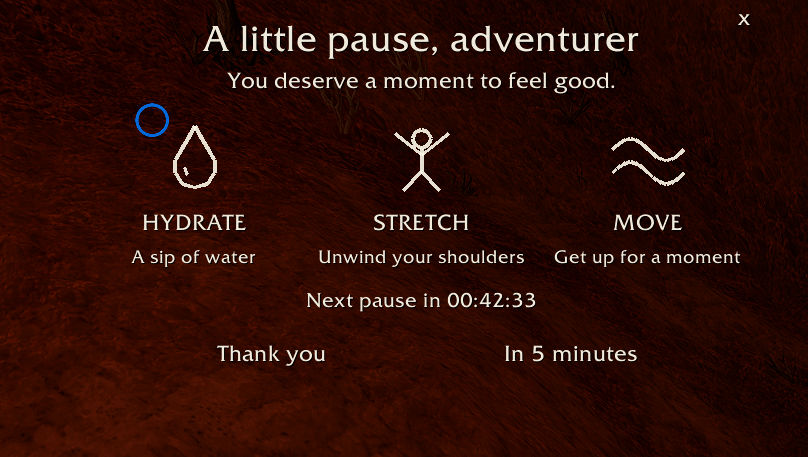
After an hour of logged-in play, a small overlay appears with three simple reminders: **Hydrate, Stretch, and Move**. Its cream line drawings and transparent background keep the reminder light and welcoming. No sounds, flashing alerts, or chat broadcasts.
## A reminder that fits your session
- **Hourly by default:** choose an interval from 5 to 240 minutes.
- **Gameplay countdown:** see the time until your next pause in the overlay or minimap tooltip. The tooltip also shows elapsed time for the current session.
- **Saved remaining time:** logging out or reloading the UI preserves the countdown. Time offline doesn't count; logged-in AFK time does.
- **Combat-aware:** automatic reminders wait until combat ends.
- **Take your time:** reminders stay until you dismiss them. Select **Thank you** to start the next interval or **In 5 minutes** to snooze.
- **Pause whenever you like:** the options menu can pause and resume reminders while preserving remaining time.
## Make it feel like yours
Drag the overlay to a comfortable spot and lock it in place when you're happy. Open the options menu to adjust:
- Overlay size, text size, and opacity.
- Cream, white, or soft gold colors, with RGB sliders for a custom color.
- An optional soft cocoa background with adjustable opacity.
- Visibility of the title, reminder descriptions, and countdown.
- Minimap button visibility and reminder interval.
Changes save automatically. Appearance changes preview immediately, and the menu includes **Preview reminder**, **Reset position**, and **Restore defaults** buttons.
## Getting started
1. Install the addon into your game's `Interface/AddOns` folder. The folder should contain `WarmPause/WarmPause.toc`.
2. Enable Warm Pause in the AddOns menu and enter the game. If you're already logged in, run `/reload`.
3. Left-click the water-drop minimap button to show or hide the overlay. Right-click it to open options.
You can drag the minimap button around the minimap. Opening the overlay for a preview doesn't restart your countdown.
## Useful commands
- `/wp` — show the overlay.
- `/wp options` — open or close the customization menu, including when the minimap button is hidden.
- `/wp hide` — dismiss the overlay and start a new interval.
- `/wp on` or `/wp off` — enable or disable reminders and reset the countdown.
- `/wp reset` — reset the overlay's position, size, and opacity.
`/warmpause` also works in place of `/wp`.
## Lightweight by design
Warm Pause uses no external addon libraries. Its symbols are drawn directly in the UI, and a single timer checks once per second. Overlay movement updates run only while dragging, and the options window is created when first opened.
## Compatibility
Developed for World of Warcraft: Forever. Compatibility with other WoW clients has not been verified.
## Feedback
If you encounter a problem, include your addon version, game client version, what you were doing, and any Lua error message when reporting it.
You must be logged in to leave a comment.