
Warbands
Zero-setup local Battlegroup mesh (solos & parties within 150 yds) plus 120-player multi-raid coalition command with shared vitals, target marks, roles, layer sync, and HUD overlay.
Details
Expansion
 Forever
 Categories
Developers

Having issues?
WARBANDS
Open-World Battlegroup Proximity Mesh & 120-Player Multi-Raid Command Network
World of Warcraft’s default raid frames end at 40 players, and open-world combat leaves solos and 5-man parties blind to friendly forces fighting in the same zone.
WARBANDS introduces a dual-engine tactical interface built specifically for World PvP. Whether you are roaming solo, rolling in a 5-man dungeon party, or organizing a 120-man coalition to siege a capital city, WARBANDS seamlessly bridges allied fighters into a shared tactical grid without external voice bots, web servers, or complex setup.
Core Modes
1. Battlegroup Proximity Mesh (Default Mode)
Designed for everyday world PvP, zone defense, and open skirmishes:
- Zero-Setup Faction Discovery: Automatically connects same-faction addon users in your current zone over dynamic background relays.
- 150-Yard Tactical Perimeter: Friendly fighters within 150 yards instantly appear on your dashboard and floating HUD overlay with live health, class colors, roles, and target marks.
- Cross-Group Synthesis: Solos, duos, and 5-man parties running WARBANDS automatically merge into one unified fighting force on your screen without leaving your party or converting to a raid.
- Proxy Relay Engine: Players running the addon automatically broadcast health and position telemetry for non-addon teammates in their party, keeping the entire local force visible.
- Instant Enlist Toggle: Click [Enlist in Battlegroup] to activate your transceiver, or stand down anytime to run silent.
2. Raid Command 120 (Multi-Raid Coalition Grid)
Engineered for massive open-world campaigns, city defense, and multi-raid coalitions:
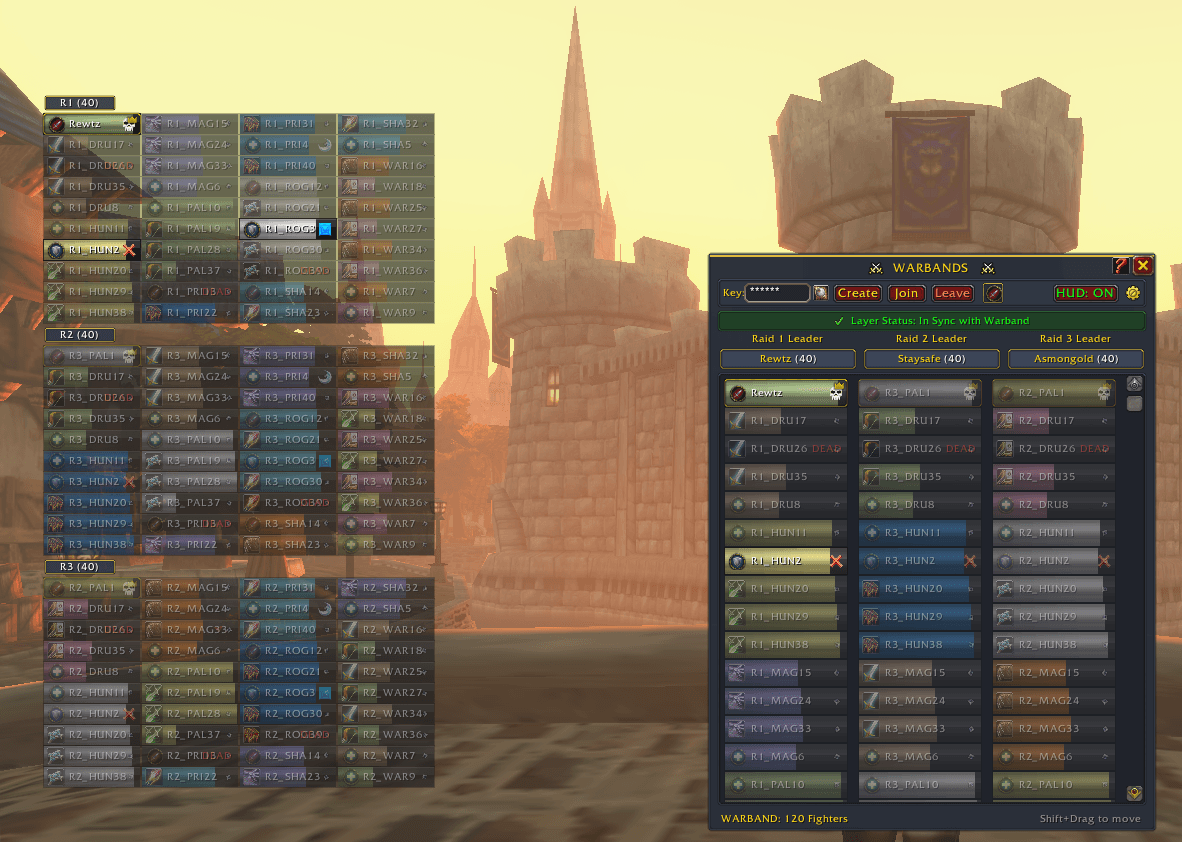
- 120-Slot Tactical Battlefield Grid: Monitors up to 3 distinct 40-man raids side by side in a dedicated commander dashboard.
- Host Key Authentication: The host leader creates a private session key (
/wb), partner leaders enter the key, and the host approves incoming raids with one click. - Layer Detection & One-Click Anchor: Detects when an allied raid is phased onto another server shard layer and provides a one-click anchor request to pull your forces together.
- Unified Coalition Chat: Use
/warband <message>to route battlefield orders across all 3 synchronized raids simultaneously.
Visuals & Interface
- Lightweight Floating HUD Overlay: A compact, vertically stacked unit array designed to track allied health and statuses in combat without blocking default bags or character panes.
- Proximity Opacity & Directional Compass:
- Within 40 Yards: 100% full opacity for target acquisition.
- Tactical Perimeter (100 Yards): 65% opacity with an active compass arrow tracking the ally's direction.
- Out of Range (Far): 30% dimmed opacity with bearing tracking.
- Native Right-Click Unit Menus: Full right-click integration on unit bars to access native Blizzard menus (Inspect, Whisper, Trade, Promote, Dungeon Difficulty, Leave Group) without interface lockups.
- Custom Visual Themes: Choose between 4 distinct commander aesthetics directly in the Settings drawer:
- Midnight: Deep slate navy with gold trim.
- Charcoal: Matte obsidian with platinum-white accents.
- Horde Blood: Crimson iron with battle-red trim.
- Alliance Royal: Cobalt blue with gilded brass borders.
- Triage & Role Filtering: Assign Tank, Healer, or DPS badges, and toggle one-click filters to isolate only healers or only commanders across the battlefield.
- Streamer-Safe Key Masking: Mask private session keys with one click across the dashboard and minimap tooltips.
Quick Start
- For Open-World Skirmishes: Open
/wb. You are automatically enlisted in the local Battlegroup mesh. Nearby friendly forces in your zone will populate your frames automatically. - For Multi-Raid Battles: Click the [Raid Command (120)] tab, enter a shared session key, click Create (Host) or Join (Partners), and approve the joining squads on the header plaques.
Slash Commands
/wbor/warbands— Toggle the Warbands Dashboard./wb hudor/wb overlay— Toggle the floating HUD overlay on/off./wb hud reset— Reset HUD position and scale back to the top-left default./wb test— Run a full 120-player dummy simulation (40/40/40) to test layouts, scaling, and filters./wb icon— Force the minimap launcher icon visible./warband <message>or/wbchat <message>— Broadcast a message across all synchronized raid groups.
You must be logged in to leave a comment.