

TruePlayed
WoW Forever: your real /played - XP per hour, time to level, mobs to kill and time per zone, without AFK, inn or city time, in 13 themes.
Details
Expansion
 Forever
 Categories
Developers

Having issues?
TruePlayed for WoW Forever - your real /played
Your real /played: without AFK, inn or city time, your choice.
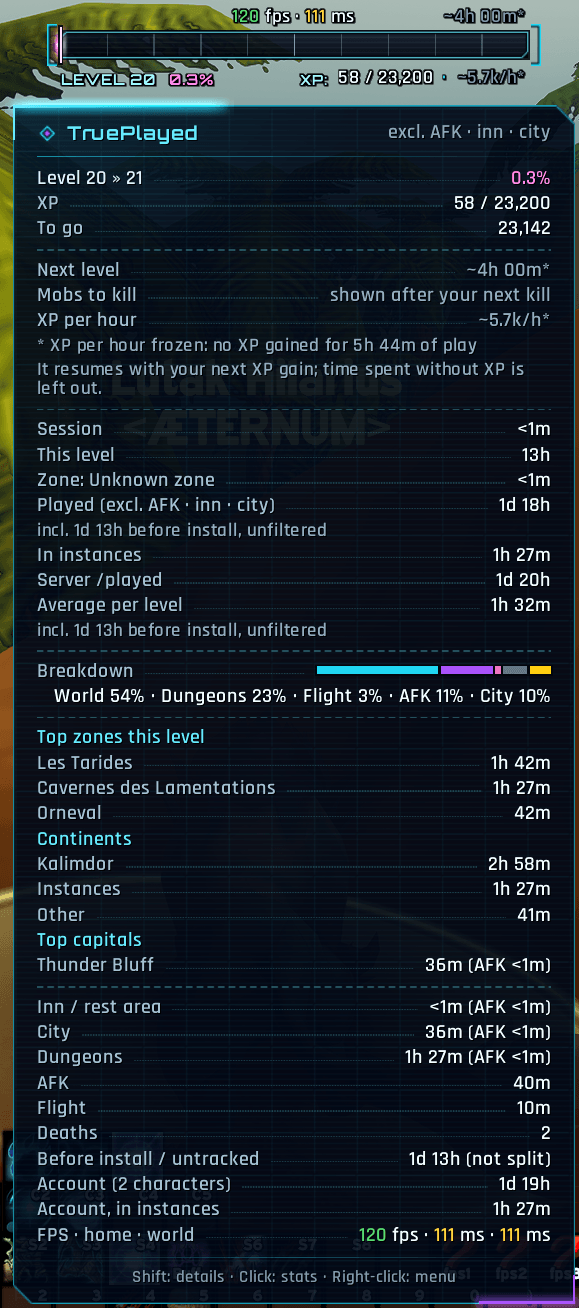
The game's /played counts everything: the coffee break, the evening chatting at the inn, the auction house trips. TruePlayed records every played second, knows what you were doing and lets you decide what counts. It shows how fast you really level on WoW Forever: XP per hour, time to next level, mobs to kill, time per level, time per zone and, at any level, your time in dungeons, raids and PvP.
Features
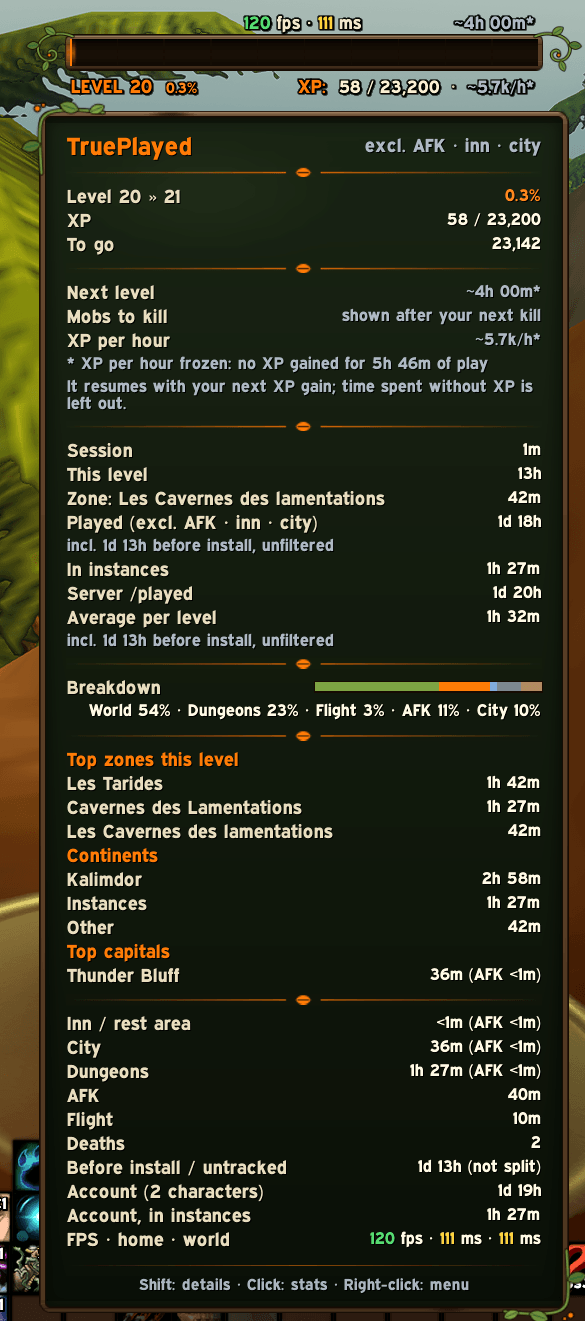
- 13 themes: the bar, its tooltip, the FPS graph and the statistics window change look together. Futuristic (neon HUD, the default), Classic (the original look), Heroic fantasy, Pixel (old school), and one theme per class: Warrior, Paladin, Hunter, Rogue, Priest, Shaman, Mage, Warlock, Druid, each with its own frame, ornaments, fonts and tooltip. Class (automatic) gives each character the theme of its class. Switch in the options, the right-click menu or with
/tpl theme; your own colours still win. Bundled fonts under the SIL Open Font License. - XP per hour and time to next level, aware of your rested XP. Kept per character: they survive
/reload, restarts and crashes, and do not start again from zero at each login. Right after installing, they start from an estimate based on your server /played (shown with a~) instead of staying empty. After 20 minutes of play without any XP they freeze (dimmed, with a*) instead of drifting: no absurd time to level after hours at a level cap. - Temporary level caps (the WoW Forever beta): after 3 mobs in a row that give no XP, the bar reads "LEVEL 20 · CAP", the tooltip explains it, and everything goes back to normal by itself when XP comes again.
- Mobs to kill: how many mobs like your last 10 kills (their average XP) you still need to level up, aware of rested XP (rested kills give double XP): "~5h 05m · 38 mobs" on the bar, "Mobs to kill: ~38 (average: 47 XP, last: 30 XP)" in the tooltip.
- Rested XP like the game's XP bar: the bar takes the rested colour while you are rested, with a lighter part up to where your rested XP ends; "Rested: 11,600 XP (50%)" in the tooltip.
- Instance time as a real statistic: dungeons, raids and PvP (battlegrounds, arenas) recorded apart from the open world, AFK included. Tooltip lines, most played instances in the Zones tab (character or account), an instance column in the Levels and Sessions tabs, account totals and two bar infos. Made for max-level players too.
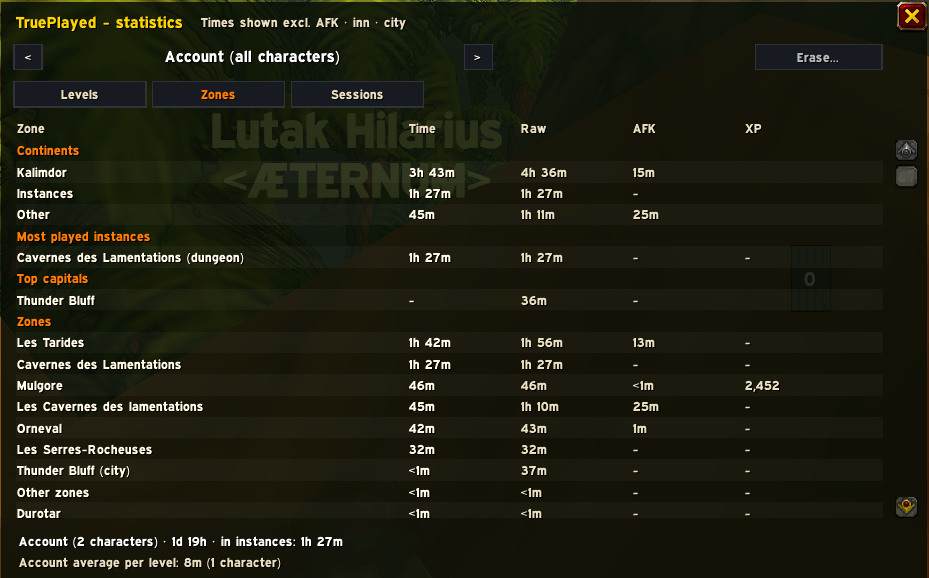
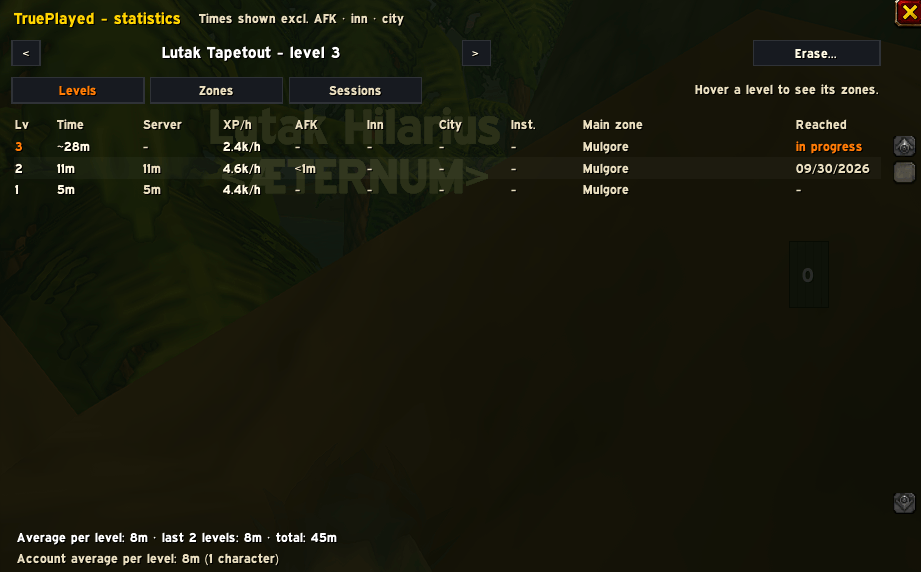
- Time per level, with a full level history (time, server time, XP per hour, AFK, inn, city, instances, main zone, date reached).
- Average time per level: overall, last 5 levels, and your whole account.
- Time per zone (Elwynn Forest, Stranglethorn Vale...): a Zones tab with every zone you played in (filtered time, raw time, AFK, XP), the zones of each level (hover a level in the Levels tab), your time per continent (Kalimdor, Eastern Kingdoms, instances) and the time in your current zone in the tooltip. Exclusions apply to zones too.
- Played and session totals, next to the live server /played.
- AFK time, always recorded separately.
- Inn / rest area time and city time, always recorded separately.
- Your most visited capitals, with the AFK part.
- Exclude AFK time, exclude inn time, exclude city time: one click in the right-click menu, the options or a slash command. Nothing is deleted, every number is recalculated instantly, and switching it off brings the original numbers back. While your current state is excluded, timers show pause marks.
- Choose what the bar shows: three infos among 19 (time to level, mobs to kill, XP per hour, % of level per hour, XP to go, rested XP, time this level, session, total, server /played, AFK this session, average per level, time in zone, instance time, FPS, latency...). Full XP bar or compact box, size, scale, background opacity (0 % by default), hide in combat, fade, hide at max level. Texts never overlap, even on a narrow bar.
- Readable texts: thin outline and shadow by default (outline none / thin / thick), and the text colour of your choice with the game's colour picker.
- Bar colours: the XP bar and rested colours of your choice, over any theme, with a "Theme colours" button back to the theme's own.
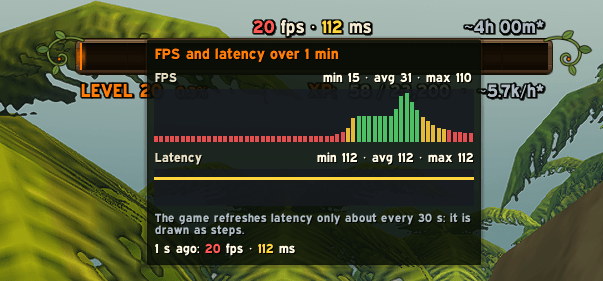
- FPS and latency on the bar, measured only while displayed, green / yellow / red (or your text colour). Hover them for a graph of the last 30 s, 1 min or 5 min, with min / average / max and the value at the moment you point at. Latency is refreshed by the game about every 30 seconds: the graph shows it as steps, honestly.
- Crash recovery: the game saves addon data only at logout, so a crash used to lose your session. TruePlayed takes the missing time back from the server /played at the next login, splits it between levels with the exact XP you gained and between activities with your own habits, and marks it as rebuilt.
- One record per character (two characters with the same name never mix), settings shared by the account, and an account view in the statistics window.
- Lightweight: no per-frame code, one 1-second timer, nothing built until you open it.
/tpl perfshows the memory (code plus the saved data of all your characters) and CPU it uses.
Commands
| Command | What it does |
|---|---|
/tpl | Options |
/tpl stats | Statistics window (levels, zones, sessions) |
/tpl lock / unlock | Lock or move the bar |
/tpl show / hide | Show or hide the bar |
/tpl style bar / box | Full bar or compact box |
/tpl theme [name] | Show or change the theme (futuriste, actuel, heroic, pixel, class, warrior, paladin, hunter, rogue, priest, shaman, mage, warlock, druid) |
/tpl lang [en|fr|auto] | Show or choose the language of TruePlayed (applies after /reload) |
/tpl afk / inn / city [on|off] | Exclusions (no argument: toggle) |
/tpl citytoggle | Count the current zone as a city (or not) |
/tpl played | Summary in the chat |
/tpl sync | Refresh the server /played |
/tpl reset pos / session / rate / char | Resets (erasing a character asks for confirmation) |
/tpl perf | Memory and CPU used |
/tpl help | All commands |
FAQ
Why is the number different from /played? Without exclusion it is exactly the server /played. With exclusions it is the server /played minus the AFK, inn or city time TruePlayed recorded.
What about the time played before I installed it? It cannot be split, so it is shown on its own ("Before install / untracked") and never excluded. Totals and the overall average still include it, and the tooltip says so.
How do I get the old look back? Choose the Classic theme (Options > Display > Theme, right-click the bar > Theme, or /tpl theme actuel): it is the look of TruePlayed before themes, unchanged.
Some theme textures or fonts are missing. Restart the game completely after installing or updating: the game loads new fonts and textures only when it starts, not on /reload.
What does the ~ before XP per hour mean? It is an estimate from your server /played, used right after installing until TruePlayed has measured about ten minutes of your own play. The tooltip says so.
How are the mobs to kill counted? From the average XP of your last 10 kills (without their rested bonus), your XP to go and your rested XP. Quest and exploration XP are not kills.
Why does my old dungeon time show as open world? Dungeons, raids and PvP are recorded apart from version 0.1.0-beta.1 on; earlier instance time cannot be told apart.
Why do a few AFK minutes count as active? The game sets the AFK flag only after about 5 minutes without input; those minutes count as active.
Does a crash lose my time? No: see "Crash recovery" above. It needs one server /played at login, which TruePlayed asks for (the usual lines appear once in the chat) unless another addon already did. You can turn that request off in the options and type /tpl sync instead.
What counts as a city? The whole map of a capital, not only its inn. A flight over a capital counts as flight. /tpl citytoggle adds or removes the current zone.
Does it work with RXPGuides? Yes. RXPGuides asks for /played at login and TruePlayed simply listens. A /played you type within about 3 seconds of RXPGuides' request may be hidden by RXPGuides once.
Compatibility
- WoW Forever 1.60.x (interface 16001).
- Classic Era: planned.
- Works with RXPGuides. With WTFix: open /wtfix and untick TruePlayed (otherwise WTFix restores an older copy of its data at every load).
- Optional Data Broker feed when your UI already provides LibDataBroker, and an addon compartment button.
Languages
English and French. TruePlayed follows the game's language by default; choose another one in Options > Display > Language (Langue) or with /tpl lang en|fr|auto, then reload the interface. Names that come from the game (zones, mobs) stay in the game's language. Translations are welcome on GitHub.
Issues and suggestions
Please report problems on GitHub: //github.com/Lutakh/TruePlayed/issues" rel="noopener nofollow" target="_blank">https://github.com/Lutakh/TruePlayed/issues" target="_blank" rel="noopener noreferrer">https://github.com/Lutakh/TruePlayed/issues (include the addon version, your game language and the Lua error text).
TruePlayed was developed with the help of Claude (Anthropic), who also drew the logo.
You must be logged in to leave a comment.