
TrinketManagerForever
Keep all your trinket cooldowns in view – TrinketManagerForever shows the trinkets from your list that are ready or almost ready, and lets you swap them in with a single click.
Details
Expansion
 Forever
 Categories
Developers

Having issues?
TrinketManagerForever
Keep all your trinket cooldowns in view – TrinketManagerForever shows the trinkets from your list that are ready or almost ready, and lets you swap them in with a single click.
What it does
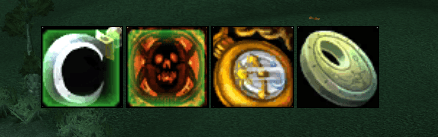
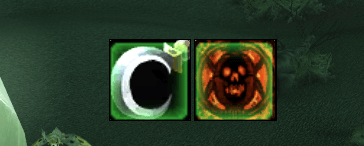
You choose which trinkets to track. TrinketManagerForever then shows a compact row of icons, one per trinket, depending on the situation:
| Situation | Icons shown |
|---|---|
| In combat | Your equipped trinkets that are ready or whose cooldown is almost over |
| Out of combat | All listed trinkets you carry (equipped or in your bags) that are ready or almost ready |
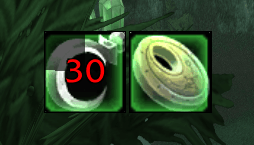
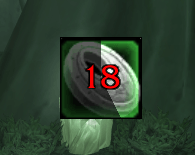
"Almost ready" means the remaining cooldown is below a threshold you set (30 seconds by default). When a trinket goes on cooldown, its icon disappears. Once the cooldown drops below the threshold, the icon comes back with a countdown.
Clear visual feedback
- Ready: icon in full color
- Almost ready: icon greyed out with a cooldown swipe and a countdown in the middle
- Equipped: marked with a frame in your faction's style, or a glow, or not at all (see below)
The icons are always sorted the same way: equipped trinkets first, then the others by remaining cooldown, so the next ready trinket is always right next to your equipped ones.
Features
Your trinket list
- Add trinkets by Shift-clicking an item link into the input field, by entering the item ID or the exact name, or by dragging a trinket from your bags onto the list
- "Add equipped trinkets" adds both of your current trinkets in one click
- The list shows each trinket's status: Equipped, In bags or Not owned
- Hints for trinkets without a use effect and for trinkets whose cooldown is not known yet
- The list is saved per character, so every character only sees their own trinkets
- Trinkets are stored by item ID, so the list works on any client language
Swap trinkets with one click
Out of combat, click the icon of a trinket in your bags to equip it:
- Left-click: upper trinket slot
- Right-click: lower trinket slot
The tooltip shows both hints. In combat the game does not allow equipping items, so clicks do nothing there.
Faction frames
Equipped trinkets get a frame in the style of your choice:
| Style | Look |
|---|---|
| My faction (default) | Horde or Alliance frame, depending on your character |
| Horde | Red iron frame with rivets and spikes |
| Alliance | Royal blue frame with gold trim |
| Simple glow | Soft green glow, like equipped items on the action bars |
| No glow | No marking at all |
Cooldown tracking
- Cooldowns are read directly from the game, including after
/reloadand login - Every trinket's cooldown duration is learned automatically and shared by all your characters
- You can also set a cooldown manually for any trinket in the list
- If the game hides cooldown data during combat, the addon keeps tracking with the known duration. If it doesn't know a cooldown at all, the trinket stays visible, so you never miss a ready trinket
Display
- Movable: unlock the display, drag it where you want it, lock it again
- Icon size from 16 to 96 px
- Grow direction: Right, Left, Down or Up
- Countdown color of your choice
- Click-through in combat, so the icons never block your clicks
- Item tooltip on mouseover, can be turned off
- Optionally hide everything in rested areas (cities, inns) or out of combat
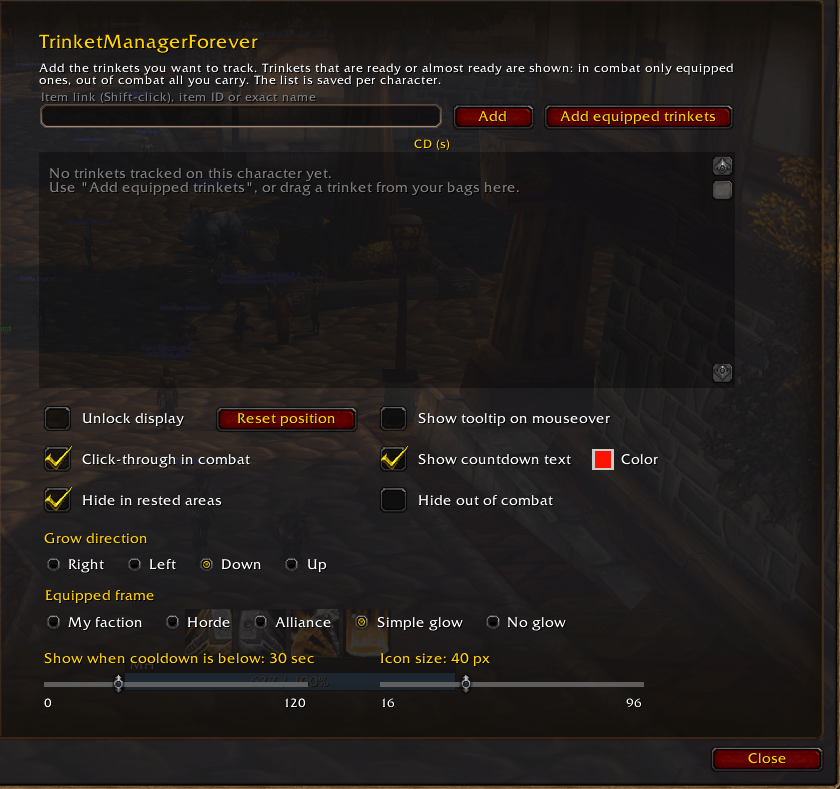
Options
Open via ESC → Options → AddOns → TrinketManagerForever, or type /tmf.
| Setting | Description |
|---|---|
| Trinket list | Add, remove and sort your trinkets, set manual cooldowns |
| Unlock display | Unlock to move the display; "Reset position" brings it back |
| Show tooltip on mouseover | Shows the item tooltip when you hover over an icon |
| Click-through in combat | Mouse clicks go through the icons while in combat |
| Show countdown text | Countdown in the middle of the icon, with a color picker next to it |
| Hide in rested areas | Hides the display in cities and inns |
| Hide out of combat | Hides the display while you're not in combat |
| Grow direction | Direction in which further icons are added |
| Equipped frame | My faction, Horde, Alliance, Simple glow or No glow |
| Show when cooldown is below | Threshold for "almost ready", 0–120 seconds |
| Icon size | 16–96 px |
All settings are saved per character.
Slash commands
| Command | Action |
|---|---|
/tmf | Open the options |
/tmf add <link or ID> | Add a trinket |
/tmf remove <link or ID> | Remove a trinket |
/tmf cd <link or ID> <seconds> | Set a manual cooldown (without seconds: remove it) |
/tmf lock / /tmf unlock | Lock / unlock the display |
/tmf reset | Reset the display position |
/tmf debug | Diagnostics: cooldown source and values per trinket |
Good to know
- TrinketManagerForever never uses a trinket for you. It only shows cooldowns and, out of combat, equips trinkets when you click them.
- The icons are plain display frames, so showing and hiding them in combat is completely safe.
You must be logged in to leave a comment.