
Transmog Atlas
Transmog Atlas is a transmog browser and collection tracker that lets you search every appearance your class can wear, preview it live on your own character, and track down what you're still missing to complete your collection.
Details
Expansion
 Forever
 Categories
Developers

Having issues?
Transmog Atlas
Browse every transmog appearance, preview it on your character, learn how to obtain it, and track your collection — all from one window.
Transmog Atlas is a full transmog browser and collection tracker: search and filter every appearance available to your class, try any of them on your actual character model without leaving the window, see how to get the ones you're missing, build and save full outfits, and keep an eye on your overall collection progress. It's built for the WoW Forever beta client.
What this addon does
At its core, Transmog Atlas replaces "alt-tab to a wiki and squint at your character sheet" with one window that does all of it:
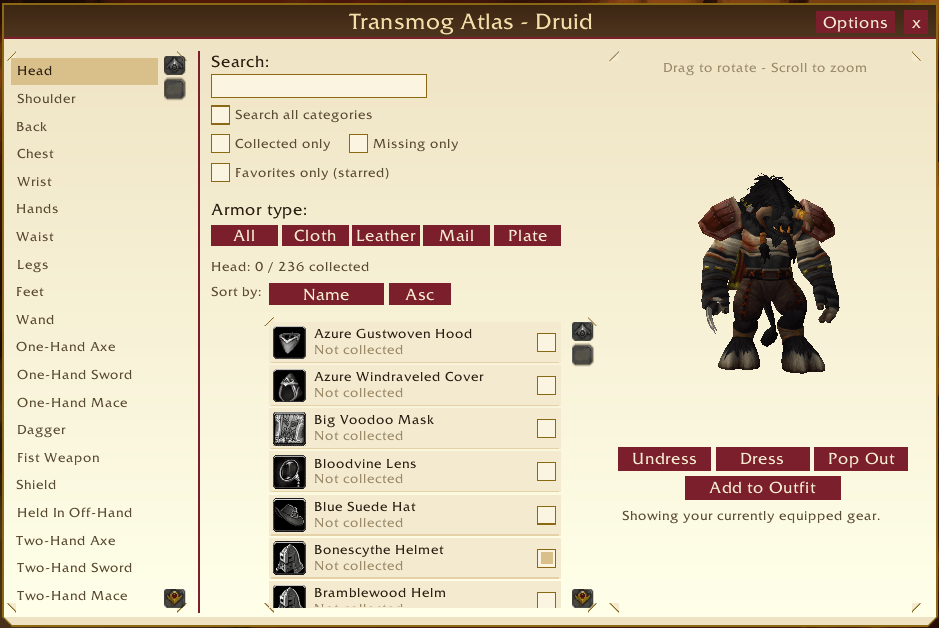
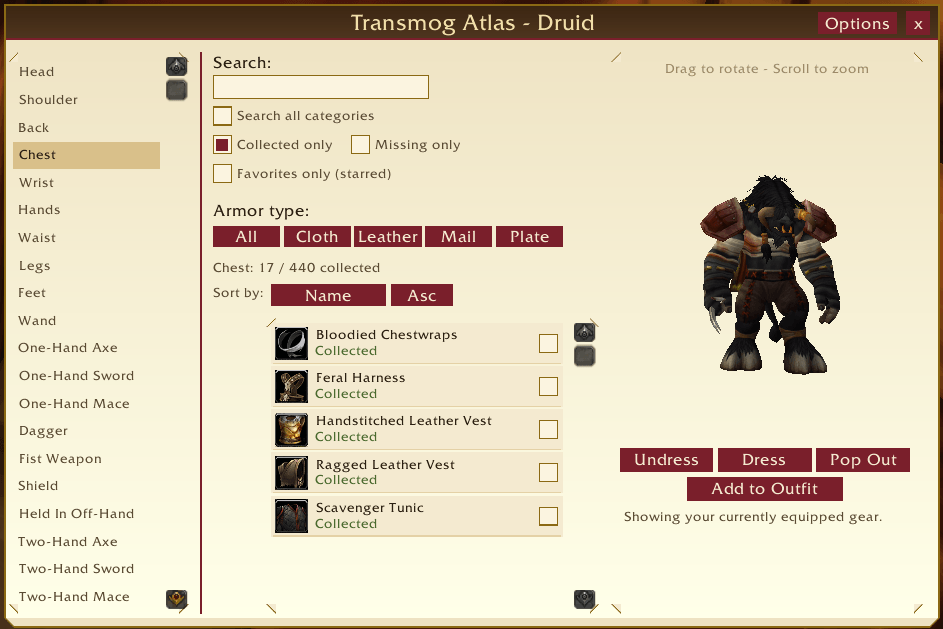
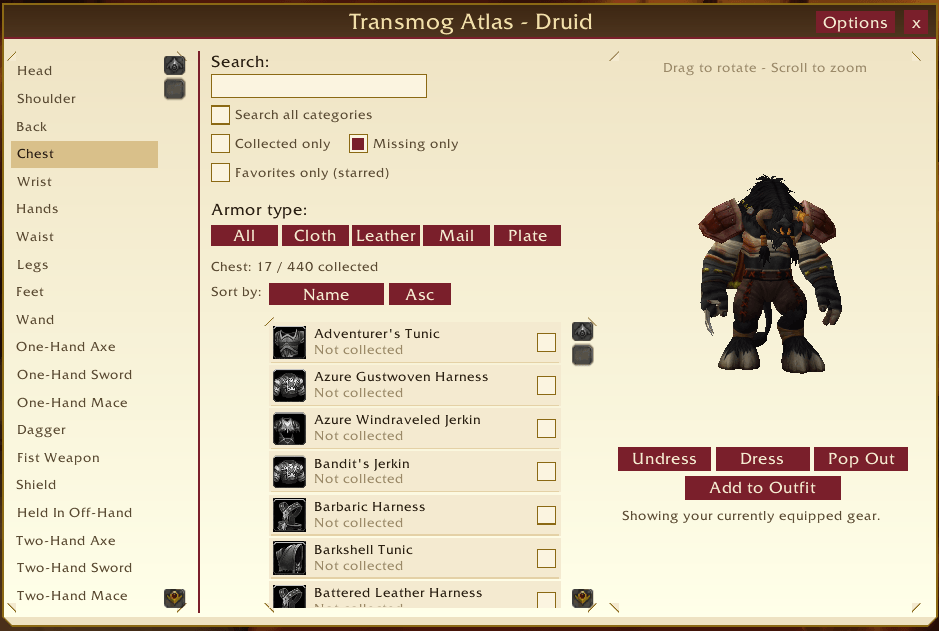
- Browse by category — every armor slot and weapon type, matching the game's own Wardrobe categories, limited automatically to what your current class can actually wear.
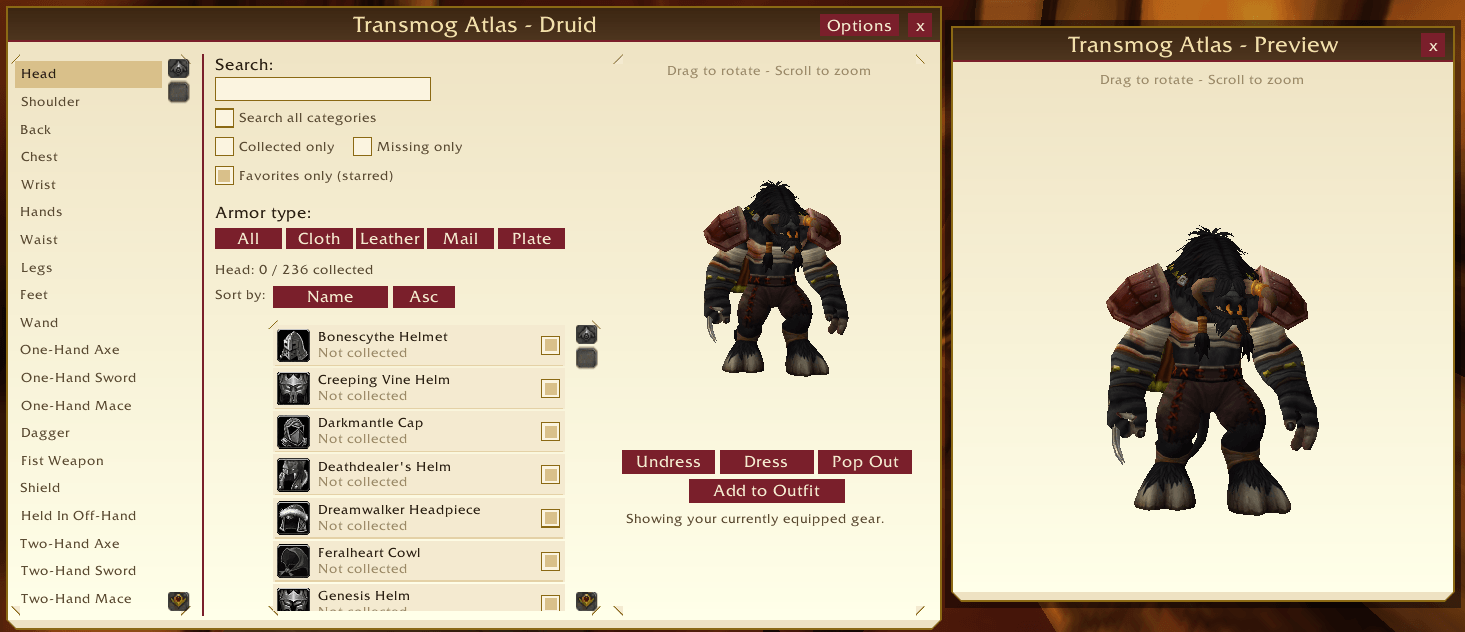
- Live character preview — click any appearance to try it on your own character model right there (drag to rotate, scroll to zoom), with Dress/Undress buttons to compare against your currently equipped look. A Pop Out button opens the same preview in its own separate floating window.
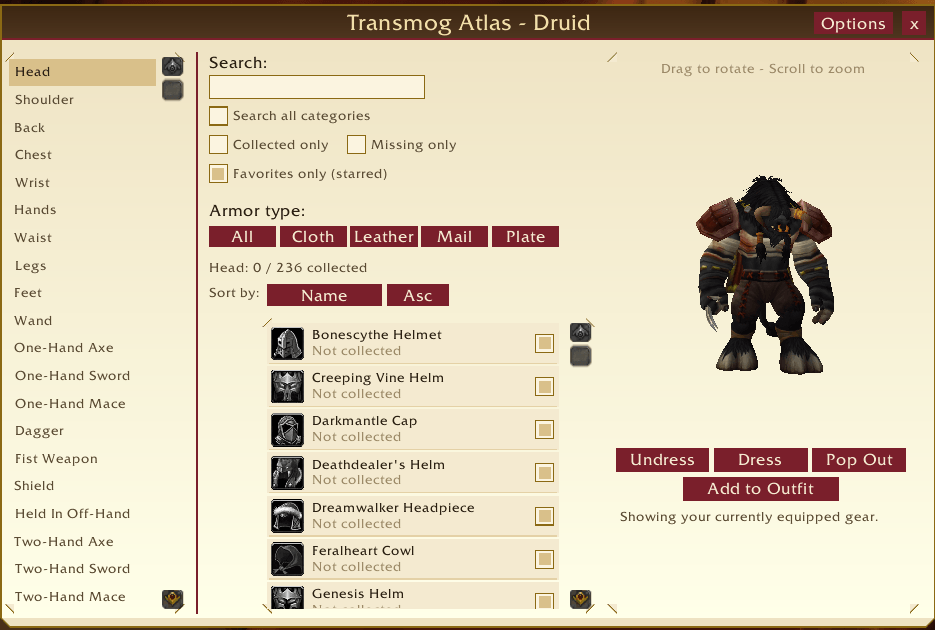
- Search and filter — search by name inside a category, or check Search all categories to search your whole class's appearance list at once. Filter down to Collected only, Missing only, Favorites only, or a specific armor type, in any combination. Sort by name or rarity, ascending or descending.
- Obtain info — every appearance shows how it's obtained (vendor, quest, drop, achievement, etc.), backed by a community-editable source list plus automatic best-effort capture of vendors/quests you personally encounter while playing.
- Favorites / wishlist — star any appearance; filter the list down to just your stars at any time.
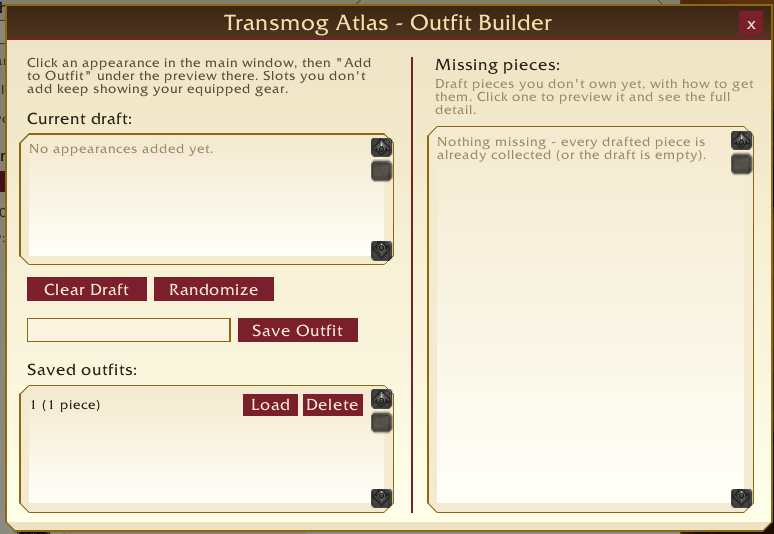
- Outfit Builder — assemble a full outfit piece by piece, preview it as a complete look, save it under a name, and reload it later. A Randomize button rolls a random collected piece into every slot for quick inspiration. A Missing pieces panel shows exactly what's left to collect for your current draft, with obtain info for each.
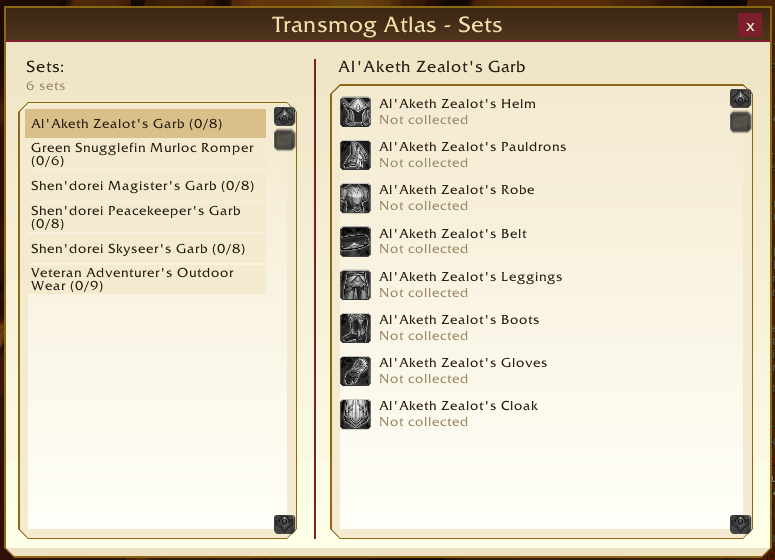
- Transmog Sets — browse the game's official appearance sets (only shown on client builds where the underlying API is actually available) with per-set collected/total counts and a piece-by-piece breakdown.
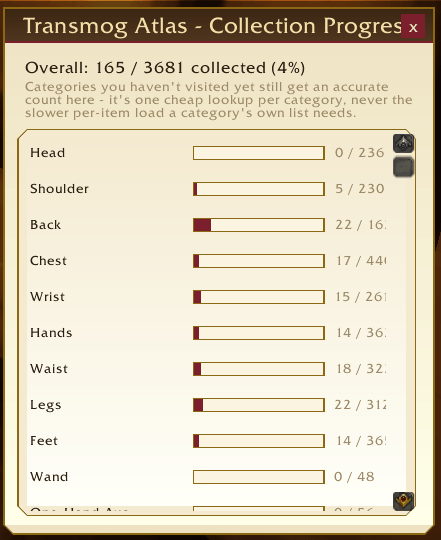
- Collection dashboard — one overall completion percentage plus a per-category breakdown with progress bars, and the same percentage in a one-glance tooltip on the minimap button.
- "NEW" tags — appearances that have become obtainable (or class-usable) since the last time you looked get a small gold NEW badge, so newly added or newly relevant items don't get lost in a long list.
- Experimental real outfit apply — optionally, apply a saved outfit to your actual equipped transmog (not just the preview) with one click. Off by default, always asks for confirmation, and only appears at all if the addon can confirm the required API exists on your client.
How it works
- Open the window with the minimap button,
/mogatlas, or/tmatlas. The window remembers its position and last-used category. - Click a category on the left to load its appearance list — lists load on demand, never automatically, so opening the window is always instant.
- Click any row to preview it on your character model and see its obtain info on the right.
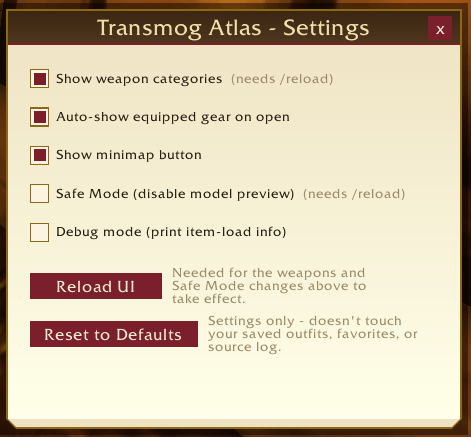
- The single Options button in the title bar opens a small menu with everything else: Sets, Progress (the dashboard), Outfits (the Outfit Builder), and Settings.
- Everything you build up — favorites, saved outfits, and the source-info log — is saved per account and persists across characters and sessions. A couple of session-only preferences (last category, window position) are also remembered.
Key points to know before you install
- This is built for the WoW Forever beta client, not retail World of Warcraft. It targets that client's interface version and its currently-known API behavior.
- "Load out of date AddOns" — because this is a fast-moving beta, the game's interface-version number can drift out of date between client builds faster than any addon can keep up. This is normal WoW behavior, not a bug: check "Load out of date AddOns" at the character-select AddOns list (bottom left) once, and this addon (and any other) will never be disabled by a version mismatch again.
- Weapon categories are on by default but their exact slot mapping hasn't been independently verified on this client build. If a weapon category ever looks wrong (empty when it shouldn't be, or shows the wrong items), turn weapons off in Settings or with
/mogatlas weaponsand report it. - The experimental "real outfit apply" feature is off by default and only appears if the addon can confirm the underlying API exists on your client. It always asks for confirmation before changing your actual equipped transmog. Everything else in the addon — Dress, Undress, TryOn, the Outfit Builder preview — only ever affects the preview model, never your real character.
- Sets only appears if supported — the Transmog Sets browser is hidden entirely on a client build where the addon can't confirm the necessary API is present, rather than showing a broken or empty window.
- Obtain info is best-effort — vendor/quest/location detail comes from a manually-curated list plus automatic guesses made from context while you play (e.g. "you looted this within 10 seconds of a vendor window being open"). It's a helpful starting point, not a guaranteed-accurate database.
- Safe Mode exists as a fallback: it disables the 3D character-preview widgets entirely if you ever run into a problem with them, while leaving browsing, search, and everything else fully functional. Toggle it with
/mogatlas safemode(requires/reload). - Favorites, saved outfits, and settings are shared across all characters on your account; only the one-time "welcome" notice is tracked per character.
Slash commands
All commands work with either /mogatlas or /tmatlas.
| Command | What it does |
|---|---|
/mogatlas | Opens or closes the main window. |
/mogatlas minimap | Shows or hides the minimap button. |
/mogatlas safemode | Toggles Safe Mode (disables the character-preview widgets). Requires /reload to take effect. |
/mogatlas weapons | Toggles whether weapon categories appear in the category list. Requires /reload to take effect. |
/mogatlas automodel | Toggles whether your currently equipped gear is shown automatically the first time you open the window each session. |
/mogatlas debug | Toggles debug mode, which prints one chat line per item processed while a category loads (useful only for diagnosing a specific problem). |
Everything else — weapon categories, auto-load model, the minimap button, Safe Mode, Debug mode, and the experimental outfit-apply toggle — is also available from the in-game Settings window (Options → Settings), including a Reset to Defaults button for just these settings. No slash command is required for day-to-day use; the commands above are there mainly as a backup if the UI is ever unreachable.
Feedback, bug reports, and corrections to obtain info are always welcome — this addon is under active development.
Support development
If Transmog Atlas has been useful to you, donations help support continued development of this and other addons: Donate via PayPal
You must be logged in to leave a comment.