
ThreatBuddy
Lightweight threat monitor for groups of enemies and bosses.
Details
Expansion
 Forever
 Categories
Developers

Having issues?
ThreatBuddy
A lightweight threat meter for WoW Classic Forever. It shows your threat on every enemy around you, or everyone's threat on your current target, in a small window that looks like the built-in damage meter.
Features
My threat
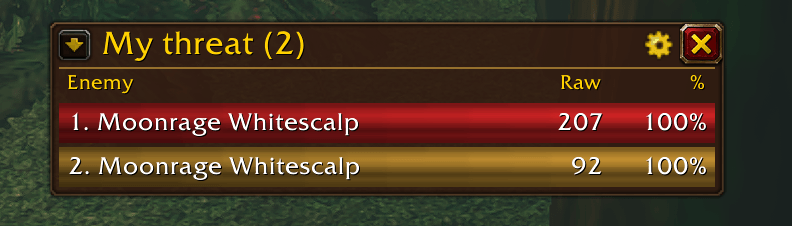
- One row for every enemy you have threat on, not just your target.
- Each row shows the enemy's raid marker (skull, cross, etc.), its name, your raw threat, and your threat %.
- Bars go from green to yellow to red as you approach pulling aggro, and turn solid red while you are tanking.
- Rows are sorted with your highest threat on top.
- Your target, focus, and group members' targets are listed even when they have no nameplate (out of range or behind a wall).
Target threat
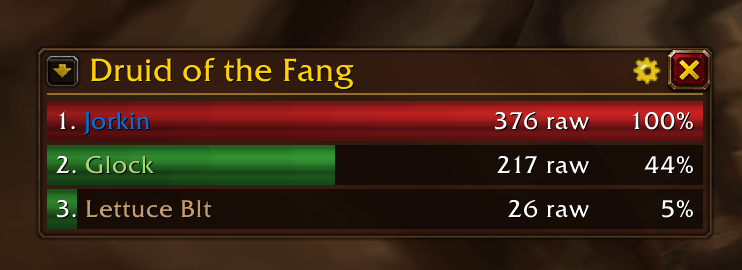
- One row for each party or raid member with threat on your current target, with class-coloured names.
- Sorted by raw threat.
- Whoever has aggro is red. Players below them are green. Players who have passed them and are about to pull are yellow.
Switch between the two views with the arrow button in the top-left of the window, or with /tb view.
Nameplate setup, handled for you
The game only reports non target threat for enemies that have a nameplate, so ThreatBuddy:
- turns enemy nameplates on and sets nameplate distance to the maximum (60, or whatever the client allows),
- warns you if another addon or a settings change undoes this,
- can re-apply the settings automatically (a checkbox in the options), or on demand with a "Fix now" button.
Group version check
A second settings page lists your party or raid and shows who is up to date, who is on an older version, and who does not appear to have ThreatBuddy installed.
Commands
/tbopens the options/tb viewswitches between My threat and Target threat/tb versionsopens the group version page/tb toggleshows or hides the window/tb locklocks or unlocks the window position/tb resetresets the window position/tb fixre-applies the nameplate settings/tb reportprints a debug report of which enemies' threat is fully readable
Good to know
This client uses the same addon restrictions as retail ("secret values"). Threat on your target, focus, mouseover, or anything a group member is targeting is fully available, so those rows are sorted and coloured. Threat on enemies that nobody is targeting can still be displayed (correct numbers and bar length), but the game does not let addons compare those numbers, so those rows are not sorted or colour-graded. In a group this covers most of a pull, since most enemies are somebody's target.
Group pets are not shown in the Target threat view yet.
Feedback
Bug reports and suggestions are welcome in the comments. If something breaks, please enable Lua errors with /console scriptErrors 1 and include the error text.
You must be logged in to leave a comment.