

thottbot4ever
Records the quests, NPCs, objects, loot, vendors and trainers you see while you play, and writes them to a file you upload to thottbot4ever.com — a Thottbot-style database for the WoW: Forever client.
Details
Expansion
 Forever
 Categories
Developers

Having issues?
Thottbot
Records what you see while you play, so the database fills itself.
Where NPCs stand, what they drop and how often, what vendors sell, what trainers teach, who gives and takes each quest. Thottbot writes it to a file you upload to thottbot4ever.com, where it becomes part of a database everyone else can read — a Thottbot-style reference rebuilt for the WoW: Forever client, with quests, items, NPCs, objects, zones, abilities and recipes, plus a talent-and-gear build optimizer.
There is nothing to configure. Play normally.
What it records
- Quests offered, in progress and turned in: text, level, rewards, and which NPC or object gave and took them, with your position at the time.
- NPCs you mouse over, target or talk to: id, name, title, level, classification, type, reaction, position.
- Objects you mouse over — chests, herbs, ore, quest objects: id, name, position.
- Loot windows: the source and every item in it. Each corpse counts once.
- Vendors: every item with price, currency and limited stock. Trainers: every spell with cost and required level.
- Items you see: name, quality, item level, bind, class, sell price, tooltip lines.
What it never records
Your character name, realm, guild, level, chat, friends or account.
Besides the game entities above, the file holds only your faction (Alliance or Horde), the addon version and the client build. It is a plain text file — open it in any editor and read exactly what you are about to send. That is the intended way to use it.
Installing
- Download
Thottbot-<version>.zipfrom thottbot4ever.com/addon. - Unpack it so the folder is
World of Warcraft/_classic_beta_/Interface/AddOns/Thottbot/— that folder must containThottbot.toc. - Start the game. If the addon list flags it out of date, tick Load out of date AddOns.
Forever loads addons and settings from a previous beta's WTF folder, so if you played an
earlier beta, check the AddOns list on the character screen shows Thottbot enabled.
In game
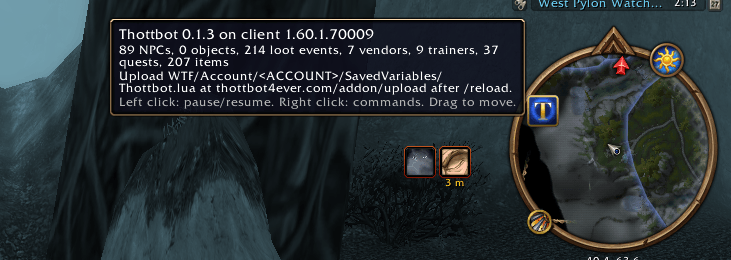
A minimap button: hover for status, left click to pause or resume, right click for the command list, drag to move it around the rim.
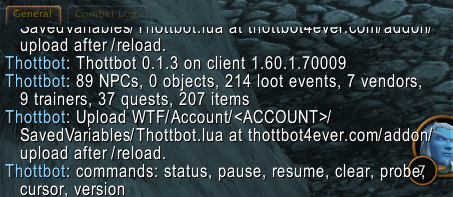
/thottbot or /tb:
| Command | Does |
|---|---|
status | What this session has collected (also the bare command) |
pause / resume | Stop and restart recording |
clear | Wipe the data and start a fresh file |
version | The addon version in the current file |
probe | Which client APIs are available — diagnostics |
cursor | What the client reports for the chest, node or herb under your mouse. Use this if objects are missing from your uploads |
Uploading
The game only writes the file when you log out or /reload. An upload taken mid-session is
missing whatever you just did.
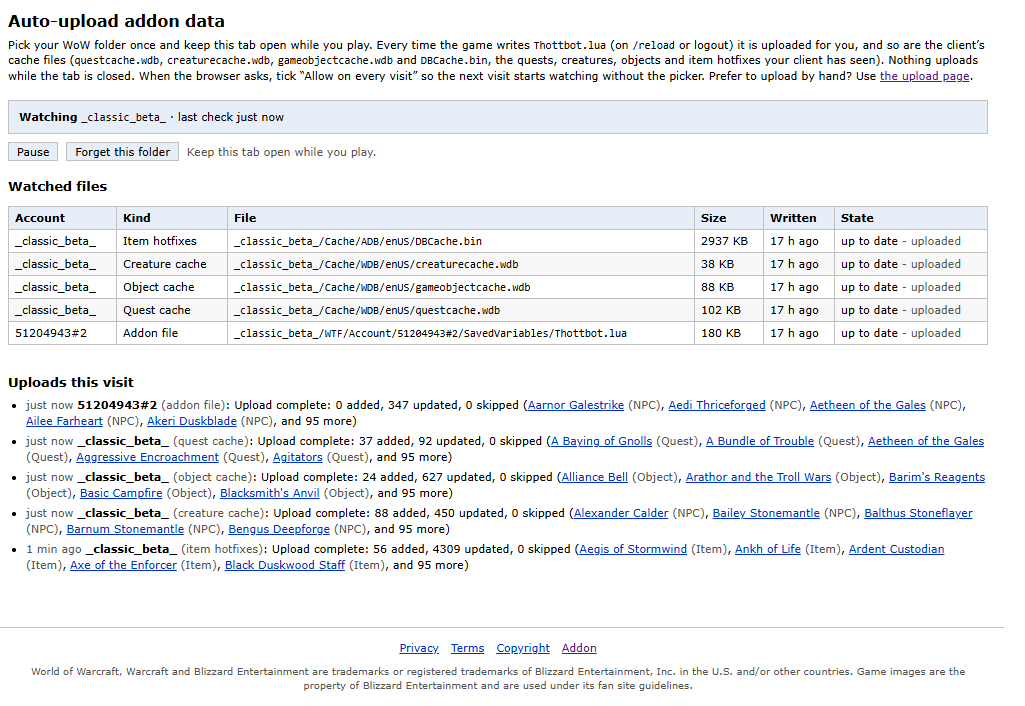
Automatic — Chrome or Edge. Open thottbot4ever.com/addon/watch,
log in, and pick your WoW folder once; the game folder or _classic_beta_ is best, since every
account under WTF/Account is found and so are the cache files below. Tick Allow on every
visit when the browser asks, then keep the tab open while you play and every file the game
writes is uploaded for you. Nothing uploads while the tab is closed.
By hand — any browser. Open thottbot4ever.com/addon/upload,
log in, and choose
World of Warcraft/_classic_beta_/WTF/Account/<ACCOUNT>/SavedVariables/Thottbot.lua.
Cache files (optional, and worth it). The client also keeps what it has been shown in
Cache/WDB/enUS/questcache.wdb, creaturecache.wdb and gameobjectcache.wdb, and in
Cache/ADB/enUS/DBCache.bin for item names and stats. Choose them alongside Thottbot.lua on
the upload page, or let the auto-upload page watch them. Only the enUS client's files are read.
Uploading the same file again after more play replaces your earlier upload — nothing is
counted twice, so there is no reason to hold back. /thottbot clear starts a clean slate when
you want one.
Every upload is credited to your account and is moderated; a bad batch can be reverted whole.
Keep it current
The site can refuse uploads from versions below a minimum it sets, and that minimum moves when the file format changes. Corrections, bug reports and data arguments are all welcome on the site.
License
MIT. Fork it, patch it, ship it — the code is yours to use.
The Thottbot name and logo are reserved, so a fork should carry its own name and art and point at its own service; otherwise players cannot tell whose database they are feeding.
You must be logged in to leave a comment.