

Stockpile – Restock Reagents, Ammo, Food & Water from Vendor & Bank
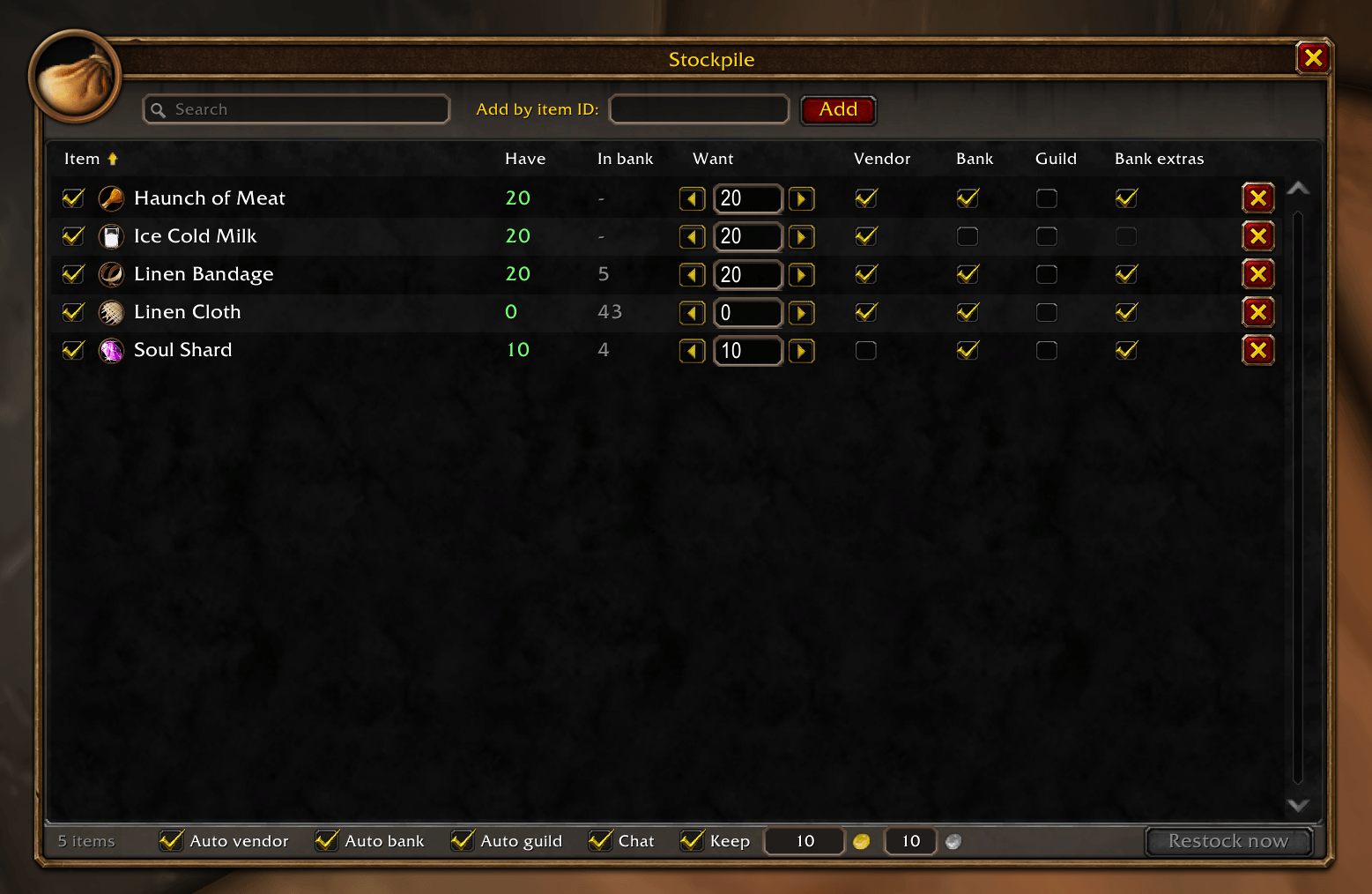
Drag items in, set how many you want, and Stockpile keeps your bags topped up from vendors, your bank and the guild bank, in a window that looks like part of the default UI.
Details
Expansion
 Forever
 Categories
Developers

Having issues?
Stockpile
Keep your bags stocked, automatically.
Drag an item in, say how many you want to carry, and tick where it should come from. Every time you open a vendor, your bank or the guild bank, Stockpile tops you up. No groups to manage, no profiles to configure. Just one clean list.
The window is built from Blizzard's own interface art, so it looks and feels like part of the default UI.
Built for WoW: Forever (Interface 16001).
Features
One simple list
- Drag any item from your bags onto the window to add it
- Item icon with quality border, quality-coloured name and the full tooltip on hover
- Search box and click-to-sort columns
- Have and In bank counts at a glance: red when you're short, green when you're stocked
You decide where each item comes from
- Independent Vendor, Bank and Guild checkboxes per item. Tick any combination
- Want count per item: Stockpile keeps at least that many in your bags. Have 13, want 20? It gets 7.
- Bank extras (per item): optionally deposit anything over your Want, so "10" means exactly 10 in your bags and the rest stays banked
Careful with your gold and your items
- Gold reserve: an optional "keep at least this much" amount. Vendor buying never takes you below it, and buys nothing at all if you're already under it
- Understands vendor bundle pricing (food sold in 5s) and never overbuys
- Stops when you can't afford more, and tells you
- Reports what actually arrived in your bags, not just what it asked for
- Bank moves happen one stack at a time and every move is verified
- Splits stacks cleanly and leaves your original stack where it was
- Says plainly when something can't be moved: bags full, bank full, not enough in the bank, guild withdrawal limit reached
Convenience
- Runs automatically when you open a vendor or bank, or turn that off and use the Restock button added to those windows
- Minimap button: left-click to open, right-click to restock now
- Untick an item to keep it on the list without restocking it
- Each character keeps its own list
Good to know
- Guild bank support is experimental. It withdraws from any tab you can view, respects daily withdrawal limits, and deposits extras into the tab you have open. Feedback welcome.
- Settings resetting every session? That's a known WoW: Forever beta client bug affecting all addons and parts of the default UI. See the official forum thread "UI/Addon settings wiped on client restart". It isn't something an addon can fix; settings will persist normally once Blizzard patches the client.
Reporting a problem
Please include the output of /stockpile debug. For anything bank-related, turn on /stockpile trace, reproduce it, and include those lines too.
Installing
- Download and extract the zip.
- Move the Stockpile folder into
World of Warcraft/_classic_beta_/Interface/AddOns/ - Restart the game (or log out to character select) and make sure Stockpile is ticked in the AddOns list.
Getting started
- Type /stockpile (or click the minimap bag icon) to open the window.
- Drag an item from your bags and drop it anywhere on the window. You can also type an item ID in the box at the top and press Add.
- Set the Want number: how many you want to carry. Use the arrows or type a number.
- Tick where it should come from:
- Vendor: buy it from any merchant that sells it
- Bank: withdraw it from your bank
- Guild: withdraw it from the guild bank
- Optional: tick Bank extras to have anything over your Want deposited when you visit the bank.
- Optional: tick Keep in the footer and enter a gold / silver amount. Stockpile will never spend you below that at vendors.
- Visit a vendor or banker. Stockpile does the rest and prints a one-line summary in chat.
Examples
| You want… | Set it up like this |
|---|---|
| Always carry 20 water | Want 20, tick Vendor |
| Carry 10 Soul Shards, bank the rest | Want 10, tick Bank + Bank extras |
| Bandages from the bank first, vendor as a fallback | Want 20, tick Vendor + Bank |
| Keep all your cloth in the bank | Want 0, tick Bank + Bank extras |
| Never let restocking take you below 5 gold | Tick Keep, enter 5 gold |
| Stop restocking something for now | Untick the checkbox at the left of its row |
The window
- Have: how many are in your bags. Red = below Want, green = at or above.
- In bank: how many are in your bank (updates when you open it).
- Vendor / Bank / Guild: where that item may come from.
- Bank extras: deposit the surplus. Only active when Bank or Guild is ticked, so it's greyed out on vendor-only items.
- Click any column header to sort; click again to reverse.
- The X at the end of a row removes the item.
Footer
- Auto vendor / Auto bank / Auto guild: run automatically when that window opens.
- Chat: print a summary after each restock.
- Keep + gold / silver boxes: your gold reserve. When ticked, vendor buying stops at that amount, and buys nothing if you already have less. Chat tells you when it kicks in (
gold reserve reached/not buying ...). Bank and guild bank moves are free, so they ignore it. Tab moves between the boxes, Enter saves, Escape cancels. - Restock now: runs a pass against whatever is currently open.
Commands
| Command | What it does |
|---|---|
/stockpile (or /restock) | Open / close the window |
/stockpile vendor | Restock from the open vendor |
/stockpile bank | Restock from the open bank |
/stockpile guild | Restock from the open guild bank |
/stockpile minimap | Show / hide the minimap button |
/stockpile trace | Print every bank move (troubleshooting) |
/stockpile debug | Diagnostic report for bug reports |
Tips
- Guild bank deposits go into the tab you have open, and only if you have deposit rights on it.
- Bank moves run at about four per second by design. Each one is verified before the next, rather than firing blind.
- If a chat summary says
asked for N, the vendor delivered fewer than requested, usually because of limited stock.
Installing
- Download and extract the zip.
- Move the Stockpile folder into
World of Warcraft/_classic_beta_/Interface/AddOns/ - Restart the game (or log out to character select) and make sure Stockpile is ticked in the AddOns list.
Getting started
- Type /stockpile (or click the minimap bag icon) to open the window.
- Drag an item from your bags and drop it anywhere on the window. You can also type an item ID in the box at the top and press Add.
- Set the Want number: how many you want to carry. Use the arrows or type a number.
- Tick where it should come from:
- Vendor: buy it from any merchant that sells it
- Bank: withdraw it from your bank
- Guild: withdraw it from the guild bank
- Optional: tick Bank extras to have anything over your Want deposited when you visit the bank.
- Optional: tick Keep in the footer and enter a gold / silver amount. Stockpile will never spend you below that at vendors.
- Visit a vendor or banker. Stockpile does the rest and prints a one-line summary in chat.
Examples
| You want… | Set it up like this |
|---|---|
| Always carry 20 water | Want 20, tick Vendor |
| Carry 10 Soul Shards, bank the rest | Want 10, tick Bank + Bank extras |
| Bandages from the bank first, vendor as a fallback | Want 20, tick Vendor + Bank |
| Keep all your cloth in the bank | Want 0, tick Bank + Bank extras |
| Never let restocking take you below 5 gold | Tick Keep, enter 5 gold |
| Stop restocking something for now | Untick the checkbox at the left of its row |
The window
- Have: how many are in your bags. Red = below Want, green = at or above.
- In bank: how many are in your bank (updates when you open it).
- Vendor / Bank / Guild: where that item may come from.
- Bank extras: deposit the surplus. Only active when Bank or Guild is ticked, so it's greyed out on vendor-only items.
- Click any column header to sort; click again to reverse.
- The X at the end of a row removes the item.
Footer
- Auto vendor / Auto bank / Auto guild: run automatically when that window opens.
- Chat: print a summary after each restock.
- Keep + gold / silver boxes: your gold reserve. When ticked, vendor buying stops at that amount, and buys nothing if you already have less. Chat tells you when it kicks in (
gold reserve reached/not buying ...). Bank and guild bank moves are free, so they ignore it. Tab moves between the boxes, Enter saves, Escape cancels. - Restock now: runs a pass against whatever is currently open.
Commands
| Command | What it does |
|---|---|
/stockpile (or /restock) | Open / close the window |
/stockpile vendor | Restock from the open vendor |
/stockpile bank | Restock from the open bank |
/stockpile guild | Restock from the open guild bank |
/stockpile minimap | Show / hide the minimap button |
/stockpile trace | Print every bank move (troubleshooting) |
/stockpile debug | Diagnostic report for bug reports |
Tips
- Guild bank deposits go into the tab you have open, and only if you have deposit rights on it.
- Bank moves run at about four per second by design. Each one is verified before the next, rather than firing blind.
- If a chat summary says
asked for N, the vendor delivered fewer than requested, usually because of limited stock.
Discord
Join my Discord for Feedback, Development Updates, Addon Ideas, Feature Requests, and Bug Reports.

You must be logged in to leave a comment.