
SNRN Rummage – Smart Consumables
One macro per item type that always uses the best item in your bags: food and flasks by your stats, drinks, potions, bandages and quest items, for WoW: Forever.
Details
Expansion
 Forever
 Categories
Developers

Having issues?
SNRN Rummage
One action slot per item type that always uses the best item in your bags.
Stop dragging a new potion or a new stack of food onto your bars every time you level. Rummage keeps one macro per item type up to date: put it on a slot once, and it points at the right item as your bags change. It picks food and flasks by the stats you care about, drinks, potions and bandages by how much they restore, and the quest item you need right now.
What's new
- 0.3.0: The
/rumwindow icons show the item's cooldown sweep and dim like native action buttons when the item cannot be used right now. - 0.2.0: SmartFlask now knows your class. Out of the box it picks the elixir that fits your class and talents (Agility for hunters, Spell Power for mages, Strength for warriors and Retribution paladins, and so on), and it never wastes an elixir your class gets nothing from. Rejuvenation potions are saved until your pure health or mana potions run out. Mageblood is read as mana regen.
- 0.1.0: First release.
Full history on the Changelog tab of each file.
What you get
| Macro | Uses |
|---|---|
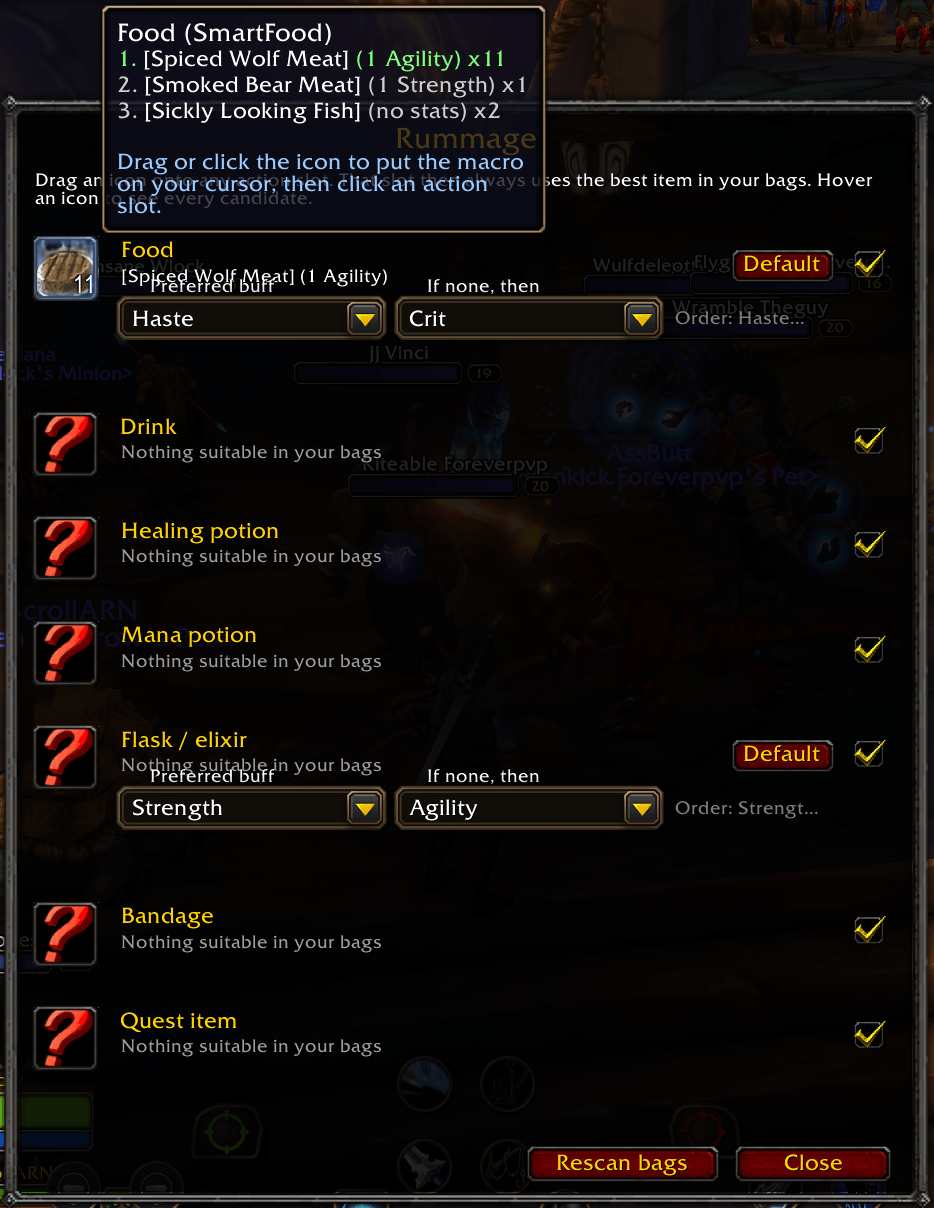
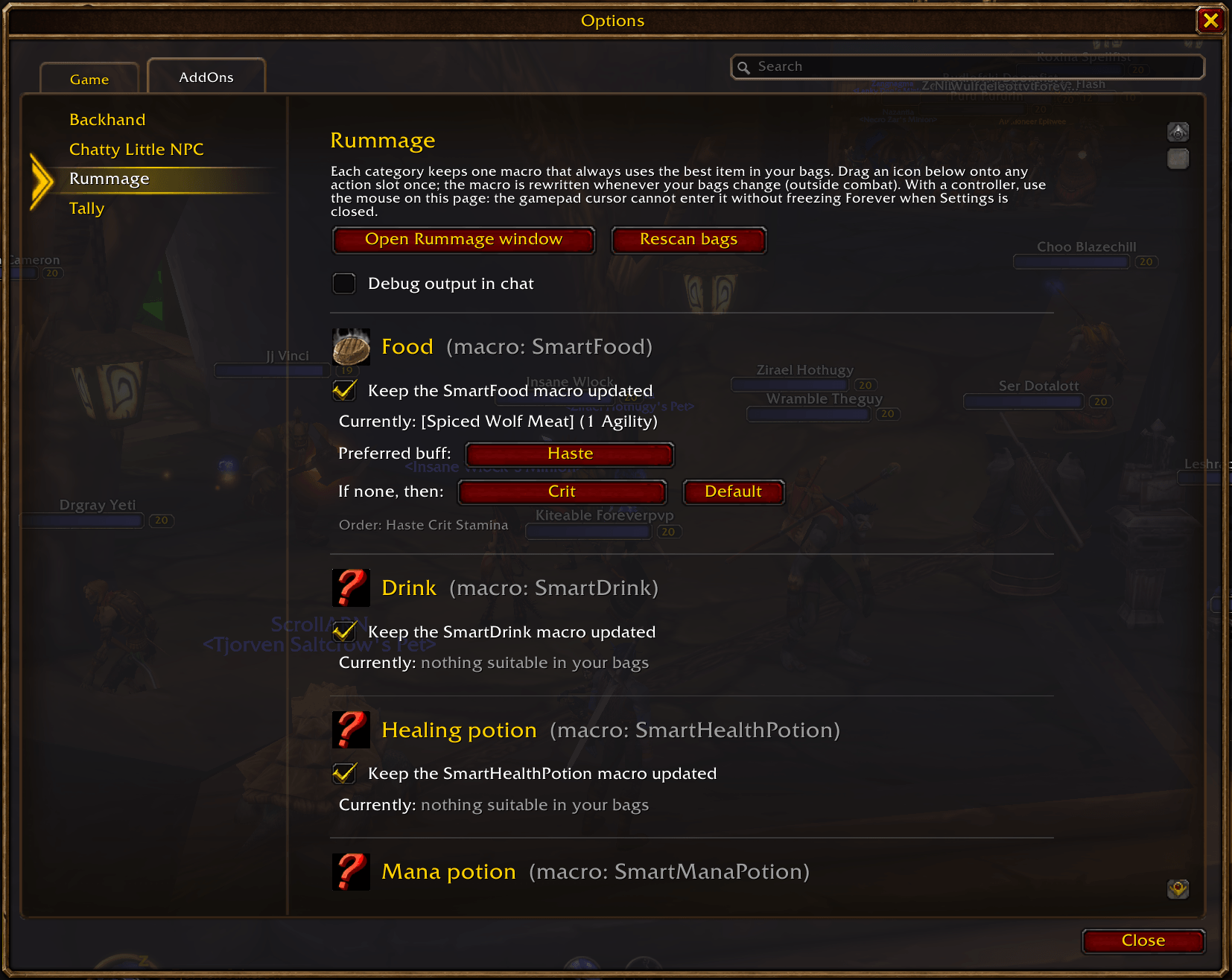
| SmartFood | Food with your preferred Well Fed buff, read from the tooltip |
| SmartDrink | The drink that restores the most mana (water, juice, conjured water) |
| SmartFlask | Flasks and elixirs that fit your class and talents, or your own stat priority |
| SmartHealthPotion | The potion that restores the most health (Rejuvenation potions last) |
| SmartManaPotion | The potion that restores the most mana (Rejuvenation potions last) |
| SmartBandage | The bandage that heals the most, used on yourself |
| SmartQuestItem | The usable item of the quest that matters most right now |
- Items above your level are skipped. Percent-based potions are valued against your current maximum.
- The slot shows the chosen item's icon and stack count.
- Each macro can be switched off on its own.
Elixirs that fit your class
Until you set your own priority, SmartFlask follows your class and talent tree, based on the Icy Veins WoW Forever guides:
| Class / role | Picks first |
|---|---|
| Warrior, Retribution and Protection Paladin, Enhancement Shaman, Feral Druid | Strength, Attack Power, Agility |
| Rogue, Hunter | Agility, Attack Power |
| Mage | Spell Power, Spirit, Intellect |
| Warlock | Spell Power, Stamina, Intellect |
| Priest, and Holy, Restoration, Balance and Elemental hybrids | Spell Power, then Mana/5, Spirit and Intellect |
- Stamina, Health and Armor elixirs are always a last resort, so the slot is rarely empty.
- Elixirs that only give stats your class cannot use (Strength on a mage, Intellect on a rogue) are skipped instead of wasted. They show as "no use to your class" when you hover the icon. Add the stat to your own priority if you want them used anyway.
- Hybrids that have not spent talent points yet get a mixed list. Druids lead with casting, paladins and shamans with Strength.
Setup in one step
Type /rum, then drag an icon from the window onto any action slot. That's it.
Hover an icon to see every candidate in your bags in ranked order. For food and flasks, pick a Preferred buff (Haste, Stamina, Strength and so on) and an If none, then fallback, per character.
Quest items
SmartQuestItem follows the item button the objective tracker shows for a quest. It picks, in order: the super-tracked quest, quests on the current map, tracked quests, the rest of your log, then bag items that start a quest. It follows quest log, tracking and zone changes.
Works with a controller
The Settings page (Settings > AddOns > Rummage) is built so WoW: Forever's gamepad cursor never touches it, which avoids the client freezing when Settings is closed with the controller. Rummage macros also work on SNRN Backhand paddle slots.
Slash commands
/rum is a shortcut for /rummage.
/rummage                        open or close the window
/rummage config                 open the settings page
/rummage status                 show what each macro currently uses
/rummage list food              every food in your bags, ranked
/rummage food haste crit sta    set the food stat priority
/rummage flask str agi          set the flask stat priority
/rummage <category> reset       back to the default priority
/rummage <category> on|off      stop or resume updating a macro
/rummage pickup <category>      put a macro on the cursor
/rummage scan                   rescan bags now
Notes
- Built for World of Warcraft: Forever. It only uses standard bag, tooltip and macro APIs, so it should also work on other clients that have them.
- Macros cannot change in combat. A bag change during a fight is applied when the fight ends, so carry a stack of potions.
- Stats are read from English tooltip text. Other languages fall back to "most health first" for now.
- Rummage creates its macros per character, or account-wide if your character macro slots are full.
Part of the SNRN family
- SNRN Backhand: extra action slots for your controller's rear paddles, built into Forever's crossbar.
- SNRN Tally: free bag slots and ammo count on Forever's gamepad HUD, which shows neither. Tally tells you your bags are filling up; Rummage keeps the right stack on your bar.
- SNRN Valet: sells greys and repairs at merchants, collects your mail, and declines duels, guild invites and charters.
- SNRN Grimoire: one command lays out an Affliction Warlock on Forever's crossbar, with Rummage's Smart macros on the consumable slots.
Reporting problems
Run /rummage status and /rummage list <category> and include the output with your report, plus the item that was picked wrongly (shift-click it into chat).
You must be logged in to leave a comment.